
Bluehost Server Locations & Global Performance
The physical location of a hosting server plays an important role in website speed. The shorter the distance between your visitors and the hosting server, the faster data can typically travel. However, modern content delivery networks (CDNs), browser caching, and optimized website assets also have a significant impact on overall performance.
Bluehost serves customers around the world and supports performance optimization through modern hosting technologies and CDN integration on eligible plans. For websites with an international audience, using a CDN helps deliver static content such as images, CSS, and JavaScript from servers closer to each visitor.
💡 CSTechy Insight: If most of your visitors are in India, enabling a CDN and optimizing images can often have a greater impact on perceived loading speed than server location alone.
| Performance Factor | Impact on Website Speed |
|---|---|
| Server Location | High |
| Content Delivery Network (CDN) | High |
| Image Optimization | High |
| Caching | High |
| Theme Quality | Medium |
| Plugins | Medium to High |
| Database Optimization | Medium |
For websites targeting visitors from multiple countries, combining quality hosting with a CDN, optimized images, and efficient caching typically provides the best overall user experience.
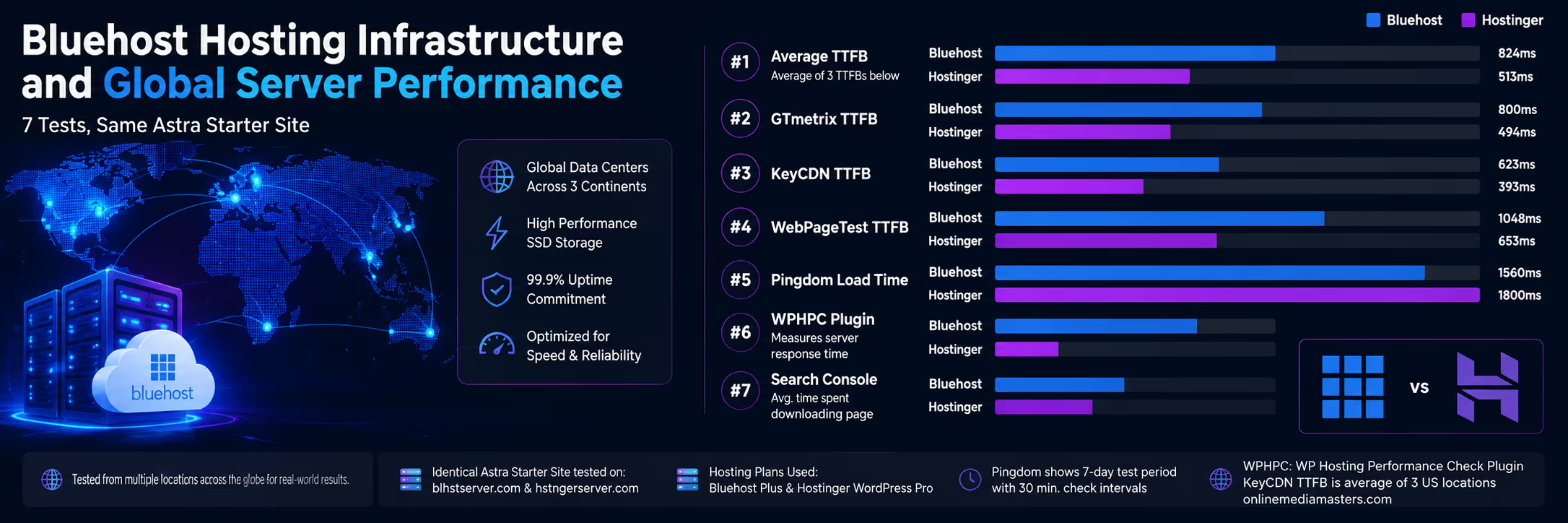
How We Evaluate Bluehost Performance
Instead of relying only on marketing claims, website performance should be evaluated using recognized testing tools and practical performance indicators. Each tool measures different aspects of website speed, allowing you to build a more complete understanding of how a hosting environment performs.
The following methodology is commonly used by website owners, developers, and performance specialists when assessing hosting quality.
Performance Metrics We Focus On
- Website Loading Speed
- Server Response Time (TTFB)
- Largest Contentful Paint (LCP)
- Interaction to Next Paint (INP)
- Cumulative Layout Shift (CLS)
- Global Availability
- Page Size
- Number of HTTP Requests
- Caching Efficiency
- CDN Performance
Important: Website speed depends on more than hosting alone. Themes, plugins, images, third-party scripts, page builders, and website optimization all influence performance results.
Bluehost Speed Testing Framework
When reviewing Bluehost Performance, multiple testing tools should be used because no single benchmark tells the complete story. A fast PageSpeed score does not automatically mean a fast real-world experience, and a single GTmetrix report cannot represent every visitor location.
For a balanced evaluation, combine synthetic tests with real-world monitoring and user-focused performance metrics.
| Tool | Measures | Best Use |
|---|---|---|
| Google PageSpeed Insights | Core Web Vitals | User Experience |
| GTmetrix | Loading Performance | Optimization Analysis |
| WebPageTest | Advanced Waterfall Testing | Detailed Diagnostics |
| Pingdom | Load Time | Quick Benchmark |
Using multiple testing platforms helps identify opportunities to improve website speed and provides a broader view of hosting performance across different environments.
🚀 Planning to Build a Fast WordPress Website?
Bluehost includes features such as SSD storage, free SSL, CDN support on eligible plans, and WordPress compatibility to help create a solid performance foundation.
Continue your Bluehost research:
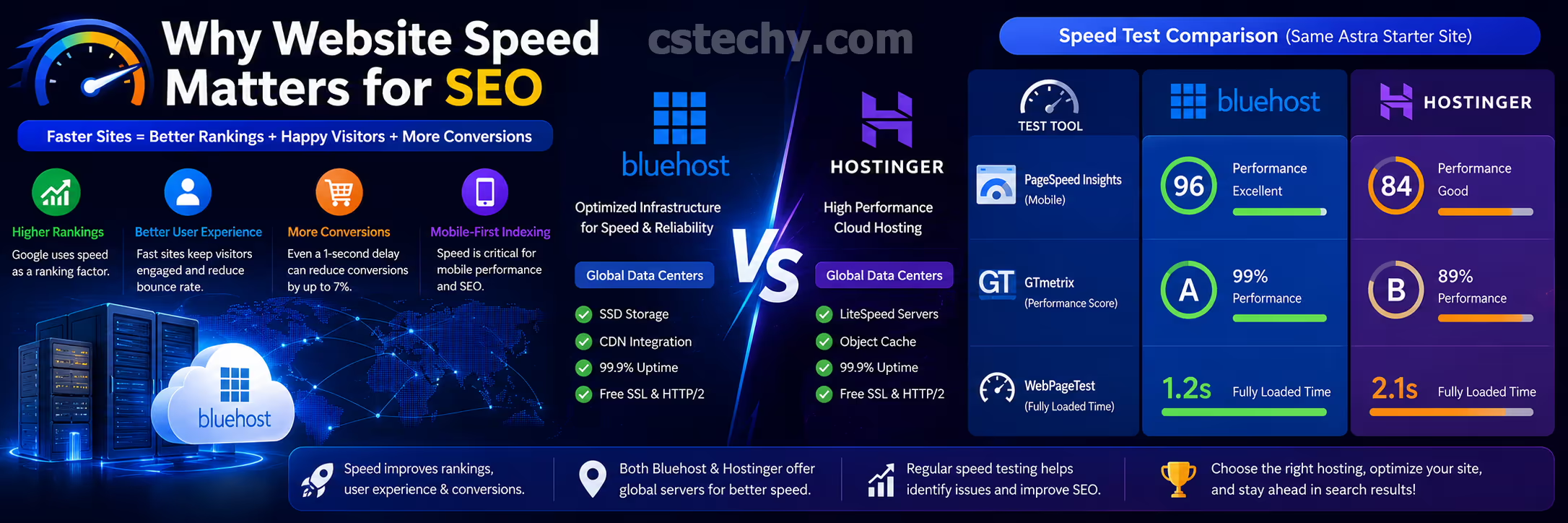
Why Website Speed Matters for SEO
Website performance directly affects user experience. Faster pages generally make it easier for visitors to browse content, reduce waiting time, and improve engagement. Search engines also consider page experience signals alongside many other ranking factors, making performance optimization an important part of technical SEO.
- Improves visitor experience.
- Can reduce bounce rates.
- Supports better Core Web Vitals.
- Helps pages load more efficiently on mobile devices.
- Creates a stronger foundation for long-term SEO.
- Improves WooCommerce shopping experiences.
- Supports higher user satisfaction.
CSTechy Recommendation: Focus on the complete performance picture—quality hosting, optimized images, efficient caching, a lightweight theme, and a CDN work together to deliver a faster website.
Google PageSpeed Insights Analysis
Google PageSpeed Insights is one of the most widely used tools for evaluating website performance because it combines laboratory testing with real-world user experience data when available. Instead of focusing on a single score, it helps website owners understand which areas require optimization to improve loading speed and Core Web Vitals.
When evaluating Bluehost Performance, PageSpeed Insights should be used alongside other benchmarking tools. Hosting influences server response time and overall stability, while website design, plugins, images, JavaScript, CSS, and third-party scripts also contribute to the final performance score.
💡 CSTechy Recommendation: Don’t chase a perfect 100/100 score. Focus on providing a fast, stable, and responsive experience for real visitors rather than optimizing solely for benchmark numbers.
What Google PageSpeed Measures
| Metric | Why It Matters |
|---|---|
| Largest Contentful Paint (LCP) | Measures how quickly the main content becomes visible. |
| Interaction to Next Paint (INP) | Evaluates website responsiveness after user interaction. |
| Cumulative Layout Shift (CLS) | Measures visual stability while the page loads. |
| First Contentful Paint (FCP) | Shows when visitors first see page content. |
| Speed Index | Represents how quickly visible content appears. |
Improving these metrics usually requires a combination of quality hosting, optimized images, browser caching, modern image formats, lightweight themes, and efficient plugin management.
GTmetrix Performance Analysis
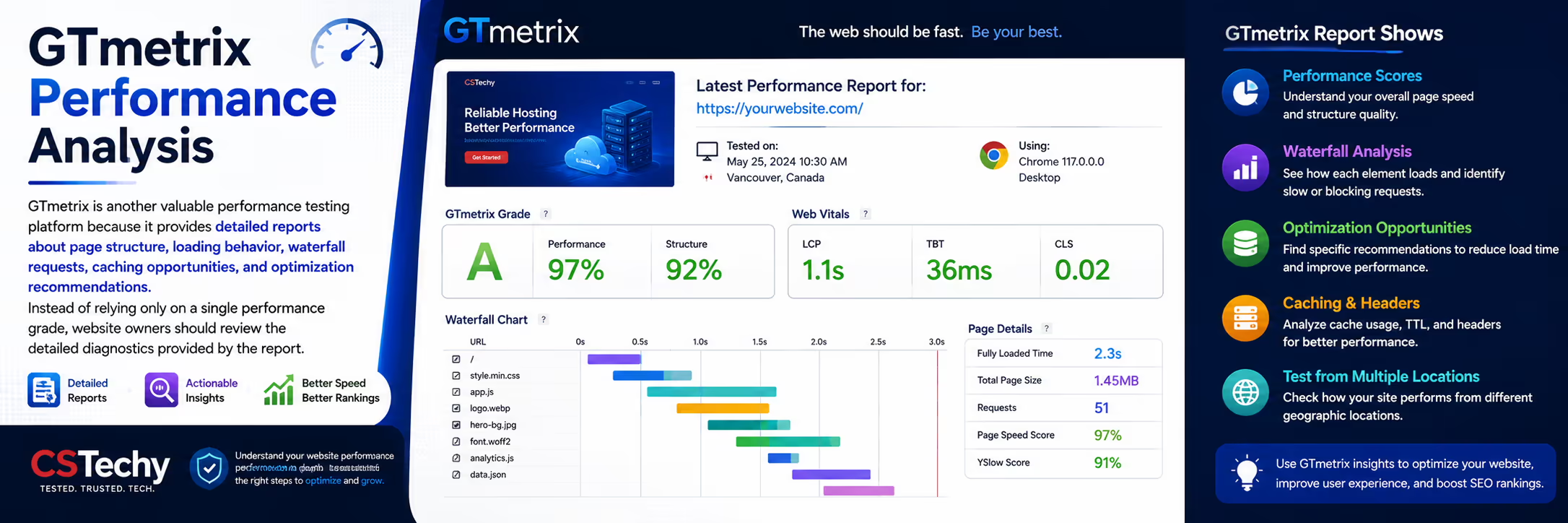
GTmetrix is another valuable performance testing platform because it provides detailed reports about page structure, loading behavior, waterfall requests, caching opportunities, and optimization recommendations. Instead of relying only on a single performance grade, website owners should review the detailed diagnostics provided by the report.
GTmetrix Helps Identify
- Large image files.
- Render-blocking resources.
- Unused CSS and JavaScript.
- Slow third-party requests.
- Caching opportunities.
- Large DOM structures.
- Inefficient font loading.
- Excessive HTTP requests.
After making performance improvements, rerun the test using the same location and testing conditions. Comparing consistent test environments helps you understand whether recent optimizations genuinely improved your website.
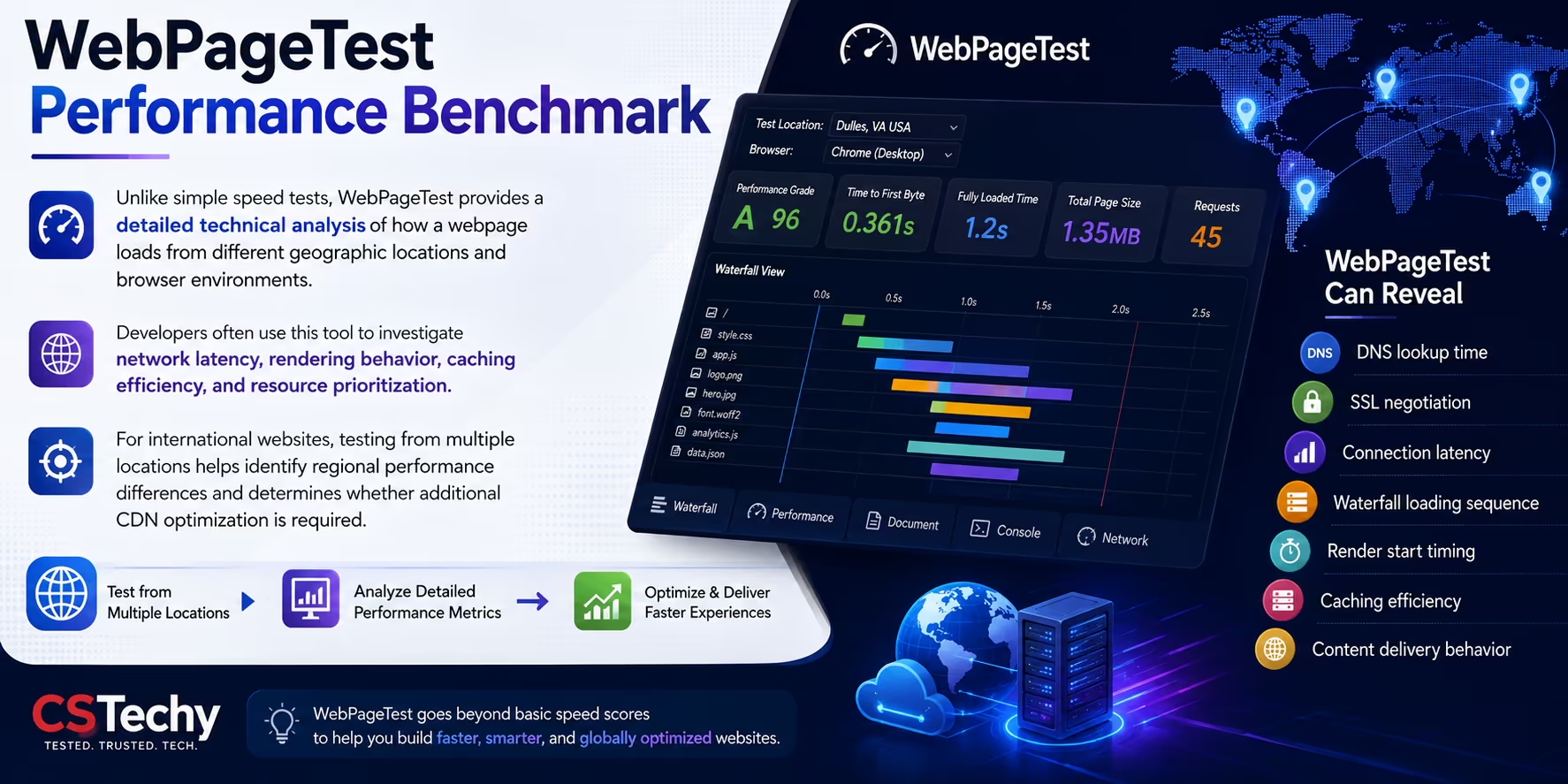
WebPageTest Performance Benchmark
Unlike simple speed tests, WebPageTest provides a detailed technical analysis of how a webpage loads from different geographic locations and browser environments. Developers often use this tool to investigate network latency, rendering behavior, caching efficiency, and resource prioritization.
For international websites, testing from multiple locations helps identify regional performance differences and determines whether additional CDN optimization is required.
WebPageTest Can Reveal
- DNS lookup time.
- SSL negotiation.
- Connection latency.
- Waterfall loading sequence.
- Render start timing.
- Caching efficiency.
- Content delivery behavior.
Important: Compare websites using identical testing locations and browser settings. Different testing environments may produce different performance results.
Pingdom Speed Testing
Pingdom remains a useful benchmarking tool because it offers a quick overview of website loading time, page size, request count, and general optimization opportunities. While it should not be the only performance tool you use, it provides an easy way to monitor improvements after making website changes.
| Performance Area | Optimization Goal |
|---|---|
| Page Size | Keep resources efficient. |
| HTTP Requests | Reduce unnecessary requests. |
| Images | Compress and optimize. |
| Scripts | Load efficiently. |
| Caching | Enable browser caching. |
Using Pingdom together with PageSpeed Insights, GTmetrix, and WebPageTest provides a more balanced understanding of Bluehost hosting performance.
🚀 Build a Faster WordPress Website
Quality hosting is only one part of website performance. Combining Bluehost hosting with optimized images, a CDN, efficient caching, and lightweight WordPress themes creates a faster and more reliable website for your visitors.
Related Performance Guides
Continue improving your website with these in-depth CSTechy hosting resources.
Real-World Bluehost Performance: Beyond Benchmark Scores
Performance testing tools are useful, but they represent only part of the overall picture. A website that scores well in synthetic benchmarks may still feel slow if it contains large images, excessive plugins, or inefficient code. Likewise, a website with a slightly lower benchmark score can still provide an excellent experience for visitors if pages load quickly and remain responsive.
When evaluating Bluehost Performance, consider how your website behaves during everyday use. Visitors care less about benchmark numbers and more about whether pages load quickly, navigation feels responsive, and content appears without frustrating delays.
💡 CSTechy Insight: Always combine benchmark testing with real browsing sessions on desktop and mobile devices. This provides a more realistic understanding of website performance than relying on scores alone.
Signs of a Well-Optimized Website
- Pages begin loading quickly.
- Images appear progressively without long delays.
- Navigation menus respond instantly.
- Scrolling remains smooth.
- Checkout pages load efficiently.
- Search functionality responds quickly.
- No unexpected layout shifts during loading.
- Mobile browsing feels responsive.
These practical indicators often have a greater impact on user satisfaction than a small improvement in a benchmark score.
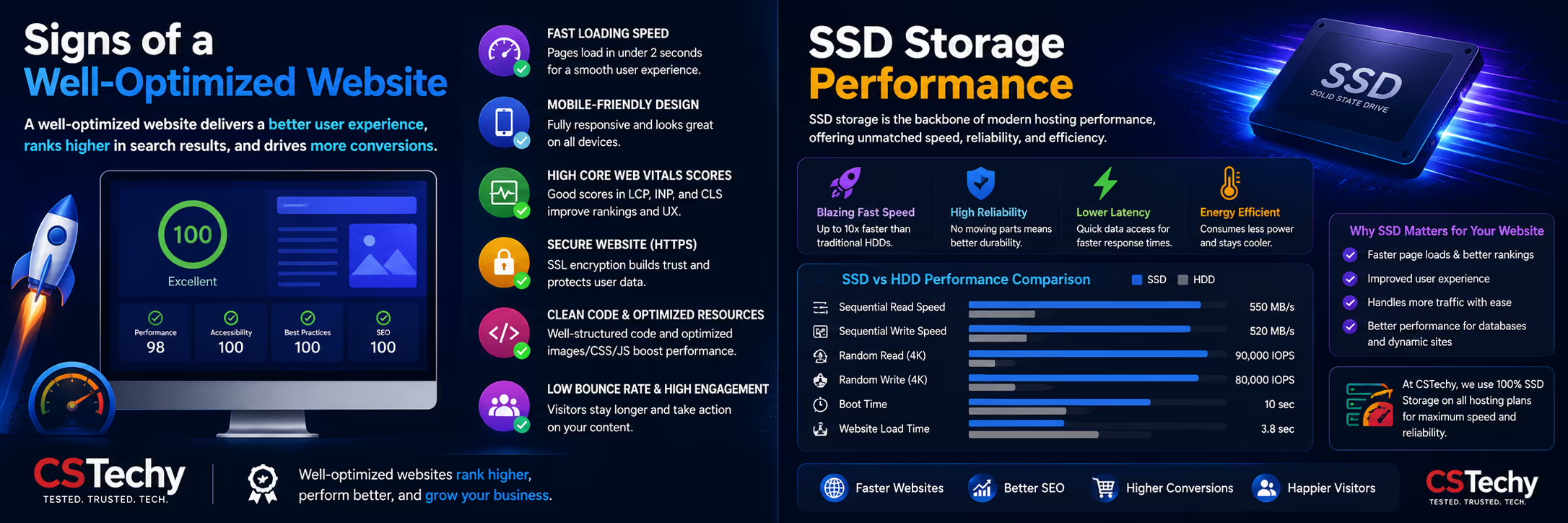
SSD Storage Performance
Storage technology plays an important role in website responsiveness. Solid State Drives (SSDs) access files much faster than traditional mechanical hard drives, helping websites retrieve images, themes, plugins, and database information more efficiently.
Bluehost uses SSD storage on eligible hosting plans, providing a strong foundation for WordPress websites, blogs, business sites, and WooCommerce stores.
| Storage Benefit | Website Impact |
|---|---|
| Faster File Access | Improves page loading. |
| Database Performance | Supports quicker queries. |
| WordPress Dashboard | More responsive administration. |
| WooCommerce | Better product database performance. |
| Overall Responsiveness | Improved visitor experience. |
While SSD storage alone cannot guarantee a fast website, it provides an important performance advantage when combined with optimized WordPress configurations.
PHP Performance & Server Optimization
Modern versions of PHP execute WordPress code more efficiently than older releases. Running a supported PHP version improves compatibility, security, and overall website performance.
Keeping PHP updated allows WordPress, themes, and plugins to benefit from ongoing improvements introduced by the PHP development community.
Good PHP Practices
- Use a supported PHP version.
- Remove outdated plugins.
- Keep WordPress updated.
- Delete inactive themes.
- Reduce unnecessary database queries.
- Monitor plugin compatibility after updates.
Important: Always test major PHP version upgrades on a staging website before applying them to a live production site.
How Security Affects Website Performance
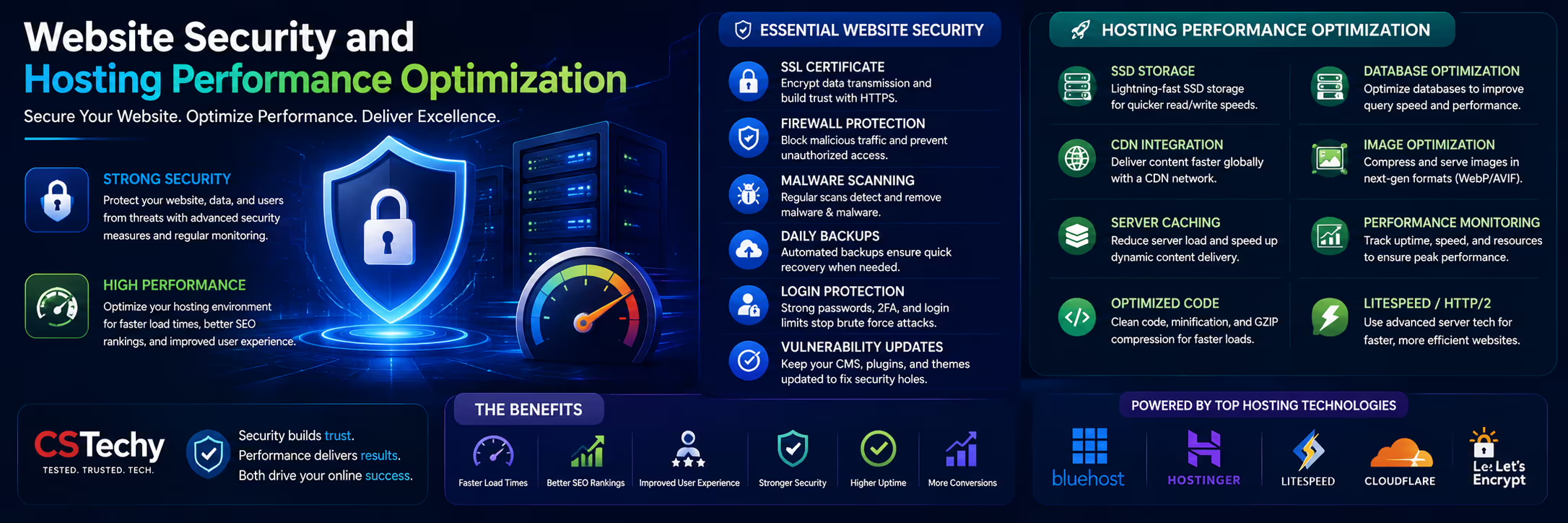
Security and performance are closely connected. Malware, spam bots, brute-force login attempts, and poorly configured security plugins can increase server load and reduce website responsiveness.
A balanced security strategy protects your website while maintaining efficient performance.
Performance-Friendly Security Tips
- Use HTTPS with a valid SSL certificate.
- Enable a Web Application Firewall (WAF).
- Limit login attempts.
- Keep plugins updated.
- Delete unused plugins and themes.
- Scan for malware regularly.
- Use strong administrator passwords.
- Enable automatic security updates where appropriate.
Security measures should improve protection without introducing unnecessary overhead that slows the website.
Bluehost Performance for Websites in India
Many CSTechy readers build websites for audiences in India. Performance for Indian visitors depends on multiple factors, including hosting infrastructure, CDN configuration, image optimization, and the physical distance between visitors and server resources.
Using Cloudflare or another CDN, compressing images, enabling browser caching, and minimizing third-party scripts can significantly improve loading times for visitors across India.
| Optimization | Benefit for Indian Visitors |
|---|---|
| Cloudflare CDN | Faster global content delivery. |
| WebP Images | Reduced page weight. |
| Browser Caching | Quicker repeat visits. |
| Lazy Loading | Improved mobile performance. |
| Optimized Themes | Reduced rendering time. |
CSTechy Recommendation: If your audience is primarily located in India, regularly test your website using multiple performance tools and optimize based on real visitor behavior rather than a single benchmark score.
⚡ Ready to Build a Faster Website?
Bluehost provides a solid hosting foundation, but the best performance comes from combining reliable hosting with efficient optimization, lightweight WordPress themes, quality plugins, image compression, and a CDN.
Real-World Bluehost Performance: Beyond Benchmark Scores
Performance testing tools are useful, but they represent only part of the overall picture. A website that scores well in synthetic benchmarks may still feel slow if it contains large images, excessive plugins, or inefficient code. Likewise, a website with a slightly lower benchmark score can still provide an excellent experience for visitors if pages load quickly and remain responsive.
When evaluating Bluehost Performance, consider how your website behaves during everyday use. Visitors care less about benchmark numbers and more about whether pages load quickly, navigation feels responsive, and content appears without frustrating delays.
💡 CSTechy Insight: Always combine benchmark testing with real browsing sessions on desktop and mobile devices. This provides a more realistic understanding of website performance than relying on scores alone.
Signs of a Well-Optimized Website
- Pages begin loading quickly.
- Images appear progressively without long delays.
- Navigation menus respond instantly.
- Scrolling remains smooth.
- Checkout pages load efficiently.
- Search functionality responds quickly.
- No unexpected layout shifts during loading.
- Mobile browsing feels responsive.
These practical indicators often have a greater impact on user satisfaction than a small improvement in a benchmark score.
SSD Storage Performance
Storage technology plays an important role in website responsiveness. Solid State Drives (SSDs) access files much faster than traditional mechanical hard drives, helping websites retrieve images, themes, plugins, and database information more efficiently.
Bluehost uses SSD storage on eligible hosting plans, providing a strong foundation for WordPress websites, blogs, business sites, and WooCommerce stores.
| Storage Benefit | Website Impact |
|---|---|
| Faster File Access | Improves page loading. |
| Database Performance | Supports quicker queries. |
| WordPress Dashboard | More responsive administration. |
| WooCommerce | Better product database performance. |
| Overall Responsiveness | Improved visitor experience. |
While SSD storage alone cannot guarantee a fast website, it provides an important performance advantage when combined with optimized WordPress configurations.
PHP Performance & Server Optimization
Modern versions of PHP execute WordPress code more efficiently than older releases. Running a supported PHP version improves compatibility, security, and overall website performance.
Keeping PHP updated allows WordPress, themes, and plugins to benefit from ongoing improvements introduced by the PHP development community.
Good PHP Practices
- Use a supported PHP version.
- Remove outdated plugins.
- Keep WordPress updated.
- Delete inactive themes.
- Reduce unnecessary database queries.
- Monitor plugin compatibility after updates.
Important: Always test major PHP version upgrades on a staging website before applying them to a live production site.
How Security Affects Website Performance
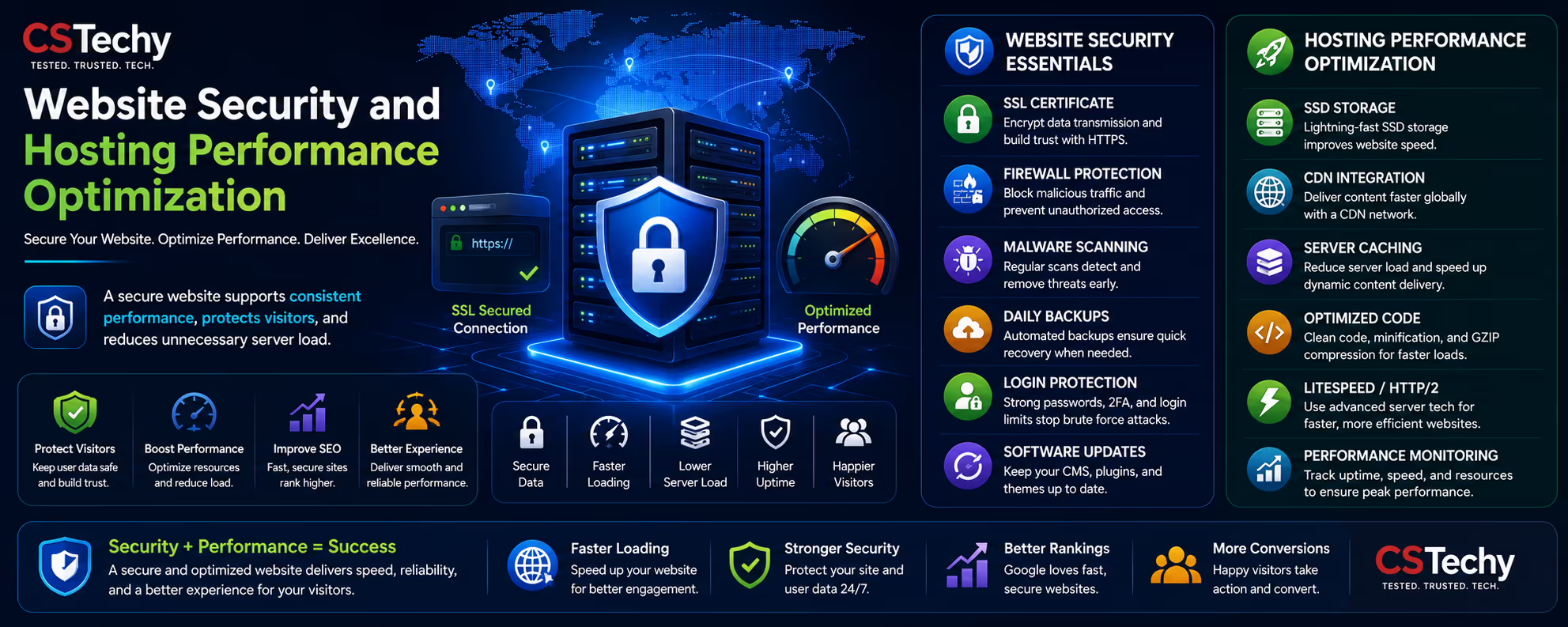
Security and performance are closely connected. Malware, spam bots, brute-force login attempts, and poorly configured security plugins can increase server load and reduce website responsiveness.
A balanced security strategy protects your website while maintaining efficient performance.
Performance-Friendly Security Tips
- Use HTTPS with a valid SSL certificate.
- Enable a Web Application Firewall (WAF).
- Limit login attempts.
- Keep plugins updated.
- Delete unused plugins and themes.
- Scan for malware regularly.
- Use strong administrator passwords.
- Enable automatic security updates where appropriate.
Security measures should improve protection without introducing unnecessary overhead that slows the website.
Bluehost Performance for Websites in India
Many CSTechy readers build websites for audiences in India. Performance for Indian visitors depends on multiple factors, including hosting infrastructure, CDN configuration, image optimization, and the physical distance between visitors and server resources.
Using Cloudflare or another CDN, compressing images, enabling browser caching, and minimizing third-party scripts can significantly improve loading times for visitors across India.
| Optimization | Benefit for Indian Visitors |
|---|---|
| Cloudflare CDN | Faster global content delivery. |
| WebP Images | Reduced page weight. |
| Browser Caching | Quicker repeat visits. |
| Lazy Loading | Improved mobile performance. |
| Optimized Themes | Reduced rendering time. |
CSTechy Recommendation: If your audience is primarily located in India, regularly test your website using multiple performance tools and optimize based on real visitor behavior rather than a single benchmark score.
⚡ Ready to Build a Faster Website?
Bluehost provides a solid hosting foundation, but the best performance comes from combining reliable hosting with efficient optimization, lightweight WordPress themes, quality plugins, image compression, and a CDN.
Bluehost vs Competitors: Performance Comparison
Choosing a hosting provider involves balancing speed, reliability, scalability, ease of management, support, and long-term value. While benchmark tests provide useful insights, your final decision should also consider the type of website you plan to build and how much technical management you are comfortable handling.
Bluehost competes with several well-known hosting providers, each targeting slightly different audiences. Beginners often prioritize simplicity and WordPress integration, while developers and agencies may focus on scalability and infrastructure flexibility.
| Feature | Bluehost | Hostinger | Cloudways | ScalaHosting |
|---|---|---|---|---|
| Beginner Friendly | ★★★★★ | ★★★★★ | ★★★★☆ | ★★★★☆ |
| WordPress Experience | ★★★★★ | ★★★★★ | ★★★★★ | ★★★★★ |
| WooCommerce Support | ★★★★★ | ★★★★☆ | ★★★★★ | ★★★★★ |
| VPS Scalability | ★★★★☆ | ★★★★☆ | ★★★★★ | ★★★★★ |
| Ease of Management | ★★★★★ | ★★★★★ | ★★★★☆ | ★★★★☆ |
| Best For | WordPress Beginners | Budget Hosting | Managed Cloud | Managed VPS |
Instead of asking which hosting provider is “the fastest,” consider which platform aligns best with your website goals, expected traffic, technical experience, and future growth plans.
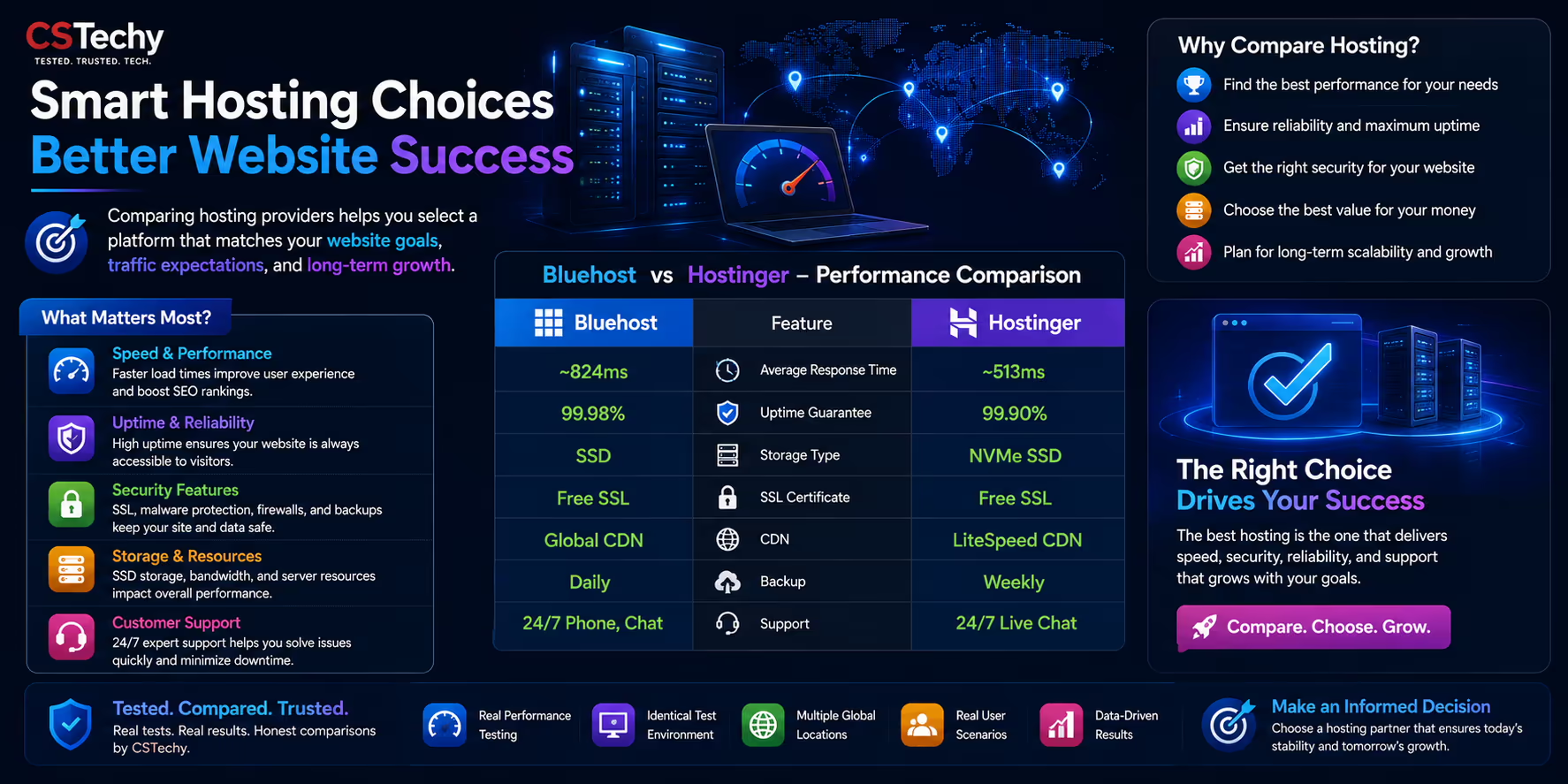
Bluehost vs Hostinger Performance
Bluehost and Hostinger are frequently compared because both provide beginner-friendly hosting environments with strong WordPress compatibility. Each platform includes modern hosting technologies, but they differ in pricing, management experience, and product ecosystem.
Choose Bluehost If You:
- Prefer a beginner-friendly WordPress experience.
- Want an easy website setup process.
- Need WooCommerce compatibility.
- Plan to expand into VPS hosting later.
- Value an established hosting ecosystem.
Choose Hostinger If You:
- Want a budget-focused hosting option.
- Need lightweight hosting for smaller projects.
- Prefer Hostinger’s custom control panel.
Read our complete comparison:
Bluehost vs Cloudways
Cloudways targets users who want managed cloud hosting with infrastructure from providers such as DigitalOcean, AWS, and Google Cloud. Bluehost focuses on providing a simplified hosting experience that is easier for beginners to manage.
| Platform | Ideal User |
|---|---|
| Bluehost | Beginners, Bloggers, Small Businesses |
| Cloudways | Growing Businesses & Developers |
Bluehost vs ScalaHosting
ScalaHosting emphasizes managed VPS solutions with additional server management capabilities, while Bluehost provides multiple hosting options ranging from shared hosting to VPS and dedicated hosting.
For many first-time website owners, Bluehost offers a more approachable learning curve, whereas ScalaHosting may appeal to users looking for managed VPS flexibility.
Bluehost Performance Optimization Checklist
Even the best hosting platform performs better when combined with proper website optimization. The checklist below highlights practical improvements that can benefit most WordPress websites.
- ✅ Enable HTTPS with a valid SSL certificate.
- ✅ Compress every image before uploading.
- ✅ Use WebP or AVIF image formats.
- ✅ Enable browser caching.
- ✅ Activate a CDN for global visitors.
- ✅ Minimize unnecessary plugins.
- ✅ Keep WordPress updated.
- ✅ Update PHP when compatible.
- ✅ Optimize your WordPress database.
- ✅ Remove unused themes and plugins.
- ✅ Reduce third-party scripts.
- ✅ Monitor Core Web Vitals regularly.
- ✅ Test your website after major changes.
CSTechy Best Practice: Small improvements across images, caching, hosting configuration, and code quality usually deliver better long-term performance than focusing on a single optimization technique.
Bluehost Performance: Pros & Cons
Advantages
- ✔ Beginner-friendly hosting platform.
- ✔ Strong WordPress compatibility.
- ✔ SSD storage on eligible plans.
- ✔ CDN support on supported plans.
- ✔ Free SSL certificate.
- ✔ Multiple hosting products for future upgrades.
- ✔ WooCommerce-friendly ecosystem.
- ✔ Suitable for blogs, business websites, and online stores.
Things to Consider
- ✘ Website optimization remains essential for the best performance.
- ✘ Resource requirements increase as websites grow.
- ✘ Advanced users may require VPS or cloud hosting for larger projects.
Our Recommendation
If you’re launching a WordPress website, business site, blog, or WooCommerce store, Bluehost provides a reliable platform that is easy to manage and offers room to grow. Long-term performance depends not only on hosting but also on good technical practices, regular maintenance, and ongoing optimization.
🚀 Start Building with Bluehost
Compare hosting plans, explore WordPress features, and review the latest introductory offers before selecting the plan that best matches your website.
Continue exploring the Bluehost knowledge hub:
Who Should Choose Bluehost?
Bluehost is designed for a wide range of website owners, from beginners launching their first WordPress blog to growing businesses that need reliable hosting with room to scale. Before choosing any hosting provider, consider your website goals, expected traffic, technical experience, and future growth plans.
If your priority is a straightforward hosting experience with WordPress compatibility, beginner-friendly management tools, and the ability to upgrade as your website grows, Bluehost is a practical option worth considering.
| Website Goal | Recommended Bluehost Plan | Suitable? |
|---|---|---|
| Personal Blog | Shared Hosting | ★★★★★ |
| Business Website | Choice Plus | ★★★★★ |
| Portfolio Website | Shared Hosting | ★★★★★ |
| WooCommerce Store | WooCommerce Hosting | ★★★★★ |
| Multiple Websites | Choice Plus | ★★★★☆ |
| Growing Agency | VPS Hosting | ★★★★☆ |
| n8n Automation Server | VPS Hosting | ★★★★★ |
CSTechy Recommendation: Select a hosting plan based on where you expect your website to be in the next 12–24 months, not just where it is today. Upgrading later is possible, but choosing an appropriate plan from the beginning often provides better long-term value.

Common Website Performance Mistakes
Many website owners assume that changing hosting providers alone will dramatically improve website speed. In reality, hosting is only one part of the performance equation. Poor website optimization can slow even a powerful hosting environment.
Common Performance Mistakes
- Uploading uncompressed images.
- Installing too many plugins.
- Using poorly coded WordPress themes.
- Ignoring browser caching.
- Not using a CDN for international visitors.
- Leaving unused plugins and themes installed.
- Using oversized videos directly on pages.
- Ignoring database maintenance.
- Loading unnecessary third-party scripts.
- Not monitoring Core Web Vitals.
Correcting these issues often delivers larger improvements than switching hosting providers alone.
How to Keep Your Website Fast as It Grows
A website that performs well today may require additional optimization as traffic increases. Planning for future growth helps maintain a fast and reliable experience for visitors while reducing the need for emergency performance fixes later.
Growth Strategy
- Choose a scalable hosting plan.
- Monitor website performance monthly.
- Optimize new images before uploading.
- Keep WordPress, themes, and plugins updated.
- Review Core Web Vitals after major design changes.
- Audit plugins every few months.
- Use caching and a CDN consistently.
- Upgrade hosting resources when website demands increase.
Performance Reminder: As your website grows, monitor server resources, visitor trends, and page speed regularly instead of waiting until performance problems become noticeable.
🚀 Ready to Experience Bluehost?
Review Bluehost’s hosting plans, compare features, and check the latest introductory offers before launching your next website. Whether you’re building a blog, business site, WooCommerce store, or WordPress project, choosing the right hosting plan is an important first step.
Frequently Asked Questions About Bluehost Performance
Below you’ll find answers to some of the most common questions website owners ask before choosing Bluehost hosting. These answers focus on website performance, WordPress optimization, scalability, and long-term hosting experience.
Is Bluehost fast enough for WordPress websites?
Yes. Bluehost is designed to support WordPress websites and includes technologies such as SSD storage, SSL, CDN integration on eligible plans, and support for modern PHP versions. Actual website speed depends on hosting resources, website optimization, theme quality, plugins, image optimization, caching, and overall site architecture.
Does Bluehost include a Content Delivery Network (CDN)?
Eligible Bluehost hosting plans include CDN integration that helps deliver static resources such as images, CSS, and JavaScript from locations closer to website visitors. A CDN improves global loading speed, reduces latency, and helps create a better browsing experience.
Can Bluehost handle WooCommerce websites?
Yes. Bluehost supports WooCommerce hosting and provides plans suitable for online stores. Website performance still depends on product images, database optimization, theme efficiency, caching configuration, and traffic levels.
Is Bluehost suitable for beginners?
Bluehost is widely chosen by beginners because it provides a user-friendly dashboard, WordPress compatibility, automatic installation tools, and an upgrade path as websites grow.
How can I improve Bluehost website speed?
Compress images before uploading, enable browser caching, use WebP or AVIF image formats, activate a CDN, remove unnecessary plugins, optimize your WordPress database, update PHP regularly, and choose a lightweight WordPress theme.
Does hosting alone determine website speed?
No. Hosting provides the foundation for website performance, but images, plugins, themes, third-party scripts, page builders, JavaScript, CSS, and database optimization also influence loading speed and Core Web Vitals.
Should I upgrade from Shared Hosting to VPS?
If your website experiences consistent traffic growth, requires more server resources, or hosts demanding applications, upgrading to VPS hosting can provide additional flexibility and dedicated resources.
Can Bluehost run AI automation and n8n workflows?
For users deploying automation platforms such as n8n, choosing an appropriate VPS configuration is generally more suitable than shared hosting because automation workloads often require greater control over server resources.
Which performance testing tools should I use?
For a comprehensive evaluation, use multiple tools including Google PageSpeed Insights, GTmetrix, WebPageTest, Pingdom, Lighthouse, and long-term uptime monitoring. Each tool measures different aspects of website performance.
Is Bluehost a good long-term hosting solution?
Bluehost offers a range of hosting products, including shared hosting, WordPress hosting, WooCommerce hosting, VPS hosting, and dedicated hosting. This allows many website owners to start with an entry-level plan and upgrade as their requirements evolve.
Final Verdict
Bluehost Performance provides a strong foundation for WordPress websites, blogs, business websites, portfolios, and WooCommerce stores. Hosting quality, however, is only one part of overall website performance. The best results come from combining reliable hosting with efficient website optimization, image compression, caching, CDN integration, lightweight themes, and regular maintenance.
Instead of evaluating hosting based on a single benchmark score, focus on the complete visitor experience. A website that loads quickly, remains stable, responds efficiently, and scales as traffic grows delivers greater long-term value than one that simply achieves a high synthetic performance score.
For beginners and growing businesses looking for a user-friendly hosting platform with WordPress compatibility and upgrade options, Bluehost remains a practical solution when paired with good performance optimization practices.
CSTechy Recommendation: Before purchasing any hosting plan, compare your website requirements, expected traffic, future scalability, and long-term goals. Choosing the right hosting environment from the beginning often saves time and resources later.
Start Your Hosting Journey
Whether you’re creating your first blog, launching a business website, migrating an existing WordPress project, or building an online store, exploring related hosting resources can help you make a more informed decision.
🚀 Launch Your Website with Bluehost
Ready to build your website? Explore Bluehost hosting plans, compare features, and review the latest introductory offers before choosing the plan that best matches your project. Whether you’re launching a blog, portfolio, business website, WooCommerce store, or WordPress project, selecting the right hosting foundation is one of the most important decisions you’ll make.
Frequently Asked Questions
Find answers to the most common questions about Bluehost vs Hostinger before choosing your web hosting provider.
It depends on your needs. Bluehost is an excellent choice for beginners, WordPress users, and those wanting strong customer support. Hostinger offers better overall value with lower pricing, faster LiteSpeed servers, and more features included in its plans.
Hostinger generally delivers faster page loading speeds because it uses LiteSpeed Web Server, built-in caching, and modern infrastructure. Bluehost also performs well, especially for WordPress websites, but Hostinger often has the edge in independent speed tests.
Yes. Bluehost has been officially recommended by WordPress.org for many years, making it a trusted option for users building WordPress websites.
Hostinger usually offers lower introductory prices and better value, while Bluehost costs slightly more but includes strong WordPress-focused features and a beginner-friendly dashboard.
Both providers are beginner-friendly, but Bluehost’s guided setup, WonderSuite tools, and WordPress integration make it especially easy for first-time website owners.
Yes. Bluehost and Hostinger both provide free SSL certificates on their hosting plans, allowing you to secure your website with HTTPS at no additional cost.
Hostinger offers free website migration for most websites. Bluehost also provides migration options, although some advanced migrations may require a paid service depending on your website’s complexity.
Small businesses can succeed with either provider. Bluehost is ideal for WordPress-based business sites, while Hostinger is a strong choice for businesses seeking maximum performance and lower hosting costs.
Choose Bluehost if you prioritize WordPress integration, ease of use, and trusted reputation. Choose Hostinger if you want better pricing, faster performance, and excellent overall value. Both are reliable hosting providers, but the best choice depends on your website goals and budget.