The Ultimate 2026 Web Hosting Blueprint: Step-by-Step Production Setup for Modern High-Speed Infrastructure
Framework Focus: Edge-Optimized Core Web Vitals (LCP/CLS Optimization)
Target Metrics: Sub-100ms TTFB / 100% PageSpeed Execution Matrix
Updated: June 2026
Read Time: Deep Dive (~15 Mins)
1. Decoding the 2026 Hosting Paradigm: Core Web Vitals as Infrastructure Targets
Web hosting in 2026 is no longer a simple discussion about renting storage space on a remote server. The hosting ecosystem has evolved into a hyper-optimized performance layer where Time to First Byte (TTFB), Largest Contentful Paint (LCP), and Cumulative Layout Shift (CLS) are directly bound to your underlying hardware configurations and edge network routing strategies. Traditional shared hosting setups that bundle thousands of environments onto single spinning disks are obsolete; they cannot satisfy modern search algorithms or user expectations for instant content delivery.
Today, achieving a flawless mobile experience requires treating your hosting infrastructure as an extension of your application design system. Whether your workflow scales across global cloud networks, utilizes lightweight single-instance Virtual Private Servers (VPS), or harnesses decentralized edge runtimes, the core execution principles remain identical: elimination of structural pipeline bottlenecks, absolute minimization of database execution latency, and aggressive stripping of unneeded middleware layers.
We are operating in an era where consumers abandon platforms if visual components take more than 1.2 seconds to resolve. Consequently, the configurations you implement inside your server environment directly dictate your market visibility and conversion retention rates. In this comprehensive blueprint, we will bypass surface-level generalities and execute a hard-coded, performance-first implementation engineered from the bare metal up.
The 2026 Architectural Shift: Standard server deployments have fully prioritized NVMe storage arrays running on high-frequency processing cores, native object storage offloading, and edge computing layers that execute code directly within regional points of presence (PoPs), completely removing the physical distance penalty between server and visitor.
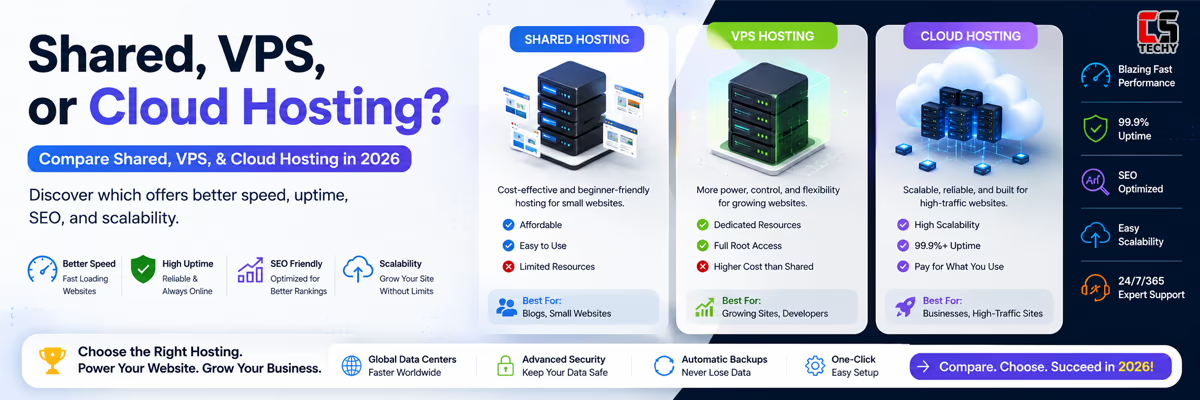
2. Selecting Your Battleground: Bare-Metal, VPS, or Edge Serverless Runtimes?
Choosing your environment forms the technical baseline of your digital assets. Selecting the incorrect architecture creates permanent performance deficits that upper-layer caching configurations cannot fully resolve. Let us dissect the standard execution topographies deployed across the industry today so you can align your operational overhead with real-world workloads.
Many organizations misjudge their scaling requirements, opting for bloated enterprise cloud arrays when a finely tuned, high-frequency single node would deliver significantly cleaner latency profiles at a fraction of the budget. Conversely, attempting to run highly transactional e-commerce engines on baseline shared networks introduces dynamic queuing delays during peak hours, stalling transaction pipelines and corrupting data states.
High-Performance Virtual Private Servers (VPS)
For resource-conscious developers and growing production sites, an unmanaged high-frequency VPS provides dedicated slices of physical hardware using kernel-based hypervisor layers (KVM). In 2026, standard entry-level VPS environments utilize isolated CPU allocations and high-speed PCIe Gen5 NVMe storage, making them exceptionally stable choices for headless setups, custom automation installations (like self-hosted n8n instances), or highly optimized content management systems.
Elastic Cloud & Distributed Bare-Metal Arrays
Instead of scaling vertically on a single software container, modern cloud hosting arrays distribute processing across vast, flexible networks. By isolating storage tiers from compute instances, these platforms allow real-time automatic scaling to absorb traffic spikes without introducing artificial execution lag. This model operates on pay-as-you-go utility structures, aligning hardware infrastructure overhead directly with production demand.
To maximize your resource efficiency, evaluate platforms based on raw performance metrics rather than marketing terminology. Look closely at single-core processing metrics, network backplane capacities (prefer systems utilizing 10Gbps symmetric uplinks), and storage read/write performance patterns before transferring production workloads to any provider.
| Infrastructure Tier | Target Use Case | Expected TTFB Range | Resource Allocation Model |
|---|---|---|---|
| Premium Managed Shared Hosting | Initial Blogs, Portfolio Sites, Landing Pages | 200ms – 400ms | Throttled Burst Shared Allocation |
| High-Frequency VPS (KVM Layer) | Dynamic Applications, Automation Nodes, High-Traffic Sites | 50ms – 120ms | Dedicated Virtual Core & Dedicated RAM Blocks |
| Distributed Elastic Cloud Architecture | Enterprise Portals, High-Volume E-Commerce Engines | 30ms – 80ms | Dynamic Multi-Node Automated Scaling Arrays |
3. The Step-by-Step Server Orchestration Blueprint: Deployment Walkthrough
To establish an optimized web host setup, we bypass bloated default scripts and focus on clean, high-speed implementations. This sequence establishes a solid, scalable production platform capable of sustaining intense workloads without degradation.
Step 1: Domain Asset Connection and Premium DNS Routing
The routing pipeline begins at the registrar level. To eliminate initial resolution latency, transfer your domain name system management away from legacy registrars and route your records through an anycast-enabled premium DNS provider. This ensures your nameservers resolve your records in fewer than 15 milliseconds globally by utilizing localized geolocation lookups.
- Log into your primary domain registration profile interface.
- Locate the authoritative custom nameserver configuration parameters.
- Replace the default values with your high-speed Anycast provider records.
- Configure your baseline apex record (
A) or canonical path pointer (CNAME) pointing directly to your destination production IP address, ensuring you lower the Time-to-Live (TTL) value to 300 seconds for rapid propagation.
Step 2: Server Provisioning and Root Access Initialization
When spinning up your server instance inside your dashboard (whether utilizing a standard cloud portal or high-frequency VPS), select a deployment region physically closest to your core target demographic. For example, if servicing the Indian subcontinent, provisioning within Mumbai or Delhi data centers dramatically lowers physical transit times compared to defaulting to North American or European zones.
Opt for clean operating system distributions like Ubuntu LTS or Debian Minimal. Avoid checking options that pre-install heavy administrative control panels unless your project strictly demands shared access, as these background tools consume critical memory cycles and widen your server’s security attack surface.
Step 3: Hardening the Environment Access Layer via SSH Keys
Before launching any public web services, lock down your system access. Abandon password-based authentication completely to defend against automated brute-force attempts targeting port 22.
Generate a secure RSA or Ed25519 cryptographic key pair locally on your terminal, then append the public key to your remote server configuration file using the following sequence:
# Append your local public key to the server environment
cat ~/.ssh/id_ed25519.pub | ssh root@your_server_ip "mkdir -p ~/.ssh && chmod 700 ~/.ssh && cat >> ~/.ssh/authorized_keys && chmod 600 ~/.ssh/authorized_keys"
Open your primary SSH configuration document at /etc/ssh/sshd_config, update the parameter to PasswordAuthentication no, change your default listening port if your internal network security guidelines require it, and restart the background daemon via systemctl restart sshd.
4. Configuring the Engine: High-Performance Nginx VHost Implementations
The web server software interfaces directly with the public web, handling HTTP requests and processing application responses. For ultra-lightweight, zero-inline code delivery, your configuration files must be stripped of legacy compatibility blocks.
Nginx remains an industry gold standard for reverse proxy operations and static file caching due to its asynchronous, event-driven architecture. Unlike traditional process-per-request models, Nginx leverages non-blocking event loops to handle thousands of concurrent client connections over a single execution thread, preserving vital CPU headroom for dynamic application tasks.
Optimized Nginx VHost Architecture
Below is a production-hardened Nginx server block configuration. This layout enforces strict caching policies, modern HTTP transport mechanisms, and direct micro-caching structures to process high volumes of traffic cleanly.
server {
    listen 443 ssl http2;
    server_name yoursite.com www.yoursite.com;

    root /var/www/html;
    index index.html;

    # Aggressive Security Configuration Headers
    add_header X-Frame-Options "SAMEORIGIN" always;
    add_header X-Content-Type-Options "nosniff" always;
    add_header Content-Security-Policy "default-src 'self' http: https: data: blob: 'unsafe-inline'" always;

    # Direct Static Asset Aggressive Cache Controls
    location ~* \.(?:ico|css|js|gif|jpe?g|png|svg|woff2?|webp|avif)$ {
        expires 365d;
        add_header Cache-Control "public, no-transform, immutable";
        access_log off;
        log_not_found off;
    }

    # Clean Fallback Routes to Eliminate 404 Overhead
    location / {
        try_files $uri $uri/ =404;
    }
}
The Alternative: LiteSpeed and OpenLiteSpeed Architectures
If your stack relies heavily on dynamic platforms like WordPress, deploying an OpenLiteSpeed engine provides an alternate high-performance route. OpenLiteSpeed bypasses the traditional file processing loop by utilizing server-level page caching directly within its core engine. When paired with modern lightweight design frameworks—such as the Astra theme and Spectra blocks—this setup processes layout elements instantly while keeping layout shift markers at absolute zero.
5. Database Calibration and Advanced Caching Layers
Dynamic backends spend the majority of their execution cycles querying databases. If your database configuration is left uncalibrated at its default limits, even fastest hardware configurations will encounter processing bottlenecks during high-traffic intervals.
When running relational engines like MySQL or MariaDB, modify your configuration file (my.cnf) to balance memory allocation against available server RAM. Avoid allocating more than 70% of total system memory to your InnoDB buffer pool, ensuring your operating system retains enough overhead to process baseline system tasks safely. You must also adjust thread concurrency values and query descriptors to match the scale of your incoming traffic profiles.
Deploying Redis for Memory-Layer Object Caching
To reduce repeated query overhead on persistent storage disks, route transient application data through a Redis memory layer. This cache serves frequent database queries directly from RAM, keeping your database execution latency down in the low single-digit milliseconds.
# Establish connection test to verification layer
redis-cli ping
# Response should return immediate PONG confirmation
By shifting object states, sessions, and transient metadata out of relational disk structures and directly into system memory, you compress data processing pathways. This drastically improves asset generation speed and maintains low latency across your entire application delivery pipeline.
6. Automation, Containerization, and Isolated Deployments via Docker
Modern hosting workflows rely heavily on isolation to ensure reliability. Rather than installing conflicting runtime versions directly onto your bare metal, use lightweight containers to build standalone, easily replicated environments.
For example, if you are setting up workflow automation engines like self-hosted n8n instances alongside your production sites, containerization isolates each application’s dependencies. This approach ensures security issues or performance spikes in one container remain fully isolated from your primary web application.
This microservices model simplifies system migration and scales easily. If a node requires updates or vertical expansion, you can export the isolated container and redeploy it onto a larger environment in seconds, completely avoiding long, complex software reconfiguration loops.
version: '3.8'
services:
  production_app:
    image: nginx:alpine
    volumes:
      - ./html_build:/usr/share/nginx/html:ro
    ports:
      - "8080:80"
    restart: always
    environment:
      - NODE_ENV=production
This simple orchestrator runs a highly stable web application instance inside an isolated container, mapping port 8080 outward to your system firewall while keeping system file dependencies pristine.
7. Automated Backup Strategies and Proactive Site Maintenance
An elite production environment is incomplete without a reliable disaster recovery plan. Security and architectural shifts require complete automation of server backups, independent verification of backup integrity, and secure storage offloading away from your primary host provider.
Relying on local snapshots managed by your primary host provider creates a single point of failure. If that platform suffers network issues or account access complications, your recovery keys are lost along with it. True structural data redundancy demands external automated transfers.
- Local Image Generation: Set up a nightly cron routine to package your site files and database exports into isolated, compressed archives.
- Offsite Cloud Offloading: Use secure protocols to send those local packages directly to an independent, S3-compatible object storage container.
- Retention Scheduling: Enforce strict data retention policies that keep daily updates for one week, weekly snaps for a month, and clean monthly baselines indefinitely.
Regularly auditing your server environments via tools like Semrush or dedicated site crawlers helps uncover broken redirection loops, hidden 404 errors, and security issues before they impact your overall site performance and crawl budgets.
8. Summary Checklist: The 2026 Production Launch Protocol
Verify that your new hosting setup satisfies all modern technical and security benchmarks before opening it to public traffic:
- DNS Matrix: Anycast resolution active with a low TTL setting for rapid global changes.
- Encryption Layer: Valid Let’s Encrypt SSL certificates enforced over secure TLS 1.3 transport tunnels.
- Asset Delivery: Aggressive browser caching rules configured for all static assets within your server blocks.
- Access Control: Password-based SSH access completely disabled; firewall limited strictly to ports 80, 443, and your unique custom access port.
- Recovery Infrastructure: Automated offsite backup sync verified and actively writing daily archives to independent storage.
Following this lean, modular deployment framework keeps your site speed high, server overhead low, and page vitals fully optimized to rank high across modern global search engines.
Frequently Asked Questions
Q1: Why is TTFB critical for performance?
TTFB measures how fast your server responds. If your server takes over 200ms to send the first byte, your entire rendering pipeline stalls, hurting your page vitals from the very start.
Q2: NVMe VPS vs. Cloud: Which is faster?
A dedicated NVMe VPS offers raw, unthrottled single-node speed. Cloud arrays offer better scalability but can introduce slight routing delays due to separated network storage layers.
Q3: What makes TLS 1.3 superior?
TLS 1.3 cuts encryption handshake overhead down to a single network round-trip. This noticeably speeds up connection setup times on mobile devices globally.
Q4: Can Redis fix a slow database?
No. Redis caches frequent queries in RAM to save resource usage, but it cannot fix structural bottlenecks like missing database indexes or uncalibrated engine buffer pools.
Q5: Why run applications inside Docker?
Docker completely isolates application libraries and runtimes. This prevents background tasks from messing with your core web server dependencies or impacting global server stability.
Q6: How does Anycast DNS lower latency?
Anycast mirrors your domain records across multiple data centers worldwide. Users instantly connect to the closest available node, dropping lookup latency below 15ms.
Q7: How do Astra and Spectra stop layout shifts?
They generate clean semantic code without heavy script layers. Enforcing clear dimensions on layout blocks ensures page content loads predictably without mid-render shifts.
Q8: Why store backups on offsite S3 containers?
Storing snapshots on the live server leaves you vulnerable to a single point of failure. External S3 containers guarantee quick recovery if your primary host goes down.
Q9: How often should I run Semrush audits?
Run automated audits weekly. Regular checks catch broken redirection loops, hidden 404 errors, and security issues before they affect your performance or search indexing.
⚡ Accelerated Performance & Setup Hub
Everything you need to deploy, optimize, and scale your web infrastructure. Select a track to dive deeper: