Last updated: August 2026. This is an educational overview based on n8n’s current official documentation and published information. It is not a hands-on testing report. Pricing and features can change, so check n8n’s official website for the latest details before making a purchase.
Introduction
n8n Review is a workflow automation platform that lets people connect apps, move data between systems, and build AI-powered workflows using a visual, node-based editor. It has become popular with developers, technical teams, and increasingly with AI builders because it combines drag-and-drop simplicity with the option to drop in custom code wherever needed.
This guide is written for beginners who are trying to understand n8n before committing time or money to it. It covers what n8n is, how it works, its AI and MCP capabilities, current pricing, self-hosting versus Cloud, its strengths and limitations, how it compares to Zapier and Make, and how a newcomer can start learning it.
What Is n8n?
At its core, n8n is workflow automation software: it connects the apps and services you already use so that data and tasks move between them automatically, without you performing every step by hand.
Instead of writing a full custom integration for every app, n8n gives you a visual canvas where you build a workflow by connecting pre-built blocks called nodes. Each node represents a step — reading data from a spreadsheet, calling an API, sending a Slack message, or running a piece of code.
Two things make n8n different from a typical no-code tool:
- It’s not purely no-code. You can add JavaScript or Python code steps directly inside a workflow, so technical users aren’t boxed in by the visual builder.
- It can be self-hosted. Because the core software is source-available under n8n’s own license, you can run it on your own server instead of only using a hosted cloud version.
How Does n8n Work?
Every n8n workflow is built from a small set of concepts. Understanding these six terms makes the rest of the platform easy to follow.
What is a trigger?
A trigger is the event that starts a workflow — for example, a new form submission, a scheduled time, or an incoming webhook. In simple terms, it’s the “when” of your automation.
What is a node?
A node is a single building block in a workflow. Think of it as one task: fetch data, transform it, send a message, or save a record. Workflows are built by connecting nodes in sequence.
What is data (in n8n)?
Data is the information that flows from node to node — the content of a form, an email, or an API response. n8n passes this data along the chain so each node can read and act on it.
What is an action?
An action is what a node does with the data after the workflow starts: sending an email, updating a CRM record, posting to a channel, and so on.
Putting it together: a simple example
A beginner-level workflow might look like this:
Form submission → n8n trigger fires → a node processes the submitted information → an action node sends a confirmation email → another node saves the data to a spreadsheet or database.
This is an illustrative example of how n8n’s building blocks fit together — not a claim that CSTechy has personally built or tested this specific workflow.
What Can You Use n8n For?
Based on n8n’s own use-case documentation and general automation patterns, common applications include:
- Lead processing and routing new leads to sales tools
- Email automation and notification systems
- Data synchronization between apps (spreadsheets, databases, CRMs)
- CRM workflows, such as updating records automatically
- Content and publishing workflows
- General business process automation
- API automation and custom integrations
- AI workflows, including AI agents and retrieval-augmented generation (RAG)
- Database read/write automation
- Webhook-driven automations that react to external events in real time
These are illustrative use cases drawn from n8n’s documented capabilities, not results CSTechy has independently verified through testing.
n8n Key Features
According to n8n’s current product pages, the platform includes:
- Visual workflow builder — a drag-and-drop canvas for connecting nodes
- Large integration library — pre-built nodes for hundreds of apps and services, plus generic HTTP/API and webhook nodes for anything not natively supported
- Custom code steps — JavaScript and Python code nodes for logic the visual builder can’t express
- Workflow templates — thousands of ready-made, community- and n8n-built templates covering common automation and AI use cases
- Credential management — a system for storing and reusing API keys and connections securely across workflows
- Error handling — dedicated error workflows and retry logic for production reliability
- Scheduling — time-based triggers for recurring automations
- AI Agent and LangChain-based nodes — for building AI agents, RAG pipelines, and multi-step reasoning workflows
- MCP support — native nodes for connecting to and exposing Model Context Protocol tools (covered below)
- Self-hosting — the option to run n8n on your own infrastructure via Docker or other deployment methods
Only currently documented features are listed here; always check n8n’s changelog for the latest additions.
n8n AI Features
n8n has increasingly positioned itself as an AI automation platform, not just a general integration tool. Based on n8n’s current AI product page, this includes:
- AI Agent nodes — for building agents that can reason over multiple steps, call tools, and take actions within a workflow
- LLM integrations — nodes that connect to various language model providers so you can plug in the model of your choice
- AI Workflow Builder — a feature that lets you describe an automation in plain language and get a starting workflow back, which you can then refine
- Chat Hub — a shared interface intended to give teams controlled access to multiple AI models and n8n’s agentic workflows from one place
- Human-in-the-loop controls — options to insert human approval steps before or during an AI-driven action
- Evaluation tools — features for testing AI outputs against defined metrics to help catch unreliable behavior before it reaches production
Importantly, n8n’s own materials frame these AI tools as pairing AI with explicit, rule-based logic rather than letting AI run entirely unsupervised — the platform is designed around combining AI steps with deterministic checks. This is a meaningfully different pitch from “fully autonomous AI does everything,” and beginners should not expect zero-configuration AI automation out of the box.
What Is MCP in n8n?
MCP stands for Model Context Protocol, an open standard that lets an AI model connect to external tools and data sources in a consistent way, regardless of which AI assistant or platform is calling those tools.
For beginners, the simplest way to think about MCP is as a shared “language” that lets different AI tools and automation platforms talk to each other’s capabilities without custom one-off integrations for every pairing.
n8n supports MCP in two directions, according to its documentation:
- As an MCP client — an n8n workflow can call tools exposed by an external MCP server (via the MCP Client and MCP Client Tool nodes), so an AI agent inside n8n can use outside tools
- As an MCP server — using the MCP Server Trigger node, an n8n instance can expose selected workflows as tools that external AI assistants and platforms can call directly
In practical terms, this means a workflow you build in n8n can become a tool that another AI system uses, and n8n workflows can, in turn, call out to external AI tool servers. This is current, documented functionality rather than a speculative future capability.
n8n Cloud vs Self-Hosting
n8n can be used two main ways: as a managed cloud service, or self-hosted on your own infrastructure.
| Factor | n8n Cloud | Self-Hosted |
|---|---|---|
| Server management | Managed by n8n | Managed by the user |
| Setup | Easier — sign up and start building | More technical — requires Docker or similar deployment knowledge |
| Infrastructure | Handled by n8n | User’s responsibility (server, backups, security) |
| Updates | Handled automatically | User applies updates manually |
| Control | Lower | Higher — full access to configuration and data location |
| Beginner friendliness | Higher | Lower |
One detail worth knowing: as of n8n’s current pricing page, the Business tier is listed as self-hosted only — there is no self-serve Cloud checkout for it the way there is for Starter and Pro. Enterprise is available either hosted by n8n or self-hosted, depending on the contract.
What Is n8n Community Edition?
The Community Edition is n8n’s free, self-hosted version, available on GitHub. Based on n8n’s current documentation:
- It’s free to run on your own infrastructure
- It includes the core workflow builder, integrations, and self-hosting capability
- Enterprise-only features — such as SSO/SAML/LDAP, advanced permissions, and certain scaling and audit tools — are gated behind a paid Business or Enterprise license, even in a self-hosted deployment
- Running it requires comfort with server administration: Docker setup, a database, backups, and security patching
The Community Edition is best suited to users who have some technical capacity and want full control without a recurring cloud subscription.
n8n Pricing
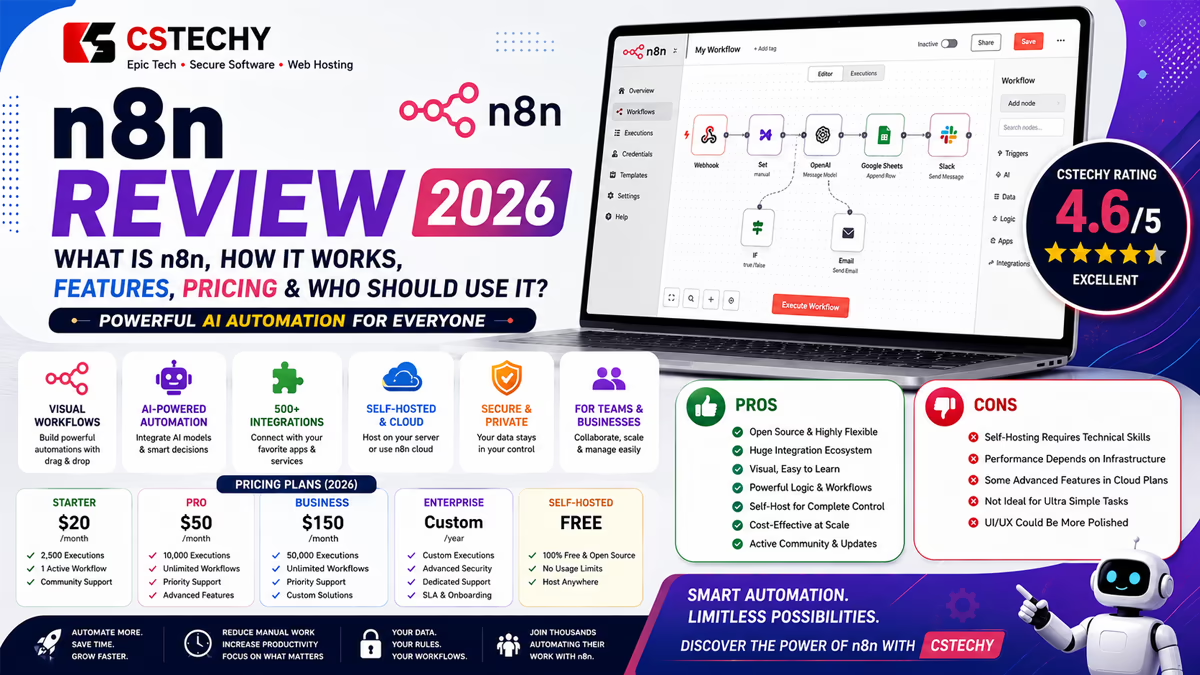
According to n8n’s official pricing page, current plans (billed annually, with a 17% discount versus monthly billing) are structured as follows. Pricing can change, so verify the current plan details on n8n’s official website before purchasing.
| Plan | Price (annual billing) | Executions Included | Hosting |
|---|---|---|---|
| Starter | €20/month | 2,500/month | Hosted by n8n (Cloud) |
| Pro | €50/month | 10,000/month | Hosted by n8n (Cloud) |
| Business | €667/month | 40,000/month | Self-hosted |
| Enterprise | Custom (contact sales) | Custom | Hosted by n8n or self-hosted |
A few points worth understanding before comparing prices to other tools:
- All Cloud plans currently include unlimited users and unlimited workflows — the only real lever on cost is monthly execution volume.
- n8n bills per execution, meaning one full run of an entire workflow, regardless of how many steps or nodes it contains. This differs from platforms that bill per individual step or “task.”
- Cloud plans include a monthly allowance of AI Assistant credits (for example, 2,300 on Starter), which are separate from workflow executions.
- A discounted Start-up Plan (50% off Business) is available for qualifying companies under 20 employees.
- The free, self-hosted Community Edition has no official execution cap — your only real cost is server infrastructure.
Is n8n Free?
The honest answer is: it depends on which version you mean.
- Community Edition (self-hosted): Free to use under n8n’s Sustainable Use License, provided usage stays within the license’s terms (generally internal business or personal use, not reselling n8n as a competing hosted service).
- n8n Cloud (Starter/Pro): Paid subscriptions, starting around €20/month, with a free trial available and no credit card required to start.
- Business and Enterprise: Paid tiers aimed at companies needing collaboration, compliance, or governance features beyond what Community Edition offers.
So n8n is free if you’re comfortable self-hosting the Community Edition; it becomes a paid product once you want a managed cloud instance or enterprise-grade collaboration and security features.
Is n8n Good for Beginners?
This deserves a balanced answer rather than a blanket “yes” or “no.”
Beginner-friendly aspects
- The visual, node-based canvas makes the flow of a workflow easy to see
- Thousands of templates give newcomers a working starting point instead of a blank canvas
- The AI Workflow Builder can generate a first draft of a workflow from a plain-language description
- A large, active community forum and learning site offer tutorials and support
Potential difficulties
- Understanding automation logic (branching, loops, conditionals) still takes some learning
- Working with APIs and credentials requires basic technical literacy
- Webhooks and data transformation between nodes can be confusing at first
- Self-hosting adds real technical overhead — server setup, updates, and security are not optional if you choose that path
- Debugging a workflow that isn’t behaving as expected requires patience and some troubleshooting skill
n8n is not automatically “easy for everyone.” It is more approachable than writing custom integration code from scratch, but it is not as simplified as some consumer-focused automation apps.
n8n Advantages
- Execution-based pricing — you pay per full workflow run, not per step, which can be significantly cheaper for multi-step automations
- Large integration ecosystem — hundreds of native app integrations plus generic HTTP and webhook nodes for anything else
- Self-hosting option — full control over data location and infrastructure, which appeals to privacy- and compliance-conscious teams
- Visual workflow building with code flexibility — you’re not locked into either pure no-code or pure code
- Native AI and MCP support — built-in nodes for AI agents, LLM connections, and both MCP client and server roles
- Active open community — a large template library and community forum reduce the amount of building you do from scratch
n8n Limitations
A fair review has to cover the realistic downsides too:
- Learning curve — even with visual tools, understanding triggers, data flow, and expressions takes time for non-technical users
- Technical concepts throughout — APIs, JSON data structures, and authentication show up quickly once you move past the simplest workflows
- Self-hosting responsibility — the free Community Edition’s cost savings come with the burden of managing your own server, backups, and security patching
- Workflow complexity at scale — large workflows with many branches can become visually cluttered and harder to maintain
- Ongoing maintenance — self-hosted instances need updates to stay current with new nodes, security fixes, and platform changes
- Pricing jumps between tiers — the gap between the Pro and Business plans is substantial, since Business is priced as a self-hosted enterprise offering rather than an incremental Cloud step
- Licensing is not traditional open source — n8n’s Sustainable Use License is “fair-code,” not an OSI-approved open-source license, and it restricts certain commercial uses (such as reselling n8n as a competing hosted service)
n8n vs Zapier
Zapier is a long-established, fully hosted automation platform aimed primarily at non-technical users.
- Ease of use: Zapier is generally considered simpler for pure no-code users; n8n’s visual builder is powerful but assumes more comfort with technical concepts
- Flexibility: n8n allows custom code steps and self-hosting, giving technical teams more control than Zapier typically offers
- Deployment model: Zapier is cloud-only; n8n offers both cloud and self-hosted deployment
- Pricing approach: n8n bills per full workflow execution regardless of step count, while Zapier traditionally bills per individual “task” or step, which can make complex, multi-step Zaps more expensive at scale
- Target users: Zapier suits non-technical individuals and small teams wanting the fastest path to a working automation; n8n suits developers and technical teams wanting more control and lower per-step costs at scale
Neither tool is universally “better” — the right choice depends on your technical comfort and whether you need self-hosting or deep customization.
n8n vs Make
Make (formerly Integromat) is another visual automation platform that sits closer to n8n in complexity than Zapier does.
- Visual workflow approach: Both tools use a node/module-based visual canvas, though their interfaces and terminology differ
- Complexity: Make and n8n are broadly comparable in the depth of logic they support; both go beyond simple linear automations
- Flexibility: n8n’s ability to self-host and add custom code nodes gives it an edge for teams wanting infrastructure control; Make is cloud-only
- Target audience: Both attract technically inclined users, though n8n leans slightly more toward developers given its code flexibility and self-hosting option
- Deployment options: Make is exclusively a hosted cloud product; n8n offers cloud and self-hosted paths
Both are strong, mature platforms — the deciding factor is usually whether self-hosting and code-level customization matter to you.
Who Should Use n8n?
n8n tends to be a good fit for:
- Developers and technical teams comfortable with APIs and basic scripting
- Startups and businesses that want to avoid escalating per-task SaaS pricing as automations scale
- Organizations with complex, multi-step, or branching workflows
- Teams building AI agents or MCP-connected automations who want fine-grained control over logic
- Privacy- or compliance-focused teams who need to self-host and control where data lives
Who May Not Need n8n?
If you only need a handful of simple, one-step integrations — for example, “when a form is submitted, add a row to a spreadsheet” — a simpler, more consumer-oriented automation tool may get you there faster with less setup. This isn’t a criticism of those alternatives; different tools are built for different levels of complexity, and picking the simplest tool that meets your actual need is usually the right call.
How Should a Beginner Start Learning n8n?
- Understand what a workflow is and how it represents an automated process
- Learn how triggers start a workflow
- Learn what nodes do and how they’re connected
- Connect a single application (like an email or spreadsheet tool) as a first exercise
- Build one simple, linear workflow end to end
- Learn how expressions and data handling work between nodes
- Learn how webhooks work and how to trigger workflows externally
- Explore basic API calls using the HTTP Request node
- Explore AI workflow nodes and simple agent building
- Learn error handling and how to debug a failing workflow
- Move on to more advanced automation: branching logic, loops, and MCP connections
This is a suggested learning path based on n8n’s documented concepts, not a record of steps CSTechy has personally completed.
n8n Alternatives
Depending on your needs, a few other platforms are worth knowing about:
- Zapier — best for non-technical users wanting the simplest possible setup
- Make — a strong visual alternative with similar complexity to n8n, cloud-only
- Pipedream — a developer-focused automation platform with a code-first approach
Each of these may be more suitable than n8n depending on your technical comfort level, budget, and whether self-hosting matters to you.
Final Verdict
n8n can be a strong option for users who want flexible workflow automation and are comfortable learning some technical concepts along the way. Its execution-based pricing, self-hosting option, and native AI/MCP support make it particularly appealing to developers, startups, and technical teams working on AI-driven automation. Beginners can realistically start with simple, template-based workflows, while more advanced users can grow into APIs, self-hosting, and multi-agent AI systems as their needs expand.
It is not the simplest possible automation tool on the market, and it’s not the right fit for someone who wants a fully hands-off, one-click setup. For that use case, a simpler platform may serve better. But for anyone willing to invest a little time in learning the fundamentals, n8n offers a genuinely flexible and cost-efficient automation platform.
Frequently Asked Questions
What is n8n?
n8n is a workflow automation platform that lets you connect apps and build automated processes using a visual, node-based editor, with the option to add custom code and AI agents.
Is n8n free?
The self-hosted Community Edition is free to use under n8n’s Sustainable Use License. n8n Cloud plans (Starter, Pro) and the Business/Enterprise tiers are paid subscriptions.
Is n8n good for beginners?
It’s approachable for beginners through templates and its visual builder, but it does involve learning automation concepts like triggers, nodes, and data flow — it isn’t a fully simplified, zero-learning-curve tool.
Is n8n better than Zapier?
Neither is universally better. Zapier is generally simpler for non-technical users; n8n offers more flexibility, custom code, and self-hosting, along with execution-based pricing that can be cheaper for complex workflows.
Is n8n better than Make?
Both are comparable in complexity and capability. n8n’s main differentiators are self-hosting and code-level customization; Make is cloud-only.
Can n8n be self-hosted?
Yes. The Community Edition can be self-hosted for free, and the Business and Enterprise plans can also be run on your own infrastructure with a license key.
Does n8n support AI?
Yes. n8n includes AI Agent nodes, LLM integrations, an AI Workflow Builder, a Chat Hub interface, and native MCP support for connecting to external AI tools.
What is n8n MCP?
MCP (Model Context Protocol) is an open standard for connecting AI models to external tools. n8n can act as both an MCP client (calling outside tools) and an MCP server (exposing its own workflows as tools to other AI systems).
What can n8n automate?
Common uses include lead processing, email and notification automation, data syncing between apps, CRM updates, content workflows, API automation, and AI-driven workflows such as agents and RAG pipelines.
Do I need coding knowledge to use n8n?
No, but it helps. Many workflows can be built visually with no code, but understanding APIs, JSON data, and basic scripting becomes useful as your automations grow more complex.