VPS Buying Guide (2026): How to Choose the Best Virtual Private Server for Performance, Security & Value
Choosing the right hosting environment can directly impact your website speed, security, scalability, and long-term growth. As websites become more complex, businesses move online, and applications require more resources, many users eventually outgrow traditional shared hosting.
A VPS Buying Guide helps you understand when a Virtual Private Server is the right investment, which specifications matter, how much you should pay, and how to avoid expensive mistakes when selecting a hosting provider.
A VPS sits between shared hosting and dedicated servers, giving you a balance of performance, control, flexibility, and affordability. However, not every VPS plan is suitable for every website. Choosing the wrong amount of CPU, RAM, storage, management level, or server configuration can result in unnecessary costs or poor performance.
This comprehensive guide explains everything you need to know before purchasing a VPS in 2026, including VPS architecture, hosting types, performance factors, security considerations, pricing, scalability, and real-world recommendations for different users.
Whether you are a beginner launching your first growing website, a developer building applications, an agency managing client projects, a business running an online store, or a founder creating SaaS products, this guide will help you make a confident hosting decision.
Table of Contents
What Is VPS Hosting?
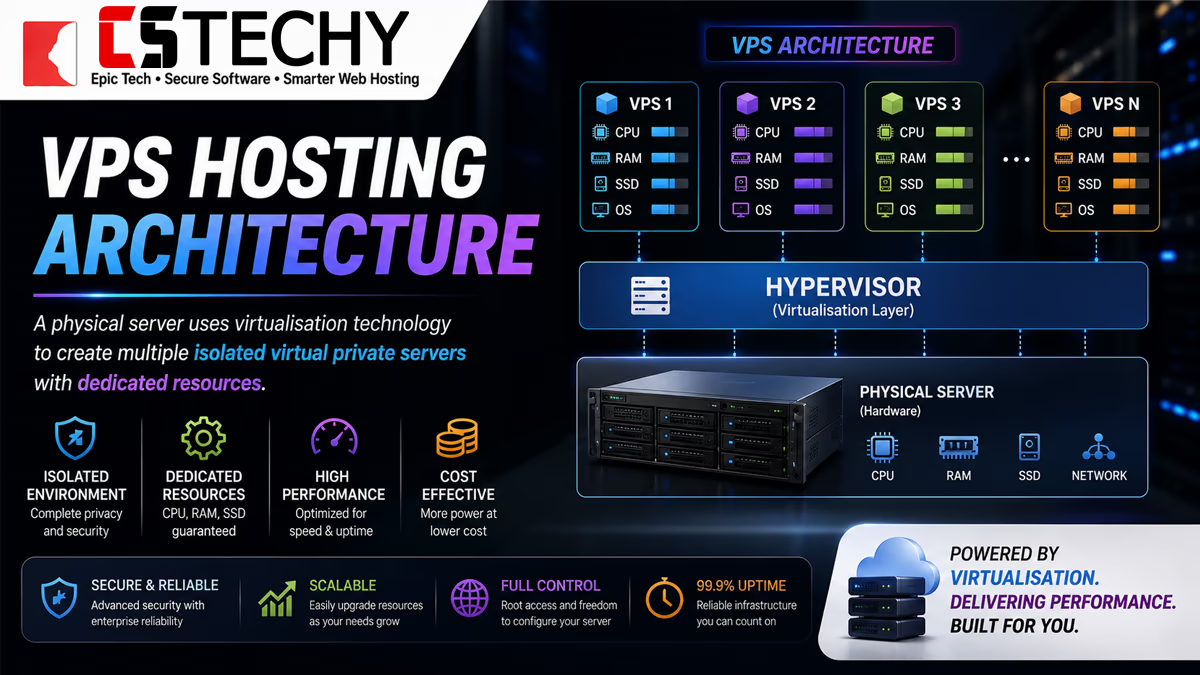
VPS hosting, also known as Virtual Private Server hosting, is a type of web hosting where a physical server is divided into multiple isolated virtual servers using virtualisation technology.
Unlike shared hosting, where many websites compete for the same server resources, a VPS provides dedicated allocations of resources such as CPU power, RAM, storage, and bandwidth.
Each VPS operates as an independent hosting environment. It has its own operating system, private resources, security settings, and configuration options.
How Does VPS Hosting Work?
A VPS works through a software layer called a hypervisor. The hypervisor sits between the physical server hardware and virtual machines, allowing one powerful server to run multiple independent server environments.
Each virtual server receives its own allocated resources. For example, a hosting provider may divide a powerful physical server into several VPS environments, assigning each customer a specific amount of:
- CPU processing power
- RAM memory
- SSD or NVMe storage
- Bandwidth capacity
- Operating system resources
Because resources are separated, one VPS customer does not normally experience the same resource competition found in traditional shared hosting environments.
Understanding Virtualisation Technology
Virtualisation is the foundation of modern hosting infrastructure. It allows hosting providers to maximise hardware efficiency while giving customers flexible server environments.
Popular virtualisation technologies include:
- KVM: Hardware-level virtualisation providing strong isolation and dedicated resource allocation.
- VMware: Enterprise-grade virtualisation technology widely used in professional environments.
- OpenVZ: Container-based virtualisation offering lightweight server environments.
- Hyper-V: Microsoft’s virtualisation platform designed for Windows environments.
VPS Resources Explained
When buying a VPS, understanding server resources is essential. Many beginners focus only on price, but the actual performance depends on the underlying specifications.
CPU and vCPU
CPU determines how quickly your server processes tasks. VPS providers usually describe processing power using vCPU or virtual CPU cores.
More CPU resources are important for:
- High traffic websites
- Ecommerce platforms
- Database-heavy applications
- Automation workflows
- Developer environments
RAM Memory
RAM controls how many processes your server can handle simultaneously. Websites using content management systems, ecommerce platforms, databases, or applications usually require more memory than simple websites.
For example:
- 1GB RAM VPS: Small websites and testing environments
- 2GB–4GB RAM VPS: Growing websites and small business applications
- 8GB+ RAM VPS: Ecommerce, agencies, developers, and demanding workloads
Storage Type
Storage technology has a major impact on website speed and server responsiveness.
- SSD VPS: Uses solid-state drives for faster performance than traditional hard drives.
- NVMe VPS: Uses newer storage technology with significantly faster data transfer capabilities.
For modern websites, applications, and databases, NVMe storage is becoming increasingly common because faster storage improves loading times, database operations, and overall hosting performance.
Bandwidth and Network Resources
Bandwidth determines how much data your server can transfer to visitors and applications.
The required bandwidth depends on:
- Monthly visitors
- Media files
- Downloads
- Video content
- API usage
- Application traffic
Types of VPS Hosting
Not all VPS hosting solutions are identical. Different VPS technologies and management options are designed for different users, technical abilities, workloads, and business requirements.
Understanding the major VPS categories helps you avoid choosing a server environment that is either too limited or unnecessarily expensive.
Managed VPS Hosting
Managed VPS hosting is designed for users who want the power of a private server without handling every technical responsibility themselves.
With a managed VPS plan, the hosting provider typically assists with server administration tasks such as:
- Operating system updates
- Security monitoring
- Server optimisation
- Technical troubleshooting
- Backups and recovery support
- Control panel management
Managed VPS hosting is often the best choice for businesses, agencies, website owners, and beginners who need reliable performance but do not want to become full-time server administrators.
Unmanaged VPS Hosting
An unmanaged VPS gives you maximum control but requires more technical knowledge. The hosting provider usually supplies the server infrastructure, while you handle configuration, maintenance, security, and optimisation.
Unmanaged VPS users are responsible for tasks such as:
- Installing software
- Configuring firewalls
- Managing updates
- Optimising databases
- Monitoring server health
- Resolving technical issues
This option is popular among developers, system administrators, and experienced users who need complete server flexibility.
Cloud VPS Hosting
Cloud VPS hosting combines VPS technology with cloud infrastructure. Instead of depending on a single physical machine, cloud environments can use distributed resources across multiple servers.
Common advantages of cloud VPS include:
- Improved scalability
- Flexible resource upgrades
- Higher availability options
- Better infrastructure flexibility
Cloud VPS is often selected by businesses and applications that expect changing traffic patterns or require easier scaling.
Linux VPS Hosting
Linux VPS hosting uses a Linux-based operating system such as Ubuntu, Debian, AlmaLinux, Rocky Linux, or other distributions.
Linux VPS is widely used because of its:
- Performance efficiency
- Open-source ecosystem
- Developer flexibility
- Large software compatibility
- Lower licensing costs
Linux VPS environments are commonly used for:
- WordPress websites
- PHP applications
- Node.js projects
- Python applications
- Docker containers
- Automation platforms
Windows VPS Hosting
Windows VPS hosting runs on Microsoft Windows Server and is often chosen by users who require Windows-specific software compatibility.
Windows VPS is suitable for workloads involving:
- Microsoft applications
- ASP.NET websites
- Remote desktop environments
- Windows-based business software
- Specialised enterprise applications
The main consideration with Windows VPS is licensing cost. Windows Server environments generally have additional licensing requirements compared with many Linux distributions.
Container VPS Hosting
Container-based VPS solutions use lightweight virtualisation methods where applications share the host operating system kernel while remaining isolated.
Containers are popular in modern development environments because they make application deployment faster and more consistent.
Technologies such as Docker and Kubernetes have increased demand for container-friendly VPS infrastructure.
KVM VPS Hosting
KVM (Kernel-based Virtual Machine) is one of the most popular VPS virtualisation technologies because it provides hardware-level virtualisation.
A KVM VPS behaves similarly to a dedicated server environment because each virtual machine has stronger resource isolation.
Benefits include:
- Better resource separation
- Improved flexibility
- Support for multiple operating systems
- Greater control over server configuration
OpenVZ VPS Hosting
OpenVZ is a container-based virtualisation technology that creates lightweight virtual server environments.
Advantages:
- Efficient resource usage
- Lower-cost VPS plans
- Fast deployment
However, OpenVZ generally provides less isolation compared with KVM because multiple environments share parts of the underlying system.
VMware VPS Hosting
VMware is a widely recognised enterprise virtualisation platform used in professional hosting and corporate environments.
VMware-based VPS solutions are often selected when organisations require mature virtualisation technology and enterprise infrastructure.
Shared Hosting vs VPS vs Cloud vs Dedicated Hosting
Choosing between shared hosting, VPS hosting, cloud hosting, and dedicated servers depends on your performance requirements, budget, technical skills, and growth expectations.
Many website owners upgrade too early because they assume more expensive hosting automatically means better results. The correct approach is choosing the right hosting environment for your current needs while allowing room for future growth.
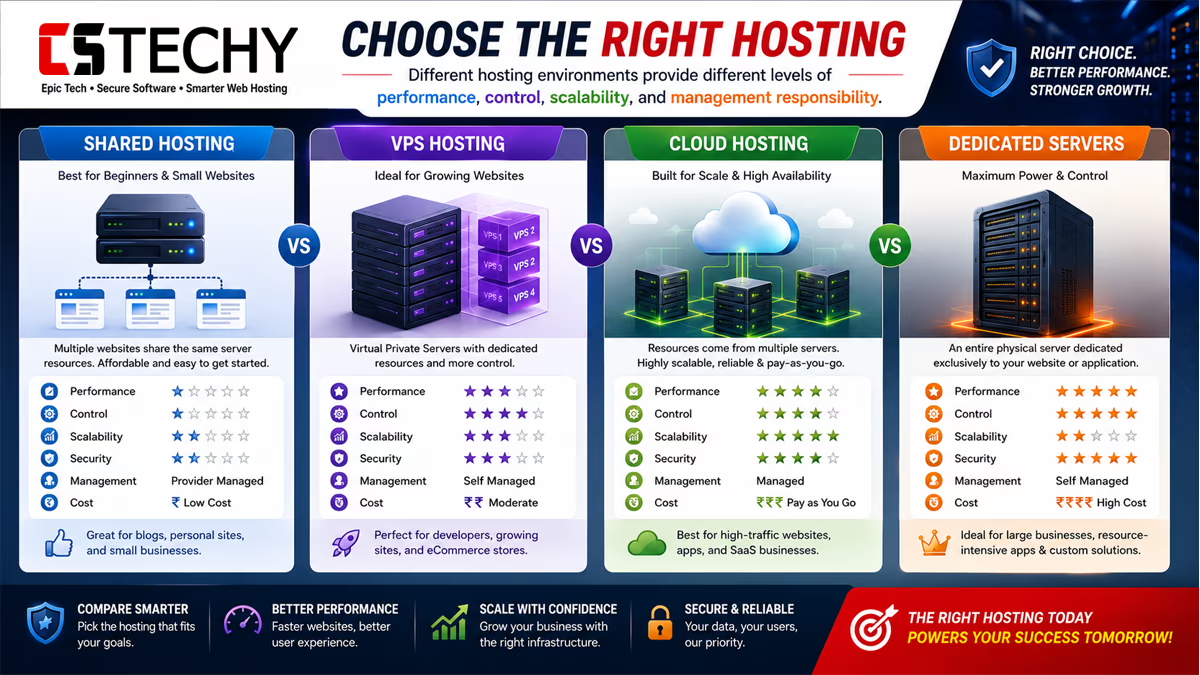
| Feature | Shared Hosting | VPS Hosting | Cloud Hosting | Dedicated Server |
|---|---|---|---|---|
| Performance | Basic performance shared between many websites | Higher performance with allocated resources | Flexible performance with scalable infrastructure | Maximum hardware performance |
| Cost | Lowest cost option | Mid-range pricing | Variable depending on resources | Highest cost |
| Security | Basic isolation | Better isolation and control | Strong infrastructure-level security | Maximum control |
| Scalability | Limited | Moderate to high depending on provider | Excellent scalability | Requires hardware upgrades |
| Control | Limited server access | Root access and configuration freedom | Advanced cloud management options | Complete server control |
| Maintenance | Managed by hosting provider | Depends on managed or unmanaged plan | Shared responsibility model | User responsibility |
| Best Use Cases | Small websites and beginners | Growing websites, businesses, developers | Applications requiring flexibility | Large organisations and high-resource projects |
For a deeper understanding of hosting environments, you can also explore our global web hosting architecture guide, which explains how modern websites rely on servers, databases, networks, and cloud infrastructure.
Who Should Buy VPS Hosting?
A VPS is designed for users who need more power, reliability, and control than shared hosting can provide, but do not yet require the cost and complexity of a dedicated server.
The decision to buy VPS hosting should be based on your website goals, application requirements, expected growth, and technical needs rather than simply following what other businesses use.
Growing Blogs and Content Websites
Many bloggers start with shared hosting because it is affordable and simple. However, as content libraries grow and organic traffic increases, websites often require more server resources.
A VPS can help growing content websites handle:
- Higher visitor volumes
- Larger media libraries
- Advanced caching systems
- Faster database queries
- Multiple website installations
A faster hosting environment can improve user experience, especially for websites receiving traffic from search engines, social media, and content marketing campaigns.
Business Websites
Professional businesses often need hosting that provides stronger reliability, security controls, and performance than entry-level hosting plans.
A business VPS can support:
- Corporate websites
- Customer portals
- Lead generation platforms
- Internal tools
- Business applications
For companies where website availability directly affects revenue, having greater control over the hosting environment can be valuable.
WooCommerce Stores and Ecommerce Websites
Online stores have different hosting requirements compared with simple websites. Ecommerce platforms such as WooCommerce depend heavily on database performance, PHP processing, caching, and server stability.
A VPS can benefit ecommerce websites by providing:
- More consistent performance during traffic spikes
- Improved database capacity
- Better control over optimisation
- Additional security configuration options
If you are evaluating ecommerce hosting options, understanding the difference between standard hosting and specialised ecommerce environments is important. Our WooCommerce hosting guide provides additional insights into ecommerce-focused hosting requirements.
Developers and Technical Professionals
Developers often choose VPS hosting because it provides a flexible environment for building, testing, and deploying applications.
A developer VPS can be used for:
- Web application hosting
- API servers
- Development environments
- Git repositories
- Testing platforms
- Docker containers
Developers working with PHP, Node.js, Python, Java, databases, and automation tools often prefer VPS hosting because they can configure the environment according to their technical requirements.
Agencies Managing Multiple Websites
Digital agencies frequently manage multiple client websites. Instead of purchasing separate hosting accounts, agencies can use VPS infrastructure to centralise management.
Agency benefits include:
- Hosting multiple websites
- Improved resource allocation
- Greater configuration control
- More professional hosting management
Gaming Servers
Gaming communities often require dedicated resources, low latency, and configurable environments. A VPS can provide a practical solution for smaller gaming servers that do not require full dedicated hardware.
Common gaming VPS uses include:
- Minecraft servers
- Private game servers
- Community platforms
- Voice communication servers
Trading and Forex VPS Users
Some traders use VPS environments for applications that require continuous availability and remote access.
A Forex VPS can provide:
- 24/7 server availability
- Remote desktop access
- Stable application hosting
- Reduced dependency on personal computers
However, users should carefully evaluate latency, reliability, and provider reputation because trading environments can be sensitive to network performance.
SaaS Founders and Application Businesses
Startups building software products often use VPS hosting during early growth stages because it provides a balance between affordability and control.
A VPS can support:
- Minimum viable products
- Customer dashboards
- Backend services
- Databases
- Automation systems
Students and Learning Environments
A VPS can also be an excellent learning tool for students who want practical experience with server administration, Linux systems, networking, and application deployment.
When VPS Hosting Is Not the Right Choice
Although VPS hosting offers many advantages, it is not the ideal solution for every website owner. Buying a VPS without understanding your requirements can create unnecessary costs and technical challenges.
Small Websites With Very Low Traffic
A simple website with limited visitors may not need VPS resources. Shared hosting can often provide enough performance for personal websites, small portfolios, and early-stage projects.
Personal Blogs With Minimal Requirements
If your website contains only a few pages, receives low traffic, and does not require custom server configuration, a VPS may provide more complexity than value.
Users Looking for the Cheapest Hosting Option
Cheap VPS hosting can be attractive, but the lowest-priced plans often require more technical responsibility. Users focused only on price may find managed shared hosting more practical.
Complete Beginners Without Technical Interest
Unmanaged VPS environments require server administration knowledge. Beginners who do not want to manage updates, security settings, and troubleshooting should consider managed VPS or simpler hosting solutions.
VPS Hosting Performance Explained
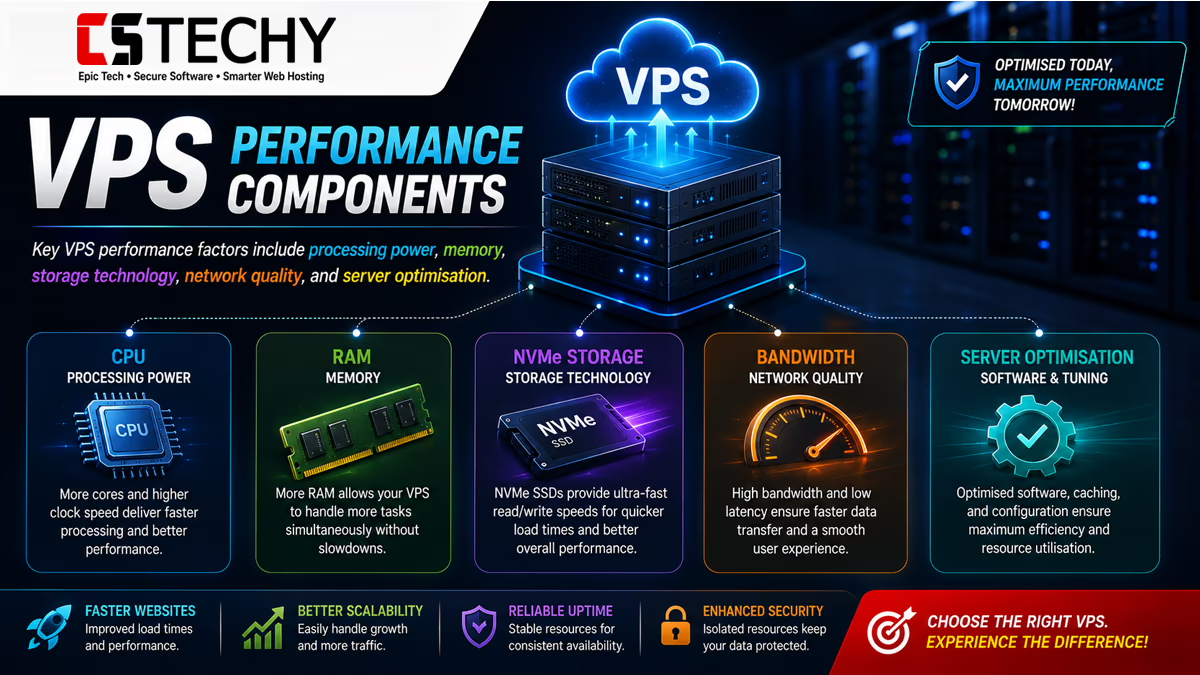
VPS hosting performance depends on several technical components working together. A fast server is not created by one specification alone; CPU, RAM, storage, network quality, software optimisation, and server location all influence the final experience.
CPU Performance
The CPU handles processing tasks performed by your website, applications, databases, and background services.
Higher CPU capacity is useful for workloads such as:
- Ecommerce transactions
- Large databases
- Application processing
- Automation workflows
- High visitor websites
vCPU vs Dedicated CPU
Many VPS plans advertise vCPU cores. A vCPU represents a virtualised CPU allocation from the physical server.
Some premium VPS providers offer dedicated CPU resources where specific processing power is reserved for your server environment.
Users with demanding workloads should pay attention not only to the number of cores but also to how resources are allocated.
RAM Requirements and Memory Management
RAM plays a critical role in VPS hosting performance because it determines how many processes your server can handle simultaneously. Websites, databases, applications, caching systems, and background services all consume memory.
Insufficient RAM can lead to slow loading times, application errors, database delays, and poor user experience. However, purchasing excessive RAM without a real requirement can increase your hosting costs without delivering meaningful benefits.
Common RAM requirements include:
- 1GB RAM VPS: Suitable for lightweight websites, testing environments, learning projects, and small applications.
- 2GB–4GB RAM VPS: Suitable for growing websites, blogs, small business websites, and moderate WordPress installations.
- 8GB RAM VPS: Suitable for ecommerce stores, agencies, developers, and resource-intensive websites.
- 16GB+ RAM VPS: Suitable for applications, SaaS platforms, databases, automation systems, and enterprise workloads.
SSD vs NVMe VPS Performance
Storage technology is one of the most important factors affecting VPS performance. Traditional hard drives have largely been replaced by SSD and NVMe storage because modern websites require faster data access.
RAM Requirements and Memory Management
RAM plays a critical role in VPS hosting performance because it determines how many processes your server can handle simultaneously. Websites, databases, applications, caching systems, and background services all consume memory.
Insufficient RAM can lead to slow loading times, application errors, database delays, and poor user experience. However, purchasing excessive RAM without a real requirement can increase your hosting costs without delivering meaningful benefits.
Common RAM requirements include:
- 1GB RAM VPS: Suitable for lightweight websites, testing environments, learning projects, and small applications.
- 2GB–4GB RAM VPS: Suitable for growing websites, blogs, small business websites, and moderate WordPress installations.
- 8GB RAM VPS: Suitable for ecommerce stores, agencies, developers, and resource-intensive websites.
- 16GB+ RAM VPS: Suitable for applications, SaaS platforms, databases, automation systems, and enterprise workloads.
SSD vs NVMe VPS Performance
Storage technology is one of the most important factors affecting VPS performance. Traditional hard drives have largely been replaced by SSD and NVMe storage because modern websites require faster data access.
| Storage Type | Performance | Best For |
|---|
| Storage Type | Performance | Best For |
|---|---|---|
| SATA HDD | Slower read/write speeds | Basic storage requirements |
| SSD | Fast and reliable storage | Websites, databases, business hosting |
| NVMe SSD | Very high-speed storage with improved responsiveness | Applications, ecommerce, demanding workloads |
NVMe VPS hosting has become increasingly popular because faster storage improves:
- Database operations
- Website loading speed
- Application response time
- File processing
- Server responsiveness
IOPS Explained
IOPS means Input/Output Operations Per Second. It measures how many read and write operations storage can handle.
High IOPS performance is particularly important for:
- Database-heavy websites
- WooCommerce stores
- Applications
- Content management systems
- Large websites with frequent updates
Bandwidth and Network Performance
Bandwidth determines how much data your VPS can transfer between your server and visitors. A website with images, videos, downloads, APIs, or high traffic requires more network capacity.
When evaluating VPS bandwidth, consider:
- Monthly visitor volume
- Average page size
- Media usage
- Application requests
- API communication
Server Location and Latency
The physical location of your VPS server affects network latency. A server located closer to your users generally provides faster response times.
For example:
- A European audience usually benefits from European data centres.
- North American customers often benefit from US-based servers.
- Global audiences may benefit from CDN services combined with strategic server locations.
Uptime and Reliability
A VPS provider’s infrastructure quality directly affects availability. Businesses should consider uptime guarantees, backup systems, monitoring capabilities, and support quality.
Reliable VPS hosting should include:
- Stable infrastructure
- Hardware monitoring
- Backup options
- Network redundancy
- Technical support
Software Optimisation Matters
Even powerful VPS hardware can perform poorly if the server software is not configured correctly.
Common optimisation technologies include:
- Nginx: High-performance web server technology often used for handling large amounts of traffic.
- Apache: A widely used web server with extensive compatibility.
- LiteSpeed: Performance-focused web server technology popular for WordPress optimisation.
- Redis: In-memory caching technology that improves application performance.
- Memcached: A caching system used to reduce database load.
A properly optimised VPS combines suitable hardware, efficient software configuration, caching, security practices, and regular maintenance.
VPS Hosting Security Guide
Security is one of the biggest reasons businesses choose VPS hosting over shared environments. A VPS provides greater isolation and control, but security still depends on proper configuration and ongoing management.
Firewall Configuration
A firewall controls incoming and outgoing network traffic. Proper firewall rules reduce unnecessary exposure and help protect server resources.
Common firewall practices include:
- Blocking unused ports
- Allowing only required services
- Monitoring suspicious activity
- Limiting unnecessary access
SSH Security
SSH provides secure remote access to Linux VPS environments. Because attackers frequently target exposed SSH services, proper configuration is essential.
Security improvements include:
- Using strong authentication
- Disabling unnecessary root login access
- Using SSH keys
- Changing default configurations
Root Access: Power and Responsibility
Root access gives complete administrative control over your VPS. This allows advanced configuration but also creates responsibility.
With root access, users can:
- Install custom software
- Configure server settings
- Optimise applications
- Manage security controls
However, incorrect changes can affect server stability, making technical knowledge important.
Backups and Snapshots
A reliable backup strategy is essential for any VPS environment. Hardware failures, configuration mistakes, security incidents, or software errors can happen unexpectedly.
Important backup options include:
- Automatic backups
- Server snapshots
- Database backups
- Off-site storage
- Recovery testing
DDoS Protection
Distributed Denial of Service attacks attempt to overwhelm servers with excessive traffic. VPS providers often provide different levels of DDoS protection depending on their infrastructure.
Operating System Updates
Keeping your operating system updated helps reduce security vulnerabilities and improves server stability.
Regular updates should include:
- Linux packages
- Windows Server updates
- Application dependencies
- Security patches
SSL Certificates and Encryption
SSL encryption protects communication between visitors and your website. Modern websites should use HTTPS to improve security, trust, and compatibility with search engines.
Many websites use services such as Let’s Encrypt to obtain free SSL certificates.
Monitoring and Access Control
Professional VPS management includes monitoring server health, resource usage, login attempts, and unusual behaviour.
Recommended security practices:
- Multi-factor authentication
- User permission management
- Regular security audits
- Resource monitoring
- Malware protection
Managed vs Unmanaged VPS: Which One Should You Choose?
One of the most important decisions when buying a VPS is choosing between managed VPS and unmanaged VPS hosting. The right option depends on your technical knowledge, available time, business requirements, and willingness to handle server administration.
Both options provide VPS infrastructure, dedicated resources, and greater control compared with shared hosting. The main difference is who manages the technical responsibilities.
Managed VPS Hosting Responsibilities
With managed VPS hosting, the provider takes responsibility for many server administration tasks, allowing you to focus on your website, business, or application.
Typical managed VPS services include:
- Operating system updates
- Security monitoring
- Server configuration assistance
- Performance optimisation
- Technical troubleshooting
- Backup management
- Control panel assistance
Advantages of Managed VPS
- Requires less technical knowledge
- Saves time on server administration
- Provides expert support when problems occur
- Suitable for businesses focused on growth
- Reduces the risk of configuration mistakes
Disadvantages of Managed VPS
- Higher monthly cost
- Less direct control over some configurations
- Advanced users may prefer more flexibility
Who Should Choose Managed VPS?
Managed VPS is usually the better choice for:
- Small and medium businesses
- Website owners without server administration experience
- WooCommerce stores
- Marketing agencies
- Professional websites where uptime matters
Unmanaged VPS Responsibilities
With unmanaged VPS hosting, you receive the server resources and full control, but you are responsible for maintaining the environment.
Responsibilities usually include:
- Installing software
- Configuring security settings
- Managing updates
- Optimising performance
- Creating backups
- Troubleshooting technical problems
Advantages of Unmanaged VPS
- Lower monthly cost
- Complete server control
- Flexible custom configurations
- Ideal for developers and system administrators
Disadvantages of Unmanaged VPS
- Requires technical expertise
- More time-consuming
- Greater responsibility for security and maintenance
- Mistakes can impact server performance
Managed VPS vs Unmanaged VPS Decision Chart
| Your Situation | Recommended Option |
|---|---|
| You want a website online without managing servers | Managed VPS |
| You run a business website and need reliable support | Managed VPS |
| You are a developer building custom applications | Unmanaged VPS |
| You understand Linux administration | Unmanaged VPS |
| You want maximum flexibility | Unmanaged VPS |
| You are moving from shared hosting for growth | Managed VPS |
Linux vs Windows VPS: Which Operating System Should You Choose?
The operating system is one of the first decisions you need to make when purchasing a VPS. The best choice depends on the software you need to run, your technical experience, and your application requirements.
Linux VPS Hosting
Linux is the most widely used operating system for VPS hosting because of its flexibility, efficiency, and strong developer ecosystem.
Popular Linux distributions include:
- Ubuntu
- Debian
- AlmaLinux
- Rocky Linux
- CentOS alternatives
Advantages of Linux VPS
- Lower licensing costs
- Excellent performance efficiency
- Large open-source ecosystem
- Strong developer support
- Wide compatibility with web technologies
Linux VPS is commonly used for:
- WordPress websites
- PHP applications
- MySQL and MariaDB databases
- Node.js applications
- Python applications
- Docker environments
- Automation platforms
Windows VPS Hosting
Windows VPS hosting is powered by Windows Server and is preferred when applications require Microsoft technologies.
Advantages of Windows VPS
- Familiar Windows interface
- Support for Microsoft applications
- Compatibility with ASP.NET environments
- Remote Desktop access
- Integration with Windows-based business systems
Linux VPS vs Windows VPS Comparison
| Factor | Linux VPS | Windows VPS |
|---|---|---|
| Performance | Highly efficient for web hosting workloads | Good performance for Windows applications |
| Cost | Usually lower due to open-source licensing | Usually higher because of Windows licensing |
| Ease of Use | Requires some technical knowledge | Familiar interface for Windows users |
| Best For | Websites, developers, applications | Microsoft software and enterprise workloads |
| Control Panels | cPanel, Plesk, custom panels | Plesk, Windows management tools |
Which VPS Operating System Is Better?
For most websites, developers, and hosting projects, Linux VPS is the preferred option because it provides excellent performance, flexibility, and compatibility.
Windows VPS is the better choice when your software specifically requires Microsoft technologies or Windows-based applications.
KVM vs OpenVZ VPS: Understanding Virtualisation Technology
The virtualisation technology behind a VPS can influence performance, security, flexibility, and resource isolation. Two commonly discussed technologies are KVM and OpenVZ.
Although both technologies create virtual server environments, they operate differently and provide different levels of control.
What Is KVM VPS?
KVM (Kernel-based Virtual Machine) is a hardware-level virtualisation technology that allows each VPS to operate as a separate virtual machine with its own kernel and allocated resources.
A KVM VPS behaves similarly to a small dedicated server because the virtual environment is strongly isolated from other users on the same physical machine.
KVM VPS Advantages
- Strong resource isolation
- Better security separation
- Supports multiple operating systems
- More flexible server configurations
- Suitable for demanding applications
KVM VPS Disadvantages
- Usually costs more than lightweight VPS technologies
- Requires more infrastructure resources
- May require additional technical knowledge
What Is OpenVZ VPS?
OpenVZ is a container-based virtualisation technology where multiple isolated environments share the same underlying Linux kernel.
Because OpenVZ uses fewer system resources, providers can offer lower-cost VPS solutions with fast deployment.
OpenVZ VPS Advantages
- Lower cost
- Efficient resource usage
- Fast server creation
- Suitable for lightweight workloads
OpenVZ VPS Disadvantages
- Less isolation compared with KVM
- Limited operating system flexibility
- Shared kernel dependency
KVM vs OpenVZ Comparison
| Feature | KVM VPS | OpenVZ VPS |
|---|---|---|
| Virtualisation Type | Hardware virtualisation | Container virtualisation |
| Resource Isolation | High isolation | Lower isolation |
| Performance | Consistent performance | Efficient for lightweight workloads |
| Operating Systems | Supports multiple operating systems | Mainly Linux-based environments |
| Security | Stronger separation | Depends more on host environment |
| Best For | Business websites, applications, developers | Budget projects and simple workloads |
Which VPS Technology Should You Choose?
For professional websites, ecommerce stores, applications, and long-term projects, KVM VPS is usually the safer choice because of stronger isolation and flexibility.
OpenVZ can still be suitable for small projects, testing environments, and users looking for affordable VPS hosting.
How Much RAM Do You Need for a VPS?
Choosing the correct RAM amount is one of the most important VPS buying decisions. Too little memory can create performance problems, while too much memory increases costs without improving results.
The right amount depends on your website platform, traffic levels, applications, databases, and future growth plans.
1GB RAM VPS
A 1GB VPS is suitable for lightweight workloads such as:
- Personal websites
- Small landing pages
- Development testing
- Learning Linux administration
- Simple applications
It may not be suitable for high-traffic websites, ecommerce stores, or complex applications.
2GB RAM VPS
A 2GB VPS provides more flexibility and can support:
- Small business websites
- Growing blogs
- Multiple lightweight websites
- Basic WordPress installations
4GB RAM VPS
A 4GB VPS is a popular choice for many growing websites because it provides a good balance between price and performance.
Suitable workloads include:
- Professional websites
- Medium-sized WordPress websites
- Small WooCommerce stores
- Agency websites
- Development environments
8GB RAM VPS
An 8GB VPS is suitable for more demanding websites and applications.
- Busy ecommerce stores
- Multiple websites
- Large databases
- Developer projects
- Automation platforms
16GB RAM VPS
A 16GB VPS is designed for advanced workloads requiring more memory capacity.
- SaaS applications
- Enterprise websites
- Large databases
- Complex development environments
- Multiple services running together
32GB+ RAM VPS
Large applications, enterprise hosting environments, AI workloads, and resource-heavy platforms may require 32GB or more RAM.
| RAM | Recommended Use |
|---|---|
| 1GB | Testing, small websites, learning |
| 2GB | Small business websites and blogs |
| 4GB | Growing websites and ecommerce |
| 8GB | Agencies, applications, higher traffic |
| 16GB+ | Advanced applications and enterprise workloads |
How Much CPU Do You Need for a VPS?
CPU resources determine how quickly your VPS can process requests, execute applications, handle database operations, and perform background tasks.
Many beginners focus heavily on RAM and storage but overlook CPU allocation. For websites with dynamic content, ecommerce transactions, APIs, or application workloads, CPU performance can significantly affect user experience.
Understanding vCPU in VPS Hosting
A vCPU, or virtual CPU core, represents a portion of physical processor capacity assigned to your virtual server.
The number of vCPUs you need depends on the complexity of your workload rather than visitor numbers alone.
1 vCPU VPS
Suitable for:
- Small websites
- Development environments
- Testing servers
- Low-resource applications
2 vCPU VPS
A 2 vCPU server is a common starting point for growing websites.
Suitable for:
- Business websites
- Medium WordPress websites
- Small online stores
- Multiple lightweight applications
4 vCPU VPS
A 4 vCPU VPS provides additional processing capacity for more demanding workloads.
Suitable for:
- WooCommerce stores
- High-traffic websites
- Database-driven applications
- Agency hosting environments
8+ vCPU VPS
Higher CPU configurations are designed for advanced workloads such as:
- SaaS applications
- Large databases
- Enterprise websites
- AI and automation workloads
- Complex backend systems
Dedicated CPU vs Shared CPU VPS
Some VPS providers offer shared CPU resources, while premium plans may include dedicated CPU allocation.
Dedicated CPU options can provide more predictable performance for businesses where consistent processing power matters.
Storage Buying Guide: SSD vs NVMe vs Traditional Storage
Storage affects more than just file capacity. It influences website speed, database performance, application responsiveness, and overall server efficiency.
SSD VPS Hosting
SSD (Solid State Drive) storage replaced traditional hard drives in many hosting environments because it provides faster data access and improved reliability.
SSD VPS hosting is suitable for:
- Business websites
- WordPress hosting
- Blogs
- Small applications
- Database-driven websites
NVMe VPS Hosting
NVMe storage is a newer storage technology designed to provide faster communication between storage devices and processors.
NVMe VPS hosting is particularly useful for:
- Ecommerce platforms
- Large websites
- Application hosting
- High-performance databases
- Developer environments
Storage Capacity Considerations
When selecting VPS storage, consider:
- Website files
- Images and media
- Databases
- Application files
- Backup requirements
- Future growth
RAID Storage Explained
Some VPS providers use RAID storage configurations to improve reliability and protect against hardware failures.
RAID technology combines multiple storage devices to improve:
- Data protection
- Availability
- Storage performance
Bandwidth Explained: How Much Traffic Can Your VPS Handle?
Bandwidth determines how much data can move between your VPS server and website visitors. It is an important factor for websites with high traffic, large files, applications, or media content.
Unlimited Bandwidth VPS
Some hosting providers advertise unlimited bandwidth. In practice, these plans usually operate under fair usage policies.
Users should review:
- Acceptable usage limits
- Network policies
- Traffic restrictions
- Server resource limitations
Metered Bandwidth VPS
Metered bandwidth provides a specific monthly transfer allowance.
This approach can be useful because it gives clearer resource planning.
Estimating VPS Traffic Requirements
Your bandwidth needs depend on:
- Monthly visitors
- Average page size
- Images and videos
- File downloads
- API requests
- Application usage
A website with thousands of text-based pages requires much less bandwidth than a platform serving large files or video content.
Root Access Explained: Benefits and Risks
Root access provides complete administrative control over your VPS environment. It allows users to customise the server, install software, modify configurations, and optimise performance.
Benefits of Root Access
- Install custom software
- Configure server settings
- Optimise applications
- Create custom hosting environments
- Manage security settings
Risks of Root Access
With greater control comes greater responsibility. Incorrect server changes can cause downtime, security problems, or application failures.
Users with root access should understand:
- Linux administration
- Security practices
- Software updates
- Server monitoring
- Backup procedures
Who Needs Root Access?
Root access is valuable for:
- Developers
- System administrators
- Advanced website owners
- Application developers
- Businesses requiring custom environments
Users who only need to manage websites through a control panel may not require full root access.
VPS Hosting Scalability: Planning for Future Growth
One of the biggest advantages of VPS hosting is scalability. Unlike traditional shared hosting environments, VPS solutions allow businesses to increase resources as their requirements grow.
A good VPS buying decision should not only solve today’s problems but also support future expansion.
Vertical Scaling
Vertical scaling means increasing the resources of your existing VPS server.
This can include upgrading:
- CPU cores
- RAM memory
- Storage capacity
- Bandwidth allocation
Vertical scaling is usually the simplest approach because your application remains on the same server environment.
Horizontal Scaling
Horizontal scaling means adding additional servers to distribute workloads.
This approach is commonly used by:
- SaaS companies
- Large applications
- High-traffic websites
- Enterprise platforms
Horizontal scaling may involve:
- Multiple VPS instances
- Load balancers
- Separate database servers
- Dedicated application servers
Cloud Migration and Hybrid Infrastructure
As businesses grow, they may move from a single VPS environment into more advanced cloud infrastructure.
A VPS can act as an excellent starting point because it helps businesses understand:
- Server management
- Application requirements
- Resource consumption
- Performance optimisation
VPS Pricing Guide: How Much Should You Pay?
VPS pricing varies significantly depending on resources, virtualisation technology, management level, location, support quality, and infrastructure.
The cheapest VPS is not always the best value. A reliable hosting environment should balance price, performance, security, and future scalability.
Budget VPS Hosting
Budget VPS plans are usually designed for:
- Learning environments
- Small websites
- Testing projects
- Low-resource applications
Typical characteristics:
- Lower RAM allocation
- Basic support
- Limited management
- Fewer premium features
Mid-Range VPS Hosting
Mid-range VPS plans are often the best choice for serious website owners.
They commonly provide:
- Better CPU allocation
- More RAM
- SSD or NVMe storage
- Improved support
- Scalability options
Premium VPS Hosting
Premium VPS environments are designed for businesses and demanding workloads.
Features may include:
- Dedicated CPU resources
- Advanced security
- Managed support
- High-performance storage
- Enhanced monitoring
Enterprise VPS Hosting
Enterprise VPS solutions focus on reliability, compliance, advanced infrastructure, and professional support.
They are commonly used by:
- Large businesses
- Software companies
- Mission-critical applications
- High-traffic platforms
Monthly vs Annual VPS Billing
Many hosting providers offer discounts for annual billing. However, beginners should consider testing a service before committing long-term.
Factors to consider:
- Refund policy
- Upgrade options
- Support quality
- Migration flexibility
Hidden VPS Costs to Consider
The advertised VPS price may not include every cost.
Potential additional expenses include:
- Control panels such as cPanel or Plesk
- Managed support
- Backup services
- Security tools
- Additional IP addresses
- Premium monitoring
Best VPS Hosting Features Checklist
Before purchasing a VPS, evaluate the following features carefully. A good VPS provider should offer a combination of performance, reliability, security, and flexibility.
- CPU Resources: Check the number of vCPU cores and whether resources are shared or dedicated.
- RAM Allocation: Choose enough memory for your current workload and future growth.
- Storage Technology: Prefer SSD or NVMe storage for modern websites and applications.
- Virtualisation Technology: KVM usually provides stronger isolation than lightweight alternatives.
- Server Location: Choose data centres close to your primary audience.
- Backup Options: Ensure reliable backup and snapshot availability.
- Security Features: Look for firewall options, DDoS protection, and monitoring.
- Support Quality: Professional support is valuable, especially for businesses.
- Scalability: Confirm that upgrading resources is simple.
- Operating System Choice: Ensure support for Linux or Windows environments you require.
- Control Panel Options: Consider cPanel, Plesk, or alternative management tools.
- Root Access: Verify whether administrative access is available if required.

VPS Buying Checklist: Printable Buyer Guide
Before purchasing a VPS, use this checklist to compare providers and avoid choosing a plan based only on price.
- Define Your Purpose: Identify whether you need VPS hosting for a website, ecommerce store, application, automation platform, development project, gaming server, or business system.
- Estimate Your Resource Needs: Review expected CPU, RAM, storage, and bandwidth requirements before selecting a plan.
- Choose the Right Management Level: Decide between managed VPS and unmanaged VPS based on your technical experience.
- Select the Correct Operating System: Choose Linux VPS for most web applications or Windows VPS for Microsoft-specific workloads.
- Check Virtualisation Technology: Consider KVM VPS when stronger isolation and flexibility are important.
- Review Storage Performance: Prioritise SSD or NVMe storage for better website and application responsiveness.
- Check Backup Availability: Confirm whether automatic backups, snapshots, and recovery options are included.
- Evaluate Security Features: Look for firewall options, DDoS protection, monitoring, SSL support, and access controls.
- Review Server Locations: Select a data centre location that provides good latency for your users.
- Check Upgrade Options: Ensure you can increase resources as your website or application grows.
- Understand Pricing: Review renewal pricing, additional services, licensing costs, and hidden charges.
- Evaluate Support: Check response times, technical expertise, and available support channels.
- Test Performance: Review available information about infrastructure quality instead of relying only on marketing claims.
25 Biggest VPS Buying Mistakes to Avoid
Many users choose VPS hosting based on price or marketing promises without understanding their actual requirements. Avoiding these common mistakes can save money and prevent technical problems.
- Choosing the cheapest VPS without checking resources. Low-cost plans may have limited performance, support, or scalability.
- Buying more RAM than necessary. Extra resources do not automatically improve performance if your workload cannot use them.
- Ignoring CPU allocation. A VPS with enough memory but weak processing power can still perform poorly.
- Choosing unmanaged VPS without technical knowledge. Server administration requires time and experience.
- Ignoring backup availability. A server without reliable recovery options creates unnecessary risk.
- Selecting a server location far from your audience. Higher latency can affect user experience.
- Focusing only on promotional pricing. Renewal costs and additional services matter.
- Ignoring security features. A VPS requires proper protection and monitoring.
- Not checking virtualisation technology. Different technologies provide different levels of isolation.
- Assuming unlimited bandwidth means unlimited resources. Fair usage policies may apply.
- Choosing Windows VPS when Linux is sufficient. Licensing costs may increase expenses.
- Choosing Linux VPS without understanding administration needs. Technical knowledge may be required.
- Ignoring storage technology. Slow storage can affect overall performance.
- Not planning future growth. Migration becomes harder when scaling is ignored.
- Running production websites without monitoring. Performance issues should be detected early.
- Installing unnecessary software. Extra services increase security risks and resource usage.
- Using weak passwords. Authentication security is essential for VPS environments.
- Ignoring software updates. Outdated systems create security vulnerabilities.
- Not configuring backups properly. A backup is useful only if recovery works.
- Assuming VPS automatically improves SEO rankings. Hosting performance helps user experience but is only one SEO factor.
- Not considering managed hosting options. Support can save significant time.
- Choosing a provider without researching support quality. Technical assistance matters during problems.
- Ignoring database requirements. Applications often need more resources than static websites.
- Not checking compatibility requirements. Some applications require specific server environments.
- Overcomplicating a simple project. A VPS should solve problems, not create unnecessary complexity.
Real VPS Buying Scenarios: Choosing the Right Solution
Different users require different VPS configurations. The following examples show how real-world requirements influence VPS decisions.
Scenario 1: Small Growing Blog
A content website receiving increasing organic traffic may outgrow shared hosting because of database usage, plugins, and visitor growth.
Recommended approach:
- Managed Linux VPS
- 2GB–4GB RAM
- SSD or NVMe storage
- Caching configuration
- Automatic backups
Scenario 2: Digital Agency Managing Client Websites
An agency hosting multiple websites needs reliability and efficient resource management.
Recommended approach:
- Managed VPS or professionally configured VPS
- Multiple website support
- Strong security controls
- Scalable resources
- Professional monitoring
Scenario 3: Developer Building Applications
Developers often require flexibility more than simplicity.
Recommended approach:
- Linux VPS
- Root access
- KVM virtualisation
- Docker support
- Custom software installation
Scenario 4: WooCommerce Store
Ecommerce websites require reliable performance because slow checkout experiences can impact sales.
Recommended approach:
- Higher CPU allocation
- 4GB+ RAM depending on traffic
- NVMe storage
- Database optimisation
- Security monitoring
Scenario 5: AI Automation and n8n Workflows
Modern businesses increasingly use VPS servers to host automation platforms, integrations, and AI workflows.
Recommended approach:
- Linux VPS
- Docker compatibility
- Reliable CPU resources
- Enough RAM for background processes
- Secure remote access
For users interested in self-hosted automation platforms, our n8n self-hosting guide explains how VPS infrastructure can support workflow automation.
Best VPS Hosting by Use Case
The best VPS hosting solution depends on what you are trying to accomplish. A server configuration that works perfectly for a blog may not be suitable for an ecommerce store, application, or automation platform.
Instead of choosing a VPS based only on specifications, match the hosting environment with your actual workload.
Best VPS for WordPress Websites
WordPress powers millions of websites, but performance depends heavily on hosting configuration, caching, database optimisation, and available resources.
A WordPress VPS is suitable for:
- High-traffic blogs
- Business websites
- Membership websites
- Content platforms
- Media-heavy websites
Recommended features:
- Linux VPS environment
- SSD or NVMe storage
- Optimised PHP configuration
- Database performance tuning
- Caching support
If you are comparing WordPress-focused hosting solutions, our WordPress hosting guide provides additional information about hosting options for WordPress users.
Best VPS for WooCommerce Stores
WooCommerce stores require more resources than standard websites because they handle product databases, customer accounts, orders, payments, and dynamic content.
A suitable WooCommerce VPS should provide:
- Strong CPU performance
- Enough RAM for database operations
- Fast NVMe storage
- Reliable backups
- Security monitoring
Best VPS for Business Websites
Businesses should prioritise reliability, security, and support rather than simply choosing the cheapest plan.
Important features include:
- Managed infrastructure
- Backup systems
- Server monitoring
- Scalable resources
- Professional support
Best VPS for Developers
Developers typically require control and flexibility. A developer VPS should support custom software environments and modern development workflows.
Useful features:
- Root access
- Linux distributions
- Docker support
- Git integration
- Custom package installation
- Multiple programming languages
Best VPS for Gaming Servers
Gaming VPS users should focus on latency, CPU performance, network quality, and server location.
Important considerations:
- Low network latency
- Reliable uptime
- Strong CPU performance
- Easy resource upgrades
Best VPS for Trading and Remote Desktop
Trading users often require stable access, low latency, and continuous availability.
A suitable VPS should provide:
- Reliable network connectivity
- Remote access support
- Consistent performance
- Strong security practices
Best VPS for Agencies
Agencies managing multiple websites benefit from VPS environments that simplify administration and improve resource control.
Recommended features:
- Multiple website hosting
- Management tools
- Backup automation
- Security controls
- Scalability
Best VPS for Application Hosting
Applications often require more flexibility than traditional websites.
Suitable VPS features include:
- Custom server configuration
- API hosting support
- Database flexibility
- Developer tools
- Monitoring capabilities
How to Choose a VPS Hosting Provider
Selecting the right VPS provider involves more than comparing prices and specifications. The provider’s infrastructure quality, support, reliability, and technical approach all influence your long-term experience.
Evaluate Infrastructure Quality
A professional VPS provider should offer modern hosting infrastructure including:
- Reliable data centres
- Modern server hardware
- Fast storage options
- Strong network connectivity
- Security infrastructure
Review Support Quality
Technical support becomes especially important when your website or application depends on server availability.
Consider:
- Response times
- Support channels
- Technical expertise
- Availability during emergencies
Compare Provider Reputation
Before selecting a VPS provider, research:
- Customer experiences
- Service history
- Infrastructure details
- Terms and policies
Bluehost VPS Hosting Considerations
For users looking for a beginner-friendly VPS environment with professional hosting support, Bluehost VPS is one option worth evaluating alongside other providers.
The right choice depends on your required resources, management preferences, technical experience, and project goals.
You can explore more details in our Bluehost VPS hosting review.
Explore Bluehost VPS OptionsVPS Migration Guide: Moving Your Website to a VPS
Migrating from shared hosting to VPS hosting can improve performance and flexibility, but the process should be carefully planned to avoid downtime or data loss.
Step 1: Analyse Your Current Hosting Environment
Before migration, review:
- Current website files
- Database size
- Email requirements
- Traffic patterns
- Software dependencies
Step 2: Create Complete Backups
Always create backups before making major hosting changes.
Backup:
- Website files
- Databases
- Configuration files
- Email data if required
Step 3: Configure the New VPS
Prepare your VPS environment before switching traffic.
This includes:
- Installing required software
- Configuring security settings
- Setting up databases
- Testing applications
Step 4: Test Before Going Live
Testing helps identify problems before visitors reach the new server.
Check:
- Website functionality
- Database connections
- Forms
- Payments
- Performance
Step 5: Update DNS Records
After successful testing, update DNS settings to point your domain towards the new VPS environment.
Step 6: Monitor After Migration
Continue monitoring performance, errors, traffic, and server resources after migration.
VPS Optimisation Tips: Improve Performance, Security and Reliability
Purchasing a VPS is only the beginning. Proper optimisation ensures that your server uses resources efficiently and provides the best possible experience for visitors and applications.
A well-configured VPS can deliver better performance, improved security, and greater stability compared with a default installation.
Optimise Your Web Server Configuration
The web server software running on your VPS directly affects how efficiently requests are processed.
Popular choices include:
- Nginx: Known for efficient handling of high traffic and concurrent connections.
- Apache: A widely supported web server with extensive compatibility.
- LiteSpeed: A performance-focused solution often used for WordPress optimisation.
Enable Website Caching
Caching reduces the amount of work your server performs by storing frequently accessed data for faster delivery.
Common caching methods include:
- Page caching
- Object caching
- Database caching
- Browser caching
- CDN caching
Optimise Database Performance
Databases are often responsible for performance bottlenecks, especially on dynamic websites and ecommerce platforms.
Database optimisation includes:
- Removing unnecessary data
- Optimising database tables
- Monitoring slow queries
- Using efficient database configurations
Use a Content Delivery Network (CDN)
A CDN distributes website resources across multiple global locations, allowing users to receive content from servers closer to them.
Services such as Cloudflare can help improve:
- Website loading speed
- Traffic handling
- DDoS protection
- Global availability
Keep Software Updated
Regular updates improve security, compatibility, and stability.
Update:
- Operating system packages
- Web server software
- Programming languages
- CMS platforms
- Server applications
Monitor VPS Resources
Resource monitoring helps identify problems before they affect users.
Monitor:
- CPU usage
- RAM consumption
- Storage usage
- Network traffic
- Application errors
Automate Routine Tasks
Automation reduces manual work and improves consistency.
Examples:
- Automated backups
- Security updates
- Monitoring alerts
- Deployment processes
- Scheduled maintenance
VPS Maintenance Checklist
Regular maintenance keeps your VPS secure, efficient, and reliable. A server should not be configured once and ignored.
Daily VPS Maintenance
- Check server availability
- Review critical alerts
- Monitor unusual traffic activity
- Verify important services are running
Weekly VPS Maintenance
- Review resource usage
- Check security logs
- Review failed login attempts
- Test backup status
- Remove unnecessary files
Monthly VPS Maintenance
- Apply software updates
- Review server performance
- Optimise databases
- Review installed applications
- Check storage capacity
Quarterly VPS Maintenance
- Perform security reviews
- Review user permissions
- Evaluate resource requirements
- Check scalability needs
Annual VPS Review
- Evaluate hosting provider performance
- Compare available upgrades
- Review business growth requirements
- Consider infrastructure improvements
The Future of VPS Hosting in 2026 and Beyond
VPS hosting continues to evolve as businesses demand faster, more flexible, and more intelligent hosting infrastructure.
Modern VPS environments are becoming more connected with cloud computing, automation, artificial intelligence, and developer-focused workflows.
AI Optimised Hosting
Artificial intelligence is influencing how hosting environments are managed, monitored, and optimised.
Future VPS platforms may increasingly use AI for:
- Performance monitoring
- Automatic optimisation
- Security detection
- Resource prediction
Edge Computing and Distributed Infrastructure
Edge computing moves computing resources closer to users, reducing latency and improving application responsiveness.
VPS environments may increasingly integrate with distributed infrastructure to support global applications.
Cloud-Native VPS Solutions
Modern applications increasingly rely on containers, microservices, and cloud-native architectures.
Technologies such as Docker and Kubernetes continue to influence how developers build and deploy applications.
ARM-Based VPS Hosting
ARM processors are becoming more popular because of energy efficiency and performance improvements.
ARM VPS solutions may become more common for specific workloads requiring efficient computing resources.
Green Hosting Infrastructure
Sustainability is becoming increasingly important in the hosting industry.
Future hosting environments are expected to focus more on:
- Energy-efficient hardware
- Renewable energy usage
- Improved data centre efficiency
Container-Based Hosting Growth
Container technologies continue to change application deployment by making software environments easier to create, manage, and scale.
Frequently Asked Questions About VPS Hosting
Below are detailed answers to the most common VPS hosting questions asked by website owners, developers, businesses, and beginners.
1. What is VPS hosting?
VPS hosting is a type of web hosting where one physical server is divided into multiple isolated virtual servers using virtualisation technology. Each VPS receives allocated resources such as CPU, RAM, storage, and bandwidth, providing more control and performance compared with shared hosting.
2. Is VPS hosting better than shared hosting?
VPS hosting is generally more powerful and flexible than shared hosting because resources are isolated and users receive greater control. However, shared hosting can still be the better option for small websites with low traffic and simple requirements.
3. Who should buy VPS hosting?
VPS hosting is suitable for growing websites, businesses, developers, agencies, ecommerce stores, SaaS projects, applications, and users who need more control than shared hosting provides.
4. Is VPS hosting good for beginners?
Managed VPS hosting can be suitable for beginners because the hosting provider handles many technical tasks. Unmanaged VPS hosting is usually better suited for users with server administration experience.
5. How much RAM does a VPS need?
The required RAM depends on your workload. Small websites may work with 1GB–2GB RAM, while ecommerce stores, applications, and busy websites often require 4GB, 8GB, or more.
6. How much CPU does a VPS need?
CPU requirements depend on website complexity and application workload. Simple websites may require one or two vCPUs, while applications, ecommerce platforms, and high-traffic websites may need additional processing power.
7. What is the difference between managed VPS and unmanaged VPS?
Managed VPS includes provider assistance with maintenance, security, and technical tasks. Unmanaged VPS gives users complete control but requires them to handle configuration, updates, and troubleshooting themselves.
8. Is Linux VPS better than Windows VPS?
Neither option is universally better. Linux VPS is usually preferred for websites, developers, and open-source applications, while Windows VPS is better when applications require Microsoft technologies.
9. What is the difference between SSD VPS and NVMe VPS?
SSD VPS uses solid-state storage, while NVMe VPS uses a newer storage technology designed for faster communication and improved performance. NVMe is often preferred for demanding websites, databases, and applications.
10. Does VPS hosting improve website speed?
A VPS can improve website speed by providing dedicated resources, better configuration options, and improved server performance. However, website optimisation, caching, code quality, and database efficiency also influence speed.
11. Is VPS hosting secure?
VPS hosting provides stronger isolation than shared hosting, but security depends on proper configuration. Firewalls, updates, backups, monitoring, strong authentication, and access controls are essential.
12. Do I need technical knowledge to use VPS hosting?
Technical knowledge is helpful, especially for unmanaged VPS plans. Beginners can choose managed VPS hosting where the provider assists with server administration.
13. What is root access in VPS hosting?
Root access provides complete administrative control over a VPS server. It allows users to install software, modify configurations, and customise the hosting environment.
14. Can I host multiple websites on a VPS?
Yes. A VPS can host multiple websites depending on available resources, configuration, and management approach. Agencies often use VPS servers to manage several client websites.
15. Can VPS hosting handle WooCommerce?
Yes. VPS hosting can be an excellent choice for WooCommerce stores because ecommerce websites often require more CPU, RAM, database performance, and security than basic websites.
16. Can I run n8n and automation tools on a VPS?
Yes. VPS hosting is commonly used for self-hosted automation platforms such as n8n because users can control the server environment, install dependencies, and manage workflows.
For more information, explore our VPS comparison for n8n automation.
17. Is cloud hosting better than VPS hosting?
Cloud hosting and VPS hosting serve different purposes. Cloud hosting often provides easier scalability across distributed infrastructure, while VPS hosting provides a dedicated virtual environment with predictable resources.
18. What is KVM VPS hosting?
KVM VPS hosting uses hardware-level virtualisation technology. It provides stronger resource isolation and flexibility compared with many container-based VPS solutions.
19. How much does VPS hosting cost?
VPS pricing depends on resources, provider quality, management level, storage technology, and infrastructure. Budget VPS plans may suit simple projects, while business and enterprise environments require higher investment.
20. How do I choose the best VPS hosting provider?
Choose a VPS provider based on resource requirements, reliability, support quality, security features, scalability options, and long-term value rather than price alone.
Featured Snippet Ready VPS Answers
These concise answers are designed to quickly explain important VPS concepts.
What is VPS hosting in simple terms?
VPS hosting is a virtual private server environment that provides dedicated resources, greater control, and improved performance compared with shared hosting while costing less than a dedicated server.
When should you upgrade to VPS hosting?
You should consider VPS hosting when your website becomes slower on shared hosting, requires more resources, needs better security control, or requires custom server configurations.
What is the difference between VPS and shared hosting?
Shared hosting divides one server between many websites, while VPS hosting creates isolated virtual environments with allocated resources and greater control.
What is managed VPS hosting?
Managed VPS hosting is a VPS service where the hosting provider handles server management tasks such as updates, security, optimisation, and technical assistance.
What is the best VPS for beginners?
The best VPS for beginners is usually a managed VPS with reliable support, simple management tools, sufficient resources, and easy upgrade options.
How much RAM is needed for WordPress VPS hosting?
Most growing WordPress websites can start with 2GB–4GB RAM, while high-traffic websites and ecommerce stores may require 8GB or more.
Is VPS hosting good for ecommerce?
Yes. VPS hosting is suitable for ecommerce because it provides better resource availability, performance control, and scalability compared with basic shared hosting.
What is NVMe VPS hosting?
NVMe VPS hosting uses advanced NVMe storage technology to deliver faster data access and improved performance for websites, databases, and applications.
What is Linux VPS hosting?
Linux VPS hosting provides a virtual server environment running on a Linux operating system, commonly used for websites, applications, and developer projects.
What is root access in VPS?
Root access gives complete administrative control over a VPS, allowing users to install software, change settings, and customise the server environment.
Can VPS hosting scale as traffic grows?
Yes. VPS hosting can usually scale by increasing CPU, RAM, storage, or adding additional servers depending on business requirements.
What is KVM VPS?
KVM VPS is a virtual private server using hardware-level virtualisation technology that provides strong isolation and flexibility.
Is VPS hosting secure?
VPS hosting provides better isolation than shared hosting, but proper security configuration, updates, monitoring, and backups are still required.
Can developers use VPS hosting?
Yes. Developers use VPS hosting for applications, APIs, databases, Docker environments, testing servers, and custom software deployments.
Should beginners use managed VPS?
Managed VPS is usually the better choice for beginners because it reduces the technical workload of server administration.
People Also Ask About VPS Hosting
These are some of the most common questions users search when researching VPS hosting before making a purchase decision.
What is the main purpose of a VPS?
The main purpose of a VPS is to provide a private, flexible hosting environment with dedicated resources without the high cost of a dedicated server. It gives users more control, performance, and scalability than shared hosting.
Is VPS hosting worth the money?
VPS hosting is worth the investment for users who need better performance, stronger security, more control, or the ability to run custom applications. For very small websites, simpler hosting may provide better value.
How is a VPS different from a dedicated server?
A VPS shares physical hardware with other virtual servers, while a dedicated server provides the entire physical machine to one customer. VPS hosting offers a balance between cost and control.
Can I install my own software on a VPS?
Yes. Most VPS environments allow users with administrative access to install custom software, configure applications, and create personalised server environments.
Can a VPS replace shared hosting?
Yes. Many websites upgrade from shared hosting to VPS hosting when they need more resources, improved reliability, or additional configuration control.
What type of websites need VPS hosting?
Websites that typically benefit from VPS hosting include business websites, ecommerce stores, high-traffic blogs, membership platforms, applications, and developer projects.
Does VPS hosting help with SEO?
VPS hosting can support SEO by improving website speed, reliability, and user experience. However, rankings also depend on content quality, technical SEO, authority, and many other factors.
What happens if my VPS runs out of resources?
If a VPS reaches its resource limits, performance may decrease. Users can usually upgrade CPU, RAM, storage, or move to a larger infrastructure solution.
Do VPS providers include backups?
Backup availability depends on the provider and plan. Users should confirm whether backups, snapshots, and recovery options are included before purchasing.
Can I host a database on a VPS?
Yes. VPS servers can host databases such as MySQL, MariaDB, and other database systems. Resource requirements depend on database size and usage.
What control panels work with VPS hosting?
Popular VPS control panels include cPanel, Plesk, and various open-source management tools. The best option depends on your operating system and management requirements.
What is the difference between cloud VPS and regular VPS?
A traditional VPS may rely on a single physical server, while cloud VPS environments often use distributed cloud infrastructure designed for flexibility and scalability.
Can I use a VPS for remote desktop?
Yes. Windows VPS environments are commonly used for remote desktop access, business applications, and specialised software requiring a Windows environment.
Can I run Docker on VPS hosting?
Many VPS environments support Docker, making them useful for developers who need portable application environments and container-based deployments.
Is NVMe VPS better than SSD VPS?
NVMe VPS generally provides faster storage performance than traditional SSD VPS, making it useful for demanding workloads such as databases, applications, and ecommerce platforms.
How long does VPS migration take?
Migration time depends on website size, application complexity, database volume, and configuration requirements. Small websites may migrate quickly, while complex applications require more planning.
Can I upgrade my VPS later?
Most VPS providers allow upgrades as your requirements grow. It is important to choose a provider with flexible scaling options.
What operating system should beginners choose for VPS?
Many beginners choose Linux distributions such as Ubuntu because of their popularity, documentation, and community support. Managed VPS solutions can also simplify administration.
What is the difference between VPS and cloud hosting?
VPS hosting provides a virtual private server with allocated resources, while cloud hosting typically uses a wider network of infrastructure designed for flexible scaling and availability.
How do I know if my website needs VPS hosting?
Signs include slow performance on shared hosting, increasing traffic, resource limitations, application requirements, or the need for more control over the server environment.
Can agencies use VPS hosting for clients?
Yes. Agencies often use VPS hosting to manage multiple websites, applications, and client projects from a centralised environment.
What security features should VPS hosting include?
Important security features include firewalls, backups, monitoring, SSL support, malware protection, DDoS protection, secure authentication, and regular updates.
What is the difference between managed hosting and VPS hosting?
Managed hosting describes who handles server administration, while VPS describes the type of infrastructure. A VPS can be managed or unmanaged depending on the provider.
Is VPS hosting suitable for startups?
Yes. VPS hosting can be a practical solution for startups because it provides flexibility, professional infrastructure, and room for growth without the cost of enterprise servers.
Final Verdict: Choosing the Right VPS Hosting Solution
Choosing the right VPS is not about finding the most expensive plan or the highest specifications. It is about selecting the hosting environment that matches your website, application, technical ability, and growth objectives.
A well-chosen VPS can provide the perfect balance between affordability, performance, flexibility, and control.
Best VPS Choice for Beginners
Beginners should usually consider managed VPS hosting with reliable support, simple management tools, and enough resources for future growth.
Best VPS Choice for Businesses
Businesses should prioritise reliability, security, backups, support quality, and scalability rather than choosing based only on price.
Best VPS Choice for Developers
Developers benefit from Linux VPS environments with root access, flexible configurations, Docker support, and the ability to install custom software.
Best VPS Choice for Ecommerce
WooCommerce and ecommerce websites should focus on CPU performance, RAM availability, fast storage, security, and reliable uptime.
Best VPS Choice for Automation and AI Workflows
Users running automation platforms, self-hosted tools, or AI-related workflows should choose VPS solutions with reliable processing power, sufficient memory, secure access, and scalability.
For users exploring VPS-based automation environments, our n8n self-hosting guide provides additional practical information.
Our Final Recommendation
Before buying VPS hosting, evaluate your actual requirements:
- How much traffic do you expect?
- What applications will you run?
- Do you need server management?
- How much technical control do you require?
- What growth do you expect in the next few years?
If you choose based on your real needs instead of marketing promises, VPS hosting can become a reliable foundation for websites, businesses, applications, and digital projects.
For users comparing hosting solutions, explore our hosting comparison hub to understand how different hosting options compare.
If you are ready to evaluate a VPS provider, compare features, resources, support, and long-term value before making your final decision.
Explore VPS Hosting Options