Windows Shared Web Hosting Explained CSTechy
Expert Masterclass by Sajesh | Updated for 2026
The Complete Microsoft Server Masterclass
Are you building a brand new website this year? You might need a highly specialized hosting solution. Most absolute beginners buy Linux hosting. Linux is perfect for standard WordPress blogs. But the corporate business world operates very differently.
Many serious business websites use custom software. They use heavy Microsoft technology. If your website uses Microsoft code, you need a Windows server. If you use the wrong hosting company, your entire website will break instantly.
In this massive guide, we make everything incredibly simple. We have Windows shared web hosting explained in plain, easy English. We avoid confusing computer jargon completely. We will show you exactly how global servers work. We will also show you the very best hosting companies for 2026. By the end of this masterclass, you will know exactly what to buy and how to protect your digital business.
What Exactly Is This Type of Web Hosting?
To understand web hosting, we must first look at the actual physical hardware. Hosting companies own giant, super-powered computers. These heavy machines are called physical servers.
These companies keep these big computers inside huge, freezing cold buildings. These buildings are called data centers. The data centers have massive backup generators and extreme security guards. These big computers run a very special operating system. It is called Windows Server 2026.
In a shared server setup, the hosting company cuts one giant physical server into many smaller digital pieces. You rent one of these small digital pieces. This is exactly why it is called shared hosting.
Curious about server resources, CPU, RAM, storage, bandwidth, uptime, IP addresses, file uploads, databases, and hosting infrastructure? Explore our in-depth Web Hosting Architecture Guide to learn how modern web hosting works from the ground up.
You share the heavy server resources with other people. You share the computer processor chip. You share the RAM memory. Because you share the expensive hardware costs, the final price is very low for you. However, your website files are completely locked. They are highly private. No one else on the server can ever see your private data.
How Does Your Website Connect to the World?
Every single server on the internet has a unique digital tracker. This is called an ip address. This is a very long list of numbers. It works exactly like a personal phone number.
When you buy a hosting account, you get a blank digital space. Your first job is to put your website code into this space. You must upload files from your home laptop to the server. You can use a visual dashboard to do this easily. You can also use FTP software.
Next, you must connect your business domain name to your server’s IP address. Your domain name is your brand name (like yourbusiness.com). When customers type your brand name into Google, the internet reads the IP address. It instantly routes the customer directly to your server. Then, they see your beautiful website.
The Three Major Levels of Web Hosting
Every single business needs different power levels. A small blog does not need the same power as a massive bank. You must choose the exact right size for your website. Let us look at your three main choices.
1. Standard Shared Hosting Plans
This is the cheapest and most popular option. Premium shared hosting plans are absolutely perfect for beginners. The biggest benefit is the incredibly easy setup process.
The hosting company does all the heavy server maintenance for you. They fix broken computer parts. They install daily safety updates. They block hackers. You do not have to worry about security patches. You just focus purely on growing your business and making money.
2. Virtual Private Servers (VPS)
If your website gets thousands of daily visitors, shared hosting will become way too slow. A VPS gives you a much bigger, private slice of the computer. You get guaranteed speed.
However, you must usually do the server maintenance yourself. You must update the operating system. You must configure the firewall. It requires much more technical skill. It is an amazing upgrade, but it takes hard work.
3. The Massive Dedicated Server
Big national banks and massive hospitals use this expensive option. A dedicated server is an entire giant computer reserved just for you. You share absolutely nothing with anyone.
It is incredibly fast. It can handle millions of visitors. However, it costs hundreds or thousands of dollars every single month. A normal small business will never need this massive amount of power.
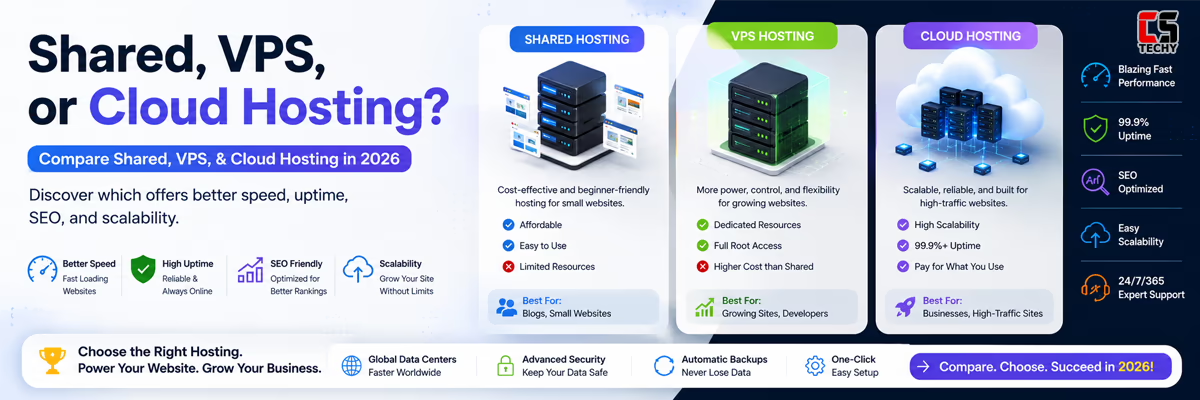
Still confused about shared, VPS, and cloud hosting? Learn how server resources, uptime, scalability, performance, security, and pricing compare in our complete Shared vs VPS vs Cloud Hosting guide.
What Should Your Hosting Plan Include?
Some cheap hosting companies will try to trick you. They hide their strict limits in small text. What should a professional plan include? Look for these exact features before you spend your money:
- Lightning Fast SSD Storage: Windows websites are very heavy. They use a lot of code. You need fast hard drives. Make sure your plan gives you solid-state drives (NVMe SSD). This makes your pictures load instantly.
- Free Security SSL Certificates: Google hates unsafe websites. If your site is not safe, Google will block it. You need a free SSL certificate to put a green secure padlock icon on your site. Never pay extra money for an SSL.
- Daily Automatic Backups: Computers break constantly. Hackers delete files. You need daily automated backups to save your hard work safely.
- Free Database Access: Make sure the company lets you create multiple databases without paying extra monthly fees.
- Unmetered Network Bandwidth: Bandwidth is the amount of data your server sends to visitors. If your video goes viral, you need unmetered bandwidth so your site does not shut down.
Do You Really Need a Microsoft Server?
This is the absolute most important part of our entire masterclass. Windows hosting costs significantly more money than Linux hosting. Microsoft is a massive corporation. They charge the hosting company expensive commercial fees.
The hosting company must pass those expensive fees directly to you. You should only buy this type of web hosting if you truly, absolutely need it.
Is this right for a normal small business? It depends entirely on your website code. You only need Windows if you perfectly match these rules:
- You write code in ASP.NET: Professional programmers use ASP.NET to build heavy, data-driven web applications. If your site uses C# code, Windows is totally mandatory. Linux simply cannot run this code.
- You use MSSQL Databases: This is Microsoft’s premium database system. It is very safe and highly powerful. If your custom app uses MSSQL, you must use Windows.
- You run Multiple Sites: Good enterprise plans let you host multiple websites on one single account. This saves you massive amounts of money.
- You need Microsoft Exchange: If your website needs to talk directly to a corporate Microsoft email server, Windows provides the best native connection.
Critical CSTechy Warning: Do you want to use WordPress? Do you want a simple online WooCommerce store? Do you want a simple photography blog? If yes, DO NOT buy Windows hosting. Linux is much better and much cheaper for WordPress. Only buy Windows if you use specific Microsoft code.
The Core Microsoft Technology Made Simple
What exactly are you buying when you pay for this? Let us look at the actual software engines inside premium web hosting services.
The Brilliant IIS Web Server
Linux uses a free program called Apache to show websites to people. Windows uses a premium program called IIS (Internet Information Services).
IIS is incredibly smart. When a customer clicks a link on your website, IIS catches that request. It reads your custom website code. It translates the code into a beautiful, visual webpage. Then, it sends that webpage directly to your customer’s mobile phone. It is very fast and highly efficient.
The Powerful MSSQL Database
Your database is the brain of your business. It stores all your written text. It stores your customer passwords. It stores your sales receipts.
MSSQL is a premium, enterprise-grade database. Large international corporations trust it completely. When you buy a good Windows plan, you get to use this highly expensive database technology for a very low monthly price.
The Master Web.Config File
This is a small, hidden text file. It is the master control brain of your website. It tells the main server exactly how to act.
You use this file to manage your secret passwords. You use it to force secure connections. You use it to block bad traffic. It is the most important file in your entire digital folder.
The Plesk Control Panel Ecosystem
Managing a real server sounds terrifying to a beginner. But it is actually very easy today. You will use a visual dashboard called Plesk.
If you use Linux, you use cPanel. But cPanel does not work well on Microsoft servers. Plesk is the absolute king of the Windows environment.
Plesk is a beautiful, visual screen. You do not need to type confusing computer code into a black box. You just click simple buttons with your mouse.
- Easy Software Updates: You can update your core software framework with one single click.
- Manage Databases Easily: You can view your huge databases visually. You can create new admin users safely. You can delete old data easily.
- Fix Sudden Crashes: If your custom website code freezes, you can click a button to restart your application pool. Your website comes back online instantly. You do not have to call customer support and wait on hold.
- Email Management: You can create professional business email addresses (like admin@yourbrand.com) in exactly two seconds.
The Importance of Server Locations
Before we rank the best providers, you must understand server geography. Where the physical computer lives is incredibly important.
If your business is located in India, and your customers live in India, you must buy a server located in India. If you buy a server in America, your website data has to travel across the entire ocean.
This massive travel distance causes terrible lag. Your website will load very slowly. Your customers will get frustrated and leave. Google will penalize your slow website. Always choose a hosting company that puts their physical hardware as close to your real customers as possible.
The Top 3 Hosting Choices for 2026
Finding a truly good Windows host is very hard. Bad hosting companies will configure their servers poorly. This will make your website crash constantly from memory leaks. We tested many global companies. Here are the absolute safest and fastest choices for 2026.
1. MilesWeb (The Best Choice for India)
If you live in India, MilesWeb is the undisputed best choice. They put their premium servers directly in Mumbai. Because the servers are physically close to you, your business website will load instantly.
They fully support all modern Microsoft code. They support legacy ASP.NET and brand new .NET Core. They give you the newest Plesk dashboard for free. They also include free MSSQL databases in their cheapest plans.
Their customer support team is very helpful and highly trained in Microsoft technology. They solve problems incredibly fast.
Don’t risk choosing the wrong hosting provider. Discover the real strengths, hidden drawbacks, and overall experience before you invest. Read our MilesWeb Review.
2. Hostinger (The Best for Huge Upgrades)
Hostinger does not sell cheap shared Windows plans anymore. But they sell amazing, high-powered Windows VPS plans. If your small business grows into a massive corporation, shared hosting will fail.
Hostinger gives you a private virtual server. You get total control over the entire machine. It is incredibly fast. It uses heavy NVMe hard drives. It is absolutely perfect for large, heavy web applications that need massive processing power.
Your website deserves fast, reliable hosting. Before choosing Hostinger, explore its real performance, features, pricing, and potential drawbacks. Read our detailed Hostinger Review.
3. Bluehost (The Best for the Linux Pivot)
Did you read this entire guide and finally realize you do not actually need Windows? Did you realize you just want a standard blog?
If you just want WordPress, use Bluehost immediately. They are the best Linux host in the world. They are incredibly cheap. They are very easy for absolute beginners. The creators of WordPress officially recommend them on their main website.
Your website is more than just files and pages—it’s your hard work, dreams, and future online. Before choosing Bluehost, discover whether it truly delivers on speed, reliability, and value. Read our detailed Bluehost Review.
The Ultimate Windows vs Linux Summary
Here is a very simple summary to help you make your final purchasing decision today:
- Windows Hosting Environments: Uses ASP.NET and C# programming languages. Uses MSSQL enterprise databases. Uses the Plesk visual dashboard. Best for custom corporate apps and heavy financial systems. It is more expensive.
- Linux Hosting Environments: Uses PHP and Python programming languages. Uses MySQL free databases. Uses the cPanel visual dashboard. Best for WordPress blogs and standard online stores. It is highly affordable.
Want to learn everything about shared hosting—from basic concepts to server resources, uptime, bandwidth, CPU, RAM, IP addresses, security, and performance? Read our complete Shared Hosting Guide .
Common Questions from Beginners
Can WordPress run on a Windows Server?
Yes, but it is a very bad idea. You have to force the software to work. It runs very slowly. It causes terrible URL link errors. It costs much more money. Always use a Linux server for WordPress projects.
Why does Windows always cost more money?
Microsoft charges a commercial fee to use their operating system. The hosting company must pay Microsoft every month. They pass that heavy cost directly to you. Linux is completely open-source and free to use.
Is it hard to use a Microsoft server?
No. The Plesk dashboard makes it very easy. You just click visual buttons on your screen. You do not need a computer science degree to upload your files.
How do I make my website load much faster?
You must log into your Plesk dashboard. You must find the setting called Dynamic Compression. You must turn it on. This shrinks your website code before sending it to your customer’s phone. It makes your website lightning fast.
Final Expert Advice
Do not let deep computer technology scare you. Having Windows shared web hosting explained simply shows it is just a digital tool. It is a very special tool built strictly for Microsoft code.
If your professional developer wrote your site in C# or ASP.NET, you have no other choice. You must buy a Windows server today. We highly recommend MilesWeb. You will get fast local speed, great 24/7 support, and a highly safe home for your business data in 2026.
(FAQ): Windows Shared Web Hosting Explained
Frequently Asked Questions (2026)
What exactly is Windows Shared Web Hosting?
Windows shared web hosting is a specific server environment where multiple websites share a physical machine running the commercial Windows Server operating system. It is heavily optimized to run ASP.NET frameworks, C# scripts, and MSSQL enterprise databases.
Can I run WordPress on a Windows Server?
Technically yes, but it is highly discouraged. Running WordPress on Windows requires forcing PHP to work on IIS, which causes slow page speeds, URL rewriting errors, and higher costs. You should always use a Linux server for WordPress projects.
Why does Windows hosting cost more than Linux?
Microsoft charges commercial licensing fees to use their Windows operating system and MSSQL database software. Hosting providers must pay these expensive fees every month and pass the cost to the user. Linux, on the other hand, is 100% free and open-source.
What is the Plesk control panel?
Plesk is the industry-standard visual dashboard for Windows servers. It replaces cPanel (which only works on Linux). Plesk allows you to easily manage your MSSQL databases, update your ASP.NET framework versions, and upload files without typing any computer code.
Do I need to know PowerShell to use a Windows server?
No. If you purchase a shared hosting plan, the visual Plesk dashboard handles everything for you. You only need to know complex PowerShell commands if you upgrade to an unmanaged Virtual Private Server (VPS) or Dedicated server.
How do I make my ASP.NET website load faster?
To speed up a Windows-hosted site, log into your Plesk dashboard and enable the “Dynamic Compression” setting. This shrinks your HTML code before sending it to a user’s device. Also, ensure your C# code explicitly closes database connections to save server RAM.