Intro
Disclosure: We’ve used Hostinger ourselves for years, and if you decide to grab a plan through the links in this article, we earn a small commission — at zero extra cost to you. It’s how we keep testing and writing guides like this one. Your trust matters more to us than any commission, so everything below is based on what we’ve actually experienced.
Is Hostinger Worth It in 2026?
Short answer: yes, for most website owners who want dependable, affordable hosting that grows with them — and yes, specifically for the reason we’re writing this update. We’ve been on Hostinger for more than five years, starting on the cheapest Starter plan and gradually moving up as CSTechy grew. We recently moved our own live site onto Hostinger Business Web Hosting, and this review reflects that journey plus what we’re observing right now, in real time, on our own server.
We’re not going to pretend this is a lab test with a stopwatch and a spreadsheet of benchmarks going back years. It’s the opposite — it’s a working website owner’s honest account of why we upgraded, what changed, and what we’re seeing so far on Business hosting. Where we haven’t personally verified something, we say so.
If you already know you want in, here’s where to start:
Our Hostinger Journey — From Starter to Business Hosting
Every hosting review tells you what a plan includes. Fewer reviews can tell you what it actually feels like to outgrow one. Ours can, because we’ve done it twice.
Why We Started With Starter Hosting
When CSTechy began, our needs were simple: one WordPress site, a handful of pages, and a budget that made sense for a new project. Hostinger’s entry-level shared hosting covered that without friction — it got the site online quickly and cheaply while we figured out what the website was actually going to become.
Why We Moved to Premium
As the site added more content and pages, we moved up to Hostinger Premium hosting after roughly two years. The move wasn’t dramatic — it was the ordinary kind of growth every publisher goes through: more posts, more images, more day-to-day administrative work, and a plan that needed a bit more headroom to keep up comfortably.
Why We Later Chose Business Hosting
More recently, as CSTechy’s content library, traffic, and technical requirements kept expanding, we made the move to Hostinger Business Web Hosting. If you’re weighing this same decision, our dedicated Hostinger Premium vs Business comparison breaks down exactly what changes between the two tiers.
What’s Different Right Now
Here’s something most reviews won’t tell you upfront: we’re still early into running our live site on Business hosting. We’re actively collecting performance data — uptime, load times, resource behavior under our real traffic — over the coming days and weeks. What you’ll read in the performance section below reflects genuine early observations, clearly labeled as such, not a finished twelve-month benchmark. We’ll keep this article updated as more data comes in.
Hostinger Business Web Hosting at a Glance
Business Web Hosting sits at the top of Hostinger’s shared hosting range, positioned for websites that have outgrown basic shared plans but don’t yet need a VPS or cloud server. Based on Hostinger’s published documentation at the time of writing, the plan generally includes:
- Support for a higher number of websites than Premium (commonly listed around 50 hosted websites)
- Increased NVMe storage compared to Premium
- A higher PHP worker allocation, which affects how many simultaneous processes your site can handle
- Daily backups on most current Business plan listings (verify current terms before purchase)
- Free CDN access on many current listings
- Free SSL, a free domain for the first term, and hPanel as the control panel
Here’s what our current resource usage looks like inside hPanel after moving to Business hosting:
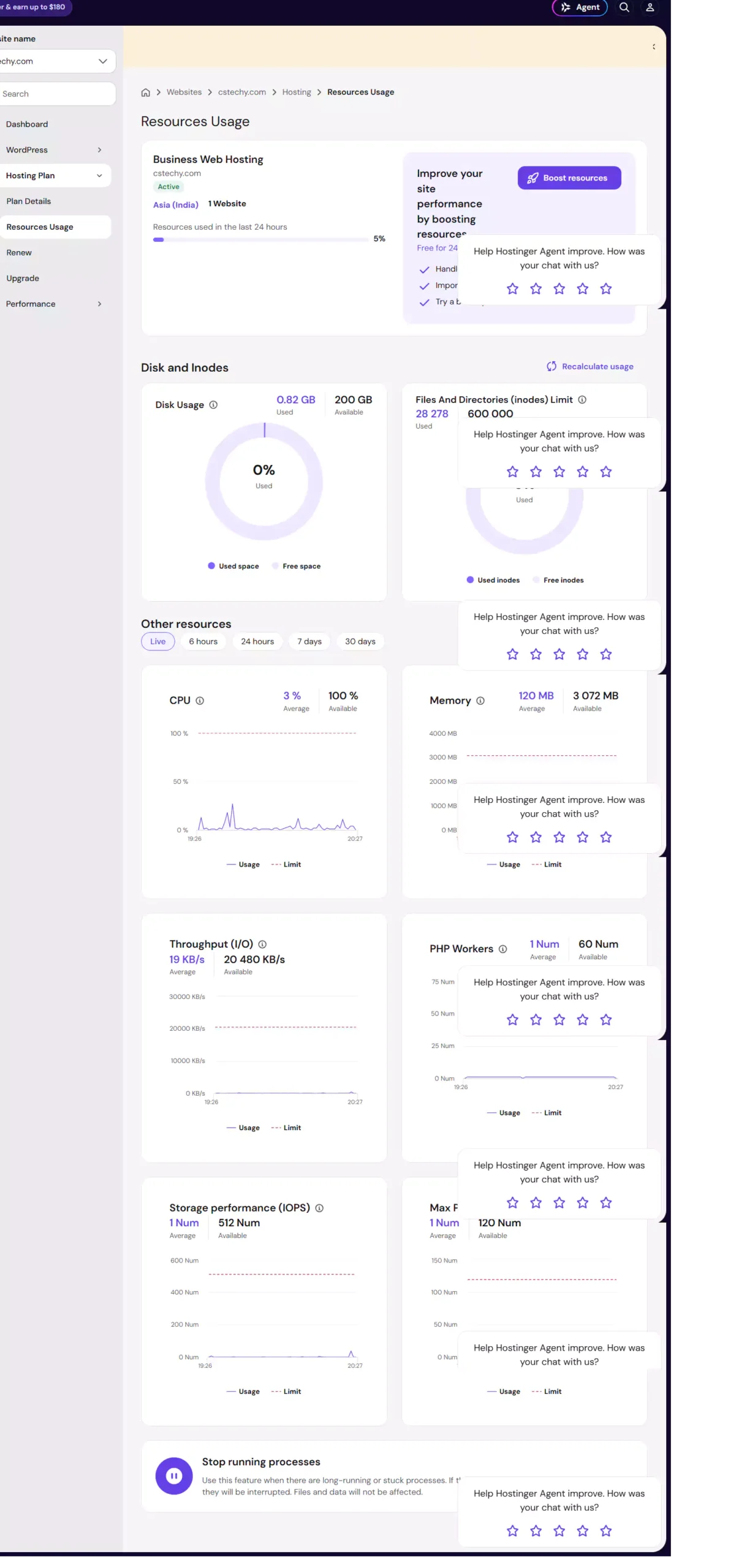
Exact specifications change over time and sometimes by region, so we’d rather point you to Hostinger’s live pricing page for the current numbers than freeze an outdated table into this article. You can also see our full breakdown in the Hostinger plans and pricing comparison.
Hostinger Business Hosting Pricing
Introductory Price vs Renewal Price
Hostinger’s pricing follows a pattern common across most budget hosts: a low introductory rate for new customers committing to a longer term, followed by a higher renewal rate once that term ends. Based on published rates at the time of writing, Business hosting’s introductory price is commonly in the low single digits per month on a 48-month commitment, with renewal pricing landing meaningfully higher — in some published comparisons, roughly two to three times the introductory rate.
This isn’t unique to Hostinger, but it does matter for your budgeting. The plan is genuinely affordable to start, and still reasonably competitive at renewal compared to many mid-market hosts — but you should plan for the renewal number, not just the headline price you see on the homepage.
What’s Included?
At the Business tier, you’re generally paying for more simultaneous website capacity, more storage, a bigger PHP worker allocation, and backup frequency that’s noticeably better than the entry-level plans. If your site runs WooCommerce, several plugins, or handles decent daily traffic, these are the resources that actually get consumed first.
Is the Price Worth It for a Growing Website?
For a brand-new blog with light traffic, Business hosting is probably more than you need — Premium will likely do the job for less. But for a site like ours, with years of published content, regular traffic, and an editorial workflow running on top of WordPress, the jump in resources is the whole point of the upgrade. Judge this against your own traffic and plugin load, not the plan name.
Hostinger Business Hosting Performance
What We Can Say Right Now
We want to be transparent: we’re at the early stages of running CSTechy on Business hosting, so treat this section as a first look rather than a verdict. Below are our own hPanel and PageSpeed readings taken directly from our live account, with a fuller performance picture to follow as we gather more data over time.
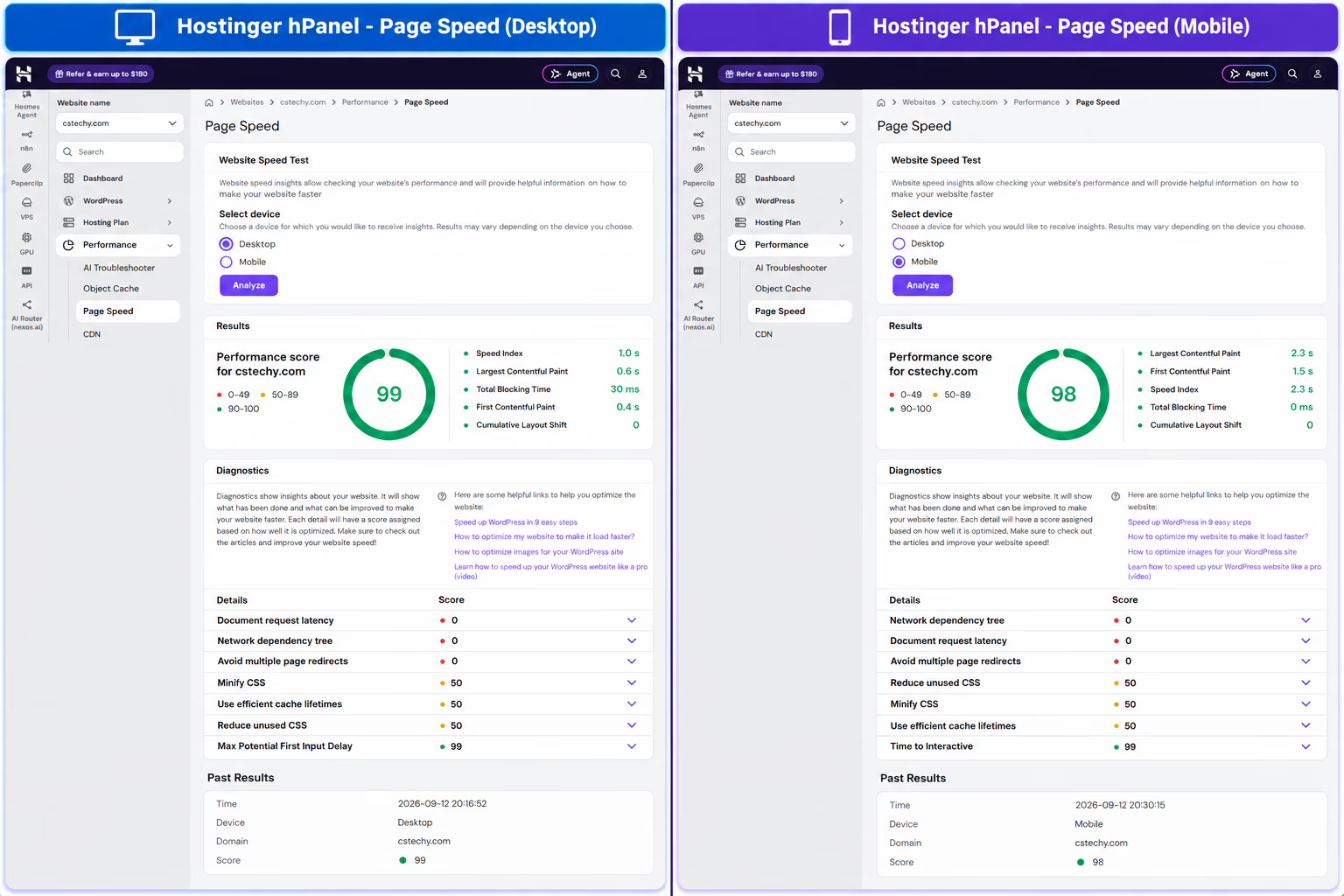
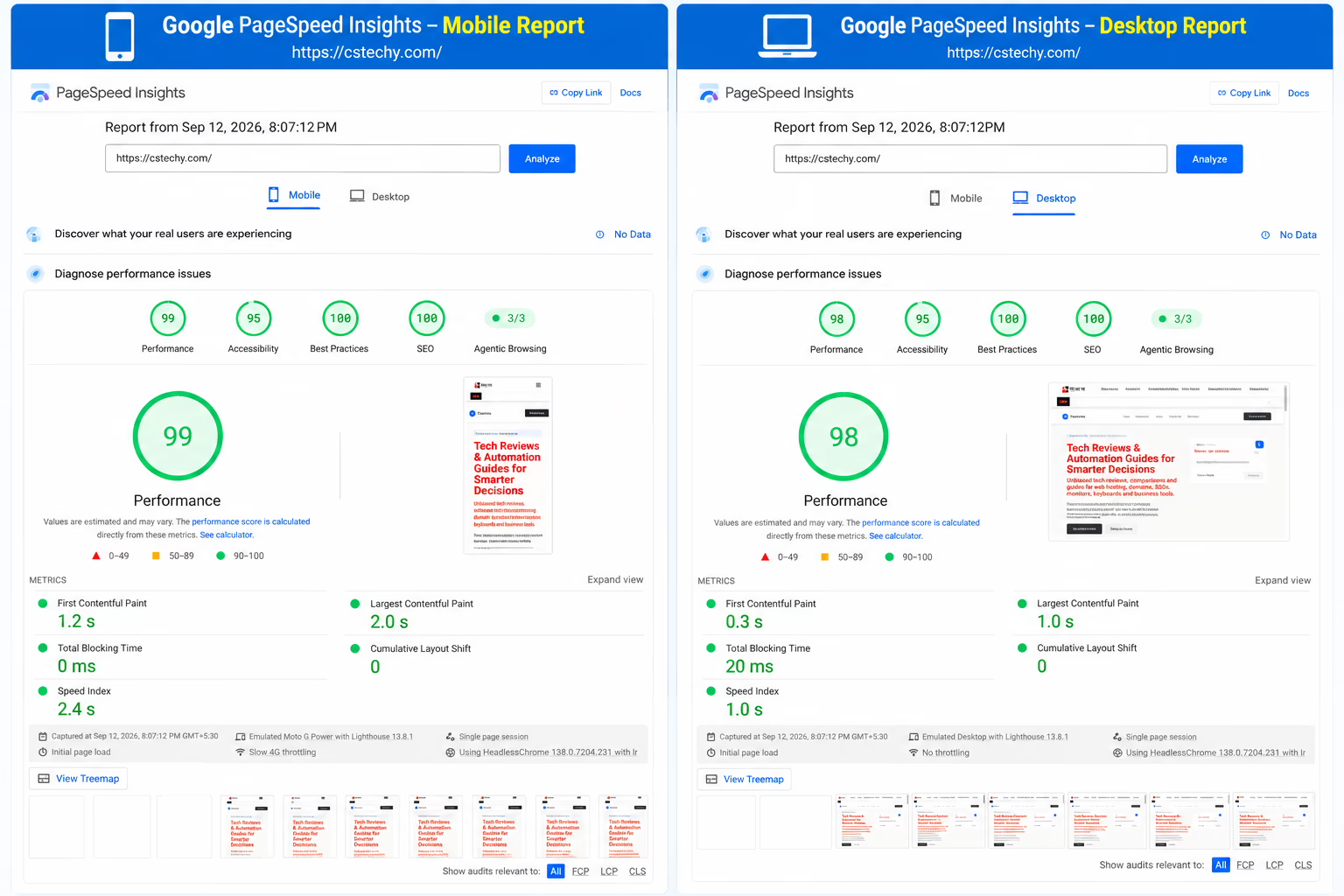
We’ll update this section with our full uptime and speed-test history as we accumulate more real-world data. For a broader look at how Hostinger performs across accounts and time, see our Hostinger performance and uptime guide.
What Actually Affects Website Performance
Hosting is one piece of the speed equation, not the whole thing. Your actual load times depend on your hosting tier, your theme and plugin choices, image optimization, caching configuration, and how much traffic hits the server at once. A well-configured site on a mid-tier plan can outperform a poorly optimized site on a bigger one — worth keeping in mind before you assume the plan name alone will fix a slow site.
Hostinger for WordPress
WordPress Management
Hostinger’s hPanel includes a dedicated WordPress management area — auto-updates, a staging environment, and one-click installs are all handled without needing to touch cPanel-style menus. If you’re used to a traditional cPanel host, hPanel takes a short adjustment period but is generally considered more modern and streamlined once you’re used to it. Our full walkthrough is here: Hostinger WordPress hPanel guide.
Staging Environment
One of the features we specifically wanted on Business hosting was staging — the ability to test theme changes, plugin updates, or bigger edits on a clone of the live site before pushing anything public. Here’s the staging option available on our account:
Backups and Restoration
Backup frequency is one of the more meaningful upgrades between Hostinger’s lower tiers and Business hosting. Daily backups (where included on your current plan) matter more the more frequently your content changes — for a publishing-heavy site like ours, that cadence is genuinely useful rather than a nice-to-have. Full detail here: Hostinger migration and backups guide.
Resource Limits and Scalability
Every shared hosting plan, Business included, has a ceiling — PHP worker limits, process limits, and fair-use policies exist to keep the shared server stable for everyone on it. If your site eventually pushes past what Business hosting comfortably handles, the next logical step is usually VPS or cloud hosting rather than staying on shared hosting and hoping it keeps up. We cover that jump in our Hostinger VPS review.
Hostinger Business Hosting Features
Beyond the headline specs, a few features are worth calling out on their practical merit rather than just listing them:
- Free CDN (where included): Helps with load times for visitors farther from your server’s data center — genuinely useful for a site with an international audience.
- hPanel: A clean, modern control panel that’s easier for non-technical users than legacy cPanel, though it takes some relearning if you’re coming from cPanel.
- Free SSL: Standard across all current Hostinger plans, not a Business-exclusive perk, but worth confirming it’s active on setup.
- Higher PHP worker count: This is the resource that most directly affects how your site handles simultaneous visitors and background plugin tasks — arguably the most meaningful upgrade over Premium for an active site.
Don’t treat this as a reason to upgrade before you need to — match the feature set to what your website is actually doing today.
Security and Backup Considerations
Hostinger includes baseline security tooling across its shared hosting plans — free SSL, DDoS protection at the network level, and malware scanning options through hPanel. None of this makes a website immune to every threat; security is a shared responsibility between your host, your WordPress configuration, your plugins, and how carefully you manage logins and updates. For a deeper breakdown, see our Hostinger security guide.
Hostinger Customer Support
Hostinger’s support is primarily live chat and a large self-service knowledge base, rather than phone support. In our experience over the years, chat support has generally been responsive for account and billing questions; for deeper technical troubleshooting, we’ve found the knowledge base articles cover most common issues well. If you need phone-based support as a hard requirement, that’s a genuine limitation worth knowing before you commit.
Hostinger Pros and Cons
Pros
- Strong value at the introductory price point across all tiers, including Business
- hPanel is modern, fast, and beginner-friendly
- Staging and daily backups on Business hosting genuinely help an active, growing site
- Free CDN and SSL reduce the need for extra paid add-ons
- Straightforward upgrade path from shared hosting to VPS if you outgrow Business
Cons
- Renewal pricing is a real jump from the introductory rate — budget for it
- No phone support — chat and documentation only
- Shared hosting resource limits still apply, even on the top shared tier
- Long-term plans (24–48 months) require paying upfront, which isn’t for everyone
Is Hostinger Business Hosting Right for You?
Based on our own progression through Hostinger’s tiers, here’s how we’d frame it for different site types:
- New blog, low traffic: Start with Premium. Business is more than you need on day one.
- Growing content site with real traffic and multiple plugins: This is where Business hosting earns its keep — it’s the tier we moved to for exactly this reason.
- Small business site or light WooCommerce store: Business hosting is a reasonable fit, provided order volume and traffic stay within shared-hosting territory.
- High-traffic or resource-intensive site: Look at Hostinger’s cloud or VPS tiers instead — see our Hostinger VPS review and Business vs Cloud hosting comparison.
Who Should Consider an Alternative?
If you specifically need phone support, a fully managed WordPress environment, or you’re already running server-level workloads like automation tools, a different setup may serve you better:
- If you self-host automation tools like n8n, a dedicated VPS is usually the better fit than shared hosting — see our n8n self-hosting guide and Hostinger’s n8n VPS hosting option.
- If you want dedicated server resources without managing a full VPS yourself, compare Hostinger’s VPS lineup directly: Hostinger VPS Hosting →
- For a side-by-side against other major providers, see our Hostinger competitor comparisons and Bluehost review.
Hostinger vs Other Hosting Providers
We haven’t run the same live, hands-on test on every competing host that we’re currently running on Hostinger, so we won’t claim otherwise. What we can say: among the budget-to-mid-tier hosts we’ve researched and compared through our own coverage, Hostinger consistently lands as one of the stronger value picks for WordPress-focused sites. For a direct comparison built from published specifications and independent sources, see our best web hosting picks and the Hostinger competitor comparison hub.
Final Verdict — Is Hostinger Worth It?
Our five-plus years on Hostinger — from Starter, to Premium, to now Business Web Hosting — reflect a website that grew gradually and a hosting plan that kept pace at each stage. That’s what our experience can honestly establish. What it can’t establish yet is a long-run performance verdict on Business hosting specifically, since we’ve only just moved our live site over and are still collecting data.
If your website’s needs look similar to where we were before this upgrade — more content, more traffic, more moving parts than a basic shared plan comfortably handles — Business hosting is a reasonable, well-priced next step. If you’re just starting out, save your money and start smaller.
Frequently Asked Questions
Is Hostinger worth it after using it for several years?
In our case, yes — we’ve stayed with Hostinger through three plan upgrades over five-plus years as our website grew, which reflects consistent enough service to keep us as a long-term customer.
Is Hostinger Business hosting good for WordPress?
Yes. It includes staging, daily backups on most current listings, and a higher PHP worker allocation than lower tiers, all of which benefit an active WordPress site with regular content updates.
Why did CSTechy move from Starter to Premium and then Business hosting?
Each move followed genuine growth in our website’s size and traffic — Starter suited our early, simple setup, Premium supported a growing content library, and Business hosting matched our current resource needs as the site expanded further.
How much does Hostinger Business hosting cost after renewal?
Renewal pricing is noticeably higher than the introductory rate — commonly two to three times higher based on current published pricing. Always check Hostinger’s live pricing page before purchase, since rates change.
Is Hostinger Business hosting suitable for a growing blog?
Yes, particularly once a blog has outgrown a basic shared plan in terms of traffic, plugins, or media storage — which mirrors our own reason for upgrading.
Is Hostinger fast and reliable?
We’re currently gathering our own performance data on Business hosting and will update this article as that data comes in. In the meantime, our published performance and uptime guide covers our broader findings.
What are the main disadvantages of Hostinger Business hosting?
The renewal price jump, the lack of phone support, and the fact that it’s still shared hosting with resource ceilings are the main trade-offs to plan around.
Can a website outgrow Hostinger’s shared hosting plans?
Yes — this is exactly the pattern we went through. When a shared plan starts limiting performance, the usual next step is VPS or cloud hosting rather than staying on shared hosting indefinitely.
Should beginners choose Hostinger Business hosting or start with a cheaper plan?
Start with a cheaper plan like Premium unless you already know you need Business-level resources on day one. You can always upgrade later, as we did.
✔ CSTechy Final Verdict: Hostinger Is Highly Recommended in 2026
Hostinger is one of the best hosting providers in 2026 for beginners, bloggers, and small businesses. It offers excellent speed, reliable uptime, and powerful features at an affordable price, making it a great value-for-money hosting solution.
With LiteSpeed servers, NVMe storage, free SSL, and an easy-to-use dashboard, Hostinger provides fast performance and a smooth hosting experience even for non-technical users.
While renewal prices are higher than the initial offer, the overall performance, reliability, and ease of use make Hostinger a trusted and recommended hosting provider for most websites.
- ✔ Best for beginners and bloggers
- ✔ Excellent performance and fast loading speed
- ✔ Affordable pricing with strong value
- ✔ Easy-to-use control panel
- ✔ Reliable uptime and security
- ✔ Trusted and recommended by CSTechy
Final Rating: ⭐ 4.8 / 5 — Excellent Hosting Choice
Final Verdict: Is Hostinger Worth It in 2026?
Hostinger is one of the best hosting providers for beginners and budget-conscious users. With fast speeds, affordable pricing, and reliable uptime, it offers great value for money.