Pabbly Connect vs n8n: Which Automation Platform Wins in 2026?
Choosing the right automation tool can save your business hours every week. Two names come up again and again: Pabbly Connect and n8n. Both promise to connect your apps and cut out manual work, but they take very different paths to get there.
This guide compares Pabbly Connect vs n8n across pricing, features, hosting options, AI capabilities, and real-world use cases. By the end, you will know exactly which platform fits your workflow.
Workflow automation has become a core part of running any modern business, whether you are a solo blogger or a large enterprise team. Instead of manually copying data between apps, automation platforms let you build a workflow once and let it run in the background.
Pabbly Connect and n8n both solve this problem, but they were built with different users in mind. Understanding that difference upfront will save you time evaluating features that may not matter for your situation.
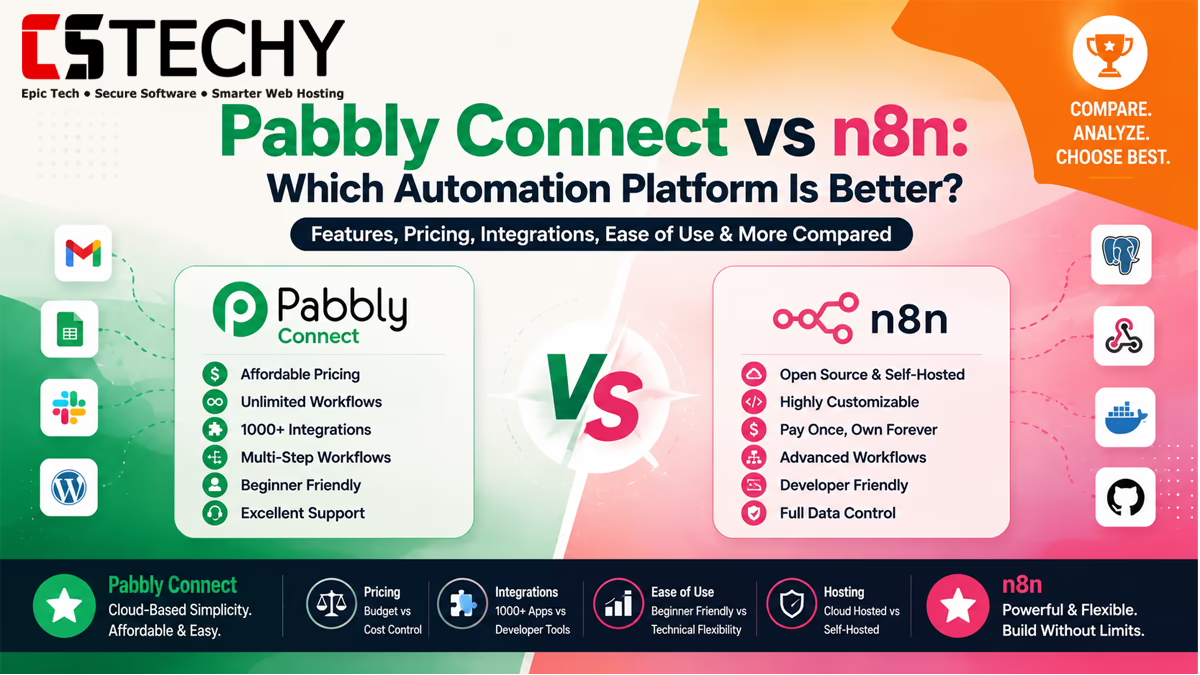
Pabbly Connect vs n8n Overview
Pabbly Connect is a cloud-based, no-code automation platform built for speed and simplicity. It uses a one-time or flat monthly pricing model and focuses on ease of use for non-technical users.
n8n is an open-source, low-code automation tool that can run in the cloud or on your own server. It gives developers deep control over workflows, including custom code, AI agents, and self-hosting.
In short: Pabbly Connect favors simplicity and predictable pricing. n8n favors flexibility and technical depth. Neither is universally “better” — the right choice depends on your skill level and goals.
What Is Pabbly Connect?
Pabbly Connect is a workflow automation platform that links your favorite apps using triggers and actions. You pick a trigger app, an action app, and Pabbly Connect handles the data transfer automatically.
It supports over 2,000 integrations, including popular tools like WordPress, Google Sheets, Mailchimp, Shopify, and Slack. Pabbly Connect is entirely cloud-hosted, so there is nothing to install or maintain.
Its biggest draw is pricing. Pabbly Connect offers a lifetime deal option, which means you pay once and use the platform without recurring fees, unlike most SaaS automation tools.
Pabbly Connect also includes built-in features like data formatting, delay steps, and multi-step routing, so users can build reasonably sophisticated automations without touching a single line of code. The dashboard shows execution history clearly, which makes troubleshooting failed tasks straightforward even for non-technical users.
What Is n8n?
n8n (pronounced “n-eight-n”) is an open-source workflow automation tool built for developers and technical teams. It offers a visual, node-based editor similar to Pabbly Connect, but with far more customization.
You can self-host n8n on your own server using Docker, or use n8n Cloud for a managed experience. Self-hosting means unlimited workflow executions without per-task billing, which is a major cost advantage at scale.
n8n supports custom JavaScript and Python code inside workflows, giving developers the power to build almost anything. It also has built-in AI agent nodes for connecting to large language models.
Because n8n is open-source, its source code is publicly available on GitHub, and a large community regularly contributes new integration nodes, templates, and bug fixes. This transparency appeals to teams that want to audit exactly how their automation platform handles data.
Feature Comparison
Here is a side-by-side look at how Pabbly Connect and n8n compare on core features.
| Feature | Pabbly Connect | n8n |
|---|---|---|
| Hosting Type | Cloud only | Cloud or self-hosted |
| Coding Required | No-code | Low-code, custom code optional |
| Integrations | 2,000+ pre-built apps | 400+ nodes plus generic HTTP/API access |
| AI Agent Support | Limited AI app connections | Native AI agent nodes, LangChain integration |
| Pricing Model | Flat monthly or lifetime deal | Free self-hosted, or usage-based cloud plans |
| Custom Code | Not supported | JavaScript and Python supported |
| Workflow Complexity | Simple, linear workflows | Complex branching and looping workflows |
| Best For | Beginners, small businesses | Developers, agencies, enterprises |
Pricing Comparison
Pricing is where these two platforms diverge the most. Pabbly Connect uses task-based cloud pricing, while n8n’s self-hosted option can be free of recurring platform fees.
| Pricing | Free Plan | Cloud | Self-Hosted | Best For |
|---|---|---|---|---|
| Pabbly Connect | Yes, limited monthly tasks | Flat monthly plans, lifetime deal available | Not available | Predictable budgets |
| n8n | Yes, self-hosted community edition | Usage-based, paid per workflow execution | Free (you pay only for server hosting) | High-volume automation |
If you run thousands of automation tasks monthly, self-hosted n8n can be dramatically cheaper. If you want a predictable bill with zero server maintenance, Pabbly Connect is simpler to budget for.
Cloud vs Self-Hosted
Pabbly Connect gives you no choice here — it is cloud-only. You log in, build workflows, and Pabbly handles all the infrastructure behind the scenes.
n8n gives you both options. n8n Cloud works like Pabbly Connect: no setup needed, just sign up and build. Self-hosted n8n runs on your own server, VPS, or local machine using Docker deployment.
Self-hosting suits teams who need data privacy, custom infrastructure, or unlimited executions. It does require basic server management skills or a DevOps team to maintain uptime and updates.
Ease of Use
Pabbly Connect wins clearly on ease of use. Its interface is built for beginners, with a simple trigger-action structure and minimal setup steps.
n8n has a steeper learning curve. The node-based canvas is powerful but can feel overwhelming for first-time users, especially when working with expressions or custom code.
That said, n8n’s documentation and community templates have improved significantly, making it more approachable than it was a few years ago. Hundreds of pre-built workflow templates let new users start from a working example instead of an empty canvas.
A useful way to think about the difference: Pabbly Connect feels like assembling furniture with clear numbered instructions, while n8n feels like a full workshop with more tools available, but also more decisions to make along the way.
Integration Comparison
Pabbly Connect leads in sheer number of ready-made app integrations, with over 2,000 supported apps covering marketing, ecommerce, and productivity tools.
n8n has fewer native integrations, but its generic HTTP Request node lets you connect to virtually any API with a public endpoint. This makes n8n more flexible for niche or custom software.
For most small business tools, Pabbly Connect’s pre-built library is faster to set up. For internal tools or less common SaaS products, n8n’s flexibility often wins.
Workflow Builder Comparison
Both platforms use a visual, drag-and-drop workflow builder, but the underlying logic differs.
Pabbly Connect workflows are mostly linear: trigger, then a sequence of actions. It supports basic filters and conditional routing, but complex branching is limited.
n8n supports advanced logic, including loops, merge nodes, error handling branches, and parallel execution paths. This makes it better suited for multi-step business processes.
AI & AI Agent Features
AI workflow automation is a growing priority for both platforms, but n8n has invested far more here.
n8n includes dedicated AI agent nodes, LangChain support, and the ability to chain multiple AI models together inside a single workflow. This makes it a strong choice for AI content workflows and chatbot automation.
Pabbly Connect supports connections to popular AI apps like OpenAI and Google Gemini as action steps, but it lacks native AI agent orchestration or memory-based agent logic.
API & Webhook Support
Both tools support webhook automation, letting you trigger workflows instantly when an event happens in another app.
Pabbly Connect offers straightforward webhook triggers and a built-in API for external calls, sufficient for most business automation needs.
n8n offers deeper API integrations, including custom authentication, pagination handling, and full control over request headers and payloads, which developers appreciate for building custom API workflows.
Performance & Scalability
Pabbly Connect performs reliably for standard task volumes, but heavy users may hit plan-based task limits that require upgrading.
n8n, especially when self-hosted, scales according to your server resources. Enterprise teams often run n8n on dedicated infrastructure to handle very high automation volumes without per-task costs.
For unpredictable or rapidly growing automation needs, self-hosted n8n generally offers better long-term scalability.
It’s worth noting that self-hosted scalability comes with a trade-off: you are responsible for monitoring server load, applying updates, and scaling resources as workflow volume grows. Pabbly Connect removes that burden entirely, trading some flexibility for a hands-off experience.
Security & Privacy
Pabbly Connect stores and processes your data on its own cloud servers, following standard SaaS security practices.
n8n’s self-hosted option gives you full control over where your data lives, which matters for industries with strict compliance or data residency requirements.
n8n Cloud follows similar security practices to other SaaS platforms, while self-hosting shifts responsibility for security and compliance to your own team.
For businesses handling sensitive customer data, healthcare records, or financial information, self-hosted n8n can be the only option that satisfies strict data residency rules, since data never leaves your own infrastructure. Pabbly Connect remains a solid choice for businesses without such strict compliance requirements, since it manages security patching and uptime on your behalf.
Customer Support
Pabbly Connect offers direct customer support through chat and email, with dedicated help for paid plan users.
n8n relies heavily on its active open-source community, forum discussions, and documentation. Paid n8n Cloud plans include more direct support options.
If you prefer hands-on vendor support, Pabbly Connect has an edge. If you are comfortable troubleshooting with community help, n8n’s ecosystem is extensive.
Pros & Cons
Pabbly Connect Pros
- Simple, beginner-friendly interface
- Lifetime deal pricing option available
- Over 2,000 pre-built integrations
- No server management needed
Pabbly Connect Cons
- No self-hosting option
- Limited support for complex branching logic
- Weaker native AI agent capabilities
n8n Pros
- Free self-hosting with Docker deployment
- Advanced AI agent and LangChain support
- Full custom code flexibility
- Highly scalable for enterprise automation
n8n Cons
- Steeper learning curve for beginners
- Self-hosting requires technical maintenance
- Cloud plan pricing can grow with usage
Who Should Choose Pabbly Connect?
Pabbly Connect is the better fit if you want automation without any technical setup. It suits bloggers, freelancers, and small businesses connecting standard tools like WordPress, Google Sheets, or email marketing apps.
It is also ideal for anyone who prefers flat, predictable pricing over usage-based billing, especially with its lifetime deal option.
Who Should Choose n8n?
n8n is the better fit for developers, agencies, and enterprises that need custom logic, self-hosting, or advanced AI workflow automation.
Teams with a DevOps background will appreciate the cost savings and control that self-hosted n8n offers at scale.
Real-World Use Cases
- Blogger automating WordPress and Google Sheets: Pabbly Connect is faster to set up with no coding needed.
- Agency managing multiple client workflows: n8n’s branching logic handles complex, varied client needs better.
- eCommerce order automation: Pabbly Connect’s ready-made Shopify and WooCommerce integrations simplify setup.
- Marketing automation across multiple channels: Both work well; Pabbly Connect is quicker to configure.
- AI content workflows: n8n’s AI agent nodes give more control over multi-step content generation.
- CRM automation for sales teams: Pabbly Connect handles simple CRM syncing with minimal setup.
- Developer building custom API workflows: n8n is the clear choice for full API control.
- Self-hosting with Docker for data privacy: Only n8n supports this deployment model.
- Enterprise automation with internal tools: n8n’s flexibility handles internal, non-standard APIs better.
Migration Tips
If you are switching between platforms, plan carefully to avoid workflow downtime or data loss.
- Document every existing workflow before starting the migration.
- Test new workflows in a staging environment first.
- Migrate low-priority workflows before critical business processes.
- Check that all API keys and authentication tokens transfer correctly.
- Run both platforms in parallel briefly to confirm accuracy.
- Monitor task or execution limits closely during the transition period.
Developer Recommendations
- Use n8n’s expression editor to transform data between nodes without writing full functions.
- Version-control your self-hosted n8n workflows by exporting them as JSON regularly.
- Set up error workflows in n8n to catch and log failed executions automatically.
- Use environment variables to keep API keys out of exported workflow files.
Beginner Tips
- Start with a single, simple two-step workflow before building complex automations.
- Use Pabbly Connect’s built-in templates to see working examples for common apps.
- Always test a workflow with sample data before connecting it to live business data.
- Keep a simple log of what each workflow does, since automations are easy to forget over time.
Buying Checklist
- Do you need self-hosting for data privacy? Choose n8n.
- Do you want zero server maintenance? Choose Pabbly Connect.
- Is AI agent automation a priority? Choose n8n.
- Do you prefer flat, predictable pricing? Choose Pabbly Connect.
- Do you need custom code inside workflows? Choose n8n.
Frequently Asked Questions
Is Pabbly Connect better than n8n?
It depends on your needs. Pabbly Connect is better for simplicity, while n8n is better for flexibility and self-hosting.
Is n8n free to use?
Yes, n8n’s self-hosted community edition is free. You only pay for your own server hosting costs.
Does Pabbly Connect support self-hosting?
No, Pabbly Connect is a cloud-only platform with no self-hosting option available.
Which platform is better for beginners?
Pabbly Connect is easier for beginners due to its simple, no-code interface and guided setup.
Which platform is better for developers?
n8n is better for developers because it supports custom code and advanced workflow logic.
Can I use AI agents with n8n?
Yes, n8n includes native AI agent nodes and LangChain support for building AI-driven workflows.
Is Pabbly Connect a one-time payment?
Pabbly Connect offers a lifetime deal option in addition to its regular monthly subscription plans.
Which is cheaper for high-volume automation?
Self-hosted n8n is usually cheaper at high volume since it avoids per-task billing.
Can I migrate workflows from Pabbly Connect to n8n?
Yes, but workflows must be rebuilt manually since the two platforms use different automation structures.
Final Verdict
| Category | Winner | Why |
|---|---|---|
| Ease of Use | Pabbly Connect | Simple, no-code setup for beginners |
| Pricing at Scale | n8n | Self-hosting avoids per-task fees |
| AI Automation | n8n | Native AI agent and LangChain support |
| Integration Library | Pabbly Connect | Over 2,000 pre-built apps |
| Developer Flexibility | n8n | Custom code and advanced logic support |
Both Pabbly Connect and n8n are strong automation platforms, but they serve different audiences. Choose Pabbly Connect if you want fast, no-code automation with predictable pricing. Choose n8n if you need self-hosting, custom logic, or advanced AI workflow automation.
Whichever you choose, start with one workflow, test it thoroughly, and expand from there. The right automation tool should save you time, not add complexity.
Some teams even use both: Pabbly Connect for quick, everyday marketing automations, and n8n for complex internal processes that need custom logic. There is no rule against running two automation platforms side by side if your budget and workflows call for it.
Related Articles
- Pabbly Connect Review
- Pabbly Connect Pricing
- Pabbly Connect Tutorial
- Pabbly Connect Templates
- Pabbly Connect Integrations
- Pabbly Connect Alternatives
- Pabbly Connect vs Zapier
- n8n Review
- n8n Self-Hosting Guide
- Workflow Automation
- Business Automation
- Automation Tools