HubSpot Pricing 2026: The Complete Plan-by-Plan Cost Guide
HubSpot pricing looks simple on the surface but gets complicated fast once you factor in seats, contacts, Hubs, and onboarding fees. This guide breaks down every HubSpot plan so you know exactly what you’ll pay.
We checked HubSpot’s official pricing structure across the Free CRM, Starter, Professional, and Enterprise tiers, plus every Hub, so you can budget accurately before you sign up.
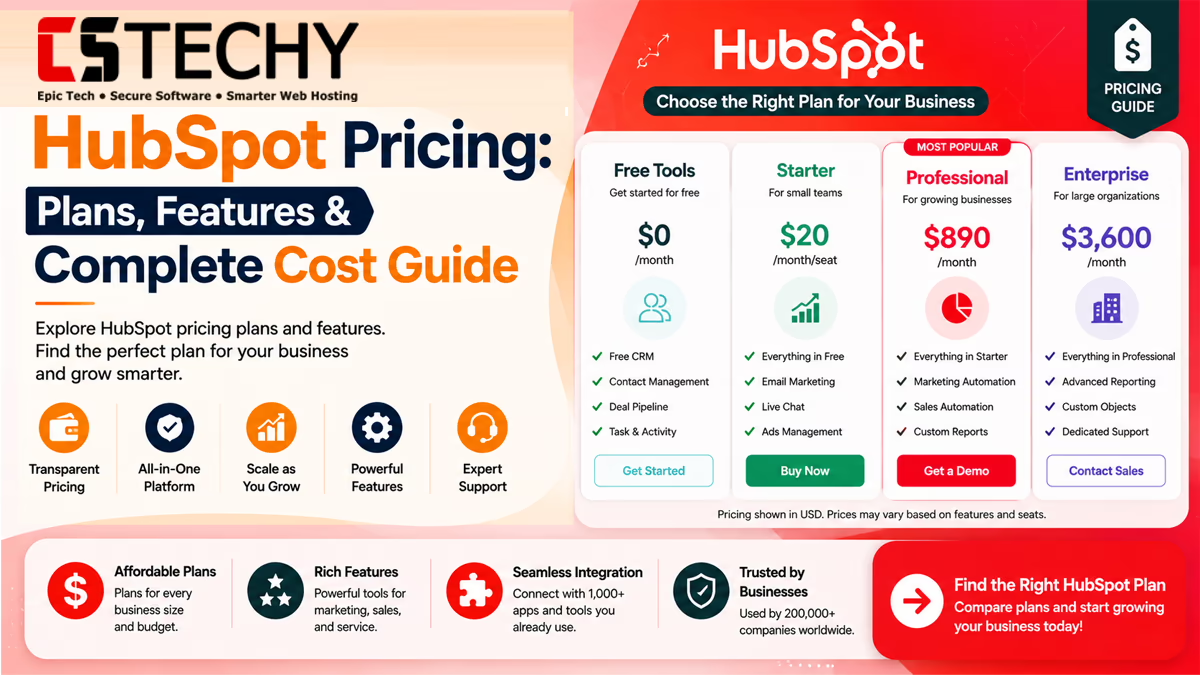
HubSpot Pricing Overview
HubSpot sells one free Smart CRM foundation, wrapped by paid “Hubs” for Marketing, Sales, Service, Content, and Operations. You can buy a single Hub, a bundle, or the full Customer Platform.
Pricing is either per-seat (Sales Hub, Service Hub) or based on marketing contacts (Marketing Hub). This mixed model is the main reason HubSpot pricing confuses first-time buyers.
| Plan | Monthly Price | Annual Billing | Best For |
|---|---|---|---|
| Free CRM | $0 | $0 | Freelancers, beginners |
| Starter | From $20/seat | From $15/seat | Small businesses |
| Professional | From $800–$890/month (Marketing Hub) | Discounted with annual commitment | Growing teams, agencies |
| Enterprise | From $3,600/month (Marketing Hub) | Annual only | Large companies, enterprises |
HubSpot Free CRM
HubSpot’s Free CRM includes contact and deal tracking, task reminders, basic email templates, live chat, and forms, with unlimited users at no cost.
It does not include workflow automation or advanced customization, so it works best for solo users and very small teams testing HubSpot before committing to a paid plan.
Starter Plans
Starter pricing sits around $20 per seat monthly, or roughly $15 per seat with an annual, upfront commitment. It is the only tier HubSpot offers on month-to-month billing.
A single Starter seat unlocks access to Marketing, Sales, Service, Content, and Commerce tools together through the Starter Customer Platform bundle, including 1,000 marketing contacts.
What Starter Adds Over Free
Starter removes HubSpot branding from emails and forms, adds simple automation, and includes basic reporting that the Free CRM does not offer.
Professional Plans
Professional tier pricing varies significantly by Hub. Marketing Hub Professional starts around $800 to $890 per month for 2,000 contacts, while Sales Hub Professional starts near $100 per seat monthly.
Professional plans typically carry a mandatory one-time onboarding fee, often cited around $3,000 to $4,500, which is not always shown until checkout.
Enterprise Plans
Enterprise is HubSpot’s top tier, built for large organizations needing custom permissions, predictive AI, and advanced attribution reporting. Marketing Hub Enterprise starts around $3,600 per month for 10,000 contacts.
Enterprise plans require annual billing and often include a larger one-time onboarding fee, sometimes reported near $7,000 to $12,000 depending on the Hub combination.
| Hub | Starter | Professional | Enterprise |
|---|---|---|---|
| Marketing Hub | From $20/month (1,000 contacts) | From $800–$890/month (2,000 contacts) | From $3,600/month (10,000 contacts) |
| Sales Hub | From $20/month (1 core seat) | From $100/month per sales seat | From $150/month per sales seat |
| Service Hub | From $20/month (1 core seat) | Similar per-seat structure to Sales Hub | Higher per-seat pricing with advanced routing |
| Content Hub | Included in Starter bundle | Adds AI content tools and membership content | Adds advanced personalization and permissions |
| Operations Hub | Basic data sync | Custom automation actions | Advanced data quality and governance tools |
Marketing Hub Pricing
Marketing Hub is priced by marketing contacts, not seats. This means your bill grows as your list grows, even if your team size never changes.
Additional contacts beyond the included tier are billed at tiered rates, commonly cited between $50 and $100 per extra 1,000 contacts, though per-contact costs decrease at higher volumes.
Sales Hub Pricing
Sales Hub uses per-seat pricing instead of contact-based pricing. Starter begins around $20 per core seat, Professional around $100 per sales seat, and Enterprise around $150 per sales seat.
Core seats give broad edit access, while Sales Seats unlock deeper features like sequences and forecasting. Adding sales seats mid-contract is usually charged at list price.
Service Hub Pricing
Service Hub follows a similar per-seat model to Sales Hub. Professional and Enterprise tiers add ticket automation, customer feedback surveys, and advanced routing rules for support teams.
Teams often pair Service Hub with Sales Hub so support agents and salespeople share the same contact timeline for a complete customer view.
Content Hub Pricing
Content Hub, formerly CMS Hub, is included at a basic level in the Starter Customer Platform bundle. Professional and Enterprise tiers add AI content drafting, membership content, and deeper personalization.
Businesses replacing a separate WordPress site with HubSpot typically need at least the Professional tier for adequate design flexibility.
Operations Hub Pricing
Operations Hub focuses on data syncing and workflow logic across connected apps. Starter offers basic two-way sync, while Professional and Enterprise unlock custom coded actions and stronger data governance.
It matters most for businesses running many integrated tools that need clean, consistently formatted data across every platform.
AI Features & Pricing
HubSpot’s AI suite, Breeze, spans three parts: Breeze Assistant, Breeze Agents, and Breeze Intelligence. Basic Assistant features, like content suggestions, are available even on free accounts.
Breeze Agents require a paid Professional or Enterprise subscription, and some Agents bill separately based on usage, such as a small per-resolved-conversation fee for the Customer Agent.
Each paid plan includes a monthly credit allotment for AI features, ranging from around 500 credits on Starter up to several thousand on Professional and Enterprise tiers.
Monthly vs Annual Billing
Monthly billing gives flexibility but usually costs more per seat. Annual billing, paid upfront, typically saves 20 to 25 percent compared to month-to-month rates.
Starter is the only tier available on true month-to-month terms. Enterprise plans generally require annual commitment regardless of how you prefer to pay.
Which Billing Option Should You Choose?
Choose monthly billing if you’re still testing HubSpot or expect major team changes soon. Choose annual billing once you’re confident in the platform and want to lock in the lower rate.
Hidden Costs
The advertised HubSpot price is rarely the full story. Several costs only appear at checkout or after your first invoice.
- Mandatory onboarding fees on Professional and Enterprise tiers
- Extra marketing contact charges once you exceed your plan’s included limit
- Additional seat costs when adding sales or service team members mid-contract
- Outcome-based charges for certain Breeze AI Agents beyond included credits
- Premium support or dedicated success manager fees on some Enterprise deals
Pros & Cons
- Pro: Free CRM is genuinely usable with no user limit
- Pro: Starter bundles multiple Hubs at an affordable entry price
- Pro: Annual billing offers meaningful savings over monthly rates
- Pro: AI features are included at every paid tier, not sold separately
- Con: Onboarding fees are not always visible until checkout
- Con: Marketing Hub costs rise quickly as your contact list grows
- Con: Per-seat Sales and Service pricing adds up fast for larger teams
- Con: Some AI Agents carry extra outcome-based charges
Best Plan for Small Businesses
Most small businesses do well starting on the Free CRM, then upgrading to Starter once they need automation or want to remove HubSpot branding from emails and forms.
Starter’s bundled access to Marketing, Sales, Service, and Content tools in one seat makes it a practical, budget-friendly choice for lean teams.
Best Plan for Enterprises
Enterprises generally need Professional or Enterprise tiers across multiple Hubs to get custom permissions, predictive lead scoring, and advanced reporting at scale.
Larger teams should budget for onboarding fees and negotiate multi-year contracts, since volume discounts of 15 to 30 percent below list price are common at this scale.
| Business Type | Recommended Plan | Reason |
|---|---|---|
| Freelancer or solo user | Free CRM | No cost, unlimited users, covers basic contact tracking |
| Small business | Starter | Affordable bundle across Marketing, Sales, and Service |
| Growing agency | Professional | Advanced automation and reporting for multiple clients |
| Enterprise organization | Enterprise | Custom permissions, predictive AI, and priority support |
Is HubSpot Worth the Price?
For most small businesses, HubSpot’s free and Starter tiers offer strong value, especially compared to piecing together separate CRM, email, and support tools.
At the Professional and Enterprise level, the return on investment depends on how much automation and reporting your team will actually use. Businesses that fully use workflows, AI content tools, and advanced reporting tend to see the cost justified faster than those using only basic features.
Real-World Pricing Scenarios
- Startup using Free CRM: a two-person startup tracks leads and deals at no cost while validating their business model.
- Small business with Starter: a local service business pays around $20 a month to run email campaigns and manage a simple sales pipeline.
- Growing agency using Professional: a marketing agency pays roughly $800 a month to manage multiple client campaigns with advanced automation and reporting.
- Enterprise with multiple hubs: a large company combines Marketing, Sales, and Service Hub Enterprise plans, budgeting several thousand dollars monthly plus onboarding costs.
- Sales automation: a sales team on Professional Sales Hub automates follow-up sequences and deal reminders across dozens of reps.
- Marketing automation: a retailer on Marketing Hub Professional builds multi-step nurture campaigns tied to purchase behavior.
- Customer support workflows: a support team on Service Hub Professional routes tickets automatically and tracks resolution time.
- AI-assisted content creation: a content team uses Breeze Agents to draft blog posts, then edits for accuracy before publishing.
Buying Checklist
- Count your current marketing contacts before choosing a Marketing Hub tier
- Decide whether you need per-seat Sales or Service tools
- Ask directly about onboarding fees before signing any annual contract
- Confirm whether Breeze AI Agents will bill separately for your expected usage
- Compare total year-one cost, not just the advertised monthly price
Money-Saving Tips
- Choose annual billing once you’re confident in the platform, since it typically saves 20 to 25 percent
- Negotiate multi-year terms for meaningful discounts on Professional and Enterprise plans
- Use free View-Only seats for stakeholders who only need dashboards, not editing access
- Set Breeze AI credit limits to avoid automatic tier upgrades and surprise charges
Upgrade Recommendations
- Move from Free to Starter once you need automation or want branding removed
- Move from Starter to Professional once your team needs advanced reporting or A/B testing
- Move to Enterprise once you need custom permissions or predictive AI at scale
Common Pricing Mistakes to Avoid
- Ignoring onboarding fees when budgeting for Professional or Enterprise plans
- Underestimating how fast contact-based Marketing Hub pricing grows with list size
- Adding seats mid-contract without checking the pro-rated list price impact
- Assuming the published price is final instead of requesting a custom quote
Frequently Asked Questions
Is HubSpot pricing based on contacts or users?
It depends on the Hub. Marketing Hub pricing is based on contacts, while Sales Hub and Service Hub pricing is based on seats.
How much does HubSpot cost per month?
HubSpot pricing starts free, with Starter plans from around $20 per seat and Professional plans starting near $800 per month.
Does HubSpot charge onboarding fees?
Yes, Professional and Enterprise plans typically include mandatory one-time onboarding fees not always shown until checkout.
Is annual billing cheaper than monthly for HubSpot?
Yes, annual billing usually saves around 20 to 25 percent compared to HubSpot’s monthly pricing.
What is included in HubSpot’s Free CRM?
The Free CRM includes contact and deal tracking, live chat, forms, and basic email tools with unlimited users.
Is HubSpot pricing negotiable?
Yes, many buyers secure discounts of 15 to 30 percent below list price through annual or multi-year commitments.
How much does HubSpot Enterprise cost?
HubSpot Enterprise pricing starts around $3,600 per month for Marketing Hub, plus a larger one-time onboarding fee.
Does HubSpot AI cost extra?
Basic Breeze AI features are included in paid plans, though some advanced AI Agents bill separately based on usage.
What is the best HubSpot plan for a small business?
Most small businesses do well starting with the Free CRM, then upgrading to Starter for basic automation and branding removal.
Final Verdict
HubSpot pricing rewards businesses that plan ahead. The Free CRM and Starter tiers offer excellent value for beginners, while Professional and Enterprise plans deliver strong automation for teams ready to invest.
The biggest risk is underestimating total cost, since onboarding fees and contact-based pricing can push your bill well above the advertised rate. Always request a full quote and confirm the latest pricing on HubSpot’s official website before committing.
Whatever your business size, matching your plan to your actual contact volume and automation needs is the surest way to get real value from HubSpot.
Related Articles
- HubSpot Review
- HubSpot Tutorial
- HubSpot CRM Guide
- HubSpot Alternatives
- HubSpot vs Salesforce
- HubSpot vs Zoho CRM
- Workflow Automation
- Business Automation
- CRM Software