Bluehost Security Review: Is Bluehost Really Safe?
Website security is no longer an optional feature. A hacked WordPress site can lose traffic, rankings, customer trust, revenue, and valuable data. That makes security one of the most important factors to evaluate before choosing a hosting provider.
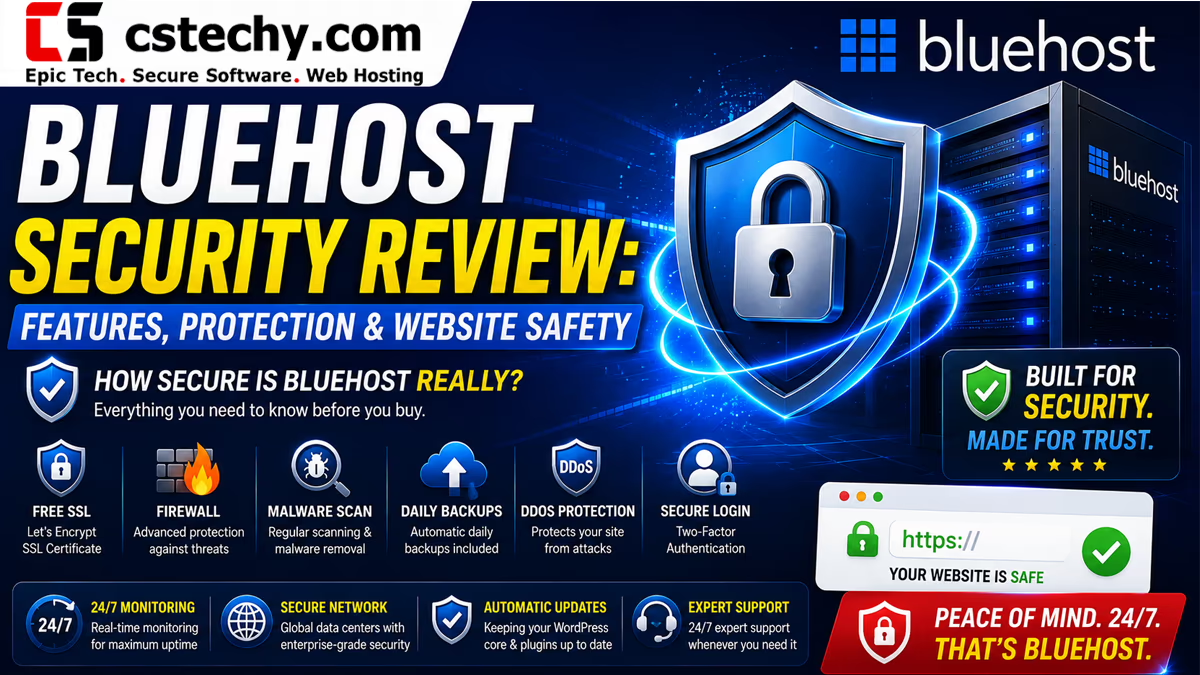
In this Bluehost Security Review, we examine the security features available with Bluehost, including SSL, malware protection, firewalls, DDoS protection, backups, SiteLock, account security, WordPress protection, and recovery options.
We also look at the biggest weakness many beginners overlook: not every security feature is included at the same level on every Bluehost plan. Some advanced protection and backup options depend on the hosting package or additional security products.
Bluehost Security Review: Key Takeaways
- Free SSL: Bluehost provides free Let’s Encrypt SSL on its hosting plans.
- Malware protection: Bluehost offers malware scanning and increasingly advanced automated malware detection and removal options.
- Firewall protection: Bluehost offers web application firewall protection through its security ecosystem and supported plans.
- DDoS protection: Bluehost provides DDoS protection on supported hosting offerings.
- Backups: Backup availability and frequency vary by plan, so users should verify the exact backup policy before relying on it.
- SiteLock: SiteLock is available as an additional security solution for website scanning, monitoring, and protection.
- WordPress security: Managed updates, SSL, malware protection, caching, and security tools can reduce common WordPress risks.
- Biggest weakness: Beginners should not assume that every advanced security feature or frequent backup is automatically included in the cheapest plan.
Our overall verdict: Bluehost provides a solid security foundation for beginners, bloggers, businesses, and WordPress users, but serious websites should still implement their own security and backup strategy rather than relying entirely on the hosting provider.
How Secure Is Bluehost?
Bluehost is generally a secure hosting choice when its built-in protections are combined with good website security practices.
The security stack can include encrypted HTTPS connections, malware detection, automated malware removal, firewall protection, DDoS protection, account security tools, website backups, and additional services such as SiteLock or CodeGuard.
However, hosting security is a shared responsibility. Bluehost can protect the server environment, but it cannot completely protect a website running outdated WordPress software, vulnerable plugins, weak passwords, compromised administrator accounts, or unsafe third-party code.
CSTechy security verdict: Bluehost provides a good baseline security layer, but the safest setup combines hosting-level protection with WordPress hardening, 2FA, secure passwords, regular updates, independent backups, and monitoring.
Bluehost Security Features Compared
| Security Feature | Bluehost | Our Assessment |
|---|---|---|
| Free SSL | Yes | Excellent baseline protection |
| Malware Scanning | Available | Strong |
| Malware Removal | Available on supported security offerings | Strong |
| Web Application Firewall | Available | Strong |
| DDoS Protection | Available on supported plans | Strong |
| Backups | Plan dependent | Check your exact plan |
| SiteLock | Available | Useful for additional protection |
| 2FA | Available in supported account/security workflows | Recommended |
| CDN | Available | Helpful for security and performance |
| WordPress Updates | Managed options available | Very useful for beginners |
1. Free SSL: Does Bluehost Protect HTTPS Connections?
Yes. Bluehost provides free SSL certificates powered by Let’s Encrypt on its hosting offerings.
SSL encrypts the connection between a visitor’s browser and your website. This is particularly important for login pages, contact forms, ecommerce websites, customer accounts, and any website handling sensitive information.
HTTPS also prevents browsers from displaying the basic insecure HTTP warning that can reduce visitor confidence.
Why SSL Matters
- Encrypts data transmitted between visitors and your website.
- Protects login and form submissions from basic interception risks.
- Improves visitor trust.
- Provides the HTTPS connection expected by modern browsers.
- Creates a secure foundation for WordPress and ecommerce websites.
CSTechy verdict: Free SSL is a major positive because website owners should not need to purchase a separate certificate simply to enable HTTPS.
2. Bluehost Malware Protection
Malware is one of the biggest security threats facing WordPress websites. A compromised plugin, theme, administrator account, or vulnerable script can give attackers an entry point into a website.
Bluehost offers malware protection that can scan websites for malicious activity and, depending on the selected security offering, provide automated detection and removal.
Bluehost’s newer security products also advertise continuous scanning, blacklist monitoring, automated malware removal, malicious-process protection, and AI-powered file scanning on supported offerings.
What Malware Protection Can Help With
- Detecting malicious files.
- Identifying suspicious website activity.
- Removing certain malware infections.
- Monitoring website reputation and blacklists.
- Reducing the risk of a compromised website remaining infected.
However, malware protection should not be treated as permission to install outdated or poorly maintained WordPress plugins.
3. Does Bluehost Have a Web Application Firewall?
Yes, Bluehost provides web application firewall protection through its supported security services and hosting infrastructure.
A WAF sits between incoming web traffic and the website application. Its purpose is to identify and block malicious requests before they can reach vulnerable application components.
A properly configured WAF can help defend against common web attacks such as malicious bots, suspicious requests, brute-force activity, and certain application-layer attacks.
4. Does Bluehost Protect Against DDoS Attacks?
Bluehost offers DDoS protection on supported hosting plans and security offerings.
A distributed denial-of-service attack attempts to overwhelm a website or server with large volumes of traffic or requests. The objective is usually to make the service slow or unavailable.
DDoS protection helps identify and filter malicious traffic so legitimate visitors can continue accessing the website.
For small blogs, this protection may operate quietly in the background. For ecommerce stores, agencies, publishers, and websites experiencing sudden traffic spikes, DDoS protection becomes much more important.
5. Bluehost Backups: The Security Feature You Should Not Ignore
Backups are different from security scanning.
A malware scanner may detect an infection, but a reliable backup gives you another recovery option when something goes wrong.
This distinction is extremely important when evaluating Bluehost security.
Bluehost offers backup services, but backup frequency and retention can vary significantly depending on the hosting plan and backup product. Bluehost documentation also describes basic weekly backups for certain hosting environments, while additional backup products can provide more advanced recovery capabilities.
Why Backup Frequency Matters
Imagine an ecommerce website is compromised on Friday and the latest available backup is several days old. Restoring that backup could mean losing orders, customer registrations, product changes, or content created after the restore point.
For this reason, high-value websites should consider a backup strategy beyond the basic hosting backup.
- Keep multiple restore points.
- Maintain an independent backup where practical.
- Back up both files and databases.
- Test restoration instead of assuming backups work.
- Use more frequent backups for frequently changing websites.
CSTechy recommendation: Never treat a hosting provider’s backup system as your only copy of a business-critical website.
6. Bluehost SiteLock Security
SiteLock is an additional website security solution available through Bluehost.
Depending on the selected service, SiteLock can provide features such as malware scanning, website monitoring, blacklist monitoring, security alerts, and firewall-related protection.
It can be particularly useful for businesses that want additional security monitoring without manually configuring every component themselves.
The important consideration is cost. Website owners should compare the included Bluehost security features against the additional SiteLock package before purchasing an upgrade.
7. Bluehost Account Security
Website security starts before an attacker reaches your WordPress installation.
If someone gains access to the hosting account itself, server-level protections may not be enough to protect the website.
Bluehost Account Security Best Practices
- Use a unique, strong Bluehost account password.
- Enable two-factor authentication where available.
- Never share your hosting login with untrusted users.
- Use separate administrator accounts for different team members.
- Remove old users who no longer need access.
- Review security alerts and account activity.
8. Is Bluehost Secure for WordPress?
Bluehost is a reasonable choice for WordPress security, particularly for users who want managed features rather than configuring an entire server security stack themselves.
WordPress hosting options can include SSL, malware protection, backups, CDN functionality, caching, managed updates, staging, and other tools that help reduce operational complexity.
But WordPress itself remains a major part of the security equation.
How to Secure WordPress on Bluehost
- Keep WordPress core updated.
- Update themes and plugins quickly.
- Delete unused plugins and themes.
- Use reputable plugins from trusted developers.
- Enable 2FA for administrator accounts.
- Use strong unique passwords.
- Limit administrator access.
- Use HTTPS everywhere.
- Maintain independent backups.
- Monitor unexpected file changes.
Bluehost Security Pros and Cons
Pros
- Free SSL provides an important baseline layer of protection.
- Malware scanning and removal options are available.
- WAF protection is available through supported security services.
- DDoS protection is available on supported hosting offerings.
- Backup solutions are available.
- SiteLock provides additional security monitoring.
- WordPress users can benefit from managed security-related features.
- Security management is relatively beginner-friendly.
Cons
- Advanced security features can depend on the hosting plan.
- Backup frequency and retention are not identical across all plans.
- Additional security products may increase the total cost.
- Hosting-level security cannot protect against every WordPress vulnerability.
- Website owners still need strong passwords, updates, 2FA, and independent backups.
Bluehost Security vs Hostinger Security
Bluehost and Hostinger both provide security features designed to protect websites from common threats. The exact feature set varies by product and plan, so comparing individual plans is more useful than comparing brands in isolation.
| Security Area | Bluehost | Hostinger |
|---|---|---|
| Free SSL | Yes | Yes |
| Malware Protection | Available | Available |
| Firewall Protection | Available | Available |
| DDoS Protection | Available on supported offerings | Available |
| Backups | Plan dependent | Plan dependent |
| Advanced Security Add-ons | Available | Available |
For a broader comparison, see our Bluehost vs Hostinger guide.
Is Bluehost Safe for Ecommerce Websites?
Bluehost can be suitable for ecommerce websites when the selected plan provides the resources and security controls required by the store.
For an online store, security should cover more than SSL. You should also consider backups, account security, malware protection, firewall protection, software updates, payment-provider security, database protection, and recovery procedures.
WooCommerce users should also review our Bluehost WooCommerce Hosting guide before choosing a plan.
Bluehost Security for n8n and VPS Users
Security requirements become more complex when you move from shared WordPress hosting to a VPS or self-hosted automation platform.
An n8n installation running on a VPS can expose additional attack surfaces, including SSH, Docker, reverse proxies, webhooks, databases, APIs, credentials, and automation endpoints.
If you are planning to run n8n on Bluehost, read our Bluehost n8n VPS Tutorial and Bluehost vs Hostinger VPS for n8n comparison.
You can also learn more about infrastructure choices in our VPS Buying Guide.
What Bluehost Does Not Protect You From
No hosting provider can make an incorrectly configured website completely secure.
You are still responsible for many security decisions at the application level.
- Weak WordPress administrator passwords.
- Compromised third-party plugins.
- Outdated themes.
- Pirated or modified software.
- Phishing attacks against administrators.
- Leaked API keys.
- Exposed database credentials.
- Unsafe file permissions.
- Improperly secured SSH access.
- Unverified third-party scripts.
This is why Bluehost’s own security guidance emphasizes that server protection is only one part of website security.
How to Make a Bluehost Website More Secure
- Enable HTTPS: Confirm your entire website redirects to HTTPS.
- Enable 2FA: Protect important accounts with an additional authentication factor.
- Update WordPress: Keep core, plugins, and themes current.
- Remove unused software: Delete plugins and themes you no longer use.
- Use reliable backups: Keep multiple restore points.
- Protect administrator accounts: Use unique usernames and strong passwords.
- Use a WAF: Enable appropriate firewall protection.
- Monitor malware: Investigate unexpected redirects, files, users, or traffic.
- Protect APIs: Never expose API credentials in public code.
- Test recovery: Make sure your backups can actually restore the website.
Common Bluehost Security Mistakes
Mistake 1: Assuming SSL Means the Website Is Fully Secure
SSL protects data in transit. It does not automatically protect WordPress from malware, vulnerable plugins, stolen passwords, or compromised administrator accounts.
Mistake 2: Relying Only on Hosting Backups
A separate backup strategy provides another recovery layer if the hosting account or website becomes compromised.
Mistake 3: Installing Too Many Security Plugins
More security plugins do not automatically mean more security. Poorly configured or overlapping security plugins can create unnecessary complexity.
Mistake 4: Ignoring Updates
One of the simplest WordPress security improvements is keeping core software, plugins, and themes updated.
Mistake 5: Using Shared Administrator Credentials
Every person who needs website access should ideally have their own account with only the permissions they require.
Who Should Choose Bluehost for Security?
- Beginners: Yes. Bluehost provides a relatively simple security ecosystem.
- Bloggers: Yes. SSL, malware protection, backups, and WordPress tools cover many common needs.
- Small businesses: Yes, provided the chosen plan includes the required security and backup features.
- WordPress sites: Yes. Bluehost offers several WordPress-focused security features.
- Ecommerce: Potentially, but security, backups, payment processing, and compliance require additional attention.
- High-security applications: Evaluate the exact infrastructure and security requirements rather than choosing a host based only on marketing features.
- n8n/VPS users: Suitable for experienced users, but VPS security becomes the customer’s responsibility to a much greater extent.
Bluehost Security: Our Expert Verdict
After examining the available security layers, Bluehost earns a strong security score for mainstream WordPress and small-business hosting.
The combination of free SSL, malware protection, firewall capabilities, DDoS protection, backups, monitoring options, and WordPress security tools gives beginners a solid starting point.
The biggest issue is not that Bluehost lacks security. It is that security features vary between plans and optional products. Users should therefore check exactly what their selected package includes before assuming they have advanced malware protection, frequent backups, or premium monitoring.
For a personal blog or standard business website, Bluehost’s security stack can be more than adequate when configured correctly. For an important ecommerce store, agency website, or revenue-generating business, we recommend adding independent backups, strong account security, 2FA, monitoring, and a tested recovery process.
Should You Buy Bluehost?
If you want an easy-to-manage hosting environment with SSL, security tools, malware protection options, backups, and WordPress-focused features, Bluehost is worth considering.
Before purchasing, compare the exact security features included in the plan rather than choosing solely on the introductory price.
If Bluehost fits your requirements, you can check Bluehost hosting plans and current offers.
For websites where security is business-critical, choose the plan based on recovery, monitoring, backup, and protection requirements first, and price second.
Frequently Asked Questions About Bluehost Security
Is Bluehost safe and legitimate?
Yes. Bluehost is a legitimate hosting provider with multiple security layers including SSL, malware protection, firewall capabilities, DDoS protection, backups, and security monitoring options. Your website still requires proper WordPress security practices.
Does Bluehost provide free SSL?
Yes. Bluehost provides free SSL certificates on its hosting plans, including Let’s Encrypt SSL on supported services.
Does Bluehost protect websites from malware?
Yes. Bluehost offers malware scanning and security products that can detect and remove malware. The exact protection level depends on the hosting plan and security product selected.
Does Bluehost have a firewall?
Yes. Firewall and web application firewall protection are available through Bluehost’s supported security services and infrastructure.
Does Bluehost protect against DDoS attacks?
Yes. Bluehost provides DDoS protection on supported hosting offerings. DDoS protection helps filter malicious traffic intended to overwhelm a website or server.
Does Bluehost automatically back up websites?
Bluehost provides backup services, but backup frequency, retention, and restoration options vary by hosting plan and backup product. Check the exact plan before relying on the included backup system.
Is Bluehost secure enough for WordPress?
For many WordPress websites, yes. Bluehost provides several useful security layers, but WordPress owners should still update software, use strong passwords, enable 2FA, remove unused plugins, and maintain independent backups.
Is Bluehost secure for ecommerce?
Bluehost can be suitable for ecommerce when the appropriate hosting plan and security controls are selected. Ecommerce websites should also use secure payment processing, strong administrator security, frequent backups, monitoring, and tested recovery procedures.
Does Bluehost include SiteLock?
SiteLock is available through Bluehost as a website security solution, but availability and features depend on the service or plan selected.
What is the biggest Bluehost security weakness?
The biggest issue is that security and backup capabilities can vary by plan. Website owners should not assume that every advanced security feature is included with the cheapest hosting package.
Final Verdict
Bluehost is a secure hosting option for most beginners, bloggers, WordPress users, and small businesses when the right plan is selected and basic security practices are followed.
Its strongest advantages are the combination of free SSL, malware protection options, firewall and DDoS protection, backups, security monitoring, and WordPress-focused tools.
But no hosting provider can replace good security habits. Keep your WordPress installation updated, protect administrator accounts with 2FA, maintain independent backups, monitor your website, and choose a plan that provides the security and recovery features your website actually needs.
If you’re still comparing hosting options, continue with our Best Hosting Comparisons guide or explore the complete Global Web Hosting Architecture Guide.
Bottom line: Bluehost is not a magic security shield, but it provides a strong security foundation. For the average WordPress website, that makes Bluehost a reasonable and practical choice.