Pabbly Connect Integrations: The Complete Guide to Connecting Your Apps
If you run a business online, you probably use more than ten apps every single day. Your email tool, your CRM, your payment gateway, and your social media accounts all work separately. Pabbly Connect Integrations solve this problem by linking these apps together so they can share data automatically.
In this guide, we break down everything you need to know about Pabbly Connect Apps, from beginner basics to advanced automation workflows. Whether you are a freelancer, a growing agency, or a marketing team, this article will help you choose the right Pabbly Connect App Integrations for your business.
We will also compare Pabbly Connect against other automation platforms, walk through real workflow examples, and share expert tips that come from actual usage. By the end, you will know exactly which integrations fit your workflow and how to set them up without confusion.
What Are Pabbly Connect Integrations?
Pabbly Connect Integrations are automated connections between two or more software applications. They let data move from one app to another without any manual copying or pasting.
For example, when someone fills out a form on your website, an integration can automatically add their details to a spreadsheet, send them a welcome email, and notify your sales team. All of this happens in seconds, without you touching a keyboard.
Pabbly Connect acts as the bridge between apps that would otherwise never talk to each other. It supports hundreds of tools across marketing, sales, eCommerce, and productivity categories.
Unlike traditional software plugins, these integrations do not require you to install anything on your website or server. Everything runs in the cloud, which means your workflows keep running even when your computer is switched off.
This makes Pabbly Connect Integrations especially valuable for small teams that cannot afford a dedicated developer. You get enterprise-level automation without needing enterprise-level technical skills.
How Integrations Work
Every Pabbly Connect workflow follows a simple structure: a trigger starts the process, and one or more actions follow it. Think of it like a chain reaction between your apps.
The Trigger Step
A trigger is an event that starts the automation. This could be a new form submission, a new sale, or a new email. Pabbly Connect watches for this event in real time.
The Action Step
Once the trigger fires, Pabbly Connect performs the action you set up. This might mean adding a row to Google Sheets, sending a Slack message, or creating a contact in your CRM.
Workflow Automation in Practice
You can chain multiple actions together in a single workflow. One trigger can update your spreadsheet, send an email, post to social media, and create a task, all at the same time.
Pabbly Connect also supports routers and filters, which let a single workflow branch into different paths depending on conditions you set. For example, high-value leads can go straight to a sales manager, while smaller leads go into a nurture email sequence.
This flexibility is what separates simple automation from real workflow automation. You are not just moving data, you are building logic that mirrors how your business actually operates.
Step-by-Step Setup Checklist
- Create a free Pabbly Connect account and log in to your dashboard.
- Click “Create Workflow” and give it a clear, descriptive name.
- Choose your trigger app and select the event that should start the automation.
- Connect your trigger app account using the API key or login credentials.
- Add your action app and choose what should happen after the trigger fires.
- Map the data fields between the trigger and action apps correctly.
- Test the workflow with sample data before turning it on.
- Switch the workflow to “active” once you confirm it runs correctly.
Benefits of App Integrations
Connecting your apps is not just a convenience. It changes how your entire business operates behind the scenes.
- Saves time: No more manual data entry between tools.
- Reduces errors: Automated data transfer avoids typos and missed steps.
- Improves speed: Leads and orders get processed instantly.
- Scales your business: Handle more customers without hiring more staff.
- Connects your entire stack: Every tool works as one connected system.
Business automation is not about replacing people. It is about freeing your team from repetitive tasks so they can focus on real growth.
Supported Apps Overview
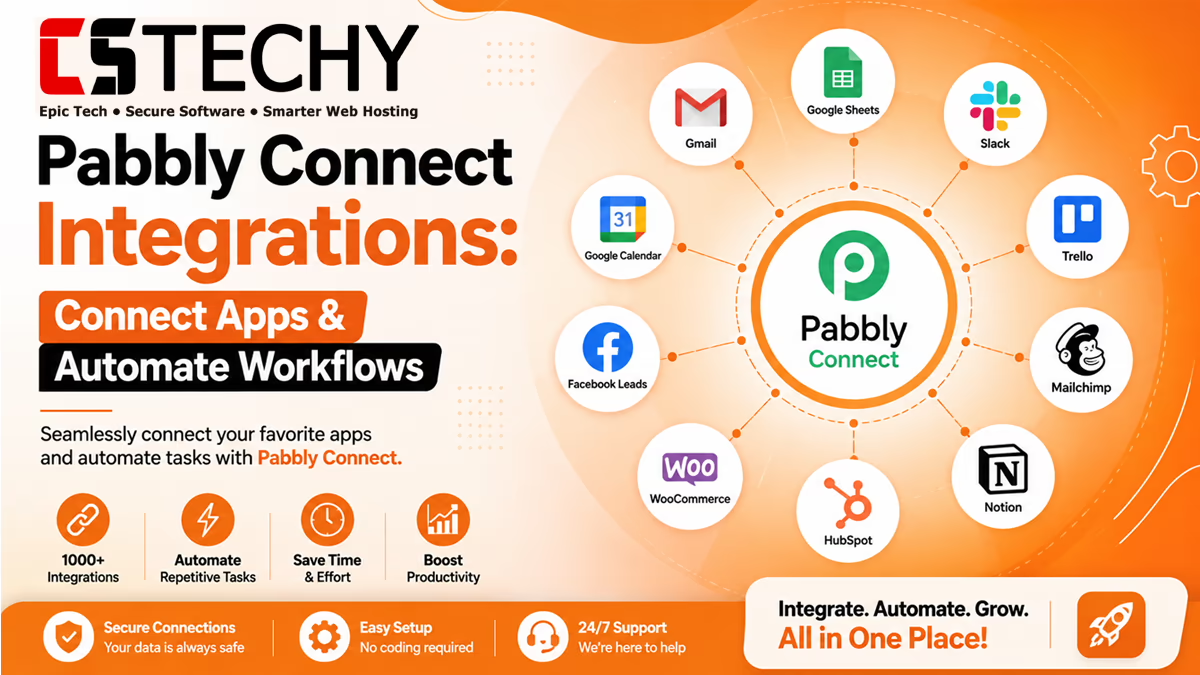
Pabbly Connect Supported Apps span nearly every category a modern business needs. From CRMs to payment gateways, the platform connects the tools you already use.
| Category | Popular Apps | Best Use Case |
|---|---|---|
| CRM | HubSpot, Salesforce, Zoho CRM | Auto-create leads from forms and ads |
| Email Marketing | Mailchimp, ActiveCampaign, Sendinblue | Add new subscribers automatically |
| eCommerce | Shopify, WooCommerce, BigCommerce | Sync orders with your inventory or CRM |
| Payments | Stripe, PayPal, Razorpay | Track payments and generate invoices |
| AI Tools | ChatGPT, OpenAI, Google Gemini | Generate content and automate replies |
| Communication | Slack, WhatsApp, Discord | Send real-time team or customer alerts |
Google Workspace Integrations
Google Workspace Integrations are among the most used Pabbly Connect Apps because nearly every business relies on Gmail, Sheets, and Google Forms.
- Gmail: Automatically send or label emails based on triggers.
- Google Sheets: Log form entries, orders, or leads as new rows.
- Google Calendar: Create events from bookings or CRM entries.
- Google Docs: Auto-generate documents from templates.
These integrations are perfect for beginners because they need no technical setup and work instantly once connected.
A freelance consultant, for example, can connect Google Forms to Google Sheets so every client inquiry lands in an organized tracker automatically. No more digging through old form notifications.
Microsoft 365 Integrations
Businesses using Microsoft tools can connect Outlook, Excel, and Teams through Pabbly Connect App Integrations. This is especially useful for corporate teams already inside the Microsoft ecosystem.
- Outlook: Automate email replies and notifications.
- Excel Online: Update spreadsheets with new automation data.
- Microsoft Teams: Send instant alerts for new leads or orders.
These Pabbly Connect App Integrations are ideal for enterprise teams and agencies that already rely on Microsoft tools for daily operations and internal reporting.
CRM Integrations
CRM Integrations help sales teams keep every lead organized without manual entry. Pabbly Connect can push new leads from ads, forms, or websites directly into your CRM.
For example, when a lead fills out a Facebook Lead Ads form, Pabbly Connect can create a new contact in HubSpot within seconds. Your sales team never misses a single lead.
You can also update deal stages automatically. When a customer completes a payment, Pabbly Connect can move their record from “negotiation” to “closed won” without anyone opening the CRM manually.
Email Marketing Integrations
Email Marketing Integrations let you grow your subscriber list automatically. Every new customer, form submission, or purchase can trigger an email sequence.
This is one of the most valuable Best Pabbly Connect Integrations for bloggers and small businesses that rely on newsletters to stay in touch with their audience.
You can also tag subscribers based on their behavior. Someone who downloads a free guide can be tagged differently than someone who books a call, which allows more targeted follow-up emails later.
eCommerce Integrations
eCommerce Integrations connect your store with inventory, shipping, accounting, and customer support tools. This keeps your entire sales pipeline synced in real time.
A Shopify store owner, for instance, can automatically notify their team on Slack every time a new order comes in, without checking the dashboard manually.
You can also connect your store to accounting tools so every sale is recorded automatically, or trigger shipping label creation the moment an order status changes to “paid.”
Payment Gateway Integrations
Payment Gateway Integrations connect tools like Stripe, PayPal, and Razorpay to your CRM, accounting software, or notification systems.
Every successful payment can trigger an invoice, update a spreadsheet, or add the customer to your onboarding sequence, all without manual work.
Failed payments can also trigger a follow-up email automatically, which helps recover lost revenue without your finance team chasing customers manually.
AI Integrations
AI Integrations are one of the fastest-growing categories in workflow automation. Pabbly Connect lets you plug AI tools like ChatGPT directly into your existing workflows.
This means you can auto-generate content, summarize documents, or create smart replies, then send the output straight into another app like Google Docs or Slack.
Marketing teams use AI Integrations to draft social captions from blog content automatically. Support teams use them to summarize long customer emails into short, actionable notes.
Social Media Integrations
Social Media Integrations help marketing teams stay active across platforms without constant manual posting. Pabbly Connect can pull leads from Facebook Ads or repost content automatically.
This is especially useful for agencies managing multiple client accounts, since it removes the need to log in and post manually on each platform every day.
Communication App Integrations
Communication tools like Slack, WhatsApp, and Discord are commonly connected to keep teams and customers updated in real time.
Agencies often use these integrations to alert their team the moment a new client signs up or a support ticket is filed.
WhatsApp automation has become especially popular for customer support teams that need to log conversations and respond quickly without switching between apps.
Webhook & API Integrations
For developers and advanced users, Pabbly Connect Webhook Integrations and Pabbly Connect API Integrations open up unlimited possibilities. If an app is not listed as a native integration, webhooks can usually still connect it.
Webhooks send data instantly the moment an event happens, making them ideal for custom-built apps, internal tools, or platforms without a direct integration.
Developers can also use Pabbly Connect API Integrations to send structured requests to third-party services, parse the response, and pass that data into the next step of a workflow. This opens the door to fully custom automation pipelines.
Popular Workflow Examples
Here are real-world automation examples that show how Pabbly Connect Integrations work in practice.
- Gmail to Google Sheets: Log every new email into a spreadsheet automatically. Ideal for freelancers tracking client inquiries.
- WooCommerce to Slack: Notify your team instantly when a new order comes in. Great for small eCommerce stores.
- Shopify to Gmail: Send personalized thank-you emails after every purchase. Useful for building customer loyalty.
- Stripe to Notion: Log every payment into a Notion database for easy tracking. Helpful for solo consultants and agencies.
- Calendly to Zoom: Automatically create a Zoom link when someone books a meeting. Saves time for coaches and consultants.
- Facebook Lead Ads to Google Sheets: Capture every ad lead in a spreadsheet instantly. Perfect for marketing teams.
- WordPress to Discord: Notify your community when a new blog post goes live. Useful for content creators.
- ChatGPT to Google Docs: Auto-generate content drafts and save them directly to Docs. Great for writers and marketers.
- WhatsApp to Google Sheets: Track customer messages automatically. Helpful for small businesses handling support on WhatsApp.
- HubSpot to Slack: Alert your sales team the moment a new deal is created. Ideal for growing sales teams.
Business Automation Examples
Different businesses use Pabbly Connect Integrations in different ways depending on their goals.
For Freelancers
Automate client onboarding by connecting form submissions to invoicing tools and email sequences.
For Agencies
Sync client leads across multiple CRMs and notify account managers instantly through Slack or email.
For Small Businesses
Connect eCommerce platforms with accounting software to keep financial records accurate without extra staff.
Best Practices
- Start with one simple workflow before building complex ones.
- Always test each workflow before making it live.
- Use clear, descriptive names for every workflow you create.
- Regularly review and remove workflows you no longer need.
- Keep API keys and webhook URLs private and secure.
Common Mistakes
- Connecting too many apps at once without testing each step.
- Ignoring error notifications from failed workflow runs.
- Using duplicate triggers that create repeated data entries.
- Forgetting to map fields correctly between apps.
- Not setting up filters, which leads to unwanted automation runs.
Expert Tips
- Use filters to control exactly when a workflow should run.
- Combine multiple actions in a single workflow to save setup time.
- Test webhook integrations using sample data before going live.
- Document your workflows so your team understands each automation.
Pros & Cons
Pros
- Affordable pricing compared to many competitors.
- Simple, beginner-friendly interface.
- Strong support for webhooks and API automation.
- Wide range of supported apps across categories.
Cons
- Smaller app library compared to some larger platforms.
- Advanced workflows may require a learning curve for beginners.
Comparison with Zapier Integrations
Zapier is one of the most well-known automation platforms, but Pabbly Connect often wins on pricing and value for smaller businesses. Zapier connects thousands of apps, yet many small teams only ever use a handful of them.
If your main goal is Google Workspace Integrations, CRM Integrations, or Email Marketing Integrations, Pabbly Connect usually covers everything you need at a fraction of the cost.
Comparison with Make Integrations
Make offers powerful visual workflows, but it can feel complex for beginners. Pabbly Connect keeps the setup process simpler while still supporting advanced use cases.
Developers who enjoy building highly custom, branching automations may prefer Make. Beginners and small business owners who want fast, reliable results usually prefer the simplicity of Pabbly Connect.
| Comparison | Pabbly Connect | Zapier | Make |
|---|---|---|---|
| Number of Apps | Growing library, 300+ | Largest library, 6000+ | Large library, 1500+ |
| Ease of Setup | Very beginner-friendly | Beginner-friendly | Moderate learning curve |
| Pricing | Budget-friendly, lifetime plans available | Higher cost at scale | Mid-range pricing |
| Customization | Good, with routers and filters | Good, with paths | Excellent, highly visual |
| Webhooks | Fully supported | Fully supported | Fully supported |
| API Support | Strong API automation support | Strong API automation support | Strong API automation support |
Frequently Asked Questions
What are Pabbly Connect Integrations used for?
They connect different apps so data moves automatically between them. This saves time and reduces manual work across your business.
How many apps does Pabbly Connect support?
Pabbly Connect supports hundreds of Pabbly Connect Apps across CRM, marketing, eCommerce, and payment categories. New apps are added regularly.
Are Pabbly Connect Integrations beginner-friendly?
Yes, most integrations use a simple trigger-and-action setup. No coding knowledge is required for standard workflows.
Can I connect apps that are not listed natively?
Yes, you can use Pabbly Connect Webhook Integrations to connect almost any app that supports webhooks or APIs.
Is Pabbly Connect good for eCommerce automation?
Yes, eCommerce Integrations like Shopify and WooCommerce work well for order tracking, notifications, and inventory syncing.
Does Pabbly Connect support AI tools?
Yes, AI Integrations like ChatGPT can be connected to automate content generation and smart responses.
What is the difference between a trigger and an action?
A trigger starts the workflow, while an action is the task performed after the trigger fires, such as sending an email.
Is Pabbly Connect cheaper than Zapier?
In most cases, yes. Pabbly Connect offers competitive pricing, including lifetime plan options for long-term savings.
Can agencies use Pabbly Connect for multiple clients?
Yes, agencies commonly use Pabbly Connect App Integrations to manage leads and notifications for several clients at once.
Final Verdict
Pabbly Connect Integrations give businesses of every size a simple way to connect their favorite apps. From Google Workspace Integrations to advanced Pabbly Connect API Integrations, the platform covers nearly every automation need.
Whether you are just starting out or managing complex workflows for clients, Pabbly Connect offers an affordable and beginner-friendly path to full business automation. Start with one workflow today, and build from there as your confidence grows.
Related Articles
- Pabbly Connect Review
- Pabbly Connect Pricing
- Pabbly Connect Tutorial
- Pabbly Connect Templates
- Pabbly Connect Alternatives
- Pabbly Connect vs Zapier
- Pabbly Connect vs Make
- Workflow Automation
- Business Automation
- Automation Tools