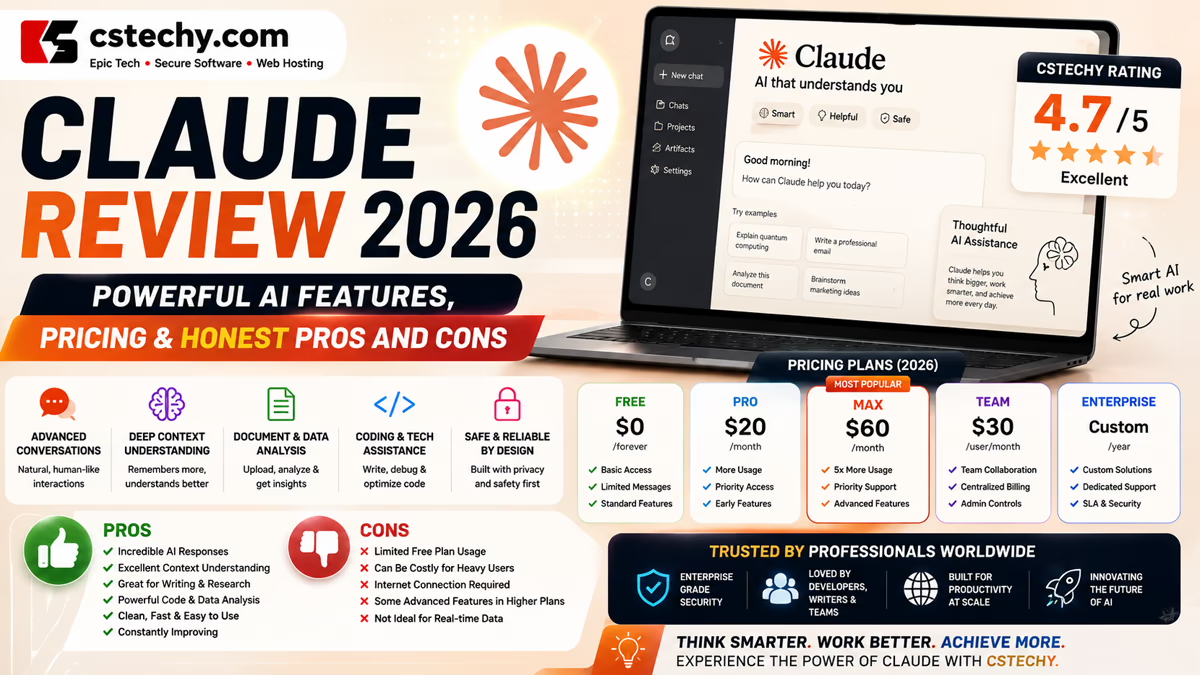
Claude Review 2026: Features, Pricing, Pros, Cons & Is It Worth It?
Claude, built by Anthropic, has grown from a capable chatbot into a genuinely broad AI workspace. In 2026 it spans conversational chat, long-context document work, agentic coding through Claude Code, a desktop-based work companion called Claude Cowork, deep research, and a growing set of connectors into tools people already use. Which of these you actually get — and how much of them — depends on your plan, platform, and account type.
So is Claude worth using, or paying for, in 2026? That depends heavily on what kind of work you’d hand it. For writers, developers, researchers, and business teams doing regular knowledge work, Claude can genuinely speed things up. For someone who only occasionally needs an AI answer, the free tier may already be plenty.
This CSTechy review covers what Claude actually offers today, how its plans compare, where it’s strongest, where it isn’t, and how it stacks up against ChatGPT — so you can make an informed call for your specific situation.
What Is Claude?
Claude is Anthropic’s family of AI models and the products built around them — most visibly Claude.ai, the consumer chat app, alongside developer-facing products like the Claude API, Claude Code, and Claude Cowork. Anthropic has positioned Claude with a particular emphasis on careful, well-reasoned responses and safety research, though as with any AI assistant, that emphasis doesn’t mean its answers are guaranteed to be correct.
Like other modern AI assistants, Claude works conversationally: you describe what you need, review the response, and refine it through follow-up messages rather than starting over each time. That iterative style is where most of the practical value comes from — using Claude to draft, then reshape, rather than treating a first answer as final.
It’s worth stating plainly: Claude should not be treated as an infallible authority. For anything with real consequences — legal, medical, financial, or safety-related — its output is a starting point to verify against primary sources or a qualified professional, not a conclusion to act on directly.
Claude Review 2026: What’s New?
Anthropic has shipped several notable updates through 2026. Claude Sonnet 5 became the default model across the Free and Pro tiers by mid-year, with Claude Opus 4.8 available as the higher-capability option on paid plans for more demanding reasoning and analysis work. Claude Haiku 4.5 continues to serve as the fast, lightweight model for simpler tasks.Anthropic also introduced a new tier above Opus: Claude Mythos 5 and Claude Fable 5, first released in June 2026 and sharing the same underlying model, with Fable 5 carrying additional safety measures around biology, cybersecurity, and AI research uplift. Shortly after launch, Anthropic temporarily suspended access to both models to comply with U.S. Department of Commerce export controls; those controls were lifted at the end of June 2026, and Anthropic restored access on July 1, 2026. Mythos itself remains limited to a small number of organizations through Anthropic’s Project Glasswing rather than being generally available.
On the product side, Claude Cowork — a desktop app aimed at non-developers handling multi-step knowledge work — and Claude Code, Anthropic’s agentic coding tool, have both continued to mature, alongside expanding integrations like Claude for Chrome, Claude for Excel, and Claude for PowerPoint. Because Anthropic updates models, plans, and features fairly often, treat any specific detail here as a snapshot and confirm current specifics on Anthropic’s official pages before making a decision based on it.
Claude’s Current Models
For an everyday user, the model question mostly comes down to two names: Sonnet and Opus.
- Claude Sonnet 5 is the default model most people interact with on Free and Pro. It’s built to handle everyday writing, analysis, and coding work well, balancing capability with speed.
- Claude Opus 4.8 is the more capable model reserved for harder reasoning, longer analysis, and more complex problem-solving, generally accessed through usage credits on paid plans rather than as the default.
- Claude Haiku 4.5 is the fastest, lightest model, useful for simple, high-volume tasks where speed matters more than depth.
- Claude Fable 5 sits above Opus as Anthropic’s newest-generation model, available through the API and limited surfaces rather than as a default consumer chat option.
It’s worth understanding that the model powering a conversation in Claude.ai isn’t necessarily identical to what’s available through the API — API access typically offers more granular model selection and separate, usage-based pricing. Anthropic periodically retires older models as newer ones launch, so if you’ve used Claude before and remember a different model name, that’s expected; check the current model picker in your account for what’s actually available to you today.
Key Claude Features
AI Writing and Editing
Claude is commonly used for drafting, rewriting, summarizing, and editing — anything from a quick email to a long-form document. It can adjust tone, tighten structure, or reframe content for a different audience through conversation. What it can’t do is guarantee the result is publish-ready: fact-checking, adding original insight, and applying editorial judgment remain the writer’s job. Treat Claude’s draft as a strong starting point, not a finished product.
Reasoning and Analysis
Claude includes an extended thinking mode on capable models, useful for multi-step problems — working through a complex decision, analyzing a dataset’s implications, or reasoning through a technical trade-off. This tends to produce more careful answers on genuinely hard questions, though it also takes longer to respond, and the underlying accuracy limitations of any AI model still apply.
Coding and Claude Code
Claude Code is Anthropic’s agentic coding tool, available via terminal, IDE integrations (VS Code, JetBrains), and the desktop app, letting developers delegate multi-step coding tasks — not just ask questions, but have Claude actually read a codebase, make edits, and run commands within the scope it’s given. This is meaningfully different from chat-based coding help: it’s closer to an assistant working inside your environment than a Q&A tool.
That agentic capability comes with real responsibility. Claude Code operates within permissions you configure, and generated or modified code still needs human review, testing, and understanding before deployment — this is especially true for anything touching authentication, security, infrastructure, or production systems. Autonomous execution is not the same as unsupervised trust; treat Claude Code as a fast collaborator that needs oversight, not a hands-off automation.
Research and Web-Based Work
Claude can search the web and pull in current information for research tasks, and Anthropic’s Research feature is built specifically for longer, multi-step investigation — gathering information across sources and synthesizing it into a structured answer. This can meaningfully speed up early-stage research, but AI-assisted synthesis isn’t a substitute for professional research rigor: source quality still varies, and important claims are worth tracing back to their original source rather than trusting a summary at face value.
Projects and Long-Context Work
Projects let you group related conversations, files, and instructions around an ongoing objective — useful for long-running work like a research effort, an extended writing project, or an evolving codebase, where starting a fresh context-free chat every time would waste effort. Claude’s models also support notably large context windows (up to 1 million tokens on some models and plans), which matters for working with lengthy documents or large codebases in a single conversation without losing earlier context.
Claude Cowork and Computer-Based Workflows
Claude Cowork is a desktop app aimed at people who aren’t developers but have multi-step work spanning files, apps, and research — letting Claude use tools like a browser, spreadsheet, or document editor as part of completing a task, rather than just producing text output. This shifts the assistant model from “answer a question” to “carry out a task across several tools.”
That shift is genuinely useful for repetitive, well-defined workflows, but it also means being deliberate about what access you grant. Understand the scope of permissions before letting Claude act across your files or accounts, and treat any AI-driven action with real-world effects — sending something, deleting something, modifying a live document — the way you’d treat delegating that action to a new employee: with clear boundaries and a review step, not blind trust.
Files, Documents and Knowledge Work
Claude can read and work with uploaded documents — summarizing, extracting information, comparing multiple files, or analyzing structured data. As with any AI file analysis, results depend heavily on input quality: an unclear scan, missing context, or an ambiguous instruction will produce a correspondingly weaker result.
Vision and Image Understanding
Claude can interpret images — reading a screenshot, analyzing a chart, describing a photo, or working through a diagram — which is useful for troubleshooting, data interpretation, or discussing visual content directly rather than describing it in text first.
Integrations and Connectors
Claude connects to a growing set of external tools and services — Google Drive, Slack, GitHub, and others, depending on plan and configuration — plus dedicated products like Claude for Chrome, Claude for Excel, and Claude for PowerPoint that bring Claude directly into a browser or Office document. These integrations can meaningfully cut down on copy-pasting between tools, but each one also means Claude has some level of access to that connected service, which is worth understanding and scoping deliberately rather than granting by default.
What Can You Use Claude For?
Claude for Students
Explaining a difficult concept differently, generating practice questions, summarizing reading material, or helping organize a study plan are all reasonable uses. Students should treat this as a learning aid, not a substitute for doing the work, and should follow whatever AI-use policy their school or program has in place.
Claude for Writers
Brainstorming, outlining, drafting, and editing are common strengths. The most reliable workflow keeps a human firmly in charge of the final product — verifying facts, adding original perspective, and applying the writer’s own quality bar before anything gets published.
Claude for Developers
Beyond chat-based coding help, Claude Code offers a genuinely agentic development workflow — useful for refactors, debugging sessions, test generation, and documentation. Generated code still requires the same scrutiny any code review would apply: testing, security review, and an understanding of what it actually does before it ships.
Claude for Researchers
Synthesizing information across documents, organizing findings, and working through long-context material are places Claude tends to help meaningfully. It doesn’t replace the judgment a trained researcher brings to evaluating sources and evidence — it can accelerate the mechanical parts of the process.
Claude for Businesses
Teams use Claude for internal documentation, meeting prep, research, and increasingly for multi-step workflows through Cowork and connected tools. Anthropic’s Team and Enterprise plans add administrative controls, centralized billing, and contractual data-handling commitments that matter for organizations with compliance obligations — worth reviewing directly rather than assuming based on the individual plans.
Claude for Everyday Users
Planning, general writing help, learning something new, or just having a capable assistant for day-to-day questions — the Free plan is often genuinely sufficient for this level of use.
Claude Plans and Pricing
As of mid-to-late 2026, Anthropic offers Claude across five main tiers: Free, Pro, Max (in two usage levels), Team, and Enterprise. Anthropic adjusts pricing and limits periodically, so treat the figures below as a general guide and confirm current numbers on Anthropic’s official pricing page before subscribing.
| Plan | Best For | Main Advantage | Important Consideration |
|---|---|---|---|
| Free | Occasional or exploratory use | No cost, access to a capable default model | Usage limits reset on a rolling window and can be reached quickly with heavy use |
| Pro | Daily individual use | Meaningfully higher usage limits, access to Opus via credits, Claude Code | Still a single-user plan with usage limits, not unlimited |
| Max | Power users and heavy coding workflows | Substantially higher usage ceiling across two price levels | Mainly adds capacity, not new features beyond Pro |
| Team | Small-to-midsize organizations | Central billing, admin controls, shared workspace | Seat minimums apply; standard and premium seat types differ significantly in usage |
| Enterprise | Larger organizations with compliance needs | SSO, audit logs, custom data retention, dedicated support | Custom-priced through Anthropic’s sales team, not self-serve |
Free gives access to Claude on web, iOS, Android, and desktop with no payment required, including text, image, and code generation and web search, subject to usage limits that reset on a rolling basis. It’s a reasonable way to evaluate Claude before committing to a subscription.
Pro is priced at $20 per month billed monthly, or a lower effective rate billed annually, and is Anthropic’s mainstream individual plan — meaningfully higher usage limits than Free, access to Opus through usage credits, and access to Claude Code. For most professionals using Claude regularly for writing, analysis, or coding, this is typically the plan that removes the friction of hitting limits.
Max comes in two usage levels, priced around $100 and $200 per month, aimed at people who consistently exhaust Pro’s limits — heavy daily use, extended coding sessions, or high-volume content work. Max is primarily a capacity upgrade rather than a feature upgrade; it doesn’t unlock capabilities entirely absent from Pro.
Team plans add centralized billing, admin controls, and a shared workspace for organizations, typically with a seat minimum and a choice between standard and higher-usage premium seats. Team plans generally include a commitment not to use business conversations for model training by default — a meaningful distinction for organizations handling confidential information.
Enterprise is Anthropic’s custom-priced tier for larger organizations, adding SSO/SAML, audit logging, custom data retention, and dedicated support. Pricing is negotiated directly with Anthropic’s sales team rather than published, and typically scales with organization size and usage.
Claude Free vs. Paid Plans
The practical difference between Free and paid plans comes down to three things: usage capacity, model access, and tooling. Free gives you Claude Sonnet with capped usage; paid plans raise that ceiling substantially and add access to Opus through usage credits. Claude Code — Anthropic’s agentic coding tool — is generally a paid-plan feature, which matters if development work is a primary use case. Claude Cowork, by contrast, is available across plans including Free, though usage capacity still scales with your tier.
If you’re testing whether Claude fits your workflow, Free is a genuinely reasonable place to start. If you find yourself hitting usage limits more than occasionally, or specifically want Claude Code, that’s usually the clearest signal it’s time to consider Pro.
Claude Pros and Cons
Advantages
- Strong writing and editing assistance across drafting, tone, and structure
- Genuinely agentic coding through Claude Code, not just Q&A-style help
- Large context windows that support long documents and extended conversations
- Broadening tool access through Cowork and integrations like Chrome, Excel, and PowerPoint
- A relatively simple plan structure compared to some competitors
- A free tier that’s usable for real, if limited, work
Disadvantages
- Usage limits are opaque in specifics and can be reached faster than expected on heavy workloads
- Subscription cost adds up quickly if you need Max-level usage
- Accuracy isn’t guaranteed — errors and confidently wrong answers still occur
- Agentic features carry real risk if permissions aren’t scoped carefully
- Model and product changes happen often, which can shift what a given plan includes
- Newer top-tier models (like Fable 5) have had availability disrupted by external factors, such as the mid-2026 export-control suspension
Claude Privacy and Security Considerations
Privacy handling differs meaningfully by plan and account type, so it’s worth understanding your specific setup rather than assuming a blanket answer. For consumer accounts, model training is generally opt-out rather than opt-in by default — meaning conversations may be used to improve Anthropic’s models unless a user actively changes that setting, with data retention periods that can extend for years for accounts that don’t opt out. Team and Enterprise plans typically exclude training on business data at the contract level, which is a materially different guarantee than an individual, user-controlled toggle.
Beyond training data, integrations and Cowork’s tool access introduce their own permissions considerations — each connected service or granted capability is worth scoping deliberately. For anything confidential, regulated, or sensitive, review Anthropic’s current privacy documentation and, for business use, your organization’s own policy before entering that information into Claude.
Claude Limitations
Claude, like any AI system, can produce factual errors, incomplete reasoning, outdated information, or confidently stated answers that turn out to be wrong. It can also misunderstand ambiguous instructions or miss context that wasn’t explicitly provided. None of this is unique to Claude — it’s inherent to how current AI models work — but it’s worth keeping in mind for anything where being wrong has real consequences.
For legal, medical, financial, security, or other high-stakes decisions, treat Claude’s output as a starting point for further verification with authoritative sources or qualified professionals, not as a final answer.
Claude vs. ChatGPT: Which Is Better?
There isn’t a universal winner here — the better choice depends on what you’re actually doing with it.
Claude tends to be favored by developers for its agentic coding workflow through Claude Code and by users who work with long documents, given its large context windows. Its plan structure is also relatively straightforward compared to some competitors’ more fragmented tier systems. ChatGPT, by comparison, has a broader consumer feature set overall — including a wider range of image tools, voice modes, and third-party integrations — and a larger, more mature ecosystem of connected apps and plugins.
For business use, both offer contractual data-training exclusions on their team-level plans, so the meaningful differences tend to come down to specific workflow fit, existing tool integrations, and which model’s writing or reasoning style a given team prefers. If you’re deciding between them rather than committing outright, the most reliable approach is testing both on your actual recurring tasks — a real coding problem, a real writing task — rather than relying on marketing claims or general reputation.
Who Should Use Claude?
- Students — explanations, study support, and research help, used to support learning
- Writers — drafting, editing, and brainstorming, with human judgment on the final result
- Developers — coding assistance and agentic development work through Claude Code
- Researchers — synthesis and organization across long or numerous documents
- Businesses — knowledge work, documentation, and multi-step workflows via Cowork and integrations
- Everyday users — general planning, writing, and question-answering
Who May Not Need Claude?
If your AI use is occasional — a handful of questions a month — the Free plan likely already covers it, and there’s little reason to pay for more. If you already rely on a different AI assistant that meets your needs well and don’t have a specific reason (like Claude Code or a particular workflow) to switch, there may not be enough incremental value to justify adding another subscription.
Is Claude Worth It in 2026?
Casual users: Free is likely enough — it supports real work, just with usage limits.
Students: Free or Pro depending on how much day-to-day support you need; Pro mainly helps if you’re hitting Free’s limits regularly.
Writers: Pro is a reasonable default for daily use; the jump to Max only makes sense if you’re producing high volumes of content regularly.
Developers: Pro is a solid entry point for Claude Code; Max becomes worth considering once you’re running extended agentic coding sessions that consistently hit Pro’s limits.
Researchers: Pro’s larger context windows and Research capability tend to justify the cost for anyone doing sustained document-heavy work.
Businesses: Team makes sense once you need shared administration and a contractual no-training commitment; Enterprise becomes relevant at scale, or when specific compliance requirements (SSO, audit logs, data residency) are non-negotiable.
Final Verdict
Claude has matured into a genuinely capable, broad AI platform — not just a chat interface, but a system that spans writing, reasoning, agentic coding, and multi-step task execution through Cowork and connectors. Its biggest strengths are a relatively clean plan structure, strong coding tooling, and large context windows that make it well-suited to long, document-heavy work.
Its limitations are the same ones that apply across the AI assistant category: outputs need verification, agentic features need careful permissioning, and no plan or feature guarantees accuracy. Claude is genuinely useful for people who do regular writing, coding, research, or knowledge work — the free tier is worth trying first, and a paid plan tends to make sense once you can point to a specific limit or feature (usage caps, Claude Code, larger context) that’s actually holding you back.
CSTechy’s take: Claude is worth considering for anyone doing regular writing, development, or research work, particularly if agentic coding or long-context document work matters to your workflow. Start with Free, and upgrade to Pro once usage limits or Claude Code access become a real constraint rather than a hypothetical one. Because Anthropic updates pricing and features fairly often, confirm current details on Anthropic’s official pricing page before subscribing.
Frequently Asked Questions About Claude
1. What is Claude AI?
Claude is Anthropic’s family of AI models and the products built around them, including the Claude.ai chat app, Claude Code for developers, and Claude Cowork for broader knowledge work. It’s designed to assist with writing, analysis, coding, research, and multi-step tasks through natural-language conversation.
2. Is Claude free to use?
Yes — Anthropic offers a permanent Free plan with access to Claude Sonnet and usage limits that reset on a rolling basis, alongside several paid tiers with higher limits and additional capabilities. Exact limits and pricing can change, so check Anthropic’s current pricing page before deciding.
3. Is Claude better than ChatGPT?
Neither is universally better — it depends on your workflow. Claude is often favored for agentic coding through Claude Code and for long-context document work, while ChatGPT tends to offer a broader consumer feature set and larger third-party ecosystem. Testing both on your actual recurring tasks is the most reliable way to decide.
4. Which Claude model should I use?
Claude Sonnet 5 is the default and handles most everyday writing, analysis, and coding work well. Claude Opus 4.8 is better suited to harder reasoning and more complex tasks, generally accessed through usage credits on paid plans. Claude Haiku 4.5 is the fastest option for simple, high-volume tasks.
5. Is Claude good for coding?
Yes — particularly through Claude Code, Anthropic’s agentic coding tool that can work across a codebase rather than just answering isolated questions. Generated or modified code should still be reviewed and tested before deployment, especially for security-sensitive or production systems.
6. Can Claude browse the web or perform research?
Yes, Claude can search the web for current information, and Anthropic’s Research capability is built for longer, multi-step research tasks that synthesize information across sources. As with any AI-assisted research, verifying important claims against primary sources remains important.
7. Is Claude safe for business use?
It can be, particularly on Team and Enterprise plans, which typically include a contractual commitment not to train on business data by default, along with administrative and security controls. Organizations should still review their own compliance and data-governance requirements before deploying it for sensitive work.
8. Can Claude generate or analyze documents and files?
Yes — Claude can read, summarize, compare, and analyze uploaded documents, and can also help create files like reports, spreadsheets, and presentations depending on the platform and plan. Output quality depends heavily on the clarity and completeness of the input provided.
9. Is Claude worth paying for in 2026?
It depends on your usage. Occasional users are usually well served by Free. Anyone hitting usage limits regularly, or specifically needing Claude Code or larger context windows for sustained document work, is likely to get real value from Pro or higher — compare your actual usage against current plan limits before subscribing.