ChatGPT Review 2026: Features, Plans, Pros, Cons & Is It Worth Using?
ChatGPT has grown well beyond a simple question-and-answer chatbot. By 2026 it functions more like a connected workspace — capable of searching the web, reading and analyzing files, generating and editing images, remembering context across conversations, organizing multi-step projects, and assisting with code. Exactly which of these capabilities you get, and how much of them, depends heavily on which plan you’re on, which platform you’re using, and where you’re located.
That raises the real question most readers have: is ChatGPT actually worth using — or paying for — in 2026?
The honest answer is that it depends entirely on how you’d use it. For students, writers, developers, marketers, researchers, and business owners who regularly work with information, ChatGPT can meaningfully cut down repetitive work. But it is not an infallible source of truth, and it shouldn’t be treated as one. AI-generated answers can be confidently wrong, out of date, or based on an incomplete understanding of what you actually asked.
This CSTechy review walks through what ChatGPT offers in 2026, how the plans differ, where it genuinely helps, where it falls short, and who is likely to get real value from it.
What Is ChatGPT?
ChatGPT is OpenAI’s conversational AI assistant. Instead of returning a list of links the way a search engine does, it responds directly to a request in natural language, and lets you refine that response through follow-up conversation — asking for a shorter version, a different tone, more detail, or a correction.
That iterative, back-and-forth format is arguably ChatGPT’s core advantage. Rather than opening a dozen browser tabs and manually piecing information together, you can describe what you’re trying to accomplish and have the assistant help structure the work with you.
It’s worth being clear about what this doesn’t mean, though: ChatGPT isn’t an authoritative reference. For anything legally significant, medically relevant, financially consequential, or otherwise high-stakes, treat its output as a starting point to verify — not a final answer.
What’s New in ChatGPT for 2026
OpenAI’s model lineup has moved quickly this year. The current flagship family, GPT-5.6, reached ChatGPT in July 2026, arriving in several variants tuned for different jobs — a higher-effort flagship version for complex reasoning, a balanced mid-tier version, and a faster, higher-volume version aimed at everyday chat. Free and Go accounts began receiving the lighter-weight model as their default over the summer, while Plus, Pro, Business, and Enterprise accounts get access to the more capable versions.
Beyond the model upgrade, 2026 has brought steady, incremental additions to the product itself: expanded memory controls, deeper file- and image-handling tools, more built-in connectors to workplace apps like Google Drive, Slack, and Microsoft 365 on business plans, and continued build-out of agentic features that let ChatGPT carry out multi-step tasks rather than just answer single questions.
The upshot is that a fair review of ChatGPT in 2026 can’t just judge it as a text generator. Its value increasingly comes from how these pieces — chat, search, files, images, memory, and connected tools — work together.
How ChatGPT Compares to Other AI Assistants
ChatGPT isn’t the only conversational AI assistant on the market — Google’s Gemini, Anthropic’s Claude, and xAI’s Grok are all active competitors, and each has carved out its own strengths. Rather than declaring an overall winner, it’s more useful to think about what each is generally known for.
ChatGPT’s biggest advantage is breadth: it has the largest ecosystem of integrations, the widest name recognition, and arguably the most mature set of consumer-facing tools, from image generation to voice mode to a genuinely useful mobile coding companion in Codex. Its plan structure is also unusually granular, with six tiers spanning casual users all the way up to large enterprises, which gives buyers more room to match price to actual need.
Where it doesn’t automatically win is on any single dimension in isolation. Competing assistants sometimes offer larger context windows, different pricing philosophies, or interface choices some users prefer. If you’re choosing between assistants rather than committing to ChatGPT specifically, the most reliable approach is to try the free or lowest-cost tier of a couple of options against your actual workload — a coding task, a writing task, a research task — rather than relying on marketing claims or benchmark scores, which can be selectively reported and don’t always reflect real-world use.
Key ChatGPT Features in 2026
1. Conversational Assistance
The core interaction model is still plain-language conversation. You can ask ChatGPT to explain a concept, rewrite a paragraph, outline a plan, compare options, or break a complicated project into steps — without learning any special syntax.
Because the format is conversational, you can iterate: if an answer is too technical, ask for something simpler; if it missed context, add it and continue. This back-and-forth refinement is often more useful than any single response on its own.
2. Web Search
ChatGPT can search the web for current information — useful for anything time-sensitive: recent news, product releases, current events, or facts that change often. This doesn’t remove the need to evaluate sources, though. Search results still vary in reliability, and important claims are worth checking against the original source rather than taking the summary at face value.
3. Files and Documents
On plans and platforms that support it, ChatGPT can read uploaded files to summarize, extract information from, compare, or analyze them. Output quality here tracks input quality closely — an incomplete document, a poor scan, or an ambiguous instruction will produce an incomplete or inaccurate result.
4. Image Generation and Editing
ChatGPT can generate new images from a text description or edit an image you provide. This is useful for concept work, marketing visuals, illustrations, and presentation assets. As with text, generated images should be checked carefully before use — especially any that include text, logos, technical diagrams, or details that need to be factually correct.
5. Memory
Where enabled, ChatGPT can retain relevant details across conversations, so you don’t need to restate preferences or background information every time. This is convenient for recurring workflows, but it’s also a privacy consideration worth taking seriously: understand what memory settings apply to your account, and avoid entering sensitive or confidential information you wouldn’t want retained. If you’re using ChatGPT for work, check your organization’s policy before feeding it proprietary or regulated data.
6. Projects
Projects let you group related conversations and files around a single goal — useful for anything that spans multiple sessions, like ongoing research, a long-running content series, or ongoing planning work. For recurring topics, this beats starting a fresh, context-free chat every time.
7. Coding Support
ChatGPT can help write, explain, debug, and document code, and OpenAI has continued building out Codex — its more specialized coding agent — across several plan tiers, including free access to a mobile version. As with any AI-generated code, it needs review, testing, and understanding before it goes anywhere near production, and extra scrutiny is warranted for anything touching authentication, security, or financial systems.
8. Voice and Multimodal Interaction
Voice conversation is available across most paid tiers, letting you speak to ChatGPT and get a spoken response rather than typing back and forth — useful for hands-busy situations like cooking, commuting, or working through an idea out loud. Some plans also support voice with a live video feed, letting the assistant respond to what its camera sees in real time. As with other capabilities, exact availability depends on plan and platform, and quality can vary with network conditions.
9. Agentic Tasks and Automation
OpenAI has been steadily building out ChatGPT’s ability to carry out multi-step tasks with less manual back-and-forth — scheduling recurring tasks, connecting to workplace tools like calendars or project boards, and, on business plans, working with company-specific knowledge and internal systems. These agentic features are genuinely useful for repetitive, well-defined workflows, but they’re also newer and less predictable than core chat — it’s worth testing carefully on a low-stakes task before trusting an agent with anything business-critical or irreversible.
What Can You Actually Use ChatGPT For?
For Students
- Getting a difficult concept explained a different way
- Generating practice questions and self-quizzes
- Summarizing supplied reading material
- Organizing a revision schedule
Use it to support learning, not replace it — and check your institution’s specific rules on AI-assisted work, since these vary and are actively enforced.
For Writers and Content Creators
- Brainstorming topics and angles
- Building outlines and structures
- Tightening clarity and flow
- Testing alternative headlines
- Adapting a piece for a different audience
The strongest workflow keeps a human firmly in charge: verify facts, add original analysis and judgment, and hold the final piece to your own editorial standard rather than publishing a first draft as-is.
For Business Users
Drafting, internal documentation, meeting prep, customer-support workflows, and light data analysis are all common uses. The thing to get right here is data governance — confidential or regulated company information should only go into ChatGPT when your plan, account configuration, and internal policy actually permit it. This is exactly why OpenAI markets Business and Enterprise plans around a no-training-on-your-data guarantee rather than leaving it to individual settings.
For Developers
Explaining unfamiliar code, investigating an error, sketching an implementation approach, or drafting documentation are all reasonable uses. Generated code is a starting point, not a finished product — testing, security review, and dependency checks remain the developer’s job.
ChatGPT Pros and Cons
Advantages
- Natural, low-friction interaction — no special commands required
- Broad usefulness across writing, research, coding, learning, and analysis
- Iterative refinement through follow-up conversation
- Multimodal input and output — text, files, and images, depending on plan
- Built-in web search for current information
- A genuine range of plans, from free to enterprise-grade
Disadvantages
- Accuracy isn’t guaranteed — errors and confidently wrong answers happen
- Feature availability is inconsistent across plans, platforms, and regions
- Usage limits apply, and they vary by tier and change over time
- Human review is still necessary for anything that matters
- Privacy requires active attention, particularly for sensitive or business data
- Over-reliance is a real risk — it should support judgment, not replace it
ChatGPT Plans in 2026: Which One Do You Actually Need?
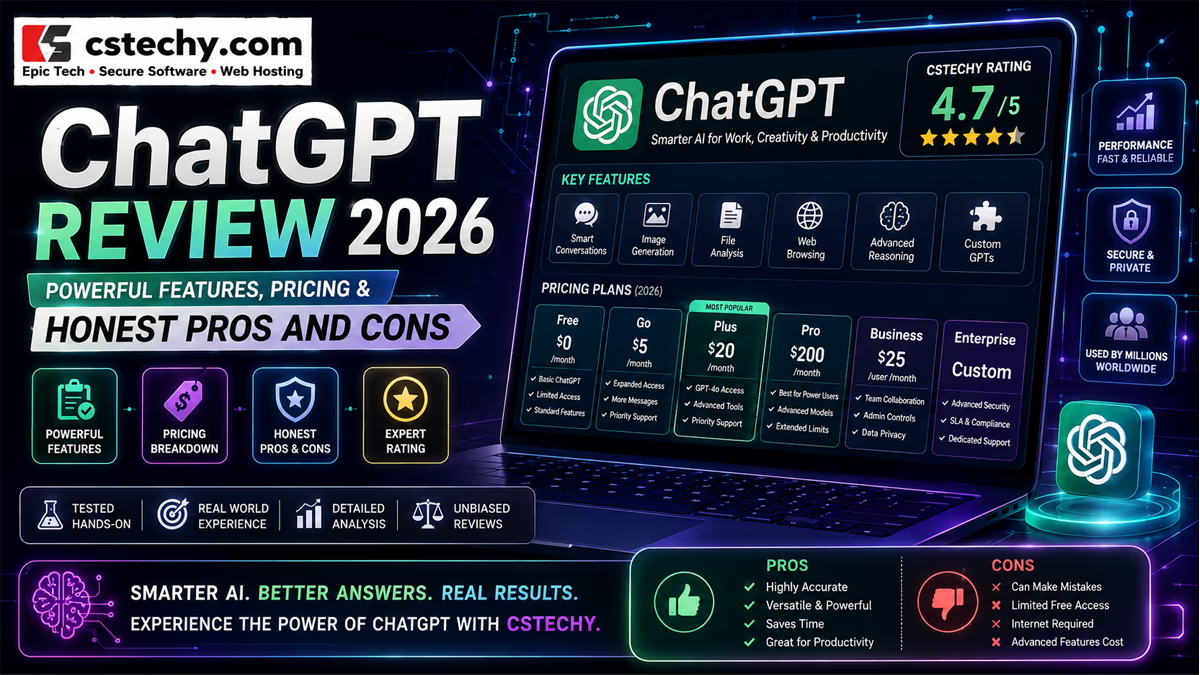
As of mid-to-late 2026, OpenAI offers ChatGPT across six tiers: Free, Go, Plus, Pro, Business, and Enterprise. Pro is currently split into two price points depending on usage needs. Because OpenAI adjusts pricing, limits, and included features fairly often, treat the figures below as a general guide and confirm current numbers on OpenAI’s official pricing pages before subscribing.
| Plan | Typical Price | Best For |
|---|---|---|
| Free | $0 | Occasional, casual use |
| Go | Roughly $8/month | Light daily use on a budget |
| Plus | $20/month | Regular individual productivity use |
| Pro | Roughly $100–$200/month, tiered by usage | Heavy professional, research, or coding use |
| Business | Around $20/user/month annually (higher billed monthly), 2-user minimum | Teams needing shared workspace and admin controls |
| Enterprise | Custom quote | Large organizations needing advanced security, compliance, and support |
Free gives anyone access to ChatGPT without a subscription, with capped usage and access to a lighter model. It’s a reasonable way to try the product or cover occasional needs.
Go sits between Free and Plus — a lower-cost paid option with higher usage limits, aimed at people who bump into Free’s limits regularly but don’t need Plus’s full feature set.
Plus is OpenAI’s mainstream paid plan, adding higher usage caps, access to more capable models, and additional tools like image generation and file uploads. For most individuals who use ChatGPT daily, this is the plan that tends to make the experience feel dependable rather than limited.
Pro targets heavy professional and technical use, with substantially higher usage ceilings and access to the most capable model variants. OpenAI currently offers two Pro price points aimed at different usage intensities.
Business is built for teams: a shared workspace, centralized billing and administration, connectors to workplace tools, and — notably — a default commitment not to use business content to train models. This matters for any team handling client, financial, or otherwise sensitive data, since Plus and Pro only offer a user-controlled opt-out rather than a contractual guarantee.
Enterprise adds the security and compliance layer larger organizations typically need: expanded context windows, SSO, role-based access controls, data residency options across multiple regions, and dedicated support — priced individually through OpenAI’s sales team.
Because pricing and included features shift over time — Business pricing, for instance, has already changed more than once in the past year — always check OpenAI’s current pricing page before making a purchasing decision.
Is ChatGPT Accurate?
This is the single most important question to answer honestly before relying on any AI assistant.
ChatGPT can be genuinely useful, but useful and accurate are not the same thing. It can misread an instruction, rely on outdated information, draw an incorrect inference, or state something wrong with total confidence. For casual brainstorming, that’s usually a minor annoyance you catch and fix. For medical, legal, financial, or safety-related decisions, it can matter a great deal more.
Use ChatGPT to speed up thinking and drafting — but keep human judgment in charge of anything consequential, and verify important facts against a primary source.
Privacy and Security Considerations
Take a few minutes to actually understand your account’s memory and data settings before using ChatGPT for anything sensitive. For personal use, avoid entering information you wouldn’t want stored or reviewed. For business use, the calculation is broader: internal policy, confidentiality obligations, applicable data-protection law, and the specific plan in use all matter.
OpenAI publishes separate privacy documentation for consumer and business products, including its data-training commitments for Business and Enterprise accounts — worth reading directly rather than assuming based on what a lower tier offers.
Is ChatGPT Good for SEO and Content Work?
ChatGPT is genuinely useful across the content pipeline — keyword brainstorming, structuring articles, drafting FAQs, tightening readability, building comparison frameworks. What it isn’t is a shortcut to publishing large volumes of unedited AI text and expecting that to perform.
For professional publishing, human editorial judgment still does the heavy lifting: verifying claims, citing reliable sources, adding original insight, and making sure the piece actually satisfies what the reader came looking for. The realistic use case for AI in SEO content isn’t “let it write everything” — it’s using it to speed up research, structuring, and editing while keeping a human firmly in the quality-control seat.
Who Should Use ChatGPT?
- Students — explanations, practice, revision support
- Writers — research help, outlining, editing, brainstorming
- Developers — coding assistance, debugging, documentation
- Marketers — campaign ideas, content planning, drafting
- Business owners — repetitive administrative and knowledge work
- Researchers — organizing and accelerating exploratory work
Who Probably Doesn’t Need It
If your AI use is limited to a handful of questions a month, Free is likely already enough — there’s no obvious reason to pay for more. Similarly, if you’re comfortable with traditional search and manual research and don’t find yourself wishing for a faster way to draft or organize, a paid plan may not add enough value to justify the cost.
The better question isn’t whether ChatGPT is impressive. It’s whether you have recurring tasks it would meaningfully speed up.
ChatGPT vs. Traditional Search
These tools solve different problems. A search engine is best when you already know what you’re looking for and want to browse multiple sources directly. ChatGPT is often more useful when you want to think through a problem, transform information into a new format, or work through something multi-step conversationally.
In practice, the strongest workflow usually combines both: search to locate authoritative information, ChatGPT to help organize, explain, or repurpose it.
Common Mistakes People Make With ChatGPT
A few habits tend to separate people who get consistent value from ChatGPT from people who come away disappointed.
- Treating the first answer as final. ChatGPT is built for iteration. A vague or generic first response is often a cue to add context or ask a follow-up question, not a sign the tool has failed.
- Skipping verification on anything that matters. Copying a statistic, legal statement, or medical claim straight into a final document without checking it is one of the most common — and most avoidable — ways AI mistakes end up in front of an audience.
- Oversharing sensitive information. It’s easy to paste a full contract, medical record, or client dataset into a chat window without thinking about where that data goes or how it’s retained. Check your account and organizational settings first.
- Assuming every feature is included on every plan. Free and Go users are sometimes surprised that a feature they saw discussed online — an advanced reasoning model, a specific tool, higher usage caps — isn’t actually available on their tier.
- Under-specifying the request. Vague prompts produce vague answers. Naming the audience, the format, the length, and the goal up front usually saves several rounds of back-and-forth.
ChatGPT Pros and Cons at a Glance
| Area | Assessment |
|---|---|
| Ease of use | Very accessible, minimal learning curve |
| Writing assistance | Strong for drafting, editing, brainstorming |
| Research assistance | Useful, especially with web search enabled |
| Coding assistance | Solid for explanations, debugging, and support — not a replacement for review |
| Image capabilities | Useful for creation and editing where available |
| Accuracy | Genuinely useful but not guaranteed; verify anything important |
| Privacy | Manageable with the right settings and awareness |
| Value | Depends heavily on how often and how you actually use it |
Final Verdict: Is ChatGPT Worth It in 2026?
For many people, yes — with the caveat that the value scales directly with how much you actually use it. An occasional user is likely well served by the Free tier. A professional who leans on it daily for research, writing, coding, or analysis is more likely to feel the difference a paid plan makes.
The real benefit isn’t that ChatGPT does something humans fundamentally can’t. It’s that it lowers the friction between having an idea and getting to a usable first draft — of a document, a plan, a piece of code, or an explanation. That’s a meaningful productivity gain for the right kind of work, even though it comes with real limitations around accuracy and privacy that are worth taking seriously.
CSTechy’s take: ChatGPT is worth considering if you regularly do writing, research, coding, learning, or planning work where a fast, iterative assistant would genuinely help. Start with Free or Go if you’re unsure, and upgrade only once you can point to a specific limit you’re actually hitting. Because plans and pricing shift often, confirm current details on OpenAI’s official pricing page before subscribing.
Frequently Asked Questions About ChatGPT
1. What is ChatGPT used for?
Writing, research, learning, brainstorming, coding help, document analysis, planning, and image creation and editing, among other tasks. Exact capabilities depend on your plan, platform, and region.
2. Is ChatGPT free to use?
Yes — OpenAI offers a free tier alongside several paid plans with expanded access. Limits and included features change periodically, so check the current official pricing page before subscribing.
3. Is ChatGPT accurate?
It can be very useful, but accuracy isn’t guaranteed. It can make factual or reasoning errors, so verify anything important independently — especially for legal, medical, financial, or safety-related decisions.
4. Is ChatGPT good for students?
Yes, for explanations, practice, revision, and study organization — but it should support learning, not replace it, and students should follow their institution’s specific rules around AI-assisted work.
5. Can ChatGPT browse the internet?
Yes, in supported experiences it can search the web for current information. Source quality still varies, so it’s worth checking the underlying sources for anything important.
6. Can ChatGPT create images?
Yes — it can generate new images from a text description or edit an existing image, depending on your plan and platform.
7. Can ChatGPT help with coding?
Yes, for explanations, debugging, code generation, and documentation. Any generated code should be reviewed and tested before it’s used in production, particularly for security-sensitive systems.
8. Is ChatGPT safe for business use?
It can be, particularly on Business and Enterprise plans, which include a default commitment not to train on your data and additional administrative and security controls. Organizations should still evaluate their own compliance and data-governance requirements before deploying it for sensitive work.
9. Is ChatGPT worth paying for in 2026?
It depends on how often you’d use it. Occasional users are usually well served by Free. Frequent users who lean on it for research, writing, coding, or analysis tend to get more out of a paid tier — compare your actual usage against current plan limits before subscribing.
Editorial and Information Notice
This review is intended for general informational purposes. ChatGPT’s features, models, plans, pricing, and policies change over time, and CSTechy does not guarantee that every feature described here will remain available in its current form. Where a capability depends on account type, subscription, region, or staged rollout, availability may differ between users.
Readers should verify current details directly with OpenAI before making purchasing, professional, legal, financial, privacy, or security decisions. CSTechy is an independent technology review platform; references to OpenAI or ChatGPT here should not be read as sponsorship, endorsement, or partnership.