Google Gemini Review 2026: Features, Pricing, Pros, Cons & Is It Worth It?
Google Gemini has grown into one of the most tightly integrated AI assistants on the market — not because it does something no other AI can do, but because of where it lives. Gemini shows up inside Gmail, Docs, Sheets, Drive, Search, Android, and Chrome, in addition to its own standalone app. For anyone already deep in Google’s ecosystem, that changes the calculation in a way a standalone AI chatbot can’t easily match.
So is Gemini actually worth using, or paying for, in 2026? The honest answer depends heavily on two things: how much you already rely on Google’s apps, and what kind of work you need an AI assistant to do. For some users, the ecosystem integration alone justifies a subscription. For others, it’s a nice bonus on top of a capable but not category-leading assistant.
This CSTechy review covers what Gemini currently offers, how its models and plans break down, where the Google ecosystem genuinely adds value, where Gemini’s limitations show up, and how it compares to ChatGPT and Claude — so you can decide what actually fits your situation.
What Is Google Gemini?
Gemini is Google’s family of AI models and the assistant built around them, available through the standalone Gemini app and website, embedded across Google Workspace apps, built into Android, and accessible to developers through the Gemini API and Google AI Studio. It’s the successor to Google’s earlier Bard chatbot, rebuilt around Google’s more capable multimodal model family.
Like other AI assistants, Gemini works conversationally — you describe a task, get a response, and refine it through follow-up messages. What sets it apart isn’t the chat interface itself but its reach: Gemini can be invoked directly inside a Gmail draft, a Google Doc, or a Sheet, rather than requiring you to copy content back and forth between a separate AI tool and your actual work.
That convenience doesn’t make Gemini infallible. Like any AI system, it can produce incorrect or outdated information, and its output should be treated as a helpful draft or starting point — not an authoritative answer — particularly for anything legally, medically, or financially significant.
Google Gemini Review 2026: What’s New?
2026 has been a fast-moving year for Gemini’s model lineup. Google introduced Gemini 3 in late 2025, bringing frontier-level reasoning, multimodal understanding, and agentic coding performance across Gemini 3 Pro and a Deep Think reasoning mode. Since then, Google has focused new releases heavily on the faster Flash tier: Gemini 3.6 Flash arrived in July 2026 as an efficiency-focused “workhorse” model for coding and everyday tasks, followed shortly by Gemini 3.7 Flash in August 2026 with further gains in software engineering and agentic workflows. Notably, as of this writing Google has not yet shipped a Gemini 3.5 or later Pro model — the flagship Pro tier remains Gemini 3.1 Pro, with a newer Pro version reportedly still in partner testing.
On the consumer side, Google restructured its subscription ladder in 2026, cutting the price of its entry-level AI Plus plan and splitting the former single Ultra tier into two usage levels. Google has also continued expanding Gemini’s presence across its products, including deeper Workspace integration, an evolving Gems feature for building custom mini-assistants, and continued rollout of Deep Research and video generation through Veo.
Because Google updates model names, pricing, and included features fairly frequently — sometimes more than once in the same year — treat any specific figure here as a snapshot and confirm current details on Google’s official Gemini pages before making a decision based on them.
Google Gemini Models Explained
Gemini’s lineup is organized into three broad tiers, and understanding the difference matters more for Gemini than for some competitors, since the tiers don’t share version numbers in lockstep.
- Gemini Pro (currently Gemini 3.1 Pro) is the flagship reasoning tier — Google’s most capable model for complex analysis, coding, and multimodal understanding, available on paid plans.
- Gemini Flash (currently Gemini 3.6 and 3.7 Flash) is the fast, everyday workhorse tier, tuned for coding, knowledge work, and agentic tasks at lower cost and latency than Pro. The free tier of the Gemini app currently runs on Flash.
- Gemini Flash-Lite is the most cost-efficient option, designed for high-volume, simpler tasks rather than complex reasoning.
- Gemini Deep Think is an extended-reasoning mode built on the Pro foundation, aimed at the hardest problems in research, science, and engineering, and reserved for Google’s highest subscription tier.
For most everyday users, the practical takeaway is simple: the free experience runs on a Flash model, and upgrading to a paid plan is primarily what unlocks full access to Gemini Pro and, at the top tier, Deep Think. As with any fast-moving AI product, expect model names to keep shifting — Google has already introduced multiple Flash updates in 2026 without a matching Pro refresh, so check the model picker in your own account for what’s currently available rather than assuming a name you’ve seen elsewhere is still current.
Key Gemini Features
Multimodal AI
Gemini can work across text, images, documents, audio, and video within a single conversation — for example, analyzing a chart you’ve uploaded, discussing a PDF, or interpreting a photo. This multimodal foundation is one of Gemini’s core strengths, letting you bring in different types of content without switching tools. As with text output, understanding of images or audio isn’t perfect, and details should be double-checked when accuracy matters.
Web Search and Google Search Integration
Gemini can search the web for current information, and its connection to Google’s own search infrastructure gives it a natural advantage for surfacing recent or fast-changing information compared to AI tools without a comparable search backbone. That said, AI-generated summaries of search results can still misstate or oversimplify what a source actually says, so verifying important claims against the original page remains a good habit.
Deep Research
Deep Research is Gemini’s capability for longer, multi-step research tasks — gathering information across many sources and compiling it into a structured report rather than a single quick answer. This is genuinely useful for early-stage research or literature scanning, but it isn’t a substitute for professional research rigor: source quality varies, and synthesized reports should be treated as a head start rather than a finished, citation-checked product.
Writing and Editing
Gemini can draft, rewrite, summarize, and adjust tone for emails, articles, and documents, with the added convenience of doing this directly inside Google Docs and Gmail rather than a separate window. It doesn’t produce guaranteed publish-ready content — fact-checking, adding original insight, and final editorial judgment still belong to the person doing the writing.
File and Document Analysis
Gemini can read and analyze uploaded files and documents already stored in Google Drive, which is a meaningful convenience for anyone whose work already lives there — no need to download and re-upload a file that’s sitting in Drive. As with any AI document analysis, results depend on the clarity of the source material and the specificity of the request.
Image Generation
Gemini includes image generation and editing capabilities for creating visuals from a text description or modifying an existing image. This is useful for concept work, illustrations, and marketing visuals, but generated images should be reviewed carefully before use — particularly anything involving text, logos, or specific factual details, and generated visuals shouldn’t automatically be assumed to be free of copyright or commercial-use complications without independent review.
Gemini Live
Gemini Live provides a real-time, voice-based conversational mode, letting you talk to Gemini and get spoken responses rather than typing — useful for brainstorming out loud, hands-busy situations, or simply a more natural way to interact on mobile. As with any voice AI, transcription and understanding can occasionally slip, particularly with background noise or ambiguous phrasing.
Canvas
Canvas gives Gemini an interactive workspace for iterating on a document or piece of code, rather than working purely through back-and-forth chat messages. For longer writing projects or coding tasks that benefit from seeing the whole draft evolve in place, this tends to be a more practical interface than scrolling through a chat log.
Gems and Personalization
Gems let users create custom, purpose-built versions of Gemini — for example, a Gem tuned to a specific recurring task or written with particular instructions baked in — and Google has continued expanding a library of premade Gems from Google Labs. This can meaningfully speed up repeated workflows, but a personalized Gem doesn’t remove the need to review its output any more than the base assistant does.
Google Workspace Integration
This is arguably Gemini’s most distinctive feature: direct integration into Gmail, Docs, Sheets, Slides, Drive, and Calendar, letting you draft an email, summarize a spreadsheet, or generate a slide outline without leaving the app you’re already working in. Exactly which Workspace features are available depends on your specific plan — personal Google AI subscriptions and Google Workspace business plans bundle Gemini differently, so it’s worth checking which applies to your account.
Android and Google Ecosystem Integration
Gemini is built into Android as an assistant option, and connects with other Google services like Maps and YouTube in supported contexts. For Android users, this tends to mean a more seamless assistant experience than installing and switching to a separate AI app — though the depth of integration can vary by device and Android version.
Coding and Developer Assistance
Gemini can generate, explain, debug, and refactor code, and Google has increasingly positioned its Flash models around agentic coding and software engineering performance. Developers also have access to Gemini through Google AI Studio and the Gemini API, plus tools like Gemini CLI for command-line workflows. As with any AI-assisted coding, generated code needs testing, security review, and human understanding before it’s used in anything production-facing — AI models can still misunderstand requirements, reference outdated APIs, or introduce subtle bugs.
What Can You Use Gemini For?
Gemini for Students
Explaining concepts, generating practice questions, summarizing reading material, and helping plan study schedules are all reasonable uses, especially convenient for students already using Google Docs and Drive for coursework. As always, this should support learning rather than replace it, and students should follow their institution’s specific AI-use policies.
Gemini for Writers
Brainstorming, drafting, and editing directly inside Google Docs is a genuine convenience for writers already working in that environment. The strongest workflow still keeps a human in charge of the final product — verifying facts and applying editorial judgment before anything gets published.
Gemini for Developers
Coding assistance, debugging, and access to Gemini’s models through the API and developer tools make it a reasonable option for development work, particularly for teams already using Google Cloud infrastructure. Code review and testing remain necessary regardless of which AI tool generated the code.
Gemini for Researchers
Deep Research and Gemini’s search integration are genuinely useful for early-stage information gathering and synthesis across documents and sources. Professional research standards — checking primary sources, evaluating evidence quality — still apply on top of whatever Gemini produces.
Gemini for Business
For organizations already on Google Workspace, Gemini’s embedded presence in Gmail, Docs, Sheets, and Slides can reduce friction compared to adopting a separate AI tool. Businesses should still review Workspace’s specific data-handling and administrative controls, and apply their own governance policies before using Gemini for confidential or regulated work.
Gemini for Everyday Users
Quick questions, planning, search-adjacent tasks, and general assistance across Android and the Gemini app cover most casual use cases well, and the free tier is often sufficient for this level of use.
Google Gemini Plans and Pricing
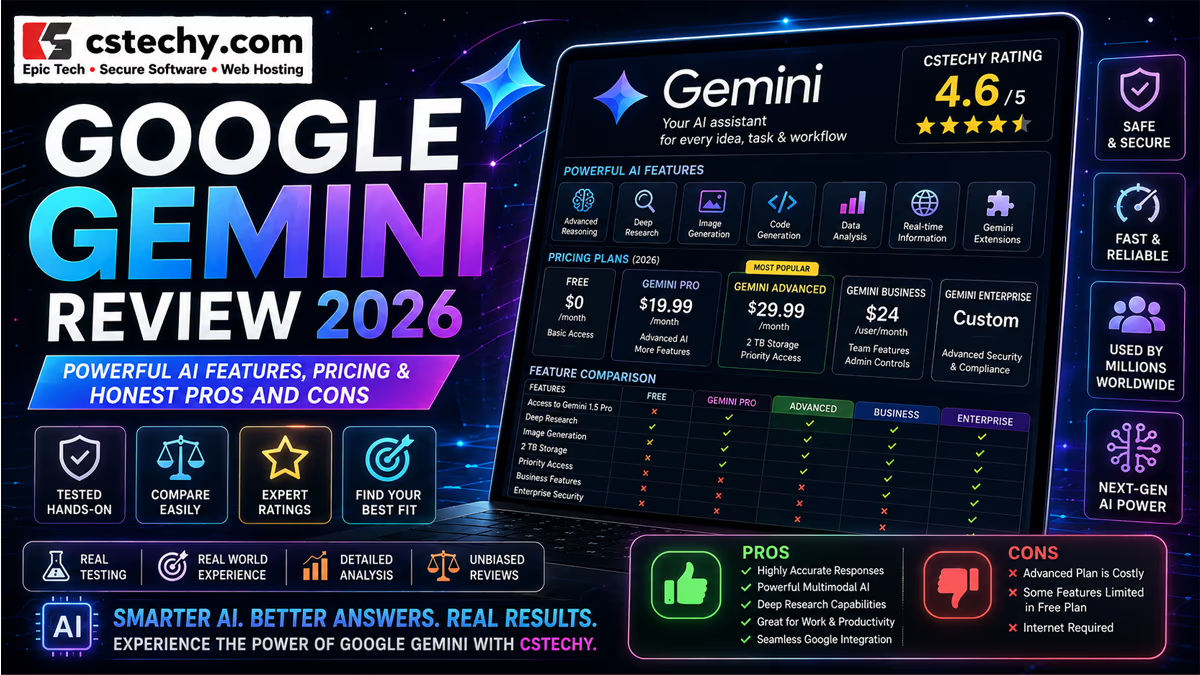
As of mid-to-late 2026, Google offers Gemini access through a Free tier and three paid consumer plans: AI Plus, AI Pro, and AI Ultra (available in two usage levels). Google has adjusted this pricing structure more than once already in 2026, so treat the figures below as a general guide and confirm current pricing at Google’s official subscription page before purchasing.
| Plan | Best For | Main Benefits | Important Consideration |
|---|---|---|---|
| Free | Casual, occasional use | No cost, access to a Flash model with daily limits | No access to full Gemini Pro or Deep Think |
| AI Plus | Light regular use | Higher limits and expanded storage over Free | Limited, not full, access to Gemini Pro |
| AI Pro | Daily individual use | Full Gemini Pro access, Deep Research, video generation | Single-user consumer plan, not built for team administration |
| AI Ultra | Power users and professionals | Highest usage ceilings, Deep Think access, largest storage allotment | Meaningfully more expensive than Pro; mainly a capacity and top-model upgrade |
Free gives everyday access to Gemini with a Flash-tier model and daily usage limits — no payment required. It’s a solid way to try Gemini and cover casual needs.
AI Plus sits between Free and Pro, adding higher limits, expanded cloud storage, and limited access to Gemini Pro, aimed at users who want more than Free but don’t need the full professional feature set.
AI Pro is Google’s mainstream paid plan, unlocking full access to Gemini Pro, Deep Research, video generation through Veo, and a substantial context window. For most people using Gemini regularly for work, this tends to be the plan that removes Free’s daily-limit friction.
AI Ultra is Google’s top consumer tier, offered at two usage levels with significantly higher caps than Pro, plus access to Deep Think and the largest storage allowance. This is aimed squarely at heavy, professional-level usage rather than typical daily needs.
Separately, Google Workspace business plans bundle Gemini differently for organizations, with its own pricing structure and administrative controls distinct from the personal Google AI plans above — worth checking directly if you’re evaluating Gemini for a team rather than individual use.
Gemini Free vs. Paid Plans
The core difference between Free and paid tiers comes down to which model you get and how much you can use it. Free runs on a Flash-tier model with daily caps; paid plans unlock full Gemini Pro access, and the top tier adds Deep Think for the hardest reasoning tasks. Paid plans also add or expand Deep Research, video generation, and cloud storage — benefits that matter more to some workflows than others.
If you’re mainly using Gemini for quick questions or occasional drafting, Free is a reasonable place to stay. If you’re hitting daily limits regularly, or specifically need full Gemini Pro or Deep Research for sustained work, that’s the clearest signal to consider AI Plus or AI Pro.
Google Gemini Pros and Cons
Advantages
- Deep Google Workspace integration — Gmail, Docs, Sheets, Slides, and Drive access directly inside the tools you already use
- Strong multimodal capabilities across text, images, documents, audio, and video
- Search integration tied to Google’s own search infrastructure
- Large context windows on Pro-tier models, useful for long documents
- A generous free tier for casual and everyday use
- Android and broader Google ecosystem integration
Disadvantages
- Model naming and tiers can be confusing, with Flash and Pro updates arriving on inconsistent schedules
- Pricing structure has changed more than once in 2026, making it harder to plan around
- Full Pro-model access requires a paid plan, unlike some competitors’ more generous free reasoning access
- Accuracy isn’t guaranteed — the same hallucination and error risks apply as with any AI system
- Ecosystem advantage diminishes for non-Google users, who won’t benefit from Workspace integration
- Business vs. personal plan structures differ, requiring separate evaluation for team use
Gemini Privacy and Security
Privacy considerations for Gemini depend heavily on which product you’re using and which account it’s tied to. Personal Google account use of Gemini is governed by Google’s consumer privacy and Gemini Apps activity controls, which include settings for managing what’s saved and how it may be used. Google Workspace business and education accounts are typically governed by separate, more restrictive data-handling terms intended for organizational use.
Because these settings and terms can differ meaningfully between a personal Google account and a Workspace account, it’s worth reviewing your specific account’s current privacy and data-control settings — particularly before using Gemini with sensitive personal information or, for organizations, confidential business data. Google publishes current documentation on Gemini Apps privacy and Workspace data protections that’s worth consulting directly rather than assuming based on general reputation.
Gemini Limitations
Gemini, like every current AI system, can produce factual errors, outdated information, misunderstood context, or confidently incorrect answers. Multimodal understanding — of images, audio, or video — adds another layer where misinterpretation is possible. AI assistance doesn’t remove the need for verification, especially for anything with real consequences. For legal, medical, financial, or other high-stakes matters, treat Gemini’s output as a starting point for further checking, not a final answer.
Gemini vs. ChatGPT
Neither tool is a universal winner — the right choice depends on your workflow and existing tooling.
Gemini’s clearest advantage is ecosystem depth: if your work already runs through Gmail, Docs, Sheets, and Drive, having an AI assistant embedded directly in those tools removes real friction a standalone chatbot can’t match. Its search integration and multimodal handling of documents, images, and video are genuine strengths too. ChatGPT, by comparison, has a broader third-party plugin and connector ecosystem and a longer track record in areas like voice interaction that some users still prefer.
For business use, the decision often comes down less to raw model capability and more to which company’s tools your organization is already standardized on. A team deeply embedded in Google Workspace is likely to get more day-to-day value from Gemini than from adopting a separate AI product from scratch, and the reverse holds for organizations built around Microsoft or other ecosystems.
Gemini vs. Claude
This comparison also doesn’t produce a clean winner. Claude tends to be favored for agentic coding through Claude Code and its straightforward plan structure, while Gemini’s strength lies in ecosystem reach and multimodal breadth — particularly images, audio, and video alongside text. Both offer large context windows on their higher-tier models for long-document work, so the practical difference often comes down to whether your documents already live in Google Drive or elsewhere, and whether your infrastructure already runs on Google Cloud. Testing both against your actual recurring tasks remains more reliable than relying on general reputation.
Who Should Use Gemini?
- Students — explanations, study support, and research help, especially within Google Docs workflows
- Writers — drafting and editing directly inside Google Docs and Gmail
- Developers — coding assistance, particularly for teams on Google Cloud infrastructure
- Researchers — Deep Research and search-integrated synthesis work
- Businesses on Google Workspace — embedded productivity across Gmail, Docs, Sheets, and Slides
- Android users — a more seamlessly integrated mobile assistant experience
Who May Not Need Gemini?
If your AI use is occasional, the Free tier likely already covers it without any need to upgrade. If you don’t use Google Workspace heavily, much of Gemini’s most distinctive advantage — deep ecosystem integration — simply won’t apply to you, and a competing AI assistant with a workflow you prefer may make more sense. Similarly, if you already rely on another AI tool that handles your needs well, there may not be enough incremental benefit to justify adding a second subscription.
Is Google Gemini Worth It in 2026?
Casual users: Free is usually sufficient — daily limits rarely bite for occasional use.
Students: Free often covers coursework support; AI Plus or Pro helps mainly if you’re hitting limits or specifically want full Gemini Pro.
Writers working in Google Docs: The Workspace integration is a genuine convenience that can make Pro worth considering even before hitting usage limits.
Developers: Worth it primarily if you’re already using Google Cloud infrastructure or specifically want Gemini’s coding-focused Flash models; otherwise, evaluate against your existing tools.
Researchers: Deep Research on AI Pro or Ultra can meaningfully speed up early-stage work, though professional verification standards still apply.
Google Workspace users: This is where Gemini’s case is strongest — the ecosystem integration alone often justifies the subscription for daily Workspace users.
Businesses: Worth evaluating primarily through the lens of your existing Workspace investment and specific data-governance requirements, rather than model capability alone.
Final Verdict
Gemini’s core differentiator isn’t a single standout capability — it’s how thoroughly it’s woven into Google’s ecosystem. For people and organizations already living inside Gmail, Docs, Sheets, and Drive, that integration removes real friction and makes Gemini genuinely more convenient than a standalone AI tool would be. For everyone else, Gemini is a capable, broadly multimodal assistant that competes reasonably well on its own merits, without a decisive advantage over ChatGPT or Claude.
Gemini’s limitations are the ones shared across the category: outputs need verification, model naming and plan structures have shifted multiple times in 2026 alone, and full access to the flagship Pro model and Deep Think reasoning requires a paid subscription. The free tier is a reasonable way to start, and upgrading tends to make the most sense once you can point to a specific limit — daily usage caps, a need for Deep Research, or a genuine Workspace workflow — that’s actually holding you back.
CSTechy’s take: Gemini is worth strong consideration if you’re already a regular Google Workspace or Android user — the ecosystem integration is a real, practical advantage. If you’re ecosystem-agnostic, it’s worth evaluating alongside ChatGPT and Claude on your actual tasks rather than assuming any one is automatically the right fit. Because Google has changed Gemini’s pricing and model lineup multiple times in 2026, confirm current details on Google’s official pricing page before subscribing.
Frequently Asked Questions About Google Gemini
1. What is Google Gemini?
Gemini is Google’s family of AI models and the assistant built around them, available through a standalone app, embedded in Google Workspace apps like Gmail and Docs, built into Android, and accessible to developers through the Gemini API.
2. Is Google Gemini free?
Yes — Google offers a permanent Free tier with access to a Flash-tier model and daily usage limits, alongside paid AI Plus, AI Pro, and AI Ultra plans with higher limits and access to more capable models. Pricing and limits change periodically, so check Google’s current pricing page before subscribing.
3. What is the best Gemini model?
Gemini Pro (currently Gemini 3.1 Pro) is the flagship model for complex reasoning and coding, available on paid plans. Gemini Flash offers a faster, more cost-efficient option suited to everyday tasks, and Deep Think provides the most advanced reasoning mode, reserved for Google’s top subscription tier.
4. Is Gemini better than ChatGPT?
Neither is universally better — it depends on your workflow. Gemini’s biggest advantage is deep Google Workspace and Android integration, while ChatGPT offers a broader third-party ecosystem and a longer track record in areas like voice and image generation. Testing both against your actual tasks is the most reliable way to decide.
5. Is Gemini good for coding?
Yes — Gemini’s Flash models in particular have been increasingly tuned for coding and agentic software engineering tasks, and Gemini integrates with developer tools like Google AI Studio and Gemini CLI. As with any AI-generated code, testing and review remain necessary before production use.
6. Can Gemini search the web?
Yes, Gemini can search the web for current information and benefits from its connection to Google’s search infrastructure. Results should still be checked against original sources for anything important, since AI-generated summaries can misstate details.
7. Can Gemini generate images?
Yes, Gemini includes image generation and editing capabilities. Generated images should be reviewed before use, particularly for accuracy of any text or factual detail, and users should apply their own judgment regarding copyright and commercial-use considerations.
8. Is Gemini safe for business use?
It can be, particularly for organizations using Google Workspace’s business-oriented data-handling and administrative controls, which differ from personal Google account settings. Organizations should review Google’s current Workspace privacy documentation and apply their own governance policies before using Gemini for sensitive work.
9. Is Google Gemini worth paying for in 2026?
It depends on your usage and how invested you already are in Google’s ecosystem. Occasional users are usually well served by Free. Regular Google Workspace users, or anyone hitting daily usage limits or needing full Gemini Pro and Deep Research, are more likely to find a paid plan worthwhile — compare your actual usage and Workspace reliance against current plan details before subscribing.