
Affiliate disclosure: CSTechy may earn a commission if you purchase Bluehost VPS Hosting through the links on this page, at no extra cost to you. This does not affect our editorial independence — all opinions and figures below are based on information published by Bluehost and independently verified where possible.
Bluehost VPS Hosting Review (2026): Features, Pricing, Performance & Is It Worth It?
If your website has outgrown shared hosting, Bluehost VPS hosting is one of the first names most people consider — and for good reason. Bluehost is one of the best-known hosting brands in the world, and its virtual private server (VPS) range gives you dedicated resources, full root access, and the option of either taking full control yourself or letting Bluehost manage the server for you.
In this review, we’ll break down exactly what Bluehost VPS hosting includes, how much it costs in 2026, how it performs, and how it compares with rivals such as Hostinger, Cloudways, ScalaHosting, A2 Hosting, and InMotion Hosting. By the end, you’ll know whether it’s the right fit for your website, app, or agency workload.
What Is Bluehost VPS Hosting?
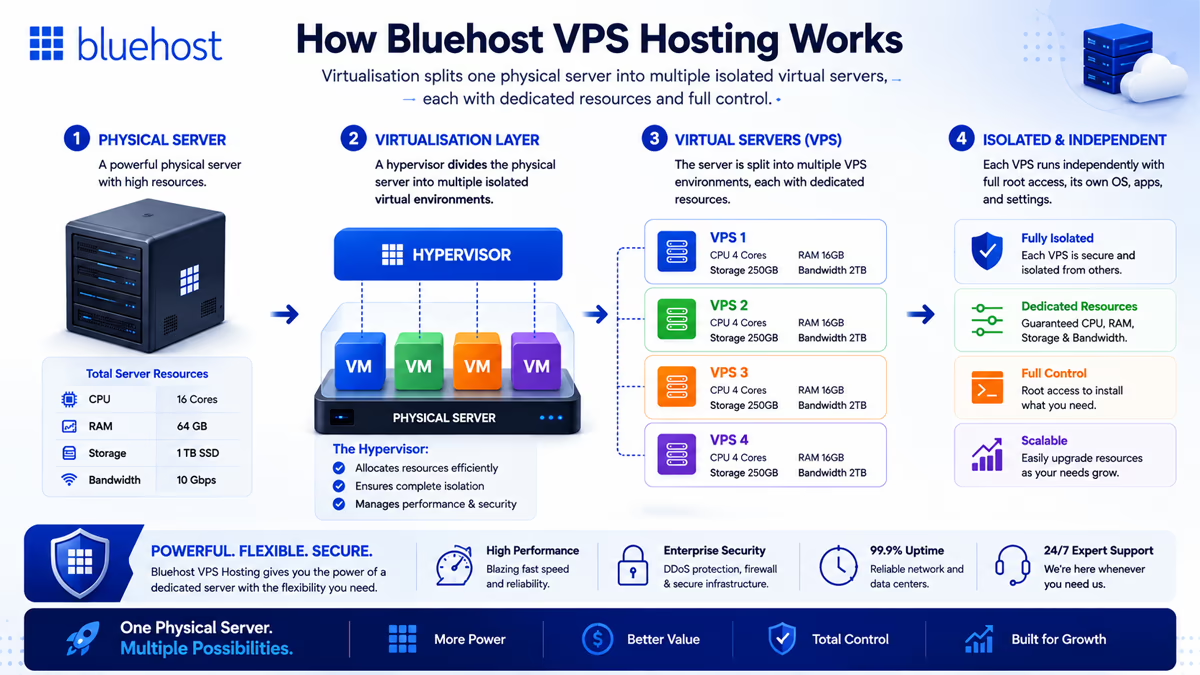
VPS hosting stands for Virtual Private Server hosting. Instead of your website sharing resources with hundreds of other accounts on one server (as happens with shared hosting), a VPS gives you your own isolated slice of a physical server, complete with a guaranteed amount of CPU, RAM, and storage.
This is made possible through virtualisation: a physical server is divided into several independent virtual machines, each running its own operating system and behaving like a standalone server. In practice, this means your website’s performance is not affected by what other customers on the same physical hardware are doing.
VPS vs Shared Hosting: What’s the Difference?
| Factor | Shared Hosting | Bluehost VPS Hosting |
|---|---|---|
| Resources | Pooled with other accounts | Dedicated CPU, RAM & NVMe storage |
| Root access | No | Yes, full root access |
| Custom software | Restricted | Install anything you need |
| Performance under load | Can be affected by neighbours | Isolated and predictable |
| Technical skill required | Minimal | Low (managed) to moderate/high (self-managed) |
| Typical price | Lower | Higher, but scalable |
Bluehost actually offers two distinct flavours of VPS: Self-Managed VPS, aimed at developers who want raw infrastructure and complete control, and Managed VPS, which bundles in cPanel, WHM, and 24/7 expert support so less technical users can still enjoy dedicated server power. We cover both throughout this review.
Typical Use Cases
- Websites that have outgrown shared hosting resource limits
- WooCommerce stores and other e-commerce sites
- Agencies hosting multiple client websites
- Developers running custom stacks, APIs, or staging environments
- AI automation tools such as n8n, OpenClaw, or self-hosted chat tools
Expert Tip: If you’re only mildly outgrowing shared hosting and don’t need root access, it’s worth checking Bluehost’s Cloud Hosting plans first — they may be a gentler, cheaper step up before committing to VPS.
Bluehost VPS Hosting Features
Whichever tier you choose, Bluehost VPS hosting runs on modern AMD EPYC processors, DDR5 RAM, and NVMe storage. Here’s what each core feature actually means for your website.
NVMe SSD Storage
All Bluehost VPS plans use NVMe (Non-Volatile Memory Express) SSD storage rather than older SATA SSDs or spinning hard drives. NVMe communicates directly with the server’s processor over a faster interface, which reduces latency for database queries, file reads, and log writes — the kind of operations that add up on busy WordPress or WooCommerce sites.
Dedicated Resources
Every plan comes with a fixed allocation of vCPU cores and RAM that is yours alone. Unlike shared hosting, a traffic spike on someone else’s site cannot eat into your server’s capacity.
Multi-Server Management
Bluehost’s dashboard lets you provision, monitor, and manage multiple VPS instances from one account — useful for agencies running several client sites or developers who separate staging and production environments.
Root Access
Root access is the highest level of administrative control on a Linux server. It lets you install any software, edit system-level configuration files, and fine-tune performance settings that shared hosting simply doesn’t allow. Every Bluehost VPS tier — self-managed and managed — includes full root access via SSH.
cPanel & WHM
cPanel is the most widely used hosting control panel, used to manage domains, email, databases, and files through a graphical interface. WHM (WebHost Manager) sits above cPanel and lets you manage multiple cPanel accounts, useful for reseller-style setups. On Bluehost’s Managed VPS plans, a cPanel licence with WHM access is included in the price. On Self-Managed VPS plans, cPanel is available as a paid add-on rather than bundled in — a distinction that’s easy to miss and worth budgeting for.
Enhanced cPanel
Managed VPS customers get an “enhanced” cPanel interface with additional server-level controls layered on top of the standard panel, giving a middle ground between beginner-friendly management and genuine server administration.
Scalability
You can increase CPU, RAM, and storage from your dashboard as your site grows, without rebuilding the server from scratch or losing your existing data, IP addresses, or configuration.
Dedicated IP
A dedicated IP address is assigned exclusively to your account rather than shared with other websites. Self-managed plans include one dedicated IP; managed plans include two, with additional IPs available on request.
RAID Storage
Bluehost’s underlying infrastructure uses redundant storage architecture to protect against single-drive failure, adding a layer of resilience beneath your NVMe storage allocation.
Server Monitoring
Bluehost states its infrastructure is actively monitored 24/7, backed by a 99.99% uptime SLA, so hardware-level issues can typically be caught and resolved before they affect your uptime.
Security
Every VPS plan includes DDoS protection at the network level, along with firewall configuration options you control through root access or, on managed plans, through cPanel.
Website Migration
Managed VPS plans include a free eligible website migration, and Bluehost also offers a self-service migration tool and expert-assisted migration with zero downtime for more complex moves.
Bluehost VPS Hosting Plans & Pricing
This is where Bluehost’s VPS lineup gets a little more nuanced than some competitors, because self-managed and managed VPS are priced and packaged separately. We verified the figures below directly from Bluehost’s official pricing pages.
Managed VPS Plans (cPanel Included)
| Plan | vCPU | RAM | NVMe Storage | Intro Price | Renewal Price |
|---|---|---|---|---|---|
| Standard (NVMe 4) | 2 cores | 4 GB DDR5 | 100 GB | $34.99/mo | $53.99/mo |
| Enhanced (NVMe 8) — Most Popular | 4 cores | 8 GB DDR5 | 200 GB | $53.99/mo | $83.99/mo |
| Ultimate (NVMe 16) | 8 cores | 16 GB DDR5 | 450 GB | $82.99/mo | $128.99/mo |
All Managed VPS plans include cPanel with WHM, two dedicated IP addresses, unmetered bandwidth, free SSL, a free eligible site migration, and a 30-day money-back guarantee.
Self-Managed VPS Plans (Root Access, No cPanel Included)
| Plan | vCPU | RAM | NVMe Storage | Intro Price | Renewal Price |
|---|---|---|---|---|---|
| NVMe 2 | 1 core | 2 GB DDR5 | 50 GB | $4.69/mo | $5.69/mo |
| NVMe 4 — Recommended | 2 cores | 4 GB DDR5 | 100 GB | $9.49/mo | $11.99/mo |
| NVMe 8 | 4 cores | 8 GB DDR5 | 200 GB | $12.99/mo | $28.99/mo |
| NVMe 16 | 8 cores | 16 GB DDR5 | 450 GB | $25.99/mo | $49.99/mo |
Self-managed plans include unmetered bandwidth, one dedicated IP, root SSH and API access, and DDoS protection, but cPanel is a separate add-on from $14.99/month, and priority support is not included by default — Bluehost describes this as “infrastructure only” support.
Warning: Don’t compare headline prices across VPS providers without checking whether cPanel and support are included. Bluehost’s cheapest self-managed plan looks very affordable, but once you add cPanel it can end up costing more than a mid-tier managed plan from a rival host.
Monthly vs Annual Pricing
Bluehost’s lowest advertised rates apply to longer commitments — 24 months for self-managed VPS and 36 months for managed VPS. Shorter terms are available but at a noticeably higher monthly rate, and all plans renew at the standard (non-discounted) rate once the introductory term ends.
Money-Saving Tip: If you’re not sure how long you’ll need the server, start with a 12- or 24-month term rather than 36 months. VPS workloads change quickly, and you can always upgrade resources later without losing your data.
Best Value Recommendation
For most small businesses and growing WordPress sites, the Managed VPS Standard (NVMe 4) plan offers the best balance of price and convenience, since it includes cPanel and expert support. Developers comfortable managing their own server will get considerably more resource for their money on the Self-Managed NVMe 4 plan instead.
Expert Tip: Deploying n8n specifically? Bluehost offers a preconfigured NVMe 4 VPS bundle with n8n installed and ready to go. Check current n8n VPS pricing on Bluehost, then follow our Bluehost n8n VPS tutorial for full setup instructions.
Bluehost VPS Performance
Bluehost’s VPS performance is built on three main pillars: AMD EPYC processors for compute, DDR5 RAM for memory bandwidth, and NVMe storage for disk I/O. On paper, this hardware stack is comparable to what specialist cloud providers use, and it should comfortably outperform typical shared hosting for CPU-bound tasks like PHP execution and database queries.
| Metric | What Bluehost Offers |
|---|---|
| Processor | AMD EPYC (modern, multi-core, low-latency) |
| Storage | NVMe SSD across all tiers |
| Memory | DDR5 RAM |
| Uptime | 99.99% SLA, 24/7 infrastructure monitoring |
| Bandwidth | Unmetered on all VPS plans |
| Data centre locations | Virginia (US), Arizona (US), London, Toronto, Amsterdam |
For UK-based site owners in particular, the London data centre option is worth highlighting — choosing a nearby region reduces round-trip latency and can meaningfully improve time to first byte (TTFB) for a domestic audience.
Load handling on a VPS is fundamentally more predictable than on shared hosting because your CPU and RAM allocation can’t be consumed by another customer’s traffic spike. That said, actual real-world load capacity depends heavily on your software stack, caching setup, and how well your application is optimised — a VPS is not a substitute for basic performance hygiene.
Performance Insight: Resource allocation only tells half the story. A poorly configured WordPress install on an 8-core VPS can still be slower than a well-cached, optimised site on a smaller plan. Pair your VPS upgrade with a caching layer (such as Redis or LiteSpeed Cache) for the best real-world results.
Bluehost VPS Security
Security on a VPS is a shared responsibility between Bluehost and you, and the split depends on which VPS type you choose.
- SSL: Free SSL certificates (Let’s Encrypt) are included, keeping traffic between your site and visitors encrypted.
- Firewall: Configurable at the server level; on managed plans this is more accessible through cPanel.
- Dedicated IP: Reduces the risk of your site’s reputation being affected by neighbours on a shared IP.
- DDoS protection: Network-level filtering is included on every VPS tier.
- Malware protection: Available and more comprehensive on Managed VPS plans, which include additional security tooling.
- SSH access: Secure Shell access is available on all plans for encrypted remote administration.
- Secure backups: Automatic backups are part of the Managed VPS package; self-managed users are responsible for configuring their own backup routine unless they purchase an add-on.
- Account isolation: Virtualisation ensures your VPS is logically separated from other customers on the same physical hardware.
Warning: If you choose Self-Managed VPS, applying OS security patches, hardening SSH access, and configuring backups is entirely your responsibility. Skipping this is one of the most common ways self-managed servers get compromised.
Bluehost VPS Control Panel
On Managed VPS plans, Bluehost includes a licensed copy of cPanel, the industry-standard hosting control panel, paired with WHM for server-wide administration. Together they let you handle:
- Account management — creating and managing hosting accounts and users
- Server management — resource monitoring, service restarts, and basic tuning
- Domain management — adding domains, subdomains, and DNS records
- Email — setting up mailboxes, forwarders, and spam filtering
- Databases — creating and managing MySQL databases via phpMyAdmin
- File manager — uploading, editing, and organising site files without SSH
On Self-Managed VPS, none of this is included by default — you get root access and a blank server, and you either install cPanel (from $14.99/month) or use a free alternative such as a lightweight control panel, or manage everything from the command line.
Good to Know: If you’ve only ever used cPanel on shared hosting and don’t want to touch a terminal, Managed VPS is almost certainly the right choice — self-managed VPS assumes genuine Linux administration experience.
Bluehost VPS for WordPress
Bluehost is officially recommended by WordPress.org, and its VPS plans extend that WordPress focus to higher-traffic and more demanding sites. If your site doesn’t need VPS-level resources yet, our Bluehost WordPress Hosting Review covers the more affordable managed WordPress tiers.
- WooCommerce: Dedicated resources help maintain checkout speed during traffic spikes and sales events.
- Business websites: Predictable performance for lead-generation and brochure sites with growing traffic.
- Membership sites: Handles the database load of logged-in, personalised content better than shared hosting.
- High-traffic blogs: Dedicated CPU prevents traffic surges from slowing the site to a crawl.
- Agency websites: Multi-server management makes it practical to host several client sites from one account.
- Developers: Root access allows custom PHP versions, caching layers, and staging environments.
- Client hosting: WHM access on Managed VPS supports reseller-style, multi-account setups.
Best For: Established WordPress and WooCommerce sites that have started to feel sluggish on shared hosting but aren’t yet ready for the cost and complexity of a dedicated server.
Bluehost VPS Pros & Cons
| Pros | Cons |
|---|---|
| Modern hardware: AMD EPYC, DDR5 RAM, NVMe storage across all tiers | cPanel costs extra on self-managed plans |
| Choice of self-managed or fully managed VPS | Self-managed plans have infrastructure-only support |
| Full root access on every plan | Lowest advertised prices require long-term contracts |
| Unmetered bandwidth on all plans | Renewal prices are significantly higher than intro pricing |
| 99.99% uptime SLA and 24/7 infrastructure monitoring | Fewer data centre regions than some cloud-first rivals |
| One-click deployment for apps like WordPress, n8n, and Docker stacks | Managed VPS entry price is higher than budget competitors |
| 30-day money-back guarantee | Advanced backup tools are add-ons on lower tiers |
Bluehost VPS vs Competitors
How does Bluehost VPS hosting actually stack up against the other well-known names? The table below compares entry-level pricing and general positioning; always check each provider’s site for the latest offers, as VPS pricing changes frequently.
| Provider | Entry Price (approx.) | cPanel Included? | Best For |
|---|---|---|---|
| Bluehost (Self-Managed) | From ~$4.69/mo | No (add-on) | Developers wanting raw resources cheaply |
| Bluehost (Managed) | From ~$34.99/mo | Yes | WordPress/WooCommerce users wanting support |
| Hostinger VPS | From ~$4.99/mo | No (hPanel used instead) | Budget-conscious developers, n8n/automation hosting |
| Cloudways | From ~$11/mo | No (proprietary panel) | Managed cloud hosting across multiple cloud providers |
| ScalaHosting | From ~$14.95/mo | No (SPanel included instead) | Customisable managed VPS with strong support |
| A2 Hosting | Varies by term | Available, cost varies | Turbo-boosted shared-to-VPS upgrade path |
| InMotion Hosting | From ~$13.99/mo | Available on managed tiers | White-glove managed VPS support |
Against Hostinger specifically, the comparison is close at the entry level: both offer sub-$5 self-managed plans with root access, but Hostinger’s hPanel is generally considered more beginner-friendly than a bare Bluehost self-managed server, while Bluehost’s Managed VPS pulls ahead if you specifically want cPanel bundled in. If you’re weighing these two up for an automation workload such as n8n, we’ve published a dedicated Bluehost vs Hostinger VPS for n8n comparison that goes deeper into that specific use case.
Cloudways takes a different approach entirely — it’s not a hosting provider itself but a management layer on top of DigitalOcean, Vultr, AWS, and other cloud infrastructure, which suits developers who want cloud flexibility without a traditional cPanel workflow. ScalaHosting is a strong pick if you want a managed VPS with a modern proprietary panel (SPanel) instead of cPanel licensing costs. A2 Hosting and InMotion Hosting both compete more directly with Bluehost’s managed tier, with InMotion in particular known for higher-touch, US-based support.
Bluehost VPS Hosting Performance Tests
We haven’t run our own live GTmetrix or PageSpeed Insights benchmark for this review, so we won’t quote specific scores as if we had — but here’s how to properly evaluate Bluehost’s real-world performance yourself, and what to expect based on the underlying hardware.
- GTmetrix: Use this to test full page-load waterfall data once your site is live on a Bluehost VPS, comparing before-and-after if you’re migrating from shared hosting.
- PageSpeed Insights: Google’s tool is useful for Core Web Vitals, though results depend as much on your theme and plugins as on the server itself.
- TTFB (Time to First Byte): With NVMe storage and dedicated CPU, TTFB should improve noticeably versus shared hosting, particularly for dynamic, database-driven pages. Choosing the data centre closest to your audience (e.g. London for UK visitors) matters as much as the hardware.
- Stress testing: Tools like k6 or Apache Bench can simulate concurrent visitors to confirm your chosen plan’s CPU and RAM allocation is sufficient before launch.
- Uptime monitoring: Third-party monitors such as UptimeRobot let you independently verify Bluehost’s uptime claims over time rather than relying on the advertised SLA alone.
Performance Insight: Always benchmark your own specific stack rather than relying solely on marketing figures or third-party review scores — hardware specs set the ceiling, but your software configuration determines what you actually get.
Who Should Buy Bluehost VPS Hosting?
- Agencies managing multiple client websites from one account
- Developers who need root access and custom server configurations
- Growing businesses whose shared hosting plan is starting to buckle under traffic
- WooCommerce stores that need dependable performance during sales periods
- Medium-traffic websites that have outgrown shared hosting but don’t yet need a dedicated server
- Anyone hosting multiple websites who wants centralised, predictable resource allocation
Who Should Avoid Bluehost VPS?
VPS hosting isn’t the right starting point for everyone. Consider alternatives if you fall into one of these groups:
- Complete beginners with no hosting experience — start with Bluehost Shared Hosting or the Bluehost AI Website Builder instead
- Tiny blogs with low, stable traffic — shared hosting will comfortably cover this at a fraction of the cost
- Personal websites without complex functionality — the extra control a VPS offers will likely go unused
- Strictly budget-limited users who don’t yet need dedicated resources — see our Best Hosting Comparisons 2026 roundup for cheaper starting points
If you’re still unsure whether VPS is the right category for you at all, our Shared vs VPS vs Cloud Hosting guide breaks down the decision in more depth.
Final Verdict
Bluehost VPS hosting earns its place among the better-known VPS options in 2026, largely because it genuinely gives you a choice: cheap, no-frills self-managed servers with full root access for developers, or a fully managed cPanel experience for everyone else. The underlying hardware — AMD EPYC processors, DDR5 RAM, and NVMe storage — is competitive with specialist cloud hosts, and the 99.99% uptime SLA and London data centre option make it a sensible pick for UK-based projects specifically.
Where it’s less competitive is transparency around what’s included. The gap between self-managed and managed pricing is large, and cPanel being a separate add-on on the cheaper tier catches some buyers out. It’s also not the cheapest option at every tier — Hostinger undercuts it slightly on self-managed pricing, and ScalaHosting’s SPanel avoids licensing costs altogether.
Overall, if you want the reassurance of a long-established, WordPress.org-recommended brand and you’re prepared to pick the plan type (managed vs self-managed) that actually matches your technical comfort level, Bluehost VPS hosting is worth it for growing WordPress sites, WooCommerce stores, and agencies. If you’re a confident Linux administrator chasing the lowest possible price, it’s worth cross-checking against Hostinger before committing.
Check current Bluehost VPS Hosting plans and pricing →
Frequently Asked Questions
What is Bluehost VPS Hosting?
Bluehost VPS hosting is a virtual private server service that gives your website dedicated CPU, RAM, and NVMe storage on isolated virtual machines, rather than shared resources. It’s available as either Self-Managed VPS, where you control everything via root access, or Managed VPS, where Bluehost handles server maintenance and includes cPanel with WHM.
Is Bluehost VPS Hosting managed?
Both options exist. Bluehost’s Managed VPS plans include cPanel, 24/7 expert support, and handled server maintenance. Self-Managed VPS plans give you full root access and raw infrastructure, but you’re responsible for OS updates, security, and configuration yourself.
How much does Bluehost VPS Hosting cost?
Self-Managed VPS starts from around $4.69/month on a 24-month term (renewing at $5.69/month), rising to $25.99/month for the top NVMe 16 tier. Managed VPS starts from around $34.99/month on a 36-month term (renewing at $53.99/month), rising to $82.99/month for the Ultimate plan. Always confirm current rates on Bluehost’s pricing page before buying.
Is Bluehost VPS good for WordPress?
Yes. Bluehost is officially recommended by WordPress.org, and its VPS plans give WordPress and WooCommerce sites dedicated resources that hold up better under traffic spikes than shared hosting. Managed VPS is generally the easier route for WordPress users who don’t want to manage server infrastructure themselves.
Can I upgrade from shared hosting to Bluehost VPS?
Yes. Bluehost offers a free eligible site migration with Managed VPS plans, plus a self-service migration tool. If your shared hosting site is regularly hitting resource limits or slowing under traffic, that’s generally the signal it’s time to move up to VPS hosting.
Does Bluehost VPS include root access?
Yes, every Bluehost VPS plan — both self-managed and managed — includes full root access via SSH, letting you install custom software and configure the server beyond what shared hosting permits.
Does Bluehost VPS include cPanel and WHM?
Managed VPS plans include cPanel with WHM access as standard. Self-Managed VPS plans do not include cPanel by default; it’s available as a paid add-on starting from around $14.99/month, or you can use a free alternative control panel.
Is Bluehost VPS suitable for WooCommerce?
Yes. Dedicated CPU and RAM help WooCommerce stores maintain checkout speed and stability during traffic spikes, such as sales events, which is harder to guarantee on shared hosting where resources are pooled with other sites.
Is Bluehost VPS worth it in 2026?
For established WordPress sites, WooCommerce stores, and agencies that have outgrown shared hosting, Bluehost VPS hosting is worth it thanks to its modern hardware, flexible managed/self-managed choice, and 99.99% uptime SLA. Budget-focused developers should still compare it against Hostinger and ScalaHosting before deciding.