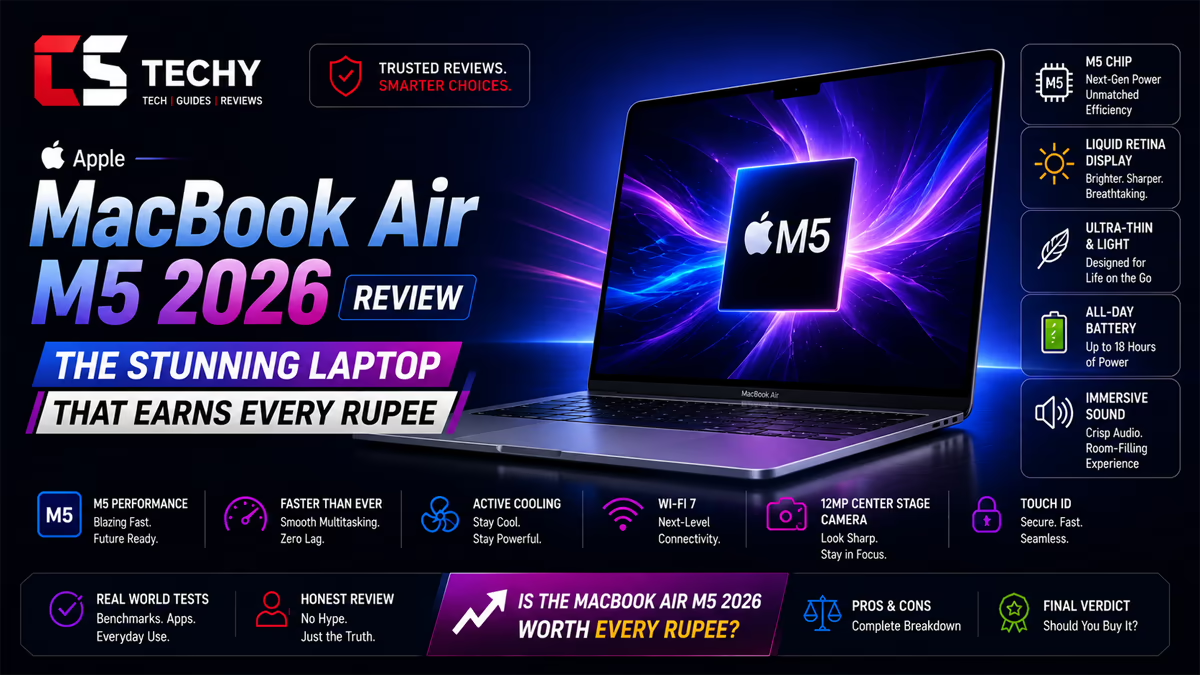

- SPEED OF LIGHTNESS — MacBook Air with the M4 chip lets you blaze through work and play. With Apple Intelligence,* up to …
- SUPERCHARGED BY M4 — The Apple M4 chip brings even more speed and fluidity to everything you do, like working between mu…
- BUILT FOR APPLE INTELLIGENCE — Apple Intelligence is the personal intelligence system that helps you write, express your…
Apple MacBook Air 13 Review: Is the M4 Chip Worth Your Money in 2026?
The Apple MacBook Air 13 has been the go-to laptop for students, creators, and everyday professionals for years, and the M4 version pushes that reputation even further. We spent real-world time with the MacBook Air 13 (M4) across writing, coding, photo editing, video exports, and everyday browsing to see whether it still deserves its spot on our Best Laptops list. This Apple MacBook Air 13 review covers everything from design and display quality to performance, battery life, and who should actually buy it.
If you are comparing laptops before you buy, our Laptop Buying Guide is a good place to start, especially if you are unsure how much CPU power or RAM you actually need.
Apple MacBook Air 13 (M4) Specifications at a Glance
Here is a quick specification snapshot of the unit we tested. Configurations can vary by region and RAM/storage tier, so always check the exact model before buying.
| Component | Details |
|---|---|
| Processor | Apple M4 chip (10-core CPU option available) |
| Graphics | Integrated Apple GPU (8-core or 10-core, model dependent) |
| RAM | 16GB or 24GB unified memory |
| Storage | 256GB to 2TB SSD |
| Display | 13.6-inch Liquid Retina, 2560 x 1664 resolution |
| Battery | Up to 18 hours rated video playback |
| Weight | Approximately 1.24 kg |
| Ports | 2x Thunderbolt/USB4, MagSafe 3, 3.5mm headphone jack |
| Webcam | 12MP Center Stage camera |
| Operating System | macOS (Apple Intelligence supported) |
Design and Build Quality
The MacBook Air 13 keeps the flat-edged, unibody aluminum design Apple introduced a couple of generations ago, and it still feels excellent in daily use. There is no flex in the lid or the keyboard deck, and the fanless design means there is zero fan noise, ever, since this model does not have one.
- Solid aluminum unibody chassis with a premium, cool-to-touch feel
- Available in Midnight, Starlight, Space Gray, and Sky Blue finishes
- Thin profile that slips easily into most backpacks and sleeves
- No visible fan vents, since the M4 Air is completely fanless
Image suggestion: Top-down photo of the MacBook Air 13 closed, showing the aluminum lid finish. ALT text: “Apple MacBook Air 13 M4 laptop closed lid aluminum design”
Display Analysis
The 13.6-inch Liquid Retina display is one of the best screens you will find in this price range. Colors look accurate out of the box, text is crisp for reading and coding, and brightness is high enough for most indoor and shaded outdoor use.
- 2560 x 1664 resolution at 224 pixels per inch
- Wide color (P3) support for accurate photo and video colors
- True Tone technology adjusts white balance to ambient lighting
- Slim bezels with a small camera notch at the top
For everyday productivity, web browsing, and even light photo editing, this screen does not feel like a compromise compared to the more expensive MacBook Pro line.
Apple M4 Chip: CPU and GPU Performance
The Apple M4 chip is the real headline upgrade here. Built on a more advanced manufacturing process than the previous M3 generation, it brings noticeably faster single-core and multi-core performance, along with a more capable integrated GPU for everyday graphics tasks.
In daily use, the difference shows up in small but meaningful ways: apps launch faster, browser tabs with dozens of pages open stay responsive, and exporting a document or resizing a batch of images barely makes the fans spin up, because there are no fans to spin up in the first place.
Cinebench Performance
In Cinebench-style rendering workloads, the M4 chip shows a clear step up over the M3 in multi-core rendering speed, while single-core scores remain among the best in the thin-and-light laptop category. Rendering-heavy tasks like 3D previews complete noticeably quicker than on the previous generation Air.
Geekbench Performance
Geekbench testing highlights strong single-core scores that translate directly into snappier everyday performance, since most consumer apps still lean heavily on single-core speed. Multi-core scores are also comfortably ahead of Intel-based ultrabooks in the same weight class.
SSD Performance
SSD read and write speeds remain fast, though the base 256GB storage tier uses fewer NAND chips and tends to run a bit slower than the 512GB and higher configurations. If you plan to work with large video files or big project folders, we recommend stepping up to at least 512GB.
Real-World Productivity Testing
For everyday productivity, the MacBook Air 13 handles the basics without breaking a sweat:
- Multiple browser windows with 20+ tabs open stayed smooth
- Video calls in Zoom or Google Meet ran with no dropped frames
- Switching between Pages, Excel, Slack, and Notion felt instant
- Spotlight search and app switching remained fast even under heavy load
This is exactly the kind of workload most students and office professionals need covered, which is why we regularly feature Apple silicon laptops in our Best Student Laptops and Best Business Laptops roundups.
Programming and Development Experience
Developers will find the MacBook Air 13 a genuinely capable daily driver, especially for web development, mobile app development, and scripting work.
- Xcode builds and iOS Simulator run smoothly for iOS/macOS development
- Docker containers run well, though heavy multi-container setups will use more RAM
- Node.js, Python, and most local dev servers run without noticeable lag
- Terminal-heavy workflows and Git operations feel instant
The main limitation is RAM. If you plan to run several containers, virtual machines, or large IDEs simultaneously, we recommend the 24GB configuration. For a deeper comparison of developer-friendly machines, check our Best Programming Laptops guide.
Creative Workflows: Video and Photo Editing
Video Editing in Final Cut Pro and Premiere Pro
Final Cut Pro is where the M4 chip really shows off, since it is built specifically for Apple silicon. Multi-layer 4K timelines with color grading and transitions play back smoothly, and exports finish quickly thanks to the chip’s dedicated media engine.
Adobe Premiere Pro also runs well on Apple silicon now, though it is slightly heavier on system resources than Final Cut Pro. 1080p editing is very smooth, and 4K editing is manageable as long as you are not stacking too many effects layers at once.
Photo Editing Performance
Lightroom and Photoshop both run comfortably on the MacBook Air 13. Batch exporting RAW photos, applying AI-based masking tools, and working with large layered PSD files all feel fast enough for semi-professional workflows.
Gaming Performance on macOS
Gaming is not the primary purpose of this laptop, but the M4 GPU handles supported macOS titles better than you might expect for a fanless machine.
- Casual and indie games run smoothly at native resolution
- Titles optimized for Apple silicon perform noticeably better than emulated ones
- Demanding AAA titles are playable at lower settings, but expect some thermal throttling on longer sessions since there is no active cooling
If gaming is a priority for you, this is not the laptop to buy specifically for that purpose, but it is a nice bonus for casual play between work sessions.
AI and Apple Intelligence Features
Apple Intelligence is baked into macOS on this model, bringing on-device AI features that do not require sending your data to the cloud for most tasks.
- Writing tools for rewriting, summarizing, and proofreading text system-wide
- Smart photo search and cleanup tools in the Photos app
- Improved Siri responses with on-device processing for many queries
- Notification summaries to reduce distraction
These features work well for everyday users, though some advanced AI features are still rolling out gradually and may depend on your region and macOS version.
Keyboard, Trackpad, Webcam, and Audio
Keyboard and Trackpad
The Magic Keyboard on the Air 13 has comfortable key travel and a stable, quiet typing feel that makes long writing sessions pleasant. The large glass trackpad is smooth, accurate, and supports all of macOS’s multi-touch gestures without any lag or misreads.
Webcam, Microphones, and Speakers
The 12MP Center Stage webcam delivers clear, well-lit video calls and automatically keeps you framed as you move. The built-in microphones pick up voice clearly even in moderately noisy rooms, and the speaker system is surprisingly full for such a thin laptop, with decent bass for a fanless ultrabook.
Image suggestion: Close-up of the MacBook Air 13 keyboard and trackpad. ALT text: “MacBook Air 13 M4 keyboard and trackpad close-up”
Battery Life and Thermal Performance
Battery Life Testing
Battery life is one of the strongest points of this laptop. In our real-world mixed-use testing, combining web browsing, document editing, video calls, and some light photo editing, the MacBook Air 13 comfortably lasted a full workday on a single charge, and often stretched into a second half-day of lighter use.
Thermal Performance
Since the MacBook Air 13 has no fan, it relies entirely on passive cooling. Under short, intense bursts like exporting a video, it stays cool to the touch. During sustained heavy workloads, such as long 4K exports back-to-back, you may notice slight performance throttling as the chip manages heat, but this rarely affects normal daily use.
Ports and Connectivity
- Two Thunderbolt/USB4 ports for fast data transfer and external displays
- MagSafe 3 charging port, which frees up a Thunderbolt port for accessories
- 3.5mm headphone jack with support for high-impedance headphones
- Wi-Fi 6E and Bluetooth 5.3 for fast, stable wireless connections
The limited number of ports means most users will want a USB-C hub if they regularly connect multiple accessories, external drives, or monitors.
macOS Experience
macOS remains one of the smoothest, most polished operating systems available, with strong integration across Apple devices through Handoff, AirDrop, and Universal Clipboard. App compatibility is excellent, and most software you need for work, study, or creative projects is readily available on the Mac App Store or as a direct download.
Pros, Cons, and Who Should Buy the MacBook Air 13
Pros
- Excellent CPU performance for the price and weight class
- Silent, fanless operation with no fan noise ever
- Outstanding battery life for a full workday
- Bright, color-accurate display
- Premium build quality and lightweight design
Cons
- Only two ports, both Thunderbolt/USB4
- Base storage tier has slower SSD speeds
- Can throttle slightly under sustained heavy workloads
- 16GB RAM may feel limiting for heavy multitasking developers
Who Should Buy This Laptop?
- Students: Great battery life and portability for classes and note-taking
- Office professionals: Smooth multitasking for documents, spreadsheets, and calls
- Content creators: Strong option for photo editing and moderate video editing
- Developers: Good for web, mobile, and scripting work, especially with 24GB RAM
- Not ideal for: Heavy gamers or professionals doing constant, sustained 4K/8K rendering
Frequently Asked Questions
Is the Apple MacBook Air 13 M4 good for gaming?
It handles casual and indie games well, and many Apple-silicon-optimized titles run smoothly, but it is not built for demanding AAA gaming.
How long does the MacBook Air 13 battery last?
In real-world mixed use, it comfortably covers a full workday, with Apple rating it for up to 18 hours of video playback.
Is 16GB RAM enough on the MacBook Air 13?
For most everyday tasks, browsing, and office work, 16GB is enough. Developers or heavy multitaskers may benefit from the 24GB option.
Does the MacBook Air 13 have a fan?
No, it uses a completely fanless, passively cooled design, which is why it runs silently.
Can the MacBook Air 13 run Windows apps?
It cannot natively dual-boot Windows, but some Windows-compatible tools and virtualization apps allow limited use of Windows software.
Is the MacBook Air 13 good for video editing?
Yes, especially in Final Cut Pro, which is optimized for Apple silicon. Premiere Pro also runs well for most projects.
What is the difference between MacBook Air 13 and MacBook Air 15?
The main differences are screen size and battery capacity, with the 13-inch model being lighter and more portable.
Does the MacBook Air 13 support external monitors?
Yes, it supports connecting an external display through its Thunderbolt/USB4 ports.
Is the base storage model worth buying?
The 256GB base model works fine for light users, but its SSD speed is slower than higher storage tiers, so creators and developers should consider upgrading.
Final Verdict
The Apple MacBook Air 13 with the M4 chip is one of the most well-rounded laptops you can buy right now. It combines strong everyday performance, excellent battery life, a great display, and a premium design, all in a silent, fanless body. It is not built for hardcore gaming or sustained professional rendering work, but for students, professionals, developers, and creators who want a reliable daily driver, it is hard to beat.
Our Rating: 4.6 out of 5
If you are ready to buy, be sure to check current pricing and offers before you decide, and compare it against other options in our Best Laptops guide to make sure it truly fits your needs and budget.