Cursor Review 2026: AI Coding Agents, Features, Pricing & Is It Worth It?
Cursor started as a VS Code fork with unusually good autocomplete. In 2026, that description no longer fits — Cursor is now an agentic development environment built around autonomous agents, its own in-house coding model, cloud-based background work, mobile remote control, and a visual editing layer that lets developers point and speak changes into existence. The company behind it, Anysphere, is also in the process of being acquired by SpaceX in a $60 billion all-stock deal, one of the largest acquisitions of a venture-backed startup on record. This CSTechy review covers what Cursor actually does today, how its plans and usage-based billing work — including the India-specific Cursor Start plan — and whether it’s worth paying for in 2026.
What Is Cursor?
Cursor is an AI-native code editor built by Anysphere. It sits on a spectrum that runs from traditional code editors, through AI-assisted editors that suggest completions, to what Cursor now represents: an agentic development environment where an AI agent can explore a codebase, plan a multi-step change, edit files, run terminal commands, execute tests, and open a pull request — with a human reviewing and approving the result. Cursor isn’t simply autocomplete with a chat window bolted on; it’s built around the idea that a developer increasingly directs and reviews AI-driven work rather than typing every line themselves.
Cursor Review 2026: What’s New?
Two developments define Cursor’s 2026 so far. First, SpaceX agreed in June 2026 to acquire Anysphere, Cursor’s parent company, in an all-stock deal valued at roughly $60 billion, with the transaction expected to close in Q3 2026 pending regulatory approval — a deal widely reported as the largest acquisition of a venture-backed startup to date. Cursor’s own leadership has framed the deal around scaling Composer, its in-house model, rather than a change in product direction, but it’s a significant ownership change worth knowing about regardless. Second, on the product side, Cursor shipped Composer 2.5 (its own frontier-capable coding model), Cursor Router (an intelligent model-routing system replacing manual model selection for Auto mode), a native iOS and iPad app with remote agent control, and an India-specific low-cost plan called Cursor Start.
How Cursor Works
Cursor operates across several distinct interaction modes rather than one single workflow. Tab completion still offers inline, context-aware suggestions as you type. Inline edit lets you select code and describe a change in natural language. Agent mode — accessed through the Agents Window — takes a broader instruction, explores relevant files, plans an approach, makes changes across multiple files, runs commands, and iterates based on results. Cloud (background) agents take this further, running asynchronously in an isolated environment so a developer can hand off a task and keep working elsewhere. Across all of these, the quality of the outcome still depends on the clarity of the instruction, the model selected, and how much relevant context the codebase actually exposes.
Cursor’s Key Features
AI Code Editing
Cursor’s core editing experience spans inline completions, natural-language edits to selected code, full-file and multi-file generation, and refactoring assistance. Like any AI code-generation tool, it can produce code based on wrong assumptions, introduce unintended changes elsewhere in a file, or reach for an incorrect or outdated API — human review of every diff remains essential before committing.
Agent Mode
Agent mode is where Cursor’s “agentic” branding earns its keep: rather than returning a single suggestion, the agent can explore the codebase, form a plan, modify multiple files, execute terminal commands, run tests, and iterate through several rounds automatically. This is a fundamentally different interaction than asking for a code snippet — it’s asking Cursor to carry out a bounded development task. Multiple agents can now run in parallel (via git worktrees or remote machines), letting a developer explore several approaches to the same problem or work on unrelated tasks simultaneously. None of this is guaranteed to produce a correct or mergeable result on the first pass; agent output is meant to be reviewed like any other pull request.
Composer
Composer is Cursor’s family of in-house models purpose-built for the agent loop — file edits, terminal operations, and tool use inside Cursor specifically, rather than general-purpose chat. Because Composer runs on Cursor’s own infrastructure, it tends to be positioned as a faster, more cost-efficient option for everyday agent work compared with routing every request to a premium third-party frontier model.
Composer 2.5
Composer 2.5, released in May 2026, is the current generation of that model, built on top of an open-source backbone with additional post-training focused on long-horizon agentic tasks, tool selection, and reliability. Cursor documents it as having a “fast” variant tuned for interactive sessions and a “standard” tier optimized further for cost per token. It has full access to Cursor’s agent tools — file search, reading and editing files, running terminal commands, and browser control for visual tasks. Independent analyses have noted Composer 2.5 performs strongly on sustained, tool-heavy agent loops specifically, while other models may be preferable for one-shot architectural reasoning or terminal-heavy work — a genuine trade-off rather than a case of one model beating all others across the board.
Multiple AI Models
Beyond Composer, Cursor gives users access to a wide range of third-party frontier models, including current Anthropic Claude models, OpenAI GPT models, Google Gemini models, and xAI Grok models, alongside its own Composer and Grok-based Cursor Models. Because this lineup changes as providers release new models, the exact list should be checked in Cursor’s model picker before assuming a specific model is available. No single model is positioned as best for every task — reasoning style, speed, and cost all vary, and the right choice depends on what the task actually needs.
Cursor Router
Cursor Router is an intelligent model router that now powers Auto mode: it analyzes each incoming request and sends it to an appropriate model, with optimization settings for Intelligence, Balance, or Cost depending on user or team preference. In Cost mode, Auto uses fixed token rates; in Balance or Intelligence mode, billing follows whichever model the request is actually routed to. Router is rolling out to Teams and Enterprise first, with individual plans (Hobby, Pro, Pro+, Ultra) receiving it somewhat later. Routing removes the need to manually pick a model for every request, but it isn’t a guarantee that the routed model is the best possible choice for unusually specialized tasks.
Codebase Context
Cursor’s usefulness on a large project depends heavily on how well it understands that project — file structure, symbols, dependencies, and relevant documentation. This context-awareness improves with a well-organized repository, clear custom instructions (rules), and specific task framing, but it is not perfect: Cursor does not have flawless understanding of an entire codebase, and larger or messier repositories can produce less reliable context than smaller, well-structured ones.
Cloud Agents
Cloud (background) agents run in an isolated remote environment rather than a developer’s local machine, letting Cursor build, test, and push changes — including opening a pull request — while the developer works on something else entirely. This unlocks genuinely asynchronous development: kick off a task, walk away, and come back to review a diff. It also raises real questions about permissions, secrets handling, and dependency access inside that remote environment, so cloud agent environments and credentials should be configured deliberately rather than left wide open, and every resulting change still needs human review before merging — Cursor is not designed to hand an agent unrestricted production access.
Agent Fleets
Building on parallel agents, Cursor supports running multiple agents concurrently across a larger project — decomposing bigger tasks, exploring competing implementation approaches, or working through several independent issues at once. Running more agents in parallel increases throughput and exploration, not automatically the quality of the resulting code; each parallel branch still requires the same review discipline as a single agent’s output.
Bugbot and Code Review
Bugbot is Cursor’s automated code-review tool, integrating with pull requests (commonly via GitHub) to flag potential bugs and quality issues as inline review comments — and, in more recent iterations, to spin up its own agent to test and propose a fix directly on the pull request when it identifies a likely bug. It’s billed on usage-based billing for individual plans and included as agentic code review for Teams. Like any automated reviewer, Bugbot is an additional layer of scrutiny, not a substitute for a qualified human reviewer signing off on a change before it ships.
Cursor CLI
Cursor CLI brings agent interaction into the terminal, with an interactive Shell Mode and a headless mode intended for CI pipelines and automation. As with any AI-suggested terminal command, generated shell commands — especially anything destructive like file deletion or force-pushes — should be read and understood before being executed, never run blindly.
MCP Servers
Cursor supports the Model Context Protocol, letting agents connect to external tools and data sources — issue trackers, logging platforms, chat tools, and more — through a standardized interface rather than one-off custom integrations. This expands what an agent can act on, but every additional MCP connection is also an additional permission surface: users and organizations should review what access each connected server actually grants before enabling it, particularly for anything touching sensitive systems or credentials.
Plugins, Hooks and Skills
Cursor extends its base behavior through plugins, hooks, and skills — mechanisms for adding reusable workflows, custom tool integrations, and standardized team behavior, discoverable in part through a marketplace. These are genuinely useful for teams wanting consistent AI behavior across a codebase, but third-party plugins and skills carry the same security and privacy considerations as any third-party code or integration — they should be reviewed before being trusted with a real repository.
Design Mode
Design Mode is a visual editing layer inside Cursor’s built-in browser that lets a developer click an element, draw an annotation over the page, or narrate a change by voice, while an agent captures the element’s code, CSS, and layout context and edits the underlying implementation to match. It’s positioned as closing the gap between describing a UI change in words and pointing directly at what needs to change, and performs best paired with Composer 2.5 for a near-real-time point-and-preview loop. It’s a genuinely different interaction model for frontend work, but generated UI changes still need the same review as any other agent output — Design Mode edits are not automatically production-ready, and undo behavior after an agent applies a change can be unreliable, making version control the real safety net.
Cursor on iOS and iPad
Cursor for iOS launched in public beta in June 2026 on paid plans, with iPad support added shortly after. The app lets a developer launch cloud agents, follow their progress in real time, review diffs and pull requests, and merge changes from a phone or tablet. It is explicitly not a full IDE — there’s no code editor, terminal, or file browser on mobile, and functions like managing secrets, MCP servers, and source-control setup stay on the desktop or web dashboard. It’s built for directing and reviewing agents, not for writing code from scratch on a small screen.
Remote Control
Remote Control lets a developer take an agent already running on their desktop and continue steering it from their phone, with an option to keep the local machine awake so it stays reachable while away from the desk. On Teams and Enterprise plans, an admin has to explicitly enable Remote Control before team members can use it. This is a meaningful workflow shift — supervising and redirecting agent work no longer requires being physically at a workstation — but it’s designed for monitoring and approving, not for replacing a full desktop review before anything significant merges.
What Can You Use Cursor For?
Cursor for Beginners
Cursor can explain code, generate learning examples, and help debug beginner projects. As with any AI coding tool, accepting generated code without understanding what it does tends to produce work a beginner can’t maintain or explain later — it’s most useful as a learning aid alongside genuine study, not a substitute for it.
Cursor for Students
Students can use Cursor for practice projects, debugging, and documentation help. Academic policies on AI-assisted coursework vary significantly by institution, so students should confirm what’s permitted before submitting Cursor-assisted work as their own for graded assignments.
Cursor for Professional Developers
Experienced developers are generally positioned to get the most out of Cursor because they can evaluate agent-generated diffs quickly and catch subtle mistakes — refactoring, debugging, migrations, and well-scoped feature work are common strong fits, particularly when combined with parallel agents and cloud agents to offload defined tasks.
Cursor for Startups
Small engineering teams often use Cursor for rapid prototyping and MVP iteration, where agentic workflows can meaningfully speed up early development. This doesn’t guarantee faster company growth — it changes how quickly code gets written, not the broader factors that determine whether a startup succeeds.
Cursor for Teams
Teams plans add centralized administration, a team marketplace for shared plugins and rules, agentic code review via Bugbot, shared cloud agents and automations, usage analytics, team-wide Privacy Mode, and SAML/OIDC SSO — the organizational layer that individual plans don’t include.
Cursor for Enterprise
Enterprise tooling adds model and provider allowlists/blocklists, spend limits, detailed usage analytics, pooled usage, SCIM provisioning, audit logs, and invoice billing. None of this automatically makes an organization’s development process compliant with a specific regulatory framework — it provides the governance controls an organization would need to build that compliance itself.
Cursor Plans and Pricing
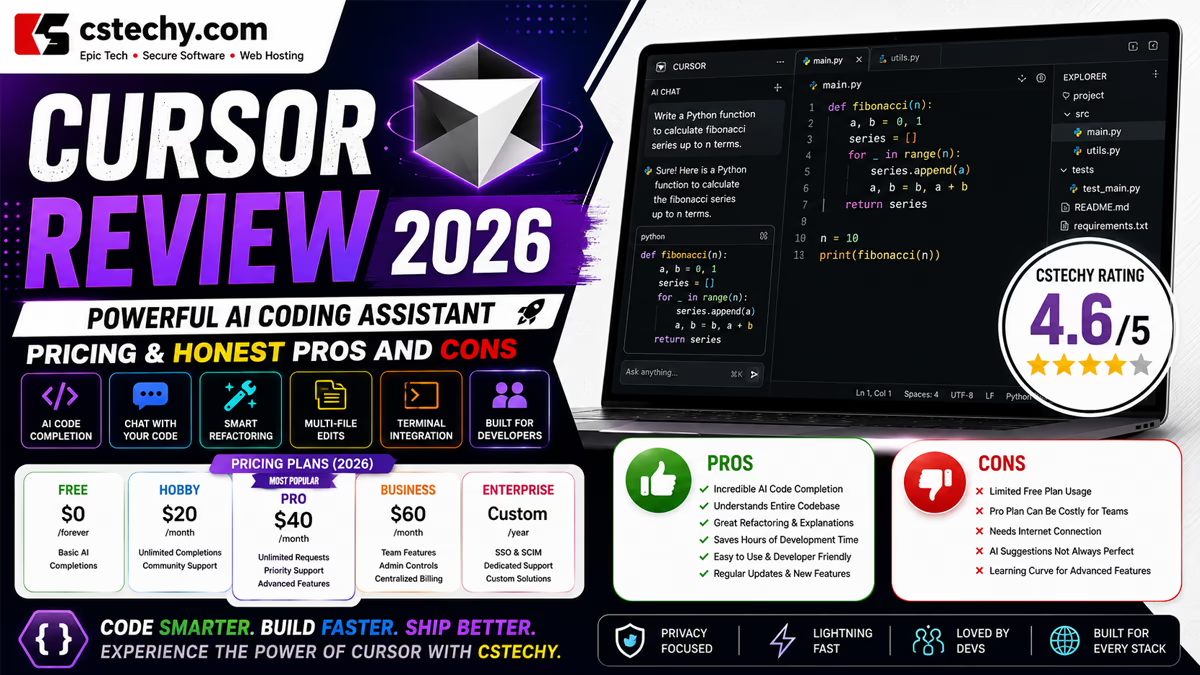
As of publication, Cursor’s official pricing lists six core tiers, running on a usage-based credit system layered on top of a flat subscription price:
| Plan | Price | Notes |
|---|---|---|
| Hobby | Free | No card required; limited Agent requests and Tab completions |
| Start (India only) | ₹649/month | Tax-inclusive; UPI or card; regional plan, see below |
| Pro | $20/month | Includes a Cursor Models pool and at least $20 of third-party model usage |
| Pro+ | $60/month | Larger included usage across both model pools |
| Ultra | $200/month | Highest included usage; priority feature access |
| Teams | $40/user/month (Standard) or $120/user/month (Premium) | Adds admin controls, SSO, Bugbot, shared cloud agents |
| Enterprise | Custom | Pooled usage, SCIM, audit logs, invoice billing |
Cursor runs two separate usage pools on paid individual plans: a “Cursor Models” pool covering Cursor’s own Grok-based and Composer models, and an “Other Models” pool covering third-party models billed at that model’s API rate. On-demand usage can continue after included usage runs out and is billed in arrears at published rates — meaning the subscription price is not necessarily a hard ceiling on monthly spend unless on-demand usage is explicitly disabled. Because Cursor has changed its pricing and usage structure multiple times in 2026, current figures should always be confirmed directly at cursor.com/pricing before subscribing.
Cursor Free vs Start vs Pro vs Pro+ vs Ultra
Hobby is a genuine free tier (not a trial) with limited Agent requests and Tab completions, plus access to Composer — enough to evaluate whether Cursor fits a given workflow, not enough for serious daily production work.
Start is discussed in detail below — a lower-priced, India-specific plan sitting between Hobby and Pro in capability.
Pro ($20/month) adds unlimited Tab completions, extended agent usage, frontier model access, MCP support, and cloud agents, with a Cursor Models pool plus at least $20/month of included third-party model usage.
Pro+ ($60/month) roughly triples the included usage over Pro, aimed at developers who consistently exhaust Pro’s monthly allowance.
Ultra ($200/month) provides the largest included usage pool and priority access to new features, intended for the heaviest individual agent users.
Cursor Start — India
Cursor Start is a regional plan for developers in India, priced at ₹649 per month, tax-inclusive, billed monthly in INR via UPI or card. According to Cursor’s own documentation, Start includes generous access to the Cursor Models pool (Grok 4.6, Grok 4.5, and Composer 2.5, running in non-fast mode at a fixed medium effort level), always-on cloud agents, Cursor for iOS with remote control, and plugins, MCP servers, hooks, and skills. It notably does not include the separate third-party (“Other Models”) usage pool, on-demand usage, Bugbot, Auto mode, Automations, or the Cursor SDK — those require upgrading to Pro or higher. Start should be understood as a distinct, India-specific entry point rather than a stand-in for Cursor’s broader global plan structure, and Indian readers deciding between Start and Pro should weigh whether they specifically need Auto mode, Bugbot, or third-party model access before choosing.
Cursor Teams and Enterprise
Teams offers two seat types: Standard at $40/user/month and Premium at $120/user/month, with Premium including roughly five times Standard’s included Agent usage. Both add centralized billing and administration, a team marketplace, agentic code review, shared cloud agents and automations, usage analytics, team-wide Privacy Mode, and SAML/OIDC SSO. Enterprise is custom-priced and adds pooled usage across the organization, SCIM provisioning, audit logs, model and provider allowlists/blocklists, spend limits, and invoice billing — the governance layer larger organizations typically need to deploy AI coding tools at scale responsibly.
| Plan | Best For | Main Benefits | Important Consideration |
|---|---|---|---|
| Hobby | Evaluating Cursor | No cost, real functionality | Limited Agent requests, not for daily production use |
| Start (India) | Indian developers wanting daily agent access cheaply | Low monthly cost, cloud agents, mobile | No Auto mode, Bugbot, or third-party model pool |
| Pro | Individual developers using Cursor daily | Unlimited completions, cloud agents, model choice | Included usage can run out on heavy agent work |
| Pro+ / Ultra | Heavy individual agent users | Substantially larger included usage | Meaningful price jump for headroom, not new features |
| Teams | Engineering teams needing shared governance | Admin controls, SSO, shared Bugbot and agents | Per-seat cost adds up quickly for larger teams |
| Enterprise | Organizations with compliance/governance needs | Pooled usage, SCIM, audit logs, model allowlists | Custom pricing requires a sales conversation |
Cursor Pros and Cons
- Strength: A genuinely AI-first editing experience with deep agent integration, rather than AI features layered onto an unrelated base editor.
- Strength: Access to a wide range of frontier models from multiple providers, plus Cursor’s own increasingly capable Composer models.
- Strength: Cloud agents, agent fleets, and mobile remote control enable genuinely asynchronous, parallel development workflows.
- Strength: Design Mode offers a distinctive, well-built visual editing workflow for frontend work.
- Strength: A meaningfully cheaper India-specific entry point through Cursor Start.
- Weakness: Usage-based billing with two separate credit pools and on-demand overage can make monthly costs hard to predict, especially for heavy agent users.
- Weakness: Cursor has changed its pricing and plan structure multiple times in 2026, making it a genuinely moving target to evaluate.
- Weakness: Agent-generated code, like any AI-generated code, can be incorrect, insecure, or built on wrong assumptions.
- Weakness: Reliance on multiple external model providers means Cursor’s own quality and cost structure shifts with decisions made outside the company.
- Weakness: The pending SpaceX acquisition introduces some uncertainty about longer-term product direction and independence.
Cursor Coding and Agent Limitations
Cursor’s agents and Composer models can generate incorrect code, insecure implementations, incomplete features, inefficient solutions, incorrect assumptions about existing code, dependency mistakes, API errors, and outright regressions — the same category of risk present in any AI-generated code, amplified somewhat by the scope of multi-file, multi-step agent changes. Developers should inspect every diff an agent produces, run the project’s test suite, use linting and static analysis tools, run relevant security scanning, review any new dependencies introduced, and genuinely understand a change before merging it. Version control matters more here than usual: since undo behavior after an agent’s “Apply” step isn’t always reliable, a clean git history is the practical safety net for reversing an unwanted change. Agent-generated pull requests should never be merged on trust alone.
Cursor Privacy and Security
Cursor offers Privacy Mode, which can be enabled in personal settings or set by a team admin. According to Cursor’s official pricing documentation, when Privacy Mode is enabled, code data is guaranteed not to be used for training by Cursor or its model providers. This is a specific, opt-in guarantee tied to that setting — it should not be assumed to automatically apply to every configuration or account by default, and users working with sensitive or proprietary repositories should confirm their Privacy Mode status before assuming a given level of protection. Organizations opting into regional data residency should also note that Cursor documents a pricing uplift for that option on eligible models.
On security, agent permissions, terminal command execution, and MCP server connections all expand what Cursor can act on — and each is a genuine attack surface that deserves deliberate configuration rather than default trust, particularly around secrets and credentials in cloud agent environments. Enterprise plans add model/provider allowlists and blocklists and spend limits specifically to give organizations more control over this. Cursor does not claim to guarantee secure code or a fully secure development environment; least-privilege access and human review remain the developer’s responsibility.
Cursor vs GitHub Copilot
Cursor is a purpose-built AI-first editor; GitHub Copilot is an AI layer that plugs into whichever editor a developer already uses, with especially deep native integration into GitHub itself — issues, pull requests, and code review all happening inside the same platform Copilot operates in. Cursor’s advantage is a more unified, AI-native editing experience with its own frontier-capable models and a distinctive visual Design Mode; Copilot’s advantage is that native GitHub integration plus broader official IDE support beyond a single editor base. Teams whose workflow is deeply centered on GitHub issues and pull requests may find Copilot’s integration more natural; developers who want one AI-first editing environment purpose-built around agentic coding may prefer Cursor. Neither is a universal winner.
Cursor vs Claude Code
Claude Code is Anthropic’s dedicated agentic coding tool, strongly oriented around terminal and IDE-based autonomous coding sessions. Cursor integrates agentic development directly into a full AI-first editor with its own UI, Design Mode, and mobile app, while Claude Code leans more heavily into a terminal-first, tool-composable workflow. The two aren’t strictly separable either — Cursor gives users access to current Claude models directly within its own model picker. Developers who want agentic coding wrapped in a complete IDE experience with visual tools may prefer Cursor; those who want a lean, terminal-native agent they can compose into custom workflows may prefer Claude Code directly.
Cursor vs ChatGPT
ChatGPT is a general-purpose AI assistant — research, writing, and broad problem-solving — with coding as one of many capabilities, typically used outside a developer’s actual codebase unless code is manually shared or connected through extensions. Cursor is specialized entirely around software development, with direct codebase context, file editing, terminal access, and agentic workflows built into the editor itself. For repository-aware coding work specifically, Cursor’s built-in context and editing integration are a structural advantage; for broader research or writing tasks alongside occasional coding questions, ChatGPT’s generalist breadth is more useful. Many developers reasonably use both for different parts of their work.
Who Should Use Cursor?
- Beginners — useful for AI-assisted learning, provided the generated code is actually understood rather than blindly accepted.
- Students — useful for practice and project development within their institution’s academic-integrity rules.
- Professional developers — a strong fit for daily AI-assisted coding, refactoring, and debugging on real codebases.
- Startup teams — useful for rapid prototyping and iteration with a small engineering team.
- Engineering teams — useful for collaborative agentic workflows with shared governance via Teams.
- Enterprises — useful where Cursor’s security and governance controls meet an organization’s specific requirements.
Who May Not Need Cursor?
Cursor may not be worth adopting for developers who code rarely, strongly prefer a traditional non-AI editor, already have an AI coding workflow that works well for them, are uncomfortable with agentic tools editing files autonomously, want to avoid usage-based cost uncertainty, or work primarily in environments Cursor doesn’t support well. There’s no obligation to switch tools just because Cursor exists — its value shows up with regular, codebase-heavy development work.
Is Cursor Worth It in 2026?
For a beginner or hobbyist, Hobby’s free tier is a legitimate way to evaluate Cursor without commitment, though its Agent request limits will feel restrictive quickly.
For a student, Cursor’s own free-year student promotion has closed to new signups as of mid-2026, so students should check current eligibility for any active offer before assuming free access.
For a developer in India who wants regular access to cloud agents and mobile control without committing to Pro pricing, Cursor Start at ₹649/month is a reasonable middle ground, provided Auto mode, Bugbot, and third-party model access aren’t required.
For an individual professional developer outside India using Cursor as a primary editor, Pro at $20/month is the sensible starting point, with Pro+ or Ultra worth considering only once Pro’s included usage is consistently exhausted rather than jumping to a higher tier by default.
For a startup or small team, Teams Standard at $40/user/month adds the shared administration and Bugbot review most growing teams eventually want.
For an enterprise with compliance, audit, or governance requirements, Enterprise’s pooled usage, SCIM provisioning, and model allowlists typically justify moving beyond Teams.
These are editorial recommendations based on how the plans and features are structured, not a guarantee of specific productivity outcomes for any individual or team.
Final Verdict
Cursor in 2026 has genuinely outgrown the “VS Code fork with good autocomplete” reputation it built its early years on. Between Composer 2.5, Cursor Router, cloud agents, agent fleets, Design Mode, and a native mobile app with remote control, it now represents one of the more complete visions of what an AI-first development environment can look like — reinforced, for better or worse, by a $60 billion acquisition that suggests serious continued investment. That breadth comes with real complexity: a two-pool, usage-based billing system that has already changed multiple times in 2026, and the same fundamental limitation every AI coding tool shares — generated code, however capable the agent producing it, still needs a human to review, test, and take responsibility for what ships. For developers who want a genuinely AI-native editor and are comfortable with usage-based pricing, Cursor remains a strong pick in 2026; for those who’d rather layer AI onto a tool they already use, or who want predictable flat-rate billing, it’s worth weighing carefully against alternatives like GitHub Copilot or Claude Code before committing.
Frequently Asked Questions About Cursor
1. What is Cursor AI?
Cursor is an AI-native code editor built by Anysphere that integrates autonomous coding agents, its own Composer models, cloud-based background agents, and multiple third-party AI models directly into the development workflow.
2. Is Cursor free?
Yes, the Hobby plan is free with no credit card required, offering limited Agent requests and Tab completions. It’s suited to evaluation rather than daily production work.
3. What is Cursor Agent?
Agent mode lets Cursor carry out multi-step coding tasks — exploring the codebase, planning an approach, editing multiple files, running commands, and iterating — rather than returning a single code suggestion.
4. What is Cursor Composer?
Composer is Cursor’s own family of in-house AI models, purpose-built for agentic coding tasks like file editing, terminal use, and tool calling inside Cursor. Composer 2.5 is the current generation.
5. What is Cursor Start in India?
Cursor Start is a regional plan for Indian developers priced at ₹649/month, including access to Cursor’s own models, cloud agents, mobile remote control, and MCP/plugin support — but not Auto mode, Bugbot, or third-party model usage, which require Pro or higher.
6. Is Cursor better than GitHub Copilot?
Neither is universally better. Cursor offers a more AI-native, purpose-built editing environment; GitHub Copilot offers deeper native GitHub integration and broader official IDE support across multiple editors.
7. Is Cursor better than Claude Code?
They serve somewhat different workflows — Cursor wraps agentic coding in a full IDE with visual tools, while Claude Code is more terminal-first and composable. Cursor also gives users direct access to Claude models within its own picker, so the two aren’t strictly exclusive.
8. Is Cursor safe for private code?
Cursor offers an opt-in Privacy Mode that, when enabled, guarantees code data isn’t used for training by Cursor or its model providers. This protection is tied specifically to that setting, so it should be confirmed as active rather than assumed by default, especially for sensitive repositories.
9. Is Cursor worth paying for in 2026?
For developers who code regularly and want a genuinely AI-first editing environment, Cursor’s paid plans generally deliver strong value, though usage-based billing means actual monthly cost can vary with how heavily premium models and agents are used. Occasional coders may find the free Hobby tier, or a different tool entirely, more appropriate.