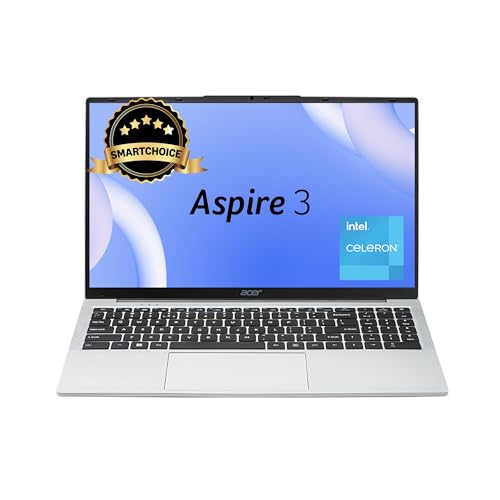
- Processor : Whether you’re at home, school, or work, get all the performance you need with the latest Intel Celeron N450…
- Operating System : Windows 11 Home | Pre Installed Software : None
- Performance : 12GB LPDDR4X RAM for full-power multitasking; 512GB SSD; Thisthin and light laptop offers a good experienc…
Acer Aspire 3 (A325-45) Review and Full Specifications: The Student Laptop That Keeps It Simple
Choosing your first study laptop shouldn’t drain your savings or leave you decoding pages of confusing tech jargon. If you’re a student juggling online classes, assignments, and the occasional binge-watch session between study breaks, you need a machine that’s affordable, reliable, and easy to carry from lecture hall to library to coffee shop. That’s exactly where the Acer Aspire 3 (A325-45) steps in.
This 2024 thin and light laptop is built for everyday computing without the premium price tag. With a 15.6-inch display, a modern Intel processor, a generous 12GB of RAM, and a fast 512GB SSD, it covers the essentials that matter most to learners. In this detailed review, we’ll walk you through every feature of the Acer Aspire 3 A325-45, explain what each spec actually means for your daily routine, and help you decide whether this is the right companion for your academic journey.
Let’s dive in.
Introduction: Meet the Acer Aspire 3 (A325-45)
The Acer Aspire 3 series has long been a favorite among budget-conscious buyers, and the A325-45 model continues that tradition. Finished in a clean Pure Silver tone and weighing just 1.5 kilograms, this laptop is designed to slip easily into a backpack and travel with you wherever your studies take you.
Acer positions the Aspire 3 as an everyday workhorse. It’s not a gaming powerhouse or a video-editing beast, and it doesn’t pretend to be. Instead, it focuses on doing the fundamentals well: web browsing, document editing, video calls, online research, and streaming your favorite shows. For most students, that’s exactly the right set of priorities.
What makes this particular configuration stand out is the balance of components. You get 12GB of LPDDR4X RAM paired with a 512GB SSD, which is a healthy step above the bare-minimum setups you often find in this price range. That extra memory and storage translate into smoother multitasking and plenty of room for your coursework, photos, and downloads.
Processor and Performance: Intel Celeron N4500, 12GB RAM, and a 512GB SSD
At the heart of the Acer Aspire 3 A325-45 sits the Intel Celeron N4500 processor. This is a dual-core chip with a base clock speed that boosts up to 2.8 GHz when you need a little extra push. The Celeron N4500 is designed for efficiency, which means it sips power and runs cool while handling the everyday tasks that fill a student’s schedule.
So what does that mean in practical terms? You can comfortably open your browser with several tabs, draft an essay in your word processor, keep your email running in the background, and join a video lecture without the system grinding to a halt. The Celeron N4500 isn’t built for heavy 3D rendering or demanding professional software, but for online study, note-taking, and general productivity, it gets the job done reliably.
Why 12GB of RAM Matters
Memory, or RAM, is what lets your laptop juggle multiple tasks at once. Many entry-level laptops ship with just 4GB or 8GB, which can feel sluggish when you have a lot going on. The Acer Aspire 3 A325-45 comes with 12GB of LPDDR4X RAM, giving you noticeably more breathing room.
That extra memory pays off when you’re switching between research tabs, a streaming video, your study notes, and a messaging app all at the same time. The LPDDR4X standard is also power-efficient, which helps the laptop stay cool and conserve battery during long study sessions.
Fast Storage with a 512GB SSD
Storage is another area where this laptop punches above its weight. Instead of a slow, old-fashioned mechanical hard drive, the Aspire 3 A325-45 uses a 512GB solid-state drive (SSD). SSDs have no moving parts, which makes them faster, quieter, and more durable.
The real-world benefits are easy to feel. Your laptop boots up in seconds, applications launch quickly, and large files transfer in a flash. The 512GB capacity also gives you plenty of space to store lecture recordings, e-books, project files, photos, and downloaded movies without constantly worrying about running out of room.
Integrated Intel UHD Graphics
The Aspire 3 relies on integrated Intel UHD Graphics rather than a separate graphics card. This integrated solution is perfectly suited for everyday visuals: streaming HD video, displaying presentations, viewing photos, and rendering web pages smoothly. While it isn’t intended for high-end gaming or professional video editing, it handles casual entertainment and academic work with ease.
Display: 15.6-Inch HD LED Screen with Acer BlueLight Shield
The Acer Aspire 3 A325-45 features a spacious 15.6-inch LED-backlit display with an HD resolution of 1366 x 768 pixels. That generous screen size gives you plenty of room to spread out your work, whether you’re reading dense study material, watching recorded lectures, or working on a spreadsheet.
A larger display is a genuine advantage for students. It reduces the need to scroll constantly, makes it easier to view documents side by side, and creates a more comfortable viewing experience during long study sessions. The LED backlighting keeps the picture bright and clear for everyday tasks.
Easy on the Eyes with BlueLight Shield
One feature that students will truly appreciate is Acer’s BlueLight Shield technology. Long hours in front of a screen can strain your eyes, and blue light is often a culprit behind that tired, fatigued feeling after a marathon study session.
BlueLight Shield reduces the amount of harmful blue light emitted by the display, helping to ease eye strain and make those late-night cram sessions more comfortable. For anyone studying online for several hours a day, this is a thoughtful addition that supports your wellbeing as much as your productivity.
Design and Build: Pure Silver, Lightweight, and Travel-Ready
The Acer Aspire 3 A325-45 sports a clean, understated design in a Pure Silver finish. It’s the kind of laptop that looks just as appropriate in a lecture hall as it does in a café or a home office. The classic clamshell form factor is familiar, practical, and built for everyday use.
Weighing in at approximately 1.5 kilograms, this is a genuinely portable machine. It won’t weigh down your backpack, and it’s easy to carry between classes, to the library, or back home. The slim profile measures roughly 35.74 x 22.80 x 1.77 cm (about 14.07 x 8.98 x 0.70 inches), making it thin enough to slide into most laptop bags without any fuss.
For students who are constantly on the move, portability is one of the most important qualities in a laptop. The Aspire 3 keeps things light and manageable, so you can take your study setup wherever inspiration (or your timetable) strikes.
The Touchpad Input
The Aspire 3 A325-45 uses a built-in touchpad as its primary pointing device. The touchpad gives you smooth, precise control for navigating documents, browsing the web, and moving around your desktop, all without the need to carry a separate mouse. It’s a convenient, space-saving choice that keeps your setup simple when you’re working on the go.
Wireless Connectivity: Dual Band Wi-Fi 5
Staying connected is non-negotiable for online learning, and the Acer Aspire 3 A325-45 keeps you online with Dual Band Wi-Fi 5 (802.11ac). The dual-band capability means the laptop can connect on both the 2.4 GHz and 5 GHz frequency bands, letting you choose the best connection for your environment.
The 5 GHz band typically offers faster speeds and less interference, which is ideal for streaming lectures and joining video calls without lag. The 2.4 GHz band offers better range, handy when you’re studying further from the router. This flexibility helps ensure a stable connection for your online classes, research, and downloads.
Optimized Webcam and Microphones for Online Classes
Video calls are a core part of modern study life, from virtual lectures to group projects and online office hours. The Acer Aspire 3 A325-45 comes equipped with an optimized webcam and microphones designed to make your video communication clearer and more reliable.
Whether you’re attending a live class, presenting an assignment, or catching up with classmates, the built-in camera and mics help ensure you’re seen and heard clearly. That’s one less accessory to worry about and one more reason this laptop fits the needs of remote learners so well.
A Note on Bluetooth
It’s worth mentioning that this particular Acer Aspire 3 A325-45 configuration does not include Bluetooth support. If you rely on wireless headphones, a wireless mouse, or other Bluetooth accessories, you’ll want to plan around this. The good news is that the laptop offers plenty of physical ports to connect your devices directly, which we’ll cover next.
Ports and Connectivity: Five Ports for Everyday Needs
Despite its slim profile, the Acer Aspire 3 A325-45 offers a practical selection of five physical ports to keep all your essential devices connected. Here’s what you get:
- 4 x USB 3.0 Ports: A generous set of four USB 3.0 ports gives you the flexibility to connect a mouse, keyboard, external hard drive, flash drive, and more, all at once. USB 3.0 also delivers fast data transfer speeds, so moving large files is quick and painless.
- 1 x HDMI Output: The HDMI port lets you connect your laptop to an external monitor, TV, or projector. This is incredibly useful for students who want a larger screen at home, or for presenting projects and assignments to a class.
- 3.5mm Headphone/Microphone Combo Jack: The combo audio jack lets you plug in wired headphones or a headset, which is especially valuable given the absence of Bluetooth. It’s perfect for private study sessions, online classes, and listening to lectures without disturbing others.
Having four USB ports is a real strength at this price point. It means you rarely have to unplug one device to make room for another, and you can build out a comfortable home study station with a wired keyboard, mouse, and external storage all connected at the same time.
Operating System and Software: Windows 11 Home
The Acer Aspire 3 A325-45 ships with Windows 11 Home pre-installed, so you’re ready to go straight out of the box. Windows 11 brings a clean, modern interface that’s intuitive and easy to navigate, even if you’re not particularly tech-savvy.
For students, Windows 11 offers a number of handy features. Snap Layouts make it easy to organize multiple windows on screen, which is great for keeping your notes and your lecture side by side. The platform is also widely compatible with the academic software, browsers, and productivity apps you’re likely to use throughout your studies.
Because Windows is the most common desktop operating system, you’ll find plenty of tutorials, guides, and support online whenever you need a hand. That makes the learning curve gentle and the troubleshooting straightforward.
Battery: 38Wh Lithium-Ion Power
The Acer Aspire 3 A325-45 is powered by a 38Wh lithium-ion battery. Paired with the power-efficient Intel Celeron N4500 processor and LPDDR4X memory, the battery is designed to support you through your typical day of lighter tasks like writing, browsing, and attending online classes.
The efficiency-first design philosophy here works in your favor. Because the components draw relatively little power, the laptop can stretch its battery across your study routine, helping you stay productive between charges. When it’s time to top up, the included adapter and power cord get you back to work without hassle.
For students moving between classes and study spots, this combination of lightweight design and efficient power management makes the Aspire 3 a practical, dependable companion.
Who Is the Acer Aspire 3 (A325-45) For?
Every laptop is built with a particular kind of user in mind, and the Acer Aspire 3 A325-45 is squarely aimed at people who need a reliable, affordable machine for everyday computing. Here’s who will get the most out of it:
Students and Online Learners
This is, first and foremost, a fantastic student laptop. The large 15.6-inch screen, eye-friendly BlueLight Shield, optimized webcam and microphones, and 12GB of RAM make it well suited to online classes, research, essay writing, and study sessions. If you’re studying from home or attending virtual lectures, this laptop checks the right boxes without overspending.
Remote Workers
For those working from home or splitting time between locations, the Aspire 3 handles core productivity tasks with ease. Email, document editing, web conferencing, and spreadsheet work all run comfortably. The four USB ports and HDMI output also make it simple to set up a more complete workstation at home.
Everyday and Entertainment Users
If you mainly use a laptop to browse the web, stream movies and shows, manage your photos, and stay in touch with friends and family, the Aspire 3 is an excellent fit. The roomy display and fast SSD make everyday entertainment smooth and enjoyable.
Who Should Look Elsewhere?
To keep things balanced, it’s worth noting who this laptop isn’t for. If you’re a serious gamer, a video editor, a 3D designer, or someone who runs heavy professional software, you’ll want a machine with a more powerful processor and a dedicated graphics card. The Aspire 3 is built for everyday computing, not demanding creative or gaming workloads.
What’s in the Box?
When your Acer Aspire 3 A325-45 arrives, you’ll find everything you need to get started right away. The box includes:
- The Acer Aspire 3 A325-45 laptop
- Power cord
- Adapter
- User manual
It’s a straightforward, no-frills package that gets you up and running quickly. The laptop also comes with a 1-year limited warranty, giving you added peace of mind with your purchase.
Full Specifications Table
For a quick, at-a-glance summary, here’s the complete specification breakdown of the Acer Aspire 3 (A325-45):
| Specification | Details |
|---|---|
| Model | Acer Aspire 3 (A325-45), 2024 |
| Processor | Intel Celeron N4500 (Dual Core, up to 2.8 GHz) |
| Graphics | Integrated Intel UHD Graphics |
| RAM | 12GB LPDDR4X |
| Storage | 512GB SSD |
| Display | 15.6-inch HD (1366 x 768) LED-backlit LCD with Acer BlueLight Shield |
| Operating System | Windows 11 Home |
| Wireless | Dual Band Wi-Fi 5 (802.11ac) |
| Bluetooth | Not supported |
| Webcam & Audio | Optimized webcam and microphones |
| Ports | 4 x USB 3.0, 1 x HDMI output, 1 x 3.5mm headphone/microphone combo jack (5 total) |
| Input Device | Touchpad |
| Battery | 38Wh Lithium-Ion |
| Color | Pure Silver |
| Weight | Approximately 1.5 kg |
| Dimensions | Approximately 35.74 x 22.80 x 1.77 cm (14.07 x 8.98 x 0.70 inches) |
| Box Contents | Laptop, Power cord, Adapter, User Manual |
| Warranty | 1-Year Limited Warranty |
Acer Aspire 3 FAQs
Is Acer Aspire 3 worth buying?
Yes, the Acer Aspire 3 is worth buying if you need a budget laptop for everyday tasks like online classes, office work, web browsing, video streaming, and light productivity. It focuses on affordability and practicality rather than premium features, which makes it a good option for students and basic home users.
Is the Acer Aspire 3 good for gaming?
The Acer Aspire 3 is not designed as a gaming laptop. Entry-level models with Intel Celeron processors are best suited for basic work, while higher-end Acer Aspire 3 variants with Intel Core i5 processors can handle only light casual gaming. For serious gaming, a dedicated gaming laptop would be a better choice.
How old is the Acer Aspire 3 laptop series?
The Acer Aspire 3 series has been around for several years as Acer’s budget-friendly mainstream laptop lineup. However, the exact age depends on the specific model, since Acer refreshes the Aspire 3 with newer processors and updated hardware across different generations.
Which is better: Acer Aspire 3 or Acer Aspire 5?
The Acer Aspire 5 is generally better if you want stronger performance, better build quality, and more premium features. The Acer Aspire 3 is the more budget-focused option and is best for basic tasks, while the Aspire 5 usually offers faster processors and a better overall experience for multitasking and long-term use.
Is Acer Aspire 3 a good laptop for students?
Yes, the Acer Aspire 3 can be a good student laptop, especially for schoolwork, online study, note-taking, web browsing, and assignments. It’s best suited for students who want an affordable Windows laptop for everyday academic use rather than heavy gaming or advanced creative workloads.
How good is the Acer Aspire 3 Intel Celeron N4500 for daily use?
The Acer Aspire 3 with Intel Celeron N4500 is suitable for very basic daily tasks such as browsing, watching YouTube, attending online classes, working on documents, and using lightweight apps. It is not a performance-focused laptop, so it’s best for users with simple computing needs and a tight budget.
Which generation is the Intel Celeron N4500 in the Acer Aspire 3?
The Intel Celeron N4500 belongs to Intel’s Jasper Lake platform and is not part of the mainstream Core i3, i5, or i7 generation branding like 11th Gen or 12th Gen. It is an entry-level dual-core processor designed for affordable laptops and basic everyday performance.
What is the Acer Aspire 3 A325-45?
The Acer Aspire 3 A325-45 is a specific model in the Aspire 3 lineup. Depending on the exact configuration, it may come with different processors, RAM, and storage options. It is generally positioned as a thin-and-light budget laptop for students, home users, and office work.
Does Acer Aspire 3 come with Intel Core i5 12th Gen or 13th Gen models?
Yes, the Acer Aspire 3 lineup has been launched in multiple configurations, including some models with Intel Core i5 12th Gen and newer processors in select markets. These versions are much more capable than the Celeron variants and are better for multitasking, office work, study, and more demanding productivity tasks.
Conclusion: Is the Acer Aspire 3 (A325-45) Worth It for Students?
When you weigh everything together, the Acer Aspire 3 A325-45 makes a strong case as an affordable, dependable laptop for students and everyday users. It nails the essentials that matter most for online study: a large, eye-friendly display, smooth multitasking thanks to 12GB of RAM, fast and roomy 512GB SSD storage, and a lightweight design that’s easy to carry between classes.
The thoughtful extras add real value too. The BlueLight Shield helps protect your eyes during long study sessions, the optimized webcam and microphones keep you connected during online classes, and the four USB ports plus HDMI output give you flexibility to expand your setup. Windows 11 Home rounds out the package with a modern, familiar, and widely supported operating system.
It’s important to keep your expectations realistic. This is a laptop built for everyday computing, online learning, productivity, and entertainment, rather than heavy gaming or demanding creative work. The absence of Bluetooth is a small trade-off, but the generous selection of physical ports helps make up for it.
If you’re a student searching for a budget-friendly laptop that handles your coursework, video lectures, research, and downtime streaming without breaking the bank, the Acer Aspire 3 A325-45 deserves a spot on your shortlist. It’s a practical, no-nonsense choice that lets you focus on what really matters: your studies and your success.
Ready to take the next step in your learning journey? A reliable laptop like the Acer Aspire 3 A325-45 could be exactly the tool you need to study smarter, stay connected, and reach your academic goals.
- Processor : Whether you’re at home, school, or work, get all the performance you need with the latest Intel Celeron N450…
- Operating System : Windows 11 Home | Pre Installed Software : None
- Performance : 12GB LPDDR4X RAM for full-power multitasking; 512GB SSD; Thisthin and light laptop offers a good experienc…