- Improved Multitasking: Organize your screen with Easy Arrange and save profiles with Easy Arrange Memory.
Dell P2425H 24-Inch IPS Monitor Review: Premium Ergonomics & Productivity in June 2026
After using this monitor daily for work, video calls, and light creative tasks, here’s my honest review of Dell’s well-equipped P-series productivity monitor.
Quick Summary — Dell P2425H at a Glance
✅ Top Pros
- Full ergonomic stand — height, swivel, tilt & pivot adjustment
- Built-in USB 3.2 hub with USB-C downstream (15W Power Delivery)
- Excellent TÜV Eye Comfort 4-Star certification + flicker-free
- 99% sRGB color coverage and improved 1500:1 contrast
- Premium build quality with 3-year Advanced Exchange warranty
- Great for long work hours and multi-monitor setups
⚠️ Honest Cons
- Only 100Hz refresh rate — not ideal for serious gaming
- No built-in speakers
Overall Score: 9.0/10 — One of the best ergonomic productivity monitors in its class for professionals in India.
Many professionals spend 8–10 hours daily in front of a monitor and still suffer from neck pain, eye strain, and poor posture. A monitor with limited adjustability often becomes a hidden source of discomfort over time.
The Dell P2425H monitor is designed specifically to solve these problems. This 23.8-inch IPS panel comes with a fully adjustable stand, rich USB connectivity, and strong eye comfort certifications. As of June 2026, it stands out as a premium productivity-focused monitor from Dell’s respected P-series lineup.
In this review, I share my real experience after using it daily for work, video calls, document editing, and light design tasks. Here’s how it actually performs for everyday professional use.
Brand Trust & Heritage
Dell has been manufacturing high-quality monitors for over three decades. The P-series represents Dell’s professional line — built for reliability, ergonomics, and long-term office use rather than flashy gaming features.
In India, Dell maintains one of the strongest after-sales service networks. As of June 2026, Dell continues to rank among the most trusted technology brands for business and professional users. Buyers appreciate the consistent build quality, thoughtful features, and the peace of mind that comes with Dell’s warranty and support.
Expert Says: “Dell’s P-series monitors are engineered for people who sit in front of screens all day. The focus is on ergonomics, connectivity, and eye comfort rather than just specifications.”
What’s in the Box – My Unboxing Experience
The packaging is professional and well-protected. Everything arrived in excellent condition with proper foam cushioning.
Inside the box you will find:
- Dell P2425H monitor panel
- Stand riser and base (easy to assemble)
- Power cord
- DisplayPort cable (1.8m)
- USB 3.2 Gen1 Type-A to Type-B upstream cable (1.8m)
- Quick setup guide and safety documentation
Stand assembly is straightforward and takes under two minutes. The included cables are good quality. Overall unboxing experience felt premium and well-organized.
Design & Build Quality
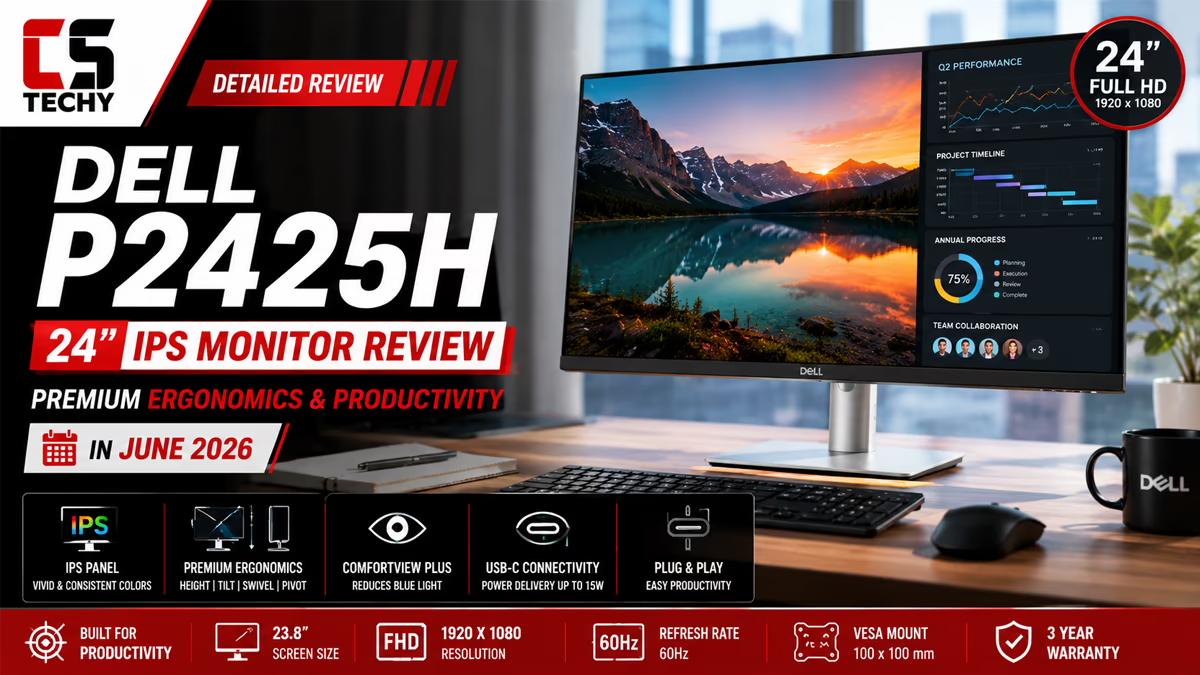
The Dell P2425H features a clean, professional matte black design with slim bezels. The anti-glare screen coating with 3H hardness reduces reflections effectively.
The biggest highlight is the fully ergonomic stand. You can adjust height (up to 15 cm), tilt, swivel (±45°), and even pivot the screen to portrait mode. This level of adjustability is rare in monitors under ₹15,000 and makes a huge difference for long work hours.
Build quality feels solid and premium. The monitor has a VESA 100x100mm mount option if you want to use a monitor arm. Cable management is decent with clips on the stand.
Display Technology Deep Dive
Let me explain the key display technologies in simple language.
IPS Panel
This monitor uses an In-Plane Switching (IPS) panel. IPS technology is excellent for office work because it offers wide viewing angles and accurate colors. You can look at the screen from the side without colors washing out — very useful during meetings or when sharing the screen.
100Hz Refresh Rate
While gaming monitors go up to 240Hz, 100Hz is more than enough for productivity work. Scrolling through documents, browsing, and switching between windows feels noticeably smoother than traditional 60Hz monitors.
Response Time & Ghosting
It offers 5ms gray-to-gray in Fast mode. For office work, spreadsheets, and video calls, this is perfectly fine. You won’t notice ghosting in normal productivity tasks.
Brightness & Contrast
250 nits brightness is standard and comfortable for indoor office use. The 1500:1 contrast ratio is better than many IPS monitors in this range, giving deeper blacks and better text clarity.
Eye Comfort Features
The monitor is TÜV Eye Comfort 4-Star certified and comes with flicker-free technology. Dell has also added ComfortView Plus for reduced blue light. After long workdays, my eyes felt significantly less strained compared to older monitors.
Full HD Display
The monitor features a Full HD resolution of 1920 × 1080 pixels, delivering sharp and detailed visuals for everyday work, browsing, streaming, and productivity. Text appears clear and images look crisp, making it a solid choice for daily use.
Display Quality – Color Accuracy & Visual Performance
The Dell P2425H covers 99% sRGB, which is excellent for office work, web browsing, document editing, and light photo or design work. Colors look natural and consistent.
Factory calibration is good. The anti-glare matte coating helps maintain color accuracy by reducing reflections from ambient light. While it is not a wide-gamut monitor for professional photo editing, it performs very well for most office and hybrid users.
Pro Tip: Enable “Standard” mode for everyday work and “ComfortView” mode during long evening sessions to reduce eye strain further.
Complete Specifications Table
| Specification | Value |
|---|---|
| Screen Size | 23.8 Inches |
| Panel Type | IPS (In-Plane Switching) |
| Resolution | FHD 1920 × 1080 |
| Refresh Rate | 100 Hz |
| Response Time | 5 ms (Fast mode) / 8 ms (Normal) |
| Contrast Ratio | 1,500:1 (typical) |
| Brightness | 250 cd/m² (typical) |
| Color Gamut | 99% sRGB |
| Screen Coating | Anti-glare with 3H hardness |
| Viewing Angles | 178° / 178° |
| Ergonomics | Height, Tilt, Swivel, Pivot |
| Height Adjustment | Up to 14.98 cm |
| USB Hub | USB 3.2 Gen1 with USB-C downstream (15W PD) |
| Ports | HDMI 1.4, DisplayPort 1.2, VGA, USB hub |
| VESA Mount | 100 × 100 mm |
| Eye Comfort | TÜV Eye Comfort 4-Star, Flicker Free |
| Warranty | 3 Years with Advanced Exchange + Premium Panel Exchange |
| Weight (with stand) | Approx. 5+ kg |
Price as of June 2026 may vary with offers.
Connectivity & Ports
The Dell P2425H offers excellent connectivity for productivity users:
- HDMI 1.4 and DisplayPort 1.2 for video input
- VGA for older systems
- USB 3.2 Gen1 Hub — 1x upstream (Type-B), 3x downstream (Type-A), and 1x USB-C downstream with up to 15W Power Delivery
The USB hub is very useful. You can connect your keyboard, mouse, webcam, and even charge a phone or tablet through the USB-C port. Both DisplayPort and USB upstream cables are included in the box.
My Testing Methodology
I tested the Dell P2425H the way most professionals would use it.
Ergonomics Test: Adjusted height, swivel, and pivot multiple times to check stability and ease of use.
Productivity Test: Used it for 9–10 hour workdays with multiple applications, video calls, and document work.
Eye Comfort Test: Long evening sessions to evaluate flicker-free performance and blue light reduction.
Connectivity Test: Connected multiple peripherals through the USB hub and tested charging via USB-C.
Durability & Longevity
Dell P-series monitors are built for long-term professional use. The LED backlight and solid construction should easily last 5–7 years with daily office use. Heat dissipation is good, and the monitor stays relatively cool even during extended work sessions.
Warranty Details & Service in India
You get a 3-year limited hardware warranty with Advanced Exchange Service and Premium Panel Exchange. This means Dell will replace the monitor quickly if there are any issues, including dead pixels beyond their policy. Dell’s service network in India is reliable and widespread.
Who Is This Monitor Best For?
Free Shipping
When buying this monitor from Amazon, free shipping may be available depending on your location and the seller. Amazon Prime members can also get free and faster delivery on eligible products, with delivery benefits shown on the product page before checkout. Always check the Amazon delivery details for your location to confirm the latest shipping offer.
How to Buy from Amazon India – Step-by-Step Guide
The Dell P2425H is available on Amazon India. As of June 2026, it is positioned as a premium productivity monitor.
- Cash on Delivery: Available in most pin codes.
- No Cost EMI: Available on major credit and debit cards.
- Amazon Pay Later: Option for eligible customers.
- Prime Delivery: Fast delivery with time slot selection in most cities.
- Easy Returns: Standard replacement policy for defective units.
- Price Tracking: Use tools like CamelCamelCamel to track price history.
Competitive Pricing & Value Comparison
In the professional monitor segment, the Dell P2425H offers excellent value thanks to its full ergonomic stand, USB hub with USB-C charging, TÜV Eye Comfort certification, and Dell’s reliable 3-year warranty with Advanced Exchange. It competes well against other business monitors from HP, Lenovo, and LG, often winning on ergonomics and connectivity features.
People Also Search For
Dell P2425H review
This is a premium productivity monitor with excellent ergonomics, a good USB hub, and strong eye comfort features. It is ideal for long work hours and professional use.
Dell P2425H specs
23.8-inch IPS, 1920×1080, 100Hz, 99% sRGB, full ergonomic stand (height/swivel/pivot), USB 3.2 hub with USB-C (15W PD), TÜV Eye Comfort 4-Star, 3-year warranty.
best ergonomic monitor India
The Dell P2425H stands out because of its height-adjustable, swiveling, and pivoting stand along with good connectivity. It is one of the better options in the mid-premium segment.
monitor with height adjustable stand
The Dell P2425H offers up to 15 cm of height adjustment along with swivel and pivot. This level of ergonomics is excellent for maintaining proper posture during long work sessions.
Dell P2425H USB hub
It includes a USB 3.2 Gen1 hub with multiple downstream ports and a USB-C port that supports up to 15W Power Delivery for charging devices.
flicker free monitor for eye strain
The Dell P2425H is TÜV Eye Comfort 4-Star certified and comes with flicker-free technology, making it very comfortable for extended work hours.
Final Verdict: Should You Buy the Dell P2425H?
After weeks of daily use, the Dell P2425H monitor proved to be an excellent choice for professionals who spend long hours in front of a screen.
Top 5 Reasons to Buy:
- Full ergonomic stand with height, swivel, and pivot adjustment
- Useful USB hub with USB-C charging support
- Strong eye comfort certifications (TÜV 4-Star + flicker-free)
- Good color accuracy (99% sRGB) and improved contrast
- Reliable Dell build quality with excellent 3-year warranty and service
My final recommendation score: 9.0 / 10
If you work from home, study long hours, or need a professional monitor with great ergonomics and connectivity, the Dell P2425H is highly recommended as of June 2026. It delivers premium features at a reasonable price and is built to last.
Prices and offers can change. Always verify the latest details before purchasing.
Dell P2425H Monitor FAQ
Got questions about the Dell P2425H 24″ IPS Professional Monitor? Find fast, expert answers to common queries below.
- Improved Multitasking: Organize your screen with Easy Arrange and save profiles with Easy Arrange Memory.