GitHub Copilot Review 2026: Features, Pricing, Coding Agents, Pros & Cons
GitHub Copilot no longer fits the description most developers still carry in their heads — a tool that finishes your line of code. In 2026, Copilot spans inline completions, a conversational chat interface, an agent that can autonomously research and modify a codebase, a code-review layer for pull requests, a full terminal CLI, and access to a rotating lineup of third-party AI models. This CSTechy review breaks down what GitHub Copilot actually does today, how its plans and usage-based credit system work, where it holds up against the coding-tool competition, and whether it’s worth paying for in 2026.
What Is GitHub Copilot?
GitHub Copilot is Microsoft/GitHub’s AI developer platform, built into the GitHub ecosystem and available across major code editors, the GitHub website, GitHub Mobile, and a dedicated command-line interface. It began as an inline code-completion tool but has since expanded through several distinct capability layers: completions, chat, agent mode inside an editor, a cloud-based coding agent that works asynchronously on issues, automated code review, and a CLI that can carry out coding tasks from the terminal. GitHub is explicit that Copilot is designed to make developers more efficient, not to replace them — the product is named “Copilot,” not “Autopilot,” and its own documentation states plainly that it isn’t intended to generate code without human oversight.
GitHub Copilot Review 2026: What’s New?
The most consequential recent change isn’t a new feature — it’s how Copilot is billed. On June 1, 2026, GitHub moved from counting discrete “premium requests” to a token-based system called GitHub AI Credits, where every plan includes a monthly dollar-denominated credit allowance (1 credit = $0.01) that’s consumed by chat, agent mode, the cloud agent, code review, and CLI usage. Code completions and next-edit suggestions remain unlimited and don’t draw from that pool on any paid plan. Alongside the billing shift, GitHub has continued expanding what counts as “Copilot” — cloud agent sessions can now run in parallel, delegate work to third-party agents like Claude and OpenAI Codex on higher tiers, and integrate with project-management tools like Linear and Azure Boards.
How GitHub Copilot Works
Depending on the feature, Copilot builds its suggestions differently. For inline completions, the extension looks at the code immediately around your cursor, other open files, and repository context, then sends that to a model to generate a probabilistic “what comes next” suggestion — GitHub is explicit that this is not copy-pasting from a training set. For chat, Copilot assembles a prompt from your question plus the active file, your selection, and general workspace details like frameworks and dependencies. For cloud agent tasks, Copilot researches the relevant part of a repository, drafts an implementation plan, makes changes inside an isolated GitHub Actions-powered environment, runs tests where applicable, and pushes a pull request for human review.
GitHub Copilot’s Key Features
AI Code Completion
Inline suggestions remain the core of Copilot: single-line and multi-line completions, whole-function generation from a comment, and contextual boilerplate. Completions are unlimited on every paid plan and included (up to 2,000 per month) on the Free tier. Suggestion quality still depends heavily on language — GitHub notes that better-represented public languages like JavaScript tend to produce stronger completions than less common ones, and generated code can still carry outdated APIs, wrong assumptions, or insecure patterns inherited from its training data. Nothing here should be accepted without review.
Copilot Chat
Copilot Chat is the conversational layer, available in supported IDEs, on github.com, and in GitHub Mobile. It handles debugging questions, code explanations, refactoring suggestions, and architecture discussion, pulling in the active file, selected code, and workspace context rather than just the immediate cursor position that completions rely on. It’s a fundamentally different interaction model from inline suggestions — closer to pair-programming conversation than autocomplete.
Agent Mode
Agent mode lets Copilot carry out multi-step coding tasks directly inside supported editors (VS Code, Visual Studio, JetBrains, Eclipse, and Xcode) — planning an approach, editing multiple files, and iterating based on results, rather than returning a single suggestion. It’s included on every plan, including Free. Because agent mode can modify real files in a working directory, it still depends on the developer reviewing and approving what changes before they’re committed — GitHub’s own guidance treats agent output with the same scrutiny as any third-party code.
Copilot Coding Agent
This is Copilot’s cloud-based, asynchronous agent (GitHub also refers to it as the “cloud agent”), currently in public preview. It’s started by assigning a GitHub issue to Copilot, prompting it directly, or mentioning @copilot in a pull-request comment. Once running, it works inside an isolated, GitHub Actions-powered environment: researching the repository, drafting a plan, making commits on a branch, and running tests or linters where configured. Existing branch protections and CI/CD approval gates still apply, and the agent requests a human review before anything merges. It’s available starting on the Pro plan; Pro+ and Max additionally allow delegating tasks to third-party coding agents such as Claude and OpenAI Codex (also currently in preview).
Cloud-Based Coding Workflows
Beyond one-off tasks, the coding agent can run multiple sessions in parallel, be triggered on a schedule or in response to repository events through Copilot automations, and integrate with tools developers already use for planning work, including Microsoft Teams, Linear, and Azure Boards. This shifts a meaningful chunk of Copilot’s value away from “assistant in my editor” toward “background contributor working through a backlog,” though every resulting pull request still needs a human reviewer before it ships.
Code Review
Copilot can review pull requests directly on github.com and review file diffs inside supported editors, flagging potential bugs and suggesting improvements as review comments. Organizations can also extend this to pull requests from contributors who don’t hold a Copilot license, billed separately as GitHub AI Credits once an admin enables the relevant policies. GitHub is clear that this is an additional layer of review, not a substitute for a qualified human reviewer signing off on a change.
Pull Request Assistance
Beyond review comments, Copilot can generate pull request descriptions, respond to reviewer feedback on its own PRs by revising code, and keep iterating until a human approves. This closes the loop between the coding agent producing changes and a maintainer steering them toward mergeable quality.
GitHub Copilot CLI
Copilot CLI brings Copilot into the terminal — available on every plan, including Free — where it can answer coding questions, delegate tasks to coding agents, and make and commit changes locally or on GitHub, including a programmatic mode for scripting. Because CLI interactions can involve executing commands and modifying local files, developers should treat any AI-suggested terminal command with the same caution as one copied from an unfamiliar source — never run a generated command, especially anything destructive, without reading it first.
Multiple AI Models
Copilot’s model picker currently spans a wide range of Anthropic Claude models, OpenAI GPT-5-series and Codex models, Microsoft’s own MAI-Code model, Google Gemini models, xAI’s Grok, and others, several marked as previews. Model access is essentially the same list across Free, Pro, Pro+, and Max — the meaningful difference between tiers is how much AI Credit allowance a user has to spend on premium models, not which models are technically visible. No single model is positioned as universally best; heavier, more capable models consume credits faster, while lighter models stretch a monthly allowance further. Because GitHub updates this lineup regularly, exact model availability should be checked in-product before relying on a specific one.
Repository and Codebase Context
Copilot draws on repository content, open files, and — for Enterprise customers specifically — an indexed view of the organization’s codebase for more tailored suggestions and access to custom fine-tuned models. This deeper indexing is an Enterprise-tier capability rather than something available to individual or Business subscribers.
IDE Integrations
Copilot is officially supported in VS Code, Visual Studio, JetBrains IDEs, Neovim, Eclipse, Xcode, Raycast, Zed, and SQL Server Management Studio, plus github.com and GitHub Mobile. Feature parity isn’t identical everywhere — chat functionality, for instance, has historically been most complete in VS Code, JetBrains, and Visual Studio, with agent mode specifically supported in VS Code, Visual Studio, JetBrains, Eclipse, and Xcode. Anyone picking an editor around a specific Copilot feature should confirm current support for that IDE directly in GitHub’s documentation.
Extensions and MCP
Copilot integrates with MCP (Model Context Protocol) servers, letting it connect to external tools and data sources beyond the codebase itself, on every plan including Free. This extends what Copilot can act on, but every additional tool connection is also an additional permission surface — MCP integrations should be reviewed with the same care as any other system granted access to code, credentials, or infrastructure.
GitHub Copilot for Different Developers
Copilot for Beginners
Copilot Chat can explain errors, generate illustrative examples, and offer debugging help that’s genuinely useful while learning to code. It shouldn’t replace actually understanding what the generated code does — leaning on it to skip that step tends to produce code a beginner can’t maintain, extend, or debug on their own later.
Copilot for Students
Students can use Copilot for practice problems, explanations of unfamiliar APIs, and debugging help on personal projects. Academic institutions vary widely on whether AI-assisted work is permitted for graded assignments, so students should check their specific program’s policy before submitting Copilot-assisted work as their own.
Copilot for Professional Developers
Working developers are likely to get the most consistent value from boilerplate generation, refactoring assistance, documentation, test-writing, code review, and using agent mode or the cloud agent to offload well-scoped, well-defined tasks — freeing up time for the architectural and judgment-heavy work that still requires a human.
Copilot for Teams
Teams benefit from standardized tooling, shared code-review assistance, and consistent onboarding support, but GitHub doesn’t publish guaranteed productivity numbers for any specific team, and results will vary with codebase size, language, and how disciplined a team is about reviewing AI output before merging.
Copilot for Enterprises
Enterprise adds SAML SSO, IP indemnity, usage metrics, user management on github.com, codebase indexing for more tailored suggestions, custom fine-tuned models, and enterprise-grade security controls that Business and individual plans don’t include. Organizations rolling Copilot out at scale should pair it with clear internal policy on what code review is required before AI-assisted changes ship, not just the licensing decision itself.
GitHub Copilot Plans and Pricing
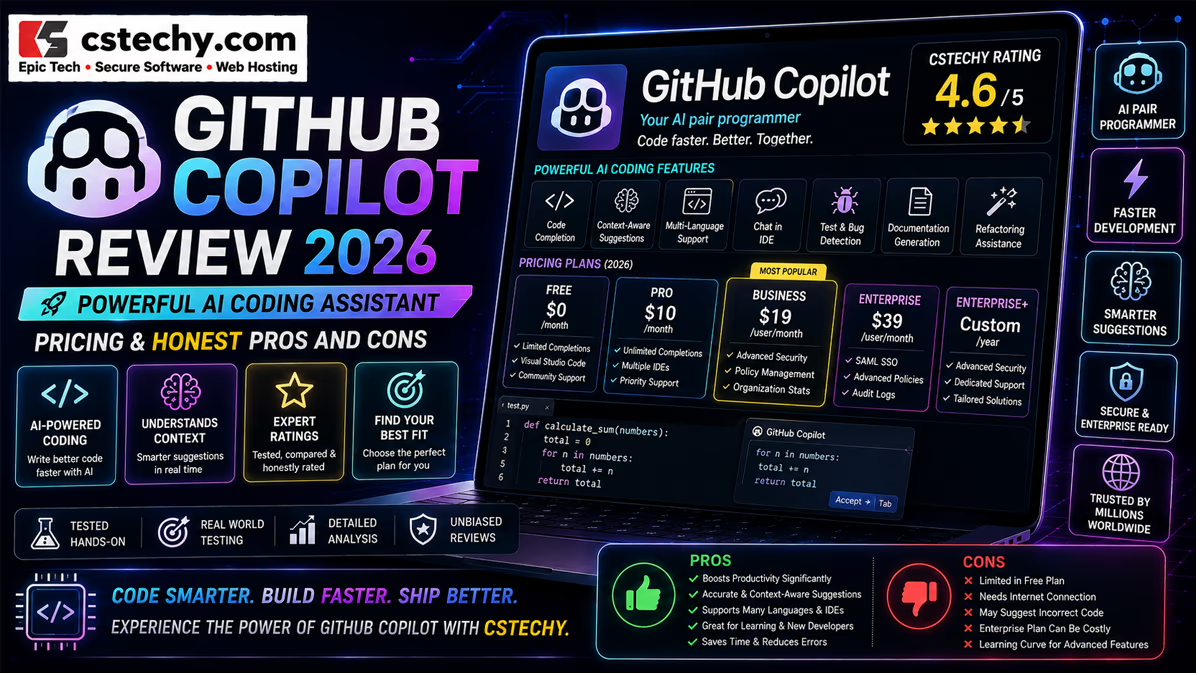
As of publication, GitHub’s official pricing page lists the following individual and organization plans, billed in GitHub AI Credits (1 credit = $0.01 USD) on top of a flat seat price. Code completions and next-edit suggestions are unlimited on every paid plan and don’t consume credits.
| Plan | Price | Monthly AI Credits |
|---|---|---|
| Free | $0 | Limited chat and agent usage; 2,000 completions/month |
| Pro | $10/user/month | $15 |
| Pro+ | $39/user/month | $70 |
| Max | $100/user/month | $200 |
| Business | $19/user/month | $19 |
| Enterprise | $39/user/month | $39 |
GitHub notes that included credit allowances, model access, and pricing structure can change, so current numbers should always be confirmed on GitHub’s own plans page before subscribing or budgeting.
GitHub Copilot Free vs Pro vs Pro+
Free includes 2,000 completions and limited chat/agent usage per month, access to a subset of models (including Haiku 4.5 and GPT-5 mini), and Copilot CLI — enough to evaluate the product but not to lean on daily.
Pro ($10/month) adds unlimited code completions, the cloud agent, code review, model selection across the full lineup, and $15/month in AI Credits — GitHub’s positioning for this tier is “everyday coding with agents.”
Pro+ ($39/month) adds a substantially larger credit allowance ($70/month, more than 4x Pro), audit logs, and the ability to delegate tasks to third-party agents like Claude and OpenAI Codex.
Verified students, teachers, and maintainers of popular open-source projects may qualify for free access to Pro through GitHub Education or the Global Maintainers Program — worth checking before paying out of pocket.
GitHub Copilot Business vs Enterprise
Business ($19/user/month) is built around the coding environment itself — the IDE, CLI, and GitHub Mobile — plus organizational license and policy management and IP indemnity, none of which individual plans include.
Enterprise ($39/user/month) includes everything in Business and adds a chat interface integrated directly into github.com, codebase indexing for more context-aware suggestions, access to custom fine-tuned models, SAML SSO, and enterprise-grade security and usage-metrics controls.
Neither Business data nor Enterprise data is used to train GitHub’s AI models, per GitHub’s official FAQ — a protection that individual Free, Pro, and Pro+ subscribers do not automatically get (more on that below).
| Plan | Best For | Main Benefits | Important Consideration |
|---|---|---|---|
| Free | Evaluating Copilot before committing | No cost, core features available | Hard monthly limits on completions and chat |
| Pro | Individual developers using GitHub daily | Unlimited completions, cloud agent, code review | Credit pool can run out on heavy agent use |
| Pro+ | Power users leaning on premium models | 4x+ credits of Pro, third-party agent delegation | Meaningful price jump over Pro |
| Business | Teams needing license and policy control | Admin management, IP indemnity | No github.com chat integration or codebase indexing |
| Enterprise | Organizations needing deep GitHub-native AI | Codebase indexing, custom models, SSO | Highest per-seat cost |
GitHub Copilot Pros and Cons
- Strength: Deep, native GitHub integration — issues, pull requests, commits, and code review all live in the same platform Copilot operates in.
- Strength: Broad IDE support across VS Code, Visual Studio, JetBrains, Eclipse, Xcode, and more.
- Strength: Access to a wide, regularly updated set of models from multiple AI providers under one subscription.
- Strength: A genuine terminal CLI and an autonomous cloud agent capable of working through backlog issues asynchronously.
- Strength: Enterprise controls — SSO, IP indemnity, codebase indexing, and admin usage policies — for organizations that need governance.
- Weakness: The June 2026 shift to credit-based billing adds real complexity to predicting monthly cost, especially for heavy agent users.
- Weakness: Generated code can still be incorrect, insecure, or based on outdated patterns — GitHub itself is explicit about this.
- Weakness: Individual (Free/Pro/Pro+) subscriber data may be used for AI model training unless the user opts out, unlike Business and Enterprise data.
- Weakness: The Coding Agent and third-party agent delegation are still officially in preview and subject to change.
- Weakness: Model availability and pricing structure have already changed multiple times in 2026, making it a moving target to evaluate.
GitHub Copilot Accuracy and Coding Limitations
GitHub’s own documentation is candid about this: because Copilot’s models are trained on public code, they can synthesize the same insecure patterns, outdated APIs, and bugs that exist in that training data. GitHub has built in filters that block or flag some common vulnerable patterns — hardcoded credentials, SQL injection, path injection — but these filters are not comprehensive. Developers should treat every Copilot suggestion the way they’d treat any third-party code of unknown origin: review it, test it, run static analysis and security scanning where appropriate, check dependencies and licenses, and understand a change before deploying it. This applies just as much to agent-generated pull requests as to inline completions.
GitHub Copilot Privacy and Security
GitHub’s stated data-retention defaults for Business and Enterprise customers: prompts and suggestions from IDE chat and completions are not retained; prompts and suggestions from other access points (like chat on github.com or CLI) are retained 28 days; user engagement data is kept for two years. Business and Enterprise Copilot data is not used to train GitHub’s models.
Individual subscribers (Free, Pro, Pro+) are treated differently: GitHub may use interaction data — prompts, outputs, and code snippets — to train and improve its AI models unless the user explicitly opts out through their Copilot settings. This distinction matters for freelancers or solo developers working with sensitive or proprietary code under an individual plan rather than an organizational one.
On security specifically, Copilot includes an optional public-code matching filter (checking suggestions of roughly 65 lexemes or more against public GitHub code) and output scanning for known vulnerability patterns, but GitHub does not claim these guarantee secure or private output. Anyone working on sensitive repositories should review GitHub’s admin policy controls and the Copilot Trust Center documentation directly before assuming a given privacy posture applies.
GitHub Copilot and Copyright Considerations
Copilot’s underlying model is trained on publicly accessible code, including code with various open-source licenses, and GitHub states that in rare cases — by its own research, in less than 1% of suggestions — a generated suggestion can match code from that training data closely enough to raise licensing questions, most often when a prompt provides little context or when a suggestion reflects an extremely common coding pattern. GitHub offers an optional filter that suppresses suggestions matching public code above a certain length, plus a code-referencing feature (currently available in VS Code) that can show where a matching suggestion originated and under what license.
On ownership, GitHub’s position is that it does not claim ownership of Copilot’s suggestions, but whether a given AI-generated suggestion can be owned by anyone at all depends on the intellectual property law of the relevant jurisdiction — a question GitHub does not resolve on a user’s behalf. Paid Business and Enterprise (and eligible Pro) customers with matching-suggestion filtering enabled are covered by GitHub and Microsoft’s IP indemnity commitment for unmodified suggestions, but that indemnity has specific conditions attached. None of this amounts to a guarantee that any specific piece of Copilot-generated code is free of copyright risk — organizations with real legal exposure on a project should have generated code reviewed under their own license-compliance process, and consult qualified legal counsel for anything with meaningful commercial stakes.
GitHub Copilot vs Cursor
Cursor is a dedicated AI-first code editor (a VS Code fork), built from the ground up around AI-assisted editing, while Copilot is an AI layer added onto whichever editor a developer already uses. Cursor’s appeal is a more unified, AI-native editing experience within its own environment; Copilot’s advantage is native GitHub integration — issues, pull requests, code review, and the cloud agent all operate directly inside the platform most teams already collaborate on — plus broader IDE support beyond a single VS Code fork (JetBrains, Visual Studio, Eclipse, Xcode, and more). Pricing structures differ meaningfully too, with Copilot’s per-seat organizational plans generally undercutting Cursor’s team pricing. Neither is a universal winner: developers who want one AI-centered editor may prefer Cursor, while teams whose workflow already centers on GitHub tend to get more out of Copilot’s tighter integration.
GitHub Copilot vs Claude Code
Claude Code is Anthropic’s dedicated agentic coding tool, built around terminal and IDE-based autonomous coding sessions. GitHub Copilot’s Pro+ and Max plans can actually delegate coding-agent tasks to Claude directly, which blurs the comparison somewhat — rather than being strict competitors, the two can work together inside Copilot’s workflow. Used independently, Claude Code tends to be chosen for deep, sustained agentic sessions on a single codebase, while Copilot’s strength remains its breadth: multiple models, tight GitHub-native issue/PR integration, and support across many more IDEs. Teams already standardized on GitHub workflows may prefer keeping agentic coding inside Copilot (with or without Claude models under the hood), while developers who want Claude’s coding agent as a standalone tool outside GitHub’s ecosystem may prefer Claude Code directly.
GitHub Copilot vs ChatGPT
ChatGPT is a general-purpose AI assistant with coding help as one of many capabilities — research, writing, broad problem-solving — accessed through its own app or browser interface, disconnected from a developer’s actual repository unless code is manually pasted in or connected via extensions. Copilot is purpose-built for the software development lifecycle, with direct access to a developer’s actual codebase, IDE, and GitHub workflow. For repository-aware coding work, Copilot’s native context and agentic GitHub integration are a real structural advantage; for broader research, writing, or general assistance alongside occasional coding questions, ChatGPT’s breadth may be more useful. The two aren’t mutually exclusive, and many developers use both for different parts of their work.
Who Should Use GitHub Copilot?
- Beginners — for explanations, examples, and debugging help while learning to code.
- Students — for practice, API exploration, and project debugging, within their institution’s academic-integrity rules.
- Professional developers — for daily productivity on boilerplate, refactoring, documentation, and code review.
- Teams — for shared, standardized AI tooling integrated into existing GitHub workflows.
- Enterprises — for governed, codebase-aware AI development with admin controls and IP indemnity.
- Open-source maintainers — for repository-focused workflows, with free Pro access available through GitHub’s Global Maintainers Program for qualifying projects.
Who May Not Need GitHub Copilot?
Copilot may not be worth subscribing to for developers who code rarely, strongly prefer writing everything by hand, are already satisfied with a different AI coding assistant, don’t work primarily in GitHub or one of Copilot’s supported IDEs, or simply don’t need AI assistance in their current workflow. There’s no need to adopt it just because it exists — its value shows up with regular, GitHub-centered development work.
Is GitHub Copilot Worth It in 2026?
For a beginner or hobbyist, the Free tier is genuinely usable for evaluation and light, occasional help, though its completion and chat limits will feel restrictive for daily learning.
For a student who qualifies for GitHub Education, free Pro access removes the cost question entirely and is worth checking eligibility for before anything else.
For an individual professional developer working in GitHub regularly, Pro at $10/month is a reasonable starting point — unlimited completions plus cloud agent and code review access for a low entry cost, with Pro+ worth considering only if premium-model usage regularly exceeds Pro’s credit allowance.
For a software team, Business at $19/seat brings organizational license and policy control plus IP indemnity that individual plans lack, without paying for Enterprise-only features most teams won’t use.
For an enterprise with compliance, security, or codebase-scale requirements, Enterprise’s SSO, codebase indexing, and custom-model access typically justify the higher per-seat cost.
These are editorial recommendations based on how the plans are structured, not a guarantee of specific productivity outcomes for any individual or team.
Final Verdict
GitHub Copilot in 2026 has grown well past its original “autocomplete for code” reputation into a genuinely broad AI developer platform — chat, agent mode, an autonomous cloud coding agent, code review, a CLI, and access to models from several major AI labs, all wired directly into GitHub’s own issues, pull requests, and repositories. That native integration remains its clearest structural advantage over dedicated AI-first editors and standalone assistants. The recent move to credit-based billing adds a layer of cost-tracking complexity that didn’t exist under the old request-counting system, and GitHub is refreshingly upfront that none of this replaces the judgment, testing, and code review a human developer still needs to apply. For developers and teams already living inside GitHub, Copilot in 2026 is a strong, actively evolving default; for anyone evaluating it against a dedicated coding-agent product or a different editor entirely, the right call depends more on existing workflow than on any single feature Copilot has that competitors don’t.
Frequently Asked Questions About GitHub Copilot
1. What is GitHub Copilot?
GitHub Copilot is an AI developer platform from GitHub and Microsoft that provides code completions, chat, autonomous coding agents, code review, and a CLI, integrated across major IDEs and GitHub itself.
2. Is GitHub Copilot free?
Yes, a Free plan exists with 2,000 completions and limited chat/agent usage per month. Verified students, teachers, and qualifying open-source maintainers may also get free access to the paid Pro tier.
3. Is GitHub Copilot good for coding?
It can meaningfully speed up boilerplate, refactoring, documentation, and debugging work, but GitHub itself states that generated code can be incorrect, insecure, or based on outdated patterns and should always be reviewed and tested.
4. What is GitHub Copilot Agent Mode?
Agent Mode lets Copilot perform multi-step coding tasks — planning, editing multiple files, and iterating — directly inside a supported IDE, rather than returning a single inline suggestion.
5. Can GitHub Copilot write an entire application?
Copilot’s cloud coding agent can autonomously research, plan, and implement changes across a repository and open a pull request, but it’s designed to work on defined, reviewable tasks with human approval before anything merges — not to replace developer oversight on a full application.
6. Is GitHub Copilot better than Cursor?
Neither is universally better. Cursor offers a more AI-native single-editor experience; Copilot offers broader IDE support and deeper native GitHub integration for issues, pull requests, and code review.
7. Is GitHub Copilot secure?
Copilot includes filters for common insecure code patterns and public-code matching, and Business/Enterprise data isn’t used for model training, but GitHub does not claim Copilot output is guaranteed secure — generated code should always go through standard security review.
8. Does GitHub Copilot generate copyrighted code?
GitHub states that suggestions matching public training code occur in a small minority of cases, and offers filtering and code-referencing tools to help identify them, but doesn’t guarantee that any specific suggestion is free of copyright or licensing risk — that determination depends on the applicable law and the specific code involved.
9. Is GitHub Copilot worth paying for in 2026?
For individual developers and teams already working in GitHub regularly, Pro or Business generally deliver solid value for the price. For occasional coders, minimal-commitment users, or those who don’t work in a supported IDE, the Free tier or a different tool may make more sense.