Midjourney Review 2026: Features, Pricing, V8.2, Video & Is It Worth It?
Midjourney has spent years building a reputation as the AI image generator serious creators reach for when aesthetics matter most. In 2026, the platform looks different from the Discord-only tool many people remember: it now runs a full web app, generates video from still images, and has shipped three major model updates in a single year. This CSTechy review breaks down what Midjourney actually is today, what the current V8.2 model changes, how the plans and pricing work, and whether it is genuinely worth paying for in 2026 — without the marketing gloss.
What Is Midjourney?
Midjourney is a subscription-only AI image and video generation platform. Users type a text prompt — and optionally attach reference images — and Midjourney’s model returns a set of generated visuals that can be varied, upscaled, edited, or expanded. It began as a Discord bot and has since grown into a browser-based creative tool with its own Create page, gallery, and Editor, while still keeping the original Discord workflow alive for its long-time community.
There is no free tier and no free trial. The only way to try Midjourney is to subscribe, starting at the Basic plan.
Midjourney Review 2026: What’s New?
The biggest recent development in Midjourney’s world is the arrival of V8.2 as the default model on July 24, 2026, following V8.1’s run as the default from June 10 to July 23. Alongside the model changes, Midjourney has continued expanding its video-generation tools, refined its web-based Editor, and kept pushing Personalization as a core differentiator — the idea that the platform can learn an individual user’s visual taste over time rather than treating every prompt the same way.
Midjourney V8.2 Explained
V8.2 is described by Midjourney as an update centered on three things: aesthetics, image quality, and Personalization. According to the official version documentation, V8.2 images are intended to look more creative, bold, sophisticated, and edgy, with fewer random low-quality generations slipping through. It is not a speed update — that was V8.1, which cut standard render times by roughly four to five times over earlier versions. V8.2 is instead a refinement layered on top of that speed improvement.
The other headline change is Personalization. Midjourney says V8.2 reads a user’s aesthetic preferences more accurately, particularly on profiles that already have a large number of accumulated rating points, and that building a brand-new Personalization profile now draws from a larger and improved pool of training images. Existing V7 Personalization profiles carry over and remain compatible with V8.2, so returning users don’t lose the taste data they’ve already built up.
It’s worth noting that Omni Reference, one of Midjourney’s most useful reference tools, still runs on the underlying V7 model even when a user is generating in V8.1 or V8.2. That’s a detail Midjourney’s own release notes don’t emphasize, but it matters if a generated image’s reference handling feels slightly out of step with the rest of the picture. We won’t invent quality scores or claim to have benchmarked V8.2 ourselves — Midjourney has not published independent numerical quality metrics, and neither has CSTechy run controlled tests of our own.
How Midjourney Works
The core workflow hasn’t changed conceptually, even as the tools around it have grown:
- A user writes a text prompt, optionally attaching a Style Reference, Omni Reference, or Image Prompt.
- Midjourney’s model interprets the prompt and reference material together.
- The system generates a grid of visual variations.
- The user selects an image to vary, upscale, edit, or expand further.
- Additional prompting, the Editor, or region-specific tools refine the concept from there.
Output quality depends on the prompt itself, the model version in use, the parameters applied (stylize, chaos, raw, and others), any reference material provided, an active Personalization profile, and the inherent complexity of the subject being requested. Midjourney does not promise identical results from repeated prompts — even a locked seed only produces images that are, per Midjourney’s own documentation, roughly 99% identical rather than pixel-perfect duplicates.
Key Midjourney Features
AI Image Generation
Text-to-image generation remains the foundation of the platform. V8.2 continues to support the parameter system longtime Midjourney users rely on — stylize, chaos, aspect ratio, tile, weird, and raw mode for reducing default stylistic flourishes — alongside multi-image grids and one-click variations.
Image Quality and Aesthetics
Midjourney’s traditional strength is a distinctive visual sensibility: rich color grading, thoughtful lighting, and compositions that often look intentionally art-directed rather than generic. V8.2’s stated aesthetic push builds on that reputation, though “more sophisticated and edgy” is a qualitative description from Midjourney rather than a measurable benchmark, and individual taste will vary.
Personalization
Personalization lets Midjourney build a profile of a user’s aesthetic preferences by having them rate pairs of images over time. Once established, that profile subtly steers new generations toward the user’s demonstrated taste. It can improve consistency across a body of work, but it is not a precision control — it nudges results rather than guaranteeing an exact look, and a thin or newly created profile won’t influence output nearly as strongly as one with a large point history.
Style References
Style Reference (added via the --sref parameter or the paperclip tool on the web) lets a user point Midjourney at an existing image and ask it to borrow that image’s overall vibe — think color palette, lighting, texture, and general visual mood. It is not a command to replicate every object or person that appears in the reference image, and Midjourney documents six different style-reference interpretation versions in V7-era models, selectable with the --sv parameter. Style References can be combined with Image Prompts and Omni References in the same generation.
Omni Reference
Omni Reference is Midjourney’s tool for carrying a specific character, object, vehicle, or creature from a reference image into a new generation. It replaced the older Character Reference system and is broader in scope — it isn’t limited to faces. Only one reference image can be used per generation, and Midjourney’s documentation is upfront that fine details such as logos or precise facial features may not transfer perfectly. Omni Reference runs on V7 under the hood and currently costs roughly twice the GPU time of a standard V7 image generation.
Editor and Image Editing
The web-based Editor combines Pan, Zoom Out, Remix, and Vary Region (Midjourney’s inpainting tool, sometimes labeled “Erase”) into a single interface. Editing from the Create or Organize pages opens a lighter version tied to the creation feed; a fuller Editor is available under the site’s Edit tab for uploading outside images or doing more advanced work. Images generated with Omni Reference currently have to be opened in the Edit tab specifically, and the Omni Reference and its weight parameter need to be removed before further edits can be submitted.
Vary Region
Vary Region lets a user select part of an image — with a freehand or rectangular tool — and regenerate only that area while leaving the rest untouched. In Discord, this requires Remix Mode to be turned on if the user wants to edit the prompt text guiding the regeneration. On the current V8.2 SD images, Vary Region is available in Discord but, per Midjourney’s own documentation, the regeneration itself currently runs on the older V6.1 model rather than V8.2. That’s a genuine technical limitation worth knowing before relying on it for pixel-perfect V8.2 consistency.
Pan and Zoom Out
Pan extends the canvas of an existing image in a chosen direction, useful for changing aspect ratio or adding new content at the edges. Zoom Out adds context around all four sides at once, effectively pulling the “camera” back. Both tools can require some iteration, since Midjourney is generating new content that has to blend convincingly with the original composition.
Upscaling and HD Images
V8.1 introduced native HD image generation — 2K resolution, 2048px — without a separate upscaling step. A standard SD generation costs about 0.8 minutes of GPU time; switching to HD roughly doubles that to 1.3 minutes. One limitation worth flagging: running Pan, Zoom Out, or Vary Region on an HD image will downscale the result back to SD, and a separate Upscale step is needed to return it to HD resolution.
AI Video Generation
Midjourney can turn a still image into a short video clip, with motion, loop, and start/end frame parameters available depending on the workflow. According to official documentation, every plan tier can generate video in Fast Mode, but Relax Mode video generation — and it’s limited to SD resolution — is reserved for Pro and Mega subscribers. HD-resolution video is available on Standard, Pro, and Mega, but only through Fast Mode; there’s no Relax path for HD video on any plan. Video generation draws from the same Fast GPU pool as image generation, and it costs meaningfully more: reported figures put a batch of SD videos at around 8 minutes of GPU time and an HD video batch considerably higher, which can eat through a lower-tier plan’s monthly allotment quickly.
Fast, Relax and Turbo Modes
Fast Mode uses dedicated GPU capacity and returns results almost immediately, drawing down a plan’s monthly Fast-hour allocation. Relax Mode — available on Standard and above for images, and Pro/Mega for SD video — queues requests on shared capacity instead, which can mean waits of anywhere from a few minutes to around thirty, but doesn’t consume Fast hours and is effectively unlimited for images. Turbo Mode is an experimental faster-but-costlier option that Midjourney notes is not currently supported in V8.1-and-later versions and whose availability and pricing could change at any time.
Midjourney Web vs Discord
Midjourney now runs two parallel environments. The web app centers on the Create page, a visual gallery, and the unified Editor — generally the easier on-ramp for newcomers who’d rather point and click than learn slash commands. Discord remains the platform’s original home and still has an active community, along with some workflow quirks (like Remix Mode needing to be toggled on for certain edits) that are more visible there than on the web. Neither environment is strictly superior; which one suits a given user usually comes down to whether they already live in Discord or prefer a standalone browser tool.
What Can You Use Midjourney For?
Midjourney for Designers
Concept exploration, moodboards, and early visual direction are where Midjourney tends to add the most value for designers — quickly generating multiple stylistic directions before committing to one. Final production assets, especially anything requiring precise brand specifications, will typically still need conventional design software.
Midjourney for Artists
Artists often use Midjourney for ideation, compositing references, and exploring compositions or styles they wouldn’t otherwise have time to sketch out. It’s a tool for creative experimentation, not a replacement for an artist’s own technical skill or point of view.
Midjourney for Marketers
Campaign concepts, ad visuals, and social thumbnails are common marketing use cases. Because Midjourney’s outputs can resemble existing artistic styles or real-world imagery in unpredictable ways, human review for brand consistency, factual accuracy, and trademark risk is essential before anything goes live.
Midjourney for Content Creators
YouTube thumbnails, blog header images, and social visuals are a natural fit. Midjourney speeds up visual ideation, but it doesn’t build a content strategy or guarantee a thumbnail will perform — that judgment still sits with the creator.
Midjourney for Businesses
Creative teams use Midjourney for internal concept work, advertising ideation, and product visualization. Businesses adopting it at scale need to think through plan tier selection (especially the revenue-based commercial-use rule covered below), privacy settings, and a review process before AI-generated visuals reach customers.
Midjourney for Photographers
Photographers sometimes use Midjourney for compositing ideas, alternative concept exploration, or reference generation — not as a replacement for actual photography or the expertise it requires.
Midjourney Plans and Pricing
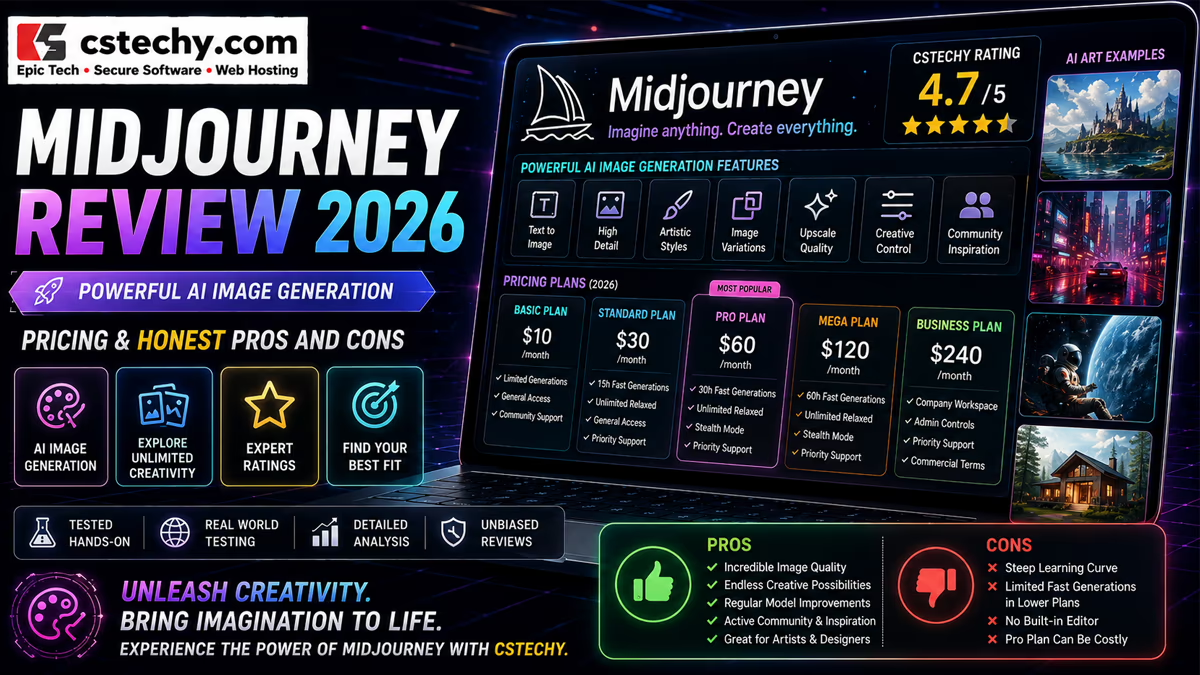
As of publication, Midjourney’s official plan comparison lists four subscription tiers, billed monthly or with a 20% discount for annual commitment:
| Plan | Monthly | Annual Equivalent |
|---|---|---|
| Basic | $10 | $8/month |
| Standard | $30 | $24/month |
| Pro | $60 | $48/month |
| Mega | $120 | $96/month |
Rather than a flat image quota, every plan is really a purchase of monthly Fast GPU time, which images, HD upscales, and video generations all draw from at different rates. Because Midjourney can adjust pricing, GPU allocations, and plan features at any time, readers should confirm current numbers directly on Midjourney’s account page before subscribing.
Midjourney Basic vs Standard vs Pro vs Mega
Basic Plan
Basic is the entry point: a fixed block of Fast GPU time and no access to Relax Mode for images. It suits people testing the platform or generating only occasionally, but heavier users tend to burn through the Fast allocation faster than expected once they start iterating on prompts.
Standard Plan
Standard adds a larger Fast allocation and, critically, unlimited image generation in Relax Mode. For anyone generating regularly, this removes the anxiety of running out mid-project, since non-urgent work can simply queue in Relax while Fast time is reserved for anything time-sensitive.
Pro Plan
Pro raises the Fast allocation further, adds unlimited image generation in Relax Mode, extends Relax access to SD video, and unlocks Stealth Mode. It’s aimed at professionals and businesses that need more capacity and — often the deciding factor — the ability to keep work private.
Mega Plan
Mega has the highest Fast allocation, unlimited image and SD video generation in Relax Mode, and Stealth Mode. It doesn’t unlock meaningfully different capabilities from Pro; it primarily scales up volume and concurrency for high-output studios and teams, not image quality.
| Plan | Best For | Main Advantage | Important Consideration |
|---|---|---|---|
| Basic | Occasional, exploratory use | Lowest entry cost | No Relax Mode; Fast time runs out quickly |
| Standard | Regular individual creators | Unlimited Relax Mode images | No Stealth Mode or Relax video |
| Pro | Professionals and small businesses | Stealth Mode plus Relax SD video | Meaningful jump in price from Standard |
| Mega | High-volume studios and teams | Largest Fast allocation and concurrency | Premium price for volume, not new features |
Midjourney Commercial Use and Copyright Considerations
Under Midjourney’s current Terms of Service, paid subscribers generally own the assets they create, “to the fullest extent possible under applicable law,” subject to a few specific carve-outs. If a business — or any employee generating on behalf of one — belongs to a company grossing more than $1,000,000 USD in annual revenue, that company needs to be on a Pro or Mega plan for its use of Midjourney assets to count as owned under the terms. If a user upscales an image originally created by someone else, ownership of that image stays with the original creator, not the person who upscaled it.
It’s important to separate two different things here: what Midjourney’s contract with its users grants, and what copyright law in any given country actually recognizes for AI-generated material. Midjourney’s own documentation states plainly that it cannot offer legal guidance and that copyright law varies by jurisdiction, recommending that users consult a qualified lawyer for anything with real commercial or legal stakes. CSTechy is not a law firm, and nothing in this article should be read as legal advice — if a specific project has meaningful commercial or IP exposure, get that reviewed by an actual attorney.
Midjourney Privacy and Stealth Mode
By default, Midjourney generations can be visible in the platform’s public community feeds. Stealth Mode, available only on the Pro and Mega plans, lets a subscriber keep their images and videos private on the Midjourney website. There’s an important caveat in the official documentation: even with Stealth Mode enabled, anything generated in a public Discord channel remains visible there. Users who need genuine privacy are advised to work from the web Create page, use Discord direct messages, or generate inside a private Discord server. Stealth Mode is a meaningful privacy tool, but it isn’t a blanket guarantee across every part of the platform.
Midjourney Limitations
- Prompt interpretation isn’t perfectly consistent — the same prompt can yield noticeably different results across runs.
- Fine details, especially text within images, hands, and small objects, can still come out wrong and need visual checking.
- Exact identity or object consistency via Omni Reference is not guaranteed, particularly for logos or precise facial detail.
- Reference images may not transfer every intended detail, and editing tools like Vary Region can introduce unintended changes elsewhere in the image.
- Video generation consumes GPU time much faster than still images, which can be an unwelcome surprise on lower-tier plans.
- Some tools, including Vary Region and Pan, currently run on an older underlying model (V6.1) even when the rest of a generation uses V8.2.
- Feature availability and pricing can change with little notice, since Midjourney updates its plans and models frequently.
- Legal rights around AI-generated output depend heavily on jurisdiction and the nature of any reference material used.
Midjourney vs ChatGPT
Midjourney is a visual-creation specialist; ChatGPT is a general-purpose AI assistant that happens to include image generation among a much broader set of capabilities — writing, research, coding, and multimodal conversation. For pure image aesthetics and fine-grained visual control (style references, personalization, dedicated editing tools), Midjourney is the more purpose-built option. For someone who wants an occasional generated image inside a broader assistant they’re already using for other tasks, ChatGPT’s built-in image tools may be more convenient. Neither is universally better; the right choice depends on whether image generation is a primary workflow or an occasional add-on.
Midjourney vs Gemini
Gemini, similarly, is Google’s broader AI assistant with image-generation features layered in, tied closely to the rest of the Google ecosystem (Docs, Search, Workspace). Midjourney remains more specialized and generally more configurable for people who care deeply about visual style and creative control. Someone already embedded in Google’s tools may find Gemini more convenient for lightweight image needs; someone whose work depends on image quality and stylistic consistency is more likely to reach for Midjourney specifically.
Midjourney vs Other AI Image Generators
Against tools like Adobe Firefly, OpenAI’s image generation, and other Google image tools, Midjourney’s differentiators tend to be its distinctive aesthetic style, its depth of reference and editing controls (Style Reference, Omni Reference, Personalization), and its long-running creative community. Adobe Firefly integrates more tightly with Creative Cloud and has historically emphasized commercially safe training data. OpenAI and Google’s tools benefit from tighter integration with their respective assistant ecosystems. None of these tools has a universal “best” answer — the right pick depends on whether ecosystem integration, commercial licensing posture, or raw aesthetic control matters most for a given workflow.
Who Should Use Midjourney?
- Designers — for concept development and rapid visual exploration before committing to a direction.
- Artists — for creative experimentation and generating references or starting points.
- Marketers — for campaign and advertising concept generation ahead of legal and brand review.
- Content creators — for thumbnails, illustrations, and social visuals produced quickly.
- Photographers — for conceptual development and compositing ideas.
- Businesses — for internal creative workflows, provided plan tier and privacy needs are matched to actual usage.
- Hobbyists — for creative exploration and entertainment, independent of any professional use case.
Who May Not Need Midjourney?
Midjourney may not be worth the subscription for people who rarely need generated images, only require occasional simple graphics that free tools can handle, mainly need text-based AI assistance rather than visuals, already have image tools that meet their needs, or require tightly controlled, precise design workflows that AI generation doesn’t reliably support. There’s no obligation to subscribe just because the tool exists — it earns its cost through regular, visual-heavy use.
Is Midjourney Worth It in 2026?
The honest answer depends on how much visual work someone actually does and how much that work depends on aesthetic quality specifically.
Casual users and hobbyists may find Basic sufficient for occasional exploration, though the lack of Relax Mode means Fast time can disappear quickly once real experimentation starts.
Designers, artists, and content creators who generate frequently are likely to get the most value from Standard, where unlimited Relax Mode removes the pressure of a ticking Fast-hour clock.
Marketers and professionals who need privacy for client work, or who regularly generate video, are the clearest fit for Pro, largely because of Stealth Mode and Relax-mode SD video access.
Professional creative teams and high-volume businesses — especially those crossing the $1,000,000 revenue threshold — are the intended audience for Mega, where the larger Fast allocation and concurrency support sustained studio-level output.
These are editorial recommendations based on how the plans are structured, not guarantees of a particular outcome for any individual workflow.
Final Verdict
Midjourney in 2026 is a mature, purpose-built visual-creation platform rather than a general AI assistant with image features bolted on. V8.2 is an incremental refinement rather than a dramatic overhaul — sharper aesthetics and better Personalization, built on the speed gains V8.1 already delivered — and the platform’s reference tools, Editor, and video features have all continued to mature. Its subscription-only pricing and GPU-time billing model take some getting used to, and several tools still lean on older underlying models in ways that aren’t obvious from the marketing copy. For anyone whose work genuinely depends on image quality and stylistic control, Midjourney remains one of the strongest options available; for occasional or lightweight image needs, it may be more subscription than most people require.
Frequently Asked Questions About Midjourney
1. What is Midjourney?
Midjourney is a subscription-based AI platform that generates images and short videos from text prompts, accessible through both a web app and Discord.
2. Is Midjourney free?
No. Midjourney has no free tier or free trial. The only way to use it is a paid subscription starting with the Basic plan.
3. What is Midjourney V8.2?
V8.2 is Midjourney’s current default model, released July 24, 2026, focused on aesthetics, image quality, and improved Personalization, building on the speed gains introduced in V8.1.
4. How much does Midjourney cost?
Plans run from $10/month (Basic) to $120/month (Mega), with Standard at $30 and Pro at $60. Annual billing brings roughly a 20% discount on each tier.
5. Can Midjourney generate videos?
Yes. Every plan can generate video in Fast Mode; Pro and Mega add Relax Mode for SD video, and Standard, Pro, and Mega support HD video in Fast Mode.
6. Can Midjourney edit existing images?
Yes, through its Editor, which combines Pan, Zoom Out, Remix, and Vary Region (inpainting) for editing both Midjourney-generated and user-uploaded images.
7. Can Midjourney images be used commercially?
Paid subscribers generally own the assets they create under Midjourney’s terms, with exceptions — notably that businesses earning over $1,000,000 in annual revenue need a Pro or Mega plan. Copyright protection itself still depends on the laws of the relevant jurisdiction, so specific commercial questions should go to a qualified lawyer.
8. Is Midjourney better than ChatGPT for images?
For dedicated visual creation with deep style and reference controls, Midjourney is generally the more specialized tool. ChatGPT offers image generation as one part of a much broader assistant, which may be more convenient for occasional or mixed-task use.
9. Is Midjourney worth paying for in 2026?
For designers, artists, marketers, and creators who generate images regularly and care about aesthetic quality, Midjourney is generally worth the subscription. For occasional or lightweight image needs, a lower-commitment or free alternative may make more sense.