Secure n8n VPS 2026: Ultimate Setup Guide | CSTechy
In 2026, self-hosting your automation with n8n is a powerful move for better privacy and lower costs. But here’s the reality:
- Your VPS becomes a target instantly after going live
- Automated bots start scanning your server within seconds
- Any weak security setup can be exploited quickly
Recent threats like “Ni8mare” (CVE-2026-21858) prove that even advanced tools need proper protection. If you’re running workflows on a Hostinger or Bluehost VPS, security is non-negotiable. 👉 Follow the complete setup guide here: Ultimate n8n Self-Hosting Guide
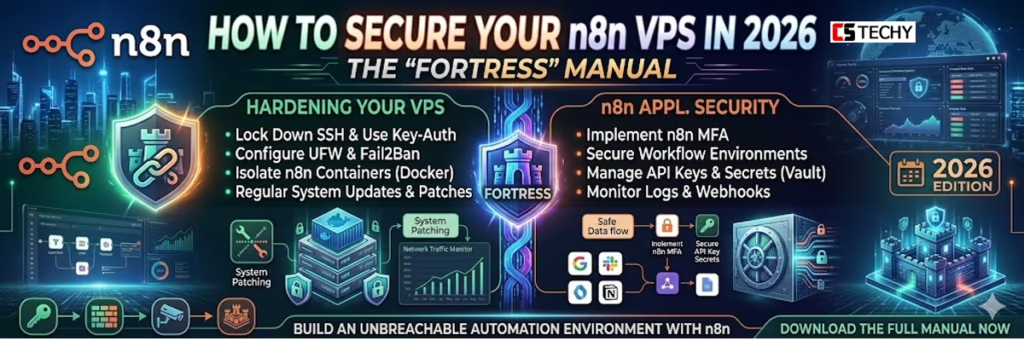
This guide will help you turn your server into a secure fortress using:
- SSH key-only authentication for zero password attacks
- Fail2Ban firewall to block malicious login attempts
- Docker Hardened Images (DHI) for safer deployments
- n8n environment variables for advanced security control
Level 1: SSH Fortress Mode — Bulletproof Your VPS Entry (Secure n8n VPS 2026)
As we discussed in our guide on How to Connect to Your VPS, SSH is your main entry point. If a hacker gets your SSH password, they own your entire automation empire. In 2026, “Password Authentication” is considered a legacy risk.
1.1 Disable Password Logins Entirely
The first step in any CSTECHY security audit is to disable passwords. Once you have set up your SSH Keys, edit your SSH configuration:
sudo nano /etc/ssh/sshd_config
Find the following lines and ensure they are set to no:
PasswordAuthentication no
PermitRootLogin no
By setting PermitRootLogin no, you force yourself to use a non-root user with sudo privileges. This adds a critical layer of “Horizontal Security”—even if someone breaks into your user account, they still don’t have the power to delete your entire server.
1.2 Changing the Default SSH Port
Most botnets are “dumb.” They scan Port 22 because that’s the default. By changing your SSH port to something random like 2234, you disappear from 99% of automated scans.
Level 2: Docker Armor — Lock Down the Engine Powering n8n (Secure n8n VPS 2026)
Since you are likely using our Docker Compose method, the security of your n8n instance is directly tied to the security of your containers. In a secure n8n VPS 2026 setup, this becomes critical—especially after n8n officially adopted Docker Hardened Images (DHI) in February 2026.
2.1 Use the Official n8n Hardened Image
Hardened images are stripped of unnecessary tools (like curl or wget) that an attacker could use to download malware once they are inside your container. Update your docker-compose.yml to use the secure source:
image: docker.n8n.io/n8nio/n8n:latest-hardened
2.2 The N8N_ENCRYPTION_KEY
This is the “Master Key” that encrypts every API key and password you save in n8n. In 2026, we recommend a 64-character hex string. You can generate one inside your terminal:
openssl rand -hex 32
Crucial: If you lose this key, you lose your data. Keep it in a secure password manager, not just on your VPS.
2.1 Use the Official n8n Hardened Image (Secure n8n VPS 2026)
For a truly secure n8n VPS 2026 setup, always use the official Docker Hardened Image (DHI) provided by n8n. These images are built with reduced attack surfaces, minimal dependencies, and enhanced security configurations.
Unlike standard images, hardened versions remove unnecessary packages and follow strict security best practices, making them ideal for production environments.
👉 Learn more from the official documentation: n8n Docker Installation Guide
Level 3: Adaptive Firewall — UFW & Fail2Ban (Secure n8n VPS 2026)
A static firewall is good; an adaptive one is better. In 2026, we use Fail2Ban to monitor our logs for “Brute Force” patterns.
3.1 UFW (Uncomplicated Firewall) Basics
Only open what is absolutely necessary for n8n to function:
sudo ufw default deny incoming
sudo ufw default allow outgoing
sudo ufw allow 2234/tcp (Your custom SSH port)
sudo ufw allow 80/tcp
sudo ufw allow 443/tcp
sudo ufw enable
3.2 Fail2Ban: The Bouncer of the Internet
Fail2Ban actively monitors your logs. In a secure n8n VPS 2026 setup, if an IP fails login attempts multiple times within minutes, it automatically blocks that IP with a temporary firewall rule—like having a smart, automated bouncer guarding your server 24/7.
For n8n users on Hostinger or Bluehost, this is the #1 way to keep your CPU usage low, as it stops bots from constantly slamming your login page with requests.
Level 4: n8n Core Lockdown — Secure Internal Settings Like a Pro (Secure n8n VPS 2026)
n8n itself includes powerful built-in protections for your data. In a secure n8n VPS 2026 setup, these are no longer optional—they’re essential for any production-grade server.
- User Management: Always create a unique “Owner” account. Never use generic usernames like
adminorn8n_user. - Task Runners: Enable
N8N_RUNNERS_ENABLED=true. In 2026, this isolates the execution of your code from the main n8n process, protecting you from Sandbox Escapes (CVE-2026-25115). - Environment Variable Security: Use
_FILEsuffixes (e.g.,DB_POSTGRESDB_PASSWORD_FILE) to load secrets from files rather than passing them as plain text in your Docker config.
Level 5: SSL Shield & Header Armor — Encrypt and Protect Every Request (Secure n8n VPS 2026)
As we noted in our How to Change Webhook URL guide, HTTPS is mandatory. But you should also add “Security Headers” to your reverse proxy (Nginx/Traefik).
Add HSTS (HTTP Strict Transport Security) to your config. This tells browsers to only communicate with your n8n instance via encrypted channels, preventing “Man-in-the-Middle” attacks.
Best Providers for Secure n8n VPS 2026 — Trusted, Hardened & Battle-Tested
Security starts with the “Metal.” If your hosting provider’s physical data center is insecure, your software doesn’t matter.
- Bluehost VPS: Their Oracle Cloud infrastructure includes hardware-level “Off-box Virtualization,” which prevents attackers from jumping between different customers’ servers.
- Hostinger VPS: Their KVM tech ensures your RAM is never shared or “leaked” to other users on the same physical node.
- MilesWeb: Offers Automated Daily Backups—the ultimate security blanket if your server is ever compromised and you need to “Roll Back” to a clean state.
Conclusion: Secure n8n VPS 2026 — Security Is a Journey, Not a Destination
Securing your secure n8n VPS 2026 setup isn’t a one-time task—it’s an ongoing process. With SSH, Docker, and firewall hardening in place, your system is now a strong, secure foundation.
Now it’s time to build 🚀 Check out How to Paste JSON in n8n and start creating powerful workflows safely.
How to Secure Your n8n VPS 2026. FAQ:
1. How can I secure my n8n VPS server?
You can secure your n8n VPS by enabling a firewall, using SSH keys instead of passwords, installing SSL certificates, and restricting server ports to prevent unauthorized access.
2. Should I run n8n behind a reverse proxy?
Yes. Running n8n behind a reverse proxy like Nginx or Traefik helps add HTTPS encryption, rate limiting, and better traffic control, which improves overall security.
3. Is it safe to expose n8n directly to the internet?
No. It’s safer to protect your n8n instance with authentication, HTTPS, firewall rules, and IP restrictions instead of exposing the default port publicly.
4. How often should I update n8n on a VPS?
You should update n8n regularly whenever a new stable release is available, because updates often include security patches and bug fixes.
5. What is the most important security step for n8n servers?
One of the most important steps is enabling authentication and strong passwords, combined with server-level protections like firewalls and SSH security to block unauthorized access.